> ## Documentation Index
> Fetch the complete documentation index at: https://www.mintlify.com/docs/llms.txt
> Use this file to discover all available pages before exploring further.
# Headless docs with a custom frontend
> Build a headless documentation frontend with Astro while using Mintlify for content management, AI-powered search, and assistant features.
Mintlify's headless mode lets you control how your documentation looks and behaves while using Mintlify to manage your content. Instead of using Mintlify's hosted frontend, you can build your own custom frontend with [Astro](https://astro.build) and render your MDX content and `docs.json` configuration however you want.
This headless approach is useful when you need full control over your documentation's design, layout, or behavior—for example, to match an existing design system or embed documentation into a larger site. You still get Mintlify's publishing, search, MDX components, and AI features.
The `@mintlify/astro` integration reads your `docs.json` config and MDX content at build time, then processes everything into a format that Astro can render. Build your own layouts, components, and styles on top of it.
This guide walks you through setting up a headless Mintlify project with the starter template and getting it running locally.
| Feature | Availability | Notes |
| ------------------------------------------- | ------------- | ------------------------------------------------------------------------------------------------------------------------------------------------------------------------ |
| Mintlify components | Included | Use components like ``, ``, and `` in your MDX files without importing them. |
| Content processing | Included | The `@mintlify/astro` integration reads your `docs.json` and MDX files and processes them at build time. |
| Search | Included | The `SearchBar` component connects to Mintlify's search API using your project subdomain. |
| AI assistant | Included | The `Assistant` component provides an AI chat interface powered by your content. |
| Layouts and styling | Custom build | Header, footer, sidebar, table of contents, page templates, and all CSS. The starter template includes examples built with Tailwind CSS. |
| Routing and navigation | Custom build | A catch-all Astro route renders each page. Use `resolvePageData()` and `unwrapNav()` from `@mintlify/astro/helpers` to resolve navigation state from `docs.json`. |
| Deployment and hosting | Custom build | Deploy your Astro site to any hosting provider. |
| SEO | You build | Meta tags, Open Graph tags, sitemap, and `robots.txt` are your responsibility to generate. |
| Third-party integrations | Custom build | Add integrations directly to your Astro layout. Tools configured in `docs.json` for hosted projects do not apply in headless. |
| `llms.txt`, `llms-full.txt`, and `skill.md` | Custom build | For headless projects, you must generate and serve these files. |
| Dashboard analytics | Custom build | If you use the `Assistant` component, assistant usage analytics are available in your dashboard. For page traffic, add your own analytics provider to your Astro layout. |
| Web editor | Not available | Requires Mintlify's hosted rendering environment. |
| Authentication and password protection | Not available | Only available for sites hosted on a Mintlify subdomain or custom domain pointed at Mintlify. |
| API playground | Not available | Only available for sites hosted on the Mintlify platform. |
| User feedback | Not available | The page feedback feature is part of Mintlify's hosted rendering layer. |
| Preview deployments | Not available | Use your hosting provider's preview environment. |
| PDF export | Not available | Not available for headless projects. |
## Prerequisites
* A [Mintlify account](https://app.mintlify.com)
* A [GitHub account](https://github.com)
* [Node.js](https://nodejs.org) v20.17.0 or later (LTS versions recommended)
* Familiarity with [Astro](https://docs.astro.build)
## Set up your project
Navigate to the [mintlify-astro-starter](https://github.com/mintlify/mintlify-astro-starter) repository on GitHub and click **Use this template** to create a new repository on your account.
Clone the repository to your local machine.
If you don't have a Mintlify account, sign up at [app.mintlify.com/signup](https://app.mintlify.com/signup).
On the [Git settings](https://app.mintlify.com/settings/deployment/git-settings) page of your Mintlify dashboard, install the [Mintlify GitHub app](/deploy/github). If you already have the app installed, uninstall it and reinstall it so that you are ready to connect your new repository.
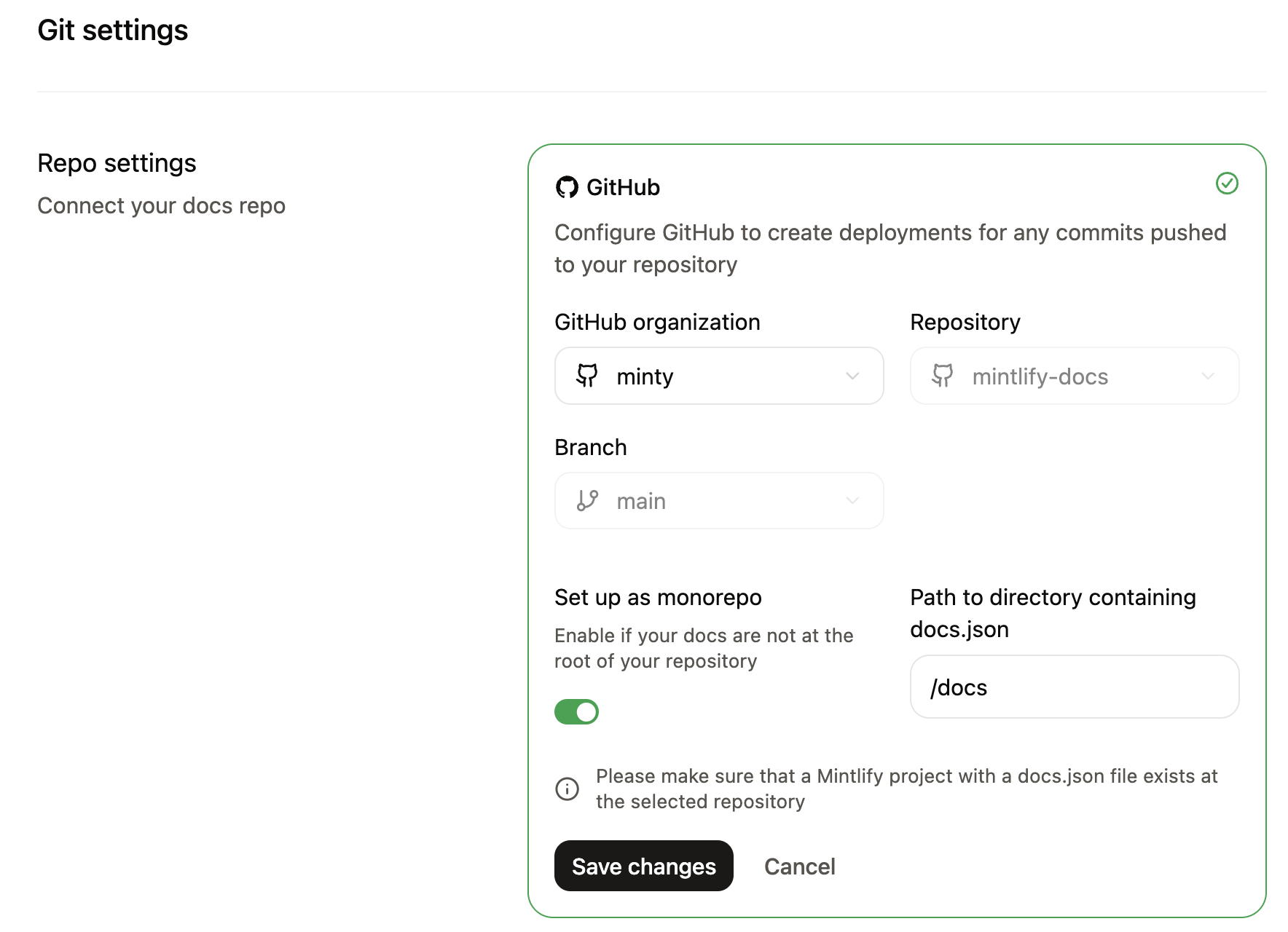
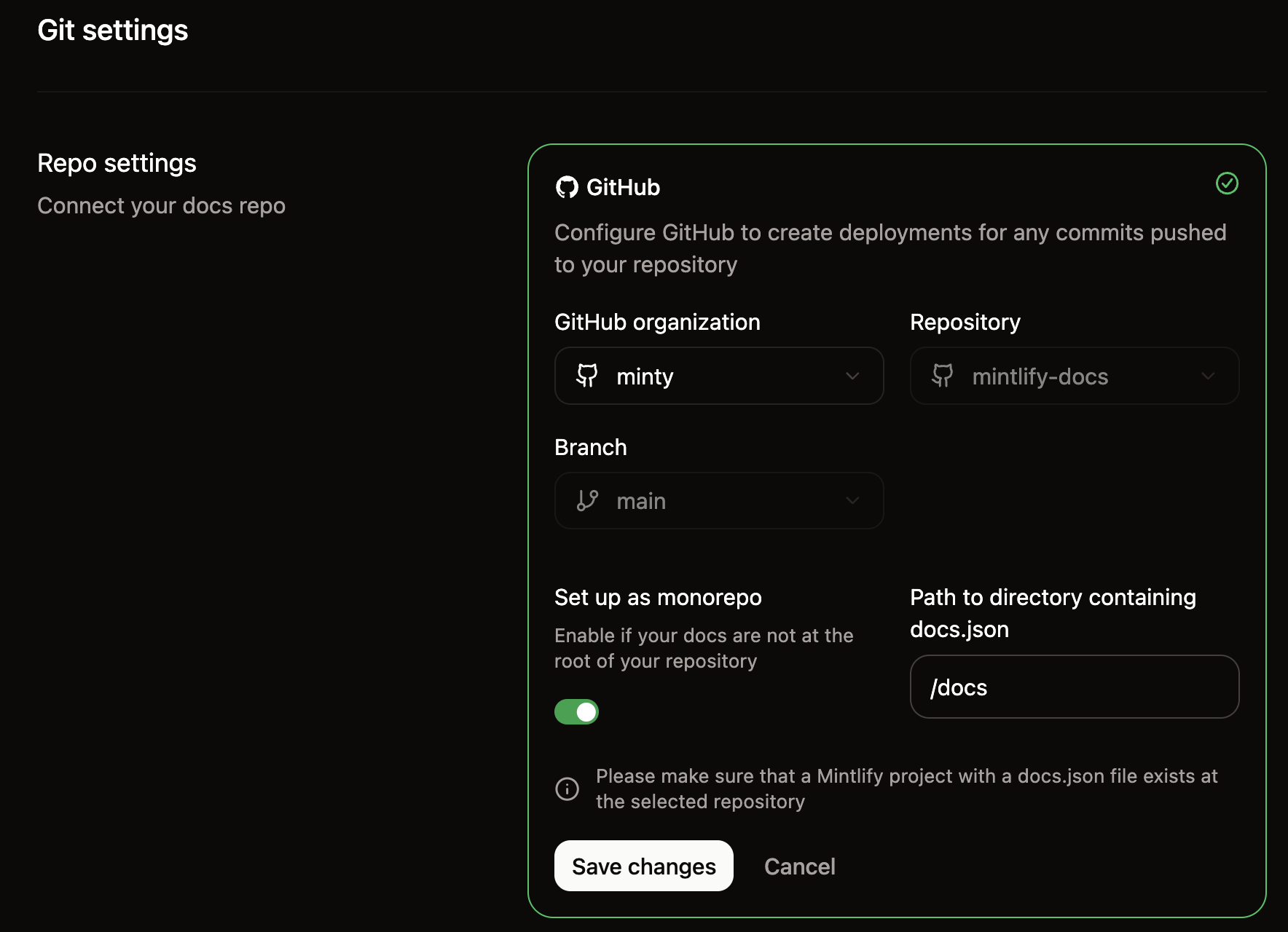
1. On the [Git settings](https://app.mintlify.com/settings/deployment/git-settings) page, select the repository you created from the starter template.
2. Enable the **Set up as monorepo** toggle.
3. Enter `/docs` as the path to the directory containing your `docs.json` file.
4. Click **Save changes**.
 Clone your new repository locally and create a `.env` file at the project root with your Mintlify credentials:
```bash .env theme={null}
PUBLIC_MINTLIFY_SUBDOMAIN=your-subdomain
PUBLIC_MINTLIFY_ASSISTANT_KEY=your-assistant-api-key
```
Your subdomain is the domain name of your project. It is the part of your dashboard URL after the organization name. For example, if your dashboard URL is `https://app.mintlify.com/org-name/domain-name`, your subdomain is `domain-name`.
Generate an assistant API key on the [API keys](https://app.mintlify.com/settings/organization/api-keys) page of your dashboard. The assistant API key starts with `mint_dsc_`.
Install dependencies and start the local development server in your cloned repository:
```bash theme={null}
cd path/to/your-repository
npm install
npm run dev
```
Your site now runs locally at `http://localhost:4321`.
## How it works
The integration connects three parts: the Astro build system, your content in the `docs/` directory, and the Mintlify packages that process and render that content.
### Astro configuration
Configure the `mintlify()` integration in `astro.config.mjs` with the path to your docs directory:
```javascript astro.config.mjs theme={null}
import { defineConfig } from 'astro/config';
import react from '@astrojs/react';
import mdx from '@astrojs/mdx';
import { mintlify } from '@mintlify/astro';
export default defineConfig({
integrations: [mintlify({ docsDir: './docs' }), react(), mdx()],
});
```
At build time, the integration reads your `docs.json` and MDX files from the `docsDir` path and processes them into `.mintlify/docs/`, where Astro's content collections pick them up.
### Content structure
Your documentation content lives in the `docs/` directory, structured the same way as any other Mintlify project:
```text theme={null}
docs/
├── docs.json # Navigation and site configuration
├── index.mdx # MDX pages for content
├── quickstart.mdx
└── guides/ # Directories for organizing pages
├── setup.mdx
└── troubleshooting.mdx
```
MDX files use standard Mintlify [frontmatter](/organize/pages#page-metadata) and can use Mintlify components without importing them.
### Routing and navigation
A catch-all route renders each MDX page. The `@mintlify/astro/helpers` package provides functions to resolve navigation state from your `docs.json`.
* `resolvePageData()`: Returns tabs, sidebar navigation, footer links, and anchors for a given page path.
* `unwrapNav()`: Flattens the navigation tree into a list for sidebar rendering.
### Layouts and styling
You control the full presentation layer. The starter template includes layouts, a sidebar, table of contents, and styles built with Tailwind CSS, but you can replace any of these with your own.
Key files to customize:
| File | Purpose |
| ------------------------------------ | ------------------------------------------- |
| `src/layouts/Layout.astro` | Root HTML layout |
| `src/pages/[...slug].astro` | Page template and data loading |
| `src/components/Header.astro` | Site header |
| `src/components/Sidebar/` | Sidebar navigation |
| `src/components/TableOfContents.tsx` | On-page table of contents |
| `src/styles/` | Global styles, typography, and color scheme |
## Connect search and assistant
The starter template includes search and assistant components that connect to Mintlify's APIs using the environment variables you configure during setup.
* **Search**: The `SearchBar` component in `src/components/SearchBar.tsx` queries the Mintlify search API.
* **Assistant**: The `Assistant` component in `src/components/Assistant/` provides an AI chat interface that answers questions using your documentation content.
Both require the `PUBLIC_MINTLIFY_SUBDOMAIN` and `PUBLIC_MINTLIFY_ASSISTANT_KEY` environment variables.
## Next steps
After setting up your project:
1. Replace the starter content in `docs/` with your own MDX files and `docs.json` configuration.
2. Customize layouts and styles to match your design system.
3. Deploy your Astro site to your preferred hosting provider.
## Related topics
- [Guides](/docs/guides/index.md)
- [LogRocket](/docs/integrations/analytics/logrocket.md)
- [Tutorial: Build an in-app documentation assistant](/docs/guides/assistant-embed.md)
Clone your new repository locally and create a `.env` file at the project root with your Mintlify credentials:
```bash .env theme={null}
PUBLIC_MINTLIFY_SUBDOMAIN=your-subdomain
PUBLIC_MINTLIFY_ASSISTANT_KEY=your-assistant-api-key
```
Your subdomain is the domain name of your project. It is the part of your dashboard URL after the organization name. For example, if your dashboard URL is `https://app.mintlify.com/org-name/domain-name`, your subdomain is `domain-name`.
Generate an assistant API key on the [API keys](https://app.mintlify.com/settings/organization/api-keys) page of your dashboard. The assistant API key starts with `mint_dsc_`.
Install dependencies and start the local development server in your cloned repository:
```bash theme={null}
cd path/to/your-repository
npm install
npm run dev
```
Your site now runs locally at `http://localhost:4321`.
## How it works
The integration connects three parts: the Astro build system, your content in the `docs/` directory, and the Mintlify packages that process and render that content.
### Astro configuration
Configure the `mintlify()` integration in `astro.config.mjs` with the path to your docs directory:
```javascript astro.config.mjs theme={null}
import { defineConfig } from 'astro/config';
import react from '@astrojs/react';
import mdx from '@astrojs/mdx';
import { mintlify } from '@mintlify/astro';
export default defineConfig({
integrations: [mintlify({ docsDir: './docs' }), react(), mdx()],
});
```
At build time, the integration reads your `docs.json` and MDX files from the `docsDir` path and processes them into `.mintlify/docs/`, where Astro's content collections pick them up.
### Content structure
Your documentation content lives in the `docs/` directory, structured the same way as any other Mintlify project:
```text theme={null}
docs/
├── docs.json # Navigation and site configuration
├── index.mdx # MDX pages for content
├── quickstart.mdx
└── guides/ # Directories for organizing pages
├── setup.mdx
└── troubleshooting.mdx
```
MDX files use standard Mintlify [frontmatter](/organize/pages#page-metadata) and can use Mintlify components without importing them.
### Routing and navigation
A catch-all route renders each MDX page. The `@mintlify/astro/helpers` package provides functions to resolve navigation state from your `docs.json`.
* `resolvePageData()`: Returns tabs, sidebar navigation, footer links, and anchors for a given page path.
* `unwrapNav()`: Flattens the navigation tree into a list for sidebar rendering.
### Layouts and styling
You control the full presentation layer. The starter template includes layouts, a sidebar, table of contents, and styles built with Tailwind CSS, but you can replace any of these with your own.
Key files to customize:
| File | Purpose |
| ------------------------------------ | ------------------------------------------- |
| `src/layouts/Layout.astro` | Root HTML layout |
| `src/pages/[...slug].astro` | Page template and data loading |
| `src/components/Header.astro` | Site header |
| `src/components/Sidebar/` | Sidebar navigation |
| `src/components/TableOfContents.tsx` | On-page table of contents |
| `src/styles/` | Global styles, typography, and color scheme |
## Connect search and assistant
The starter template includes search and assistant components that connect to Mintlify's APIs using the environment variables you configure during setup.
* **Search**: The `SearchBar` component in `src/components/SearchBar.tsx` queries the Mintlify search API.
* **Assistant**: The `Assistant` component in `src/components/Assistant/` provides an AI chat interface that answers questions using your documentation content.
Both require the `PUBLIC_MINTLIFY_SUBDOMAIN` and `PUBLIC_MINTLIFY_ASSISTANT_KEY` environment variables.
## Next steps
After setting up your project:
1. Replace the starter content in `docs/` with your own MDX files and `docs.json` configuration.
2. Customize layouts and styles to match your design system.
3. Deploy your Astro site to your preferred hosting provider.
## Related topics
- [Guides](/docs/guides/index.md)
- [LogRocket](/docs/integrations/analytics/logrocket.md)
- [Tutorial: Build an in-app documentation assistant](/docs/guides/assistant-embed.md)