
What is llmfit?
llmfit is a terminal tool that helps you find LLM models that will actually run well on your hardware. It detects your system’s RAM, CPU, and GPU specs, then scores hundreds of models across quality, speed, fit, and context dimensions to tell you which ones are compatible with your machine.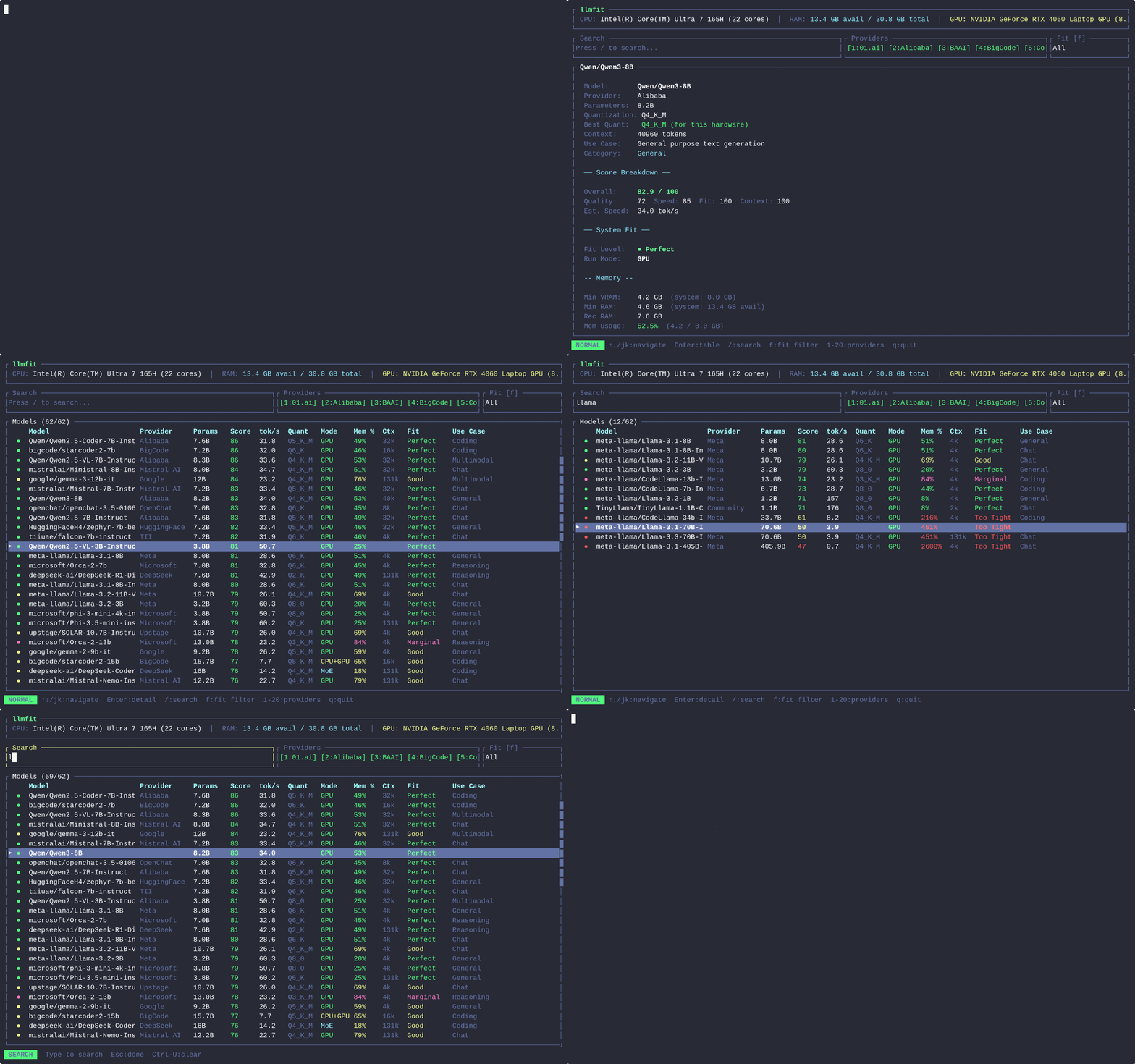
Why llmfit exists
Running large language models locally requires matching model size to your available memory. Too large and the model won’t fit; too small and you’re not taking advantage of your hardware. llmfit automates this analysis:- No guesswork: See exactly which models fit your VRAM and RAM
- Smart quantization: Automatically selects the best quality quantization that fits
- Speed estimates: Get realistic tokens/sec predictions based on your GPU model and memory bandwidth
- Multi-dimensional scoring: Balances quality, speed, memory fit, and context length for your use case
Key features
Hardware detection
llmfit automatically detects your system configuration:- CPU & RAM: Total and available system memory, CPU core count
- NVIDIA GPUs: Multi-GPU support via
nvidia-smi, aggregates VRAM across all GPUs - AMD GPUs: Detection via
rocm-smiwith ROCm acceleration - Intel Arc: Discrete VRAM via sysfs, integrated via
lspci - Apple Silicon: Unified memory via
system_profiler(VRAM = system RAM) - Ascend NPUs: Detection via
npu-smi - Backend identification: Automatically identifies CUDA, Metal, ROCm, SYCL, or CPU acceleration
If GPU detection fails, use
--memory=24G to manually specify your VRAM size.Model scoring system
Every model is scored across four dimensions (0-100 each):| Dimension | What it measures |
|---|---|
| Quality | Parameter count, model family reputation, quantization penalty, task alignment |
| Speed | Estimated tokens/sec based on backend, params, and quantization |
| Fit | Memory utilization efficiency (sweet spot: 50-80% of available memory) |
| Context | Context window capability vs target for the use case |
- Coding: Quality 0.40, Speed 0.25, Fit 0.25, Context 0.10
- Reasoning: Quality 0.55, Speed 0.15, Fit 0.20, Context 0.10
- Chat: Speed 0.35, Quality 0.30, Fit 0.25, Context 0.10
- General: Balanced weighting across all dimensions
TUI and CLI modes
llmfit ships with two interfaces: Interactive TUI (default)- Real-time filtering and search
- Keyboard-driven navigation (vim-style
j/kor arrow keys) - Model detail view with memory breakdown
- Hardware planning mode for “what hardware do I need?” questions
- 6 color themes (Dracula, Solarized, Nord, Monokai, Gruvbox, Default)
Dynamic quantization selection
Instead of assuming a fixed quantization, llmfit tries the best quality that fits your hardware. It walks a hierarchy from Q8_0 (highest quality) down to Q2_K (most compressed), selecting the highest quality that fits in available memory:- Q8_0: 8-bit, minimal quality loss (1.0x size)
- Q6_K: 6-bit, good balance (0.75x size)
- Q5_K_M: 5-bit medium (0.625x size)
- Q4_K_M: 4-bit medium, standard choice (0.5x size)
- Q3_K_M: 3-bit medium, lower quality (0.375x size)
- Q2_K: 2-bit, maximum compression (0.25x size)
MoE architecture support
Mixture-of-Experts models like Mixtral, DeepSeek-V2/V3, and Qwen3 MoE are detected automatically. Only a subset of experts is active per token, so the effective VRAM requirement is much lower than total parameter count. For example:- Mixtral 8x7B: 46.7B total parameters, only ~12.9B active per token
- VRAM reduction: From 23.9 GB to ~6.6 GB with expert offloading
Speed estimation
Token generation is memory-bandwidth-bound: each token requires reading the full model weights once from VRAM. llmfit uses your GPU’s actual memory bandwidth for accurate throughput estimates: Formula:(bandwidth_GB_s / model_size_GB) × efficiency_factor
The efficiency factor (0.55) accounts for kernel overhead, KV-cache reads, and memory controller effects. Speed estimates are validated against published benchmarks from llama.cpp.
For unrecognized GPUs, llmfit falls back to per-backend constants:
| Backend | Speed constant |
|---|---|
| CUDA | 220 |
| Metal | 160 |
| ROCm | 180 |
| SYCL | 100 |
| CPU (ARM) | 90 |
| CPU (x86) | 70 |
| NPU (Ascend) | 390 |
Provider integration
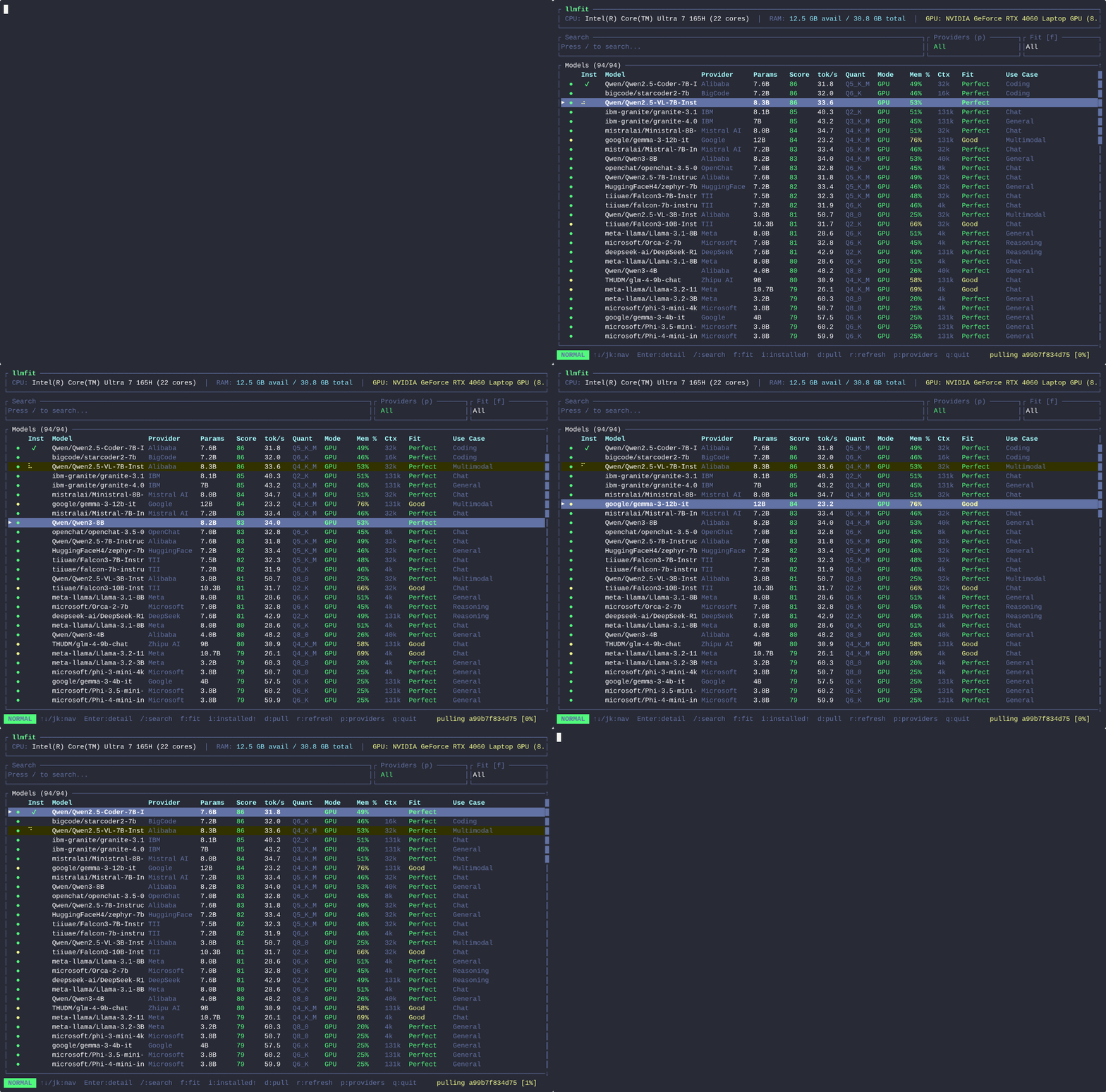
llmfit integrates with local runtime providers:- Ollama: Detects installed models via API, downloads via
POST /api/pull - llama.cpp: Direct GGUF downloads from Hugging Face, local cache detection
- MLX: Apple Silicon model cache detection, mlx-community repo support
d in the TUI to download a model. When multiple providers are available, a picker modal appears.
Fit analysis
Every model is evaluated for memory compatibility: Run modes:- GPU: Model fits in VRAM, fast inference
- MoE: Mixture-of-Experts with expert offloading (active experts in VRAM, inactive in RAM)
- CPU+GPU: VRAM insufficient, spills to system RAM with partial GPU offload
- CPU: No GPU, model loaded entirely into system RAM
- Perfect: Recommended memory met on GPU (requires GPU acceleration)
- Good: Fits with headroom (best achievable for MoE offload or CPU+GPU)
- Marginal: Tight fit, or CPU-only (CPU-only always caps here)
- Too Tight: Not enough VRAM or system RAM anywhere
Model database
llmfit ships with 106 models from HuggingFace, including:- Meta Llama (3, 3.1, 3.2, 3.3, 4 Scout/Maverick)
- Mistral (7B, Nemo, Large)
- Qwen (2.5, 3, 3.5 - including Coder and VL variants)
- Google Gemma (2, 2B, 9B, 27B)
- Microsoft Phi (3, 3.5, 4)
- DeepSeek (R1, V2, V3, Coder)
- IBM Granite (Code, Enterprise)
- xAI Grok (1)
- Cohere Command-R
- BigCode StarCoder2
- 01.ai Yi
- Specialized: Coding models (Qwen2.5-Coder, StarCoder2), multimodal (Llama 3.2 Vision, Qwen2.5-VL), embeddings (nomic-embed, bge)
Use cases
Find models for your GPU
Script model selection
Plan hardware upgrades
Run as a scheduling API
Next steps
Installation
Install llmfit via Homebrew, Scoop, curl script, or build from source
Quickstart
Get from installation to first successful run in under a minute
TUI Mode
Master keyboard shortcuts, filters, themes, and plan mode
CLI Mode
Use subcommands and JSON output for scripts and automation