
Overview
GenWealth is a comprehensive demo application for a fictional financial services company that demonstrates how to build trustworthy Gen AI features into existing applications using AlloyDB AI, Vertex AI, Cloud Run, and Cloud Functions.
Use Case: Knowledge Worker Assist
GenWealth implements three AI-powered features for investment advisory:Semantic Search
Improve investment discovery using AlloyDB AI embeddings
Customer Segmentation
Identify prospects for new products with vector similarity
RAG Chatbot
Financial advisor assistant grounded in application data
Architecture
System Components
Database Schema
The GenWealth application uses a simple but powerful relational schema: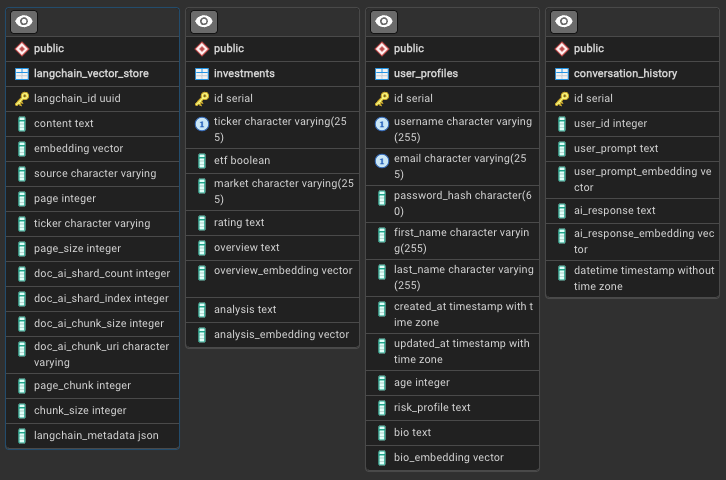 Key Tables:
investments: Stock/ETF data with AI-generated analysis and embeddingsuser_profiles: Customer data with bio embeddings for segmentationlangchain_vector_store: Document chunks from PDF ingestionconversation_history: Optional chat history for multi-turn conversations
Tech Stack
Database
AlloyDB for PostgreSQL 14+
- Native pgvector extension
- Direct Vertex AI integration
- Embeddings and LLM functions
AI Services
Vertex AI
- gemini-2.0-flash-001
- text-embedding-005
- Agent Builder
Backend
TypeScript/Node.js
- Express REST API
- Cloud Run (2nd gen)
- Cloud Functions (Python 3.11+)
Frontend
Angular 17+
- Material Design
- Vertex AI Search widget
- Real-time chat interface
Supporting Services
- Document AI: OCR processor for PDF text extraction
- Cloud Storage: Document and metadata buckets
- Eventarc: Event-driven pipeline orchestration
- Pub/Sub: Asynchronous function invocation
- Secret Manager: Database credentials and API keys
- LangChain: Text chunking and vector store integration
AlloyDB AI Integration
Native Embeddings Generation
AlloyDB integrates directly with Vertex AI LLMs through the database engine:Semantic Similarity Search
The
<=> operator calculates cosine distance. Lower values indicate higher similarity.Text Generation in SQL
AlloyDB can invoke Gemini directly for text completion:Document Ingestion Pipeline
The pipeline processes financial documents (prospectuses, 10-Ks, 10-Qs) dropped into Cloud Storage:Parallel Processing
Eventarc triggers two parallel branches:
- RAG Pipeline: Custom processing for AlloyDB vector store
- Vertex AI Search Pipeline: Automatic indexing with faceted search
RAG Pipeline: OCR & Chunking
process-pdf function:- Extracts text with Document AI OCR
- Chunks text with LangChain
- Generates embeddings with text-embedding-005
- Writes to
langchain_vector_storetable
RAG Pipeline: Analysis
analyze-prospectus function:- Retrieves document chunks from AlloyDB
- Generates company overview with Gemini
- Creates investment analysis and rating
- Saves to
investmentstable with embeddings
Pipeline Performance
- Processing time: 1-10+ minutes depending on PDF size
- Parallel documents: Up to 5 by default (quota-dependent)
- File limits: Tested up to 15MB, 200 pages
- Method: Batch processing via Document AI
Middle Tier API
The Express/TypeScript backend provides REST endpoints:Frontend Features
Investment Search Interface
- Semantic search bar: Natural language queries against investment data
- Faceted filters: Risk profile, asset type, sector
- Results display: Cards with analysis, rating, and similarity score
- PDF viewer: Inline prospectus viewing with Vertex AI Search widget
Customer Segmentation Tool
- Persona builder: Describe ideal customer in natural language
- Filter controls: Risk profile, age range, investment goals
- Match scoring: Similarity distance visualization
- Export options: CSV download for marketing campaigns
Financial Advisor Chatbot
- Conversational UI: Multi-turn chat with context preservation
- Grounding visualization: Shows retrieved documents used for responses
- Citation links: References to source prospectuses and data
- History: Persistent conversation across sessions
Deployment
Prerequisites
- Google Cloud project with billing enabled
- Cloud Shell or local terminal with gcloud CLI
- Public IP address for AlloyDB connection (during setup)
Installation Steps
Run Installation Script
- AlloyDB cluster (zonal) with pgvector extension
- Cloud Run service for Express API
- Cloud Functions for document processing
- GCS buckets for documents and metadata
- Vertex AI Search app and datastore
- Networking (VPC, PSC endpoints)
- IAM roles and service accounts
Configure Vertex AI Search
When prompted, retrieve the
configId:- Navigate to Vertex AI Search in console
- Accept terms and activate API
- Click Apps → search-prospectus → Integration
- Copy configId UUID (e.g.,
4205ae6a-434e-695e-aee4-58f500bd9000) - Paste into installation prompt
Set Allowed Domain
After deployment completes:
- Copy the Cloud Run service URL
- In Vertex AI Search Integration settings, add domain without
https://or trailing slash - Save configuration
Post-Installation
Set AlloyDB password (if prompted during install):Troubleshooting
PDF viewing returns 412 error
PDF viewing returns 412 error
Re-run bucket IAM binding:
Search widget shows 'not authorized' error
Search widget shows 'not authorized' error
Document processing takes too long
Document processing takes too long
Check:
- Document AI quota limits
- Cloud Function logs for errors:
gcloud functions logs read process-pdf - File size (max 15MB recommended)
Demo Walkthroughs
Customization & Extension
Using Non-Vertex Models
See alternate-configs/non-vertex-models.md for using open-source models.AlloyDB Omni Configuration
For on-premises deployment: alternate-configs/alloydb-omni.mdCustom Document Types
Modifyanalyze-prospectus function to handle different financial documents:
- Earnings reports
- Research papers
- Analyst ratings
- Market commentary
Cleanup
Key Takeaways
Database-Native AI
AlloyDB’s direct Vertex AI integration eliminates external API calls for embeddings and LLM inference
Hybrid Search
Combine semantic similarity with structured filters for precise results
Event-Driven Pipelines
Eventarc + Cloud Functions enable scalable, parallel document processing
Production Patterns
Secret Manager, IAM, VPC, and PSC provide enterprise-grade security
Next Steps
- Explore the FixMyCar RAG implementation with Vertex AI Search
- Learn about Spanner’s multi-modal search capabilities
- Build real-time voice AI with Gemini Live API