Extension Architecture Diagram
SubWallet Extension follows a multi-layered architecture designed for browser extensions: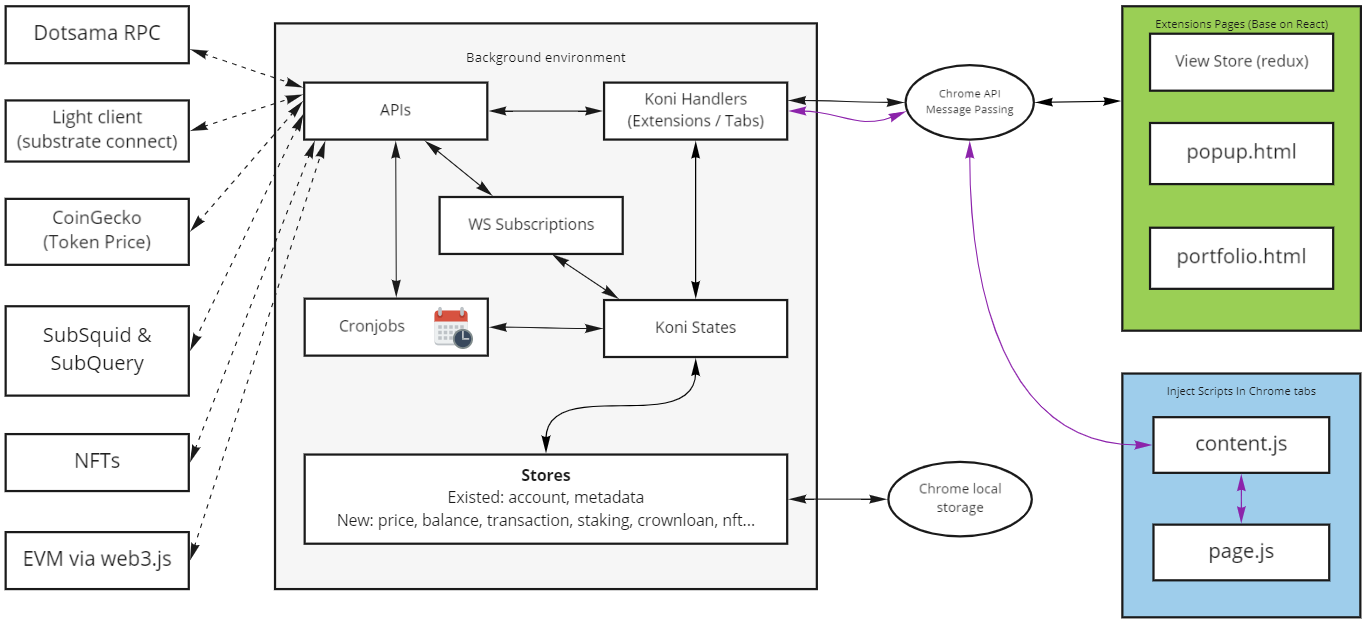 The extension is compiled from the
 packages/extension-koni folder and operates across three distinct execution contexts that communicate via Chrome’s message passing API.
Core Components
Background Environment
Background Script
The background environment is the heart of the extension, compiled from
packages/extension-koni/src/background.ts- Handle messages from extension pages and Chrome tabs via Chrome API Message Passing
- Manage all application state and persist to Chrome storage
- Execute cronjobs for periodic tasks
- Process all API calls and blockchain interactions
- Coordinate data flow between different parts of the extension
- Centralized state management through
KoniStateclass - Message routing via
KoniExtensionandKoniTabshandlers - Scheduled tasks through
KoniCron - Store persistence to Chrome local storage
Extension Pages
The frontend interface of SubWallet consists of two main views:popup.html
Main extension page displayed when clicking the extension icon in the browser toolbar
portfolio.html
Advanced view for displaying complex data like dashboards and transaction history
- React - Component-based UI framework
- Redux Toolkit - State management with React hooks
- Webpack - Module bundler for production builds
Inject Scripts
Scripts injected into Chrome tabs to enable dapp interactions:- Expose wallet functionality to web pages
- Provide the
window.injectedWeb3interface - Enable MetaMask compatibility for EVM chains
- Bridge communication between dapps and the background environment
Data Flow Architecture
Package Structure
The monorepo is organized into specialized packages:Core Packages
extension-base
extension-base
Purpose: Foundation package for background functionalityContains:
- Main features running in background
- API calling infrastructure
- Data persistence to Chrome storage
- Inject script utilities
extension-koni-base
extension-koni-base
Purpose: Custom extension of extension-baseContains:
- SubWallet-specific features
- API definitions (
packages/extension-koni-base/src/api) - Store implementations (
packages/extension-koni-base/src/store) - Cronjob definitions (
packages/extension-koni-base/src/cron) - Message handlers for
KoniExtensionandKoniTabs
extension-koni
extension-koni
Purpose: Main entry point for the extensionContains:
- Injection logic
- Background processing orchestration
- Webpack configuration for builds
extension-koni-ui
extension-koni-ui
Purpose: User interface componentsContains:
- React components
- Redux stores
- Hooks for global functions
- Internationalization (i18n)
- Messaging utilities (
messaging.ts) - Assets and resources
Integration Packages
extension-dapp
extension-dapp
Convenience wrapper for dapps to integrate with the extension, simplifying data extraction for any application that wishes to use the injected objects.
extension-inject
extension-inject
Wrapper enabling extension developers to inject their extension for use by any dapp.
extension-chains
extension-chains
Chain definitions and metadata for supported blockchain networks, including bare definitions and stripped-down call-only metadata formats.
extension-compat-metamask
extension-compat-metamask
MetaMask compatibility layer for EVM chain support and web3 provider compatibility.
extension-mocks
extension-mocks
Mock data for testing purposes.
Message Passing System
SubWallet uses Chrome’s message passing API for communication between components.Message Types
- Messages from extension pages start with
priprefix - Messages from Chrome tabs start with
pubprefix - Each message type defines: type name, request type, response type, and optional subscription parameter
Communication Patterns
- One-time Message
- Subscription Message
Extension or Chrome tab sends a request and listens for a single response. The listener is removed after receiving the response.
State Management
Store System
Stores persist data to Chrome local storage and are defined inpackages/extension-koni-base/src/store.
BaseStore- Basic persistence to Chrome local storageSubscribableStore- Extends BaseStore with RxJS subjects for reactive updates
State Coordination
Stores are managed by theKoniState class:
Background Services
Cronjob System
Periodic tasks are defined inpackages/extension-koni-base/src/cron and initialized through the KoniCron class.
Use Cases:
- Price updates
- Balance refreshes
- Network status checks
- Transaction monitoring
UI Structure
The extension UI (packages/extension-koni-ui) is organized into:
- assets - Images and resources
- components - Reusable React components
- hooks - Custom React hooks for global functions
- i18n - Internationalization files
- stores - Redux stores generated with Redux Toolkit
- partials - Header and layout components
- util - Utility methods
- messaging.ts - Functions to send messages to background and handle responses
Security Considerations
Next Steps
Now that you understand the architecture, you can:Setup Development Environment
Get started with local development
View Source Code
Explore the codebase on GitHub