Overview
iOS applications are distributed as application bundles with a.app extension. Understanding the internal structure of these bundles is fundamental to iOS reverse engineering, as it reveals how apps are organized, what resources they contain, and how they’re configured.
App Bundle Structure
An iOS app bundle is a directory with a specific structure that contains the executable binary, resources, and metadata required to run the application.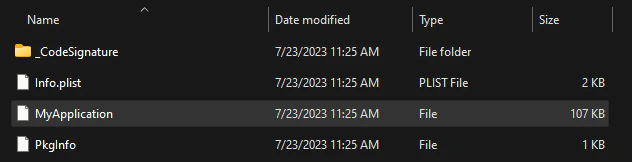
Key Components
Executable Binary
Executable Binary
The main executable file, typically sharing the app’s name, is a Mach-O binary containing the compiled application code. This file is located at the root of the bundle.The executable contains all compiled code including:
- Objective-C and Swift implementations
- C/C++ code
- Framework and library code (if statically linked)
Info.plist
Info.plist
The 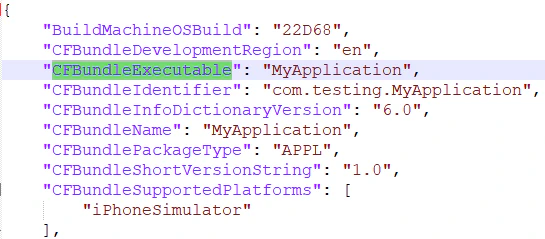
Info.plist file contains essential metadata about the application including bundle identifier, version, supported devices, and required capabilities.CFBundleIdentifier: Unique app identifier (e.g.,com.company.appname)CFBundleExecutable: Name of the executable binaryCFBundleVersion: Build version numberCFBundleShortVersionString: User-facing version stringMinimumOSVersion: Minimum iOS version requiredUIDeviceFamily: Supported device types (iPhone, iPad)
Embedded Provisioning Profile
Embedded Provisioning Profile
The
embedded.mobileprovision file contains the provisioning profile used to sign the application, including:- Developer/distribution certificates
- Allowed device UDIDs (for development builds)
- App entitlements
- Expiration date
Code Signature
Code Signature
The The
_CodeSignature directory contains files that verify the integrity and authenticity of the application:CodeResources file contains hashes of all files in the bundle to detect tampering.Resources and Assets
iOS apps contain various resource types that need to be understood during reverse engineering:Asset Catalogs
Localization Resources
Localized strings and resources are stored in.lproj directories:
Interface Files
- Storyboards
- NIB Files
Storyboards (Compiled storyboards can be inspected using tools like
.storyboard or .storyboardc when compiled) define the app’s user interface and navigation flow.ibtool or reverse engineered to understand UI structure.Configuration Files
Property Lists
BeyondInfo.plist, apps may contain additional property list files:
Settings Bundle
Settings.bundle contains app preferences displayed in the iOS Settings app.URL Schemes
Defined in
Info.plist under CFBundleURLTypes, revealing deep linking capabilities.Entitlements
Special permissions and capabilities defined in the code signature.
App Transport Security
Network security settings in
NSAppTransportSecurity key.Frameworks and Libraries
Applications may embed private frameworks and dynamic libraries:Embedded frameworks are common in apps using third-party SDKs or modular architectures. Each framework is itself a bundle with its own Mach-O binary.
Inspecting App Bundles
Using Command Line Tools
Using Reverse Engineering Tools
Practical Example
Examining the example apps in the project:Next Steps
Mach-O Format
Dive deep into the Mach-O executable binary format.
Code Signing
Learn how iOS code signing protects app integrity.
Entitlements
Understand app permissions and capabilities.
IPA Files
Learn about IPA file structure and extraction.