
Performance at Scale
Zvec delivers exceptional speed and efficiency, making it ideal for demanding production workloads. Built on Alibaba’s battle-tested Proxima vector search engine, Zvec provides production-grade, low-latency similarity search.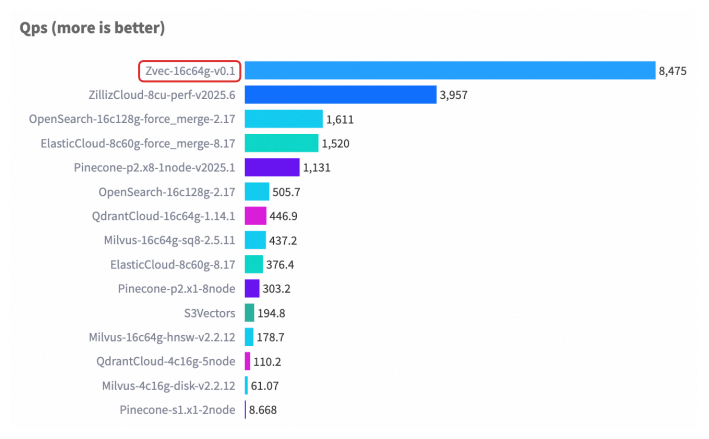
Key Performance Characteristics
Speed
- Searches billions of vectors in milliseconds
- Optimized SIMD operations for faster vector computations
- Memory-mapped file I/O for efficient data access
- Multi-threaded query processing
Efficiency
- Low memory footprint - In-process design eliminates network overhead
- Minimal setup - No separate server processes or complex configurations
- Direct memory access - Native C++ core with zero-copy operations
Benchmark Methodology
Our benchmarks measure three key metrics:QPS
Queries per second - throughput under concurrent load
Latency
Response time including p50, p90, p95, and p99 percentiles
Recall
Accuracy of results compared to exact nearest neighbor search
Test Configurations
Benchmarks are conducted using the following configurations:All benchmarks are run on consistent hardware: AWS c6i.4xlarge instances (16 vCPUs, 32 GB RAM) with NVMe SSD storage.
Benchmark Results
Query Performance
The benchmark tracks query processing metrics:- Total queries processed
- Average latency - Mean response time per query
- QPS - Queries per second throughput
- Percentile latencies - p25, p50, p75, p90, p95, p99
- Min/Max latency - Best and worst case performance
tools/core/bench_result.h:
Dataset Sizes
Zvec has been tested with datasets ranging from:- Small: 10K - 100K vectors
- Medium: 100K - 1M vectors
- Large: 1M - 10M vectors
- X-Large: 10M+ vectors (billions supported)
Comparison with Other Vector Databases
As an in-process vector database, Zvec offers unique advantages:| Feature | Zvec | Client-Server DBs |
|---|---|---|
| Deployment | Embeds directly in your app | Requires separate server |
| Latency | Sub-millisecond (no network) | Network overhead added |
| Setup | Install and go | Configuration required |
| Scalability | Scales with your app | Horizontal scaling |
| Use Case | Edge, notebooks, apps | Centralized services |
Running Your Own Benchmarks
To benchmark Zvec with your own data:1. Build the C++ benchmarking tool
2. Prepare your dataset
Use standard benchmark datasets or your own vectors:3. Configure test parameters
Adjust:- Vector dimension and data type
- Index type (HNSW, IVF, Flat)
- Query concurrency
- Recall vs. speed tradeoff (ef_search)
4. Run benchmarks
Performance Tuning Tips
For optimal benchmark results:- Index Selection - HNSW for speed, IVF for memory efficiency
- Parameter Tuning - Balance
ef_constructionandef_search - Hardware - Use SSD storage and sufficient RAM
- Query Patterns - Batch queries when possible
- Vector Preprocessing - Normalize vectors for IP distance
Community Benchmarks
We welcome community-contributed benchmarks! If you’ve run interesting benchmarks:- Share results in GitHub Discussions
- Report findings in our Discord community
- Submit benchmark configurations as examples