Architecture Layers
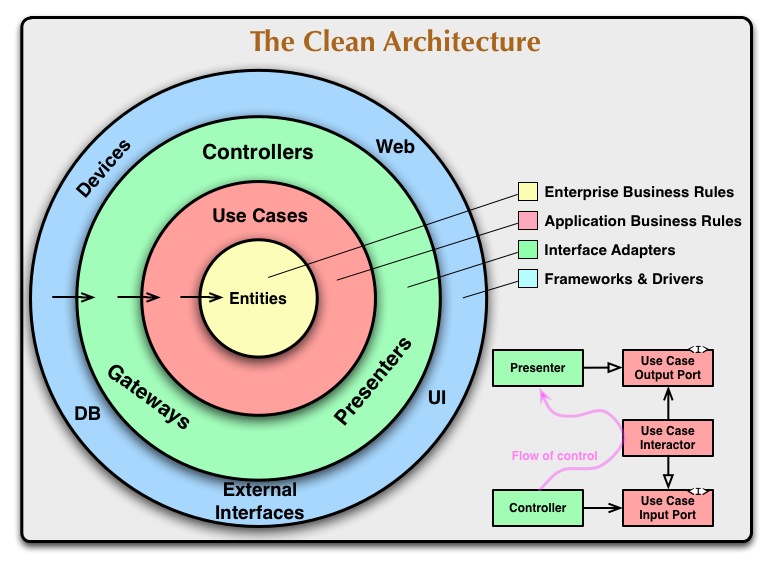 The architecture follows the Dependency Rule: dependencies only point inward. Outer layers depend on inner layers, never the reverse.
Layer Breakdown
1. Domain Layer (Core Business Logic)
The domain layer is the innermost layer and contains:- Business logic
- Domain models (entities)
- Repository interfaces
- Use cases
The domain layer has zero dependencies on Android framework or external libraries. It’s pure Kotlin/Java code.
Domain Models
Domain models represent business entities:com/bsvillarraga/spaceflightnews/domain/model/Article.kt
Repository Interfaces
The domain layer defines what data operations are needed, not how they’re implemented:com/bsvillarraga/spaceflightnews/domain/repository/ArticleRepository.kt
Use Cases
Use cases encapsulate single business operations:com/bsvillarraga/spaceflightnews/domain/usecase/GetArticlesUseCase.kt
Why use cases for simple operations?
Why use cases for simple operations?
While this use case seems like a simple pass-through, it provides:
- A single entry point for this business operation
- A place to add validation or business rules
- Easy mocking for testing the presentation layer
- Future extensibility without changing the repository interface
2. Data Layer (Data Management)
The data layer implements repository interfaces and manages data sources:- Repository implementations
- API clients (Retrofit)
- Local database (Room)
- DTOs (Data Transfer Objects)
- Data mappers
Data Transfer Objects (DTOs)
DTOs represent the API response structure:com/bsvillarraga/spaceflightnews/data/model/ArticleDto.kt
DTOs include mapping functions to convert API responses into domain models, keeping the transformation logic close to the data.
Repository Implementation
The repository implementation handles data fetching and transformation:com/bsvillarraga/spaceflightnews/data/repository/ArticleRepositoryImpl.kt:29-58
Why separate DTOs from Domain Models?
Why separate DTOs from Domain Models?
Benefits of separation:
- API changes don’t affect business logic
- Domain models contain only what the app needs
- DTOs can include serialization annotations
- Clear boundary between external and internal data representations
published_at with snake_case, but the domain model uses publishedAt with camelCase.ApiHelper and Error Handling
ApiHelper and Error Handling
The
apiHelper.safeApiCall wrapper handles:- Network connectivity checks
- Exception catching and transformation
- Consistent error response format
- Timeout handling
API Client
Retrofit interface defines API endpoints:com/bsvillarraga/spaceflightnews/data/remote/articles/ArticlesApiClient.kt
3. Presentation Layer (UI)
The presentation layer handles UI logic and user interactions:- Fragments and Activities
- ViewModels
- Adapters
- UI state management
ViewModel
ViewModels coordinate between UI and use cases:com/bsvillarraga/spaceflightnews/presentation/ui/articles/viewmodel/ArticlesViewModel.kt:20-46
The ViewModel uses debounce and distinctUntilChanged on the search query to prevent excessive API calls while typing.
Fragment (UI)
Fragments observe ViewModel state and render UI:com/bsvillarraga/spaceflightnews/presentation/ui/articles/ArticlesFragment.kt:41-49
com/bsvillarraga/spaceflightnews/presentation/ui/articles/ArticlesFragment.kt:103-116
Dependency Flow
The dependency graph flows inward:Benefits of This Architecture
Testability
Each layer can be tested independently with mocked dependencies
Maintainability
Changes in one layer don’t affect others
Scalability
New features follow the same pattern
Separation of Concerns
Each class has a single, well-defined responsibility
Real-World Example: Fetching Articles
Let’s trace a complete flow from user action to UI update:Next Steps
Dependency Injection
Learn how Dagger Hilt wires all these components together