Benchmark Setup
For reference, several fast compression algorithms were tested and compared on a desktop featuring a Core i7-9700K CPU @ 4.9GHz and running Ubuntu 24.04 (Linux 6.8.0-53-generic), using lzbench, an open-source in-memory benchmark by @inikep compiled with gcc 14.2.0, on the Silesia compression corpus.
Compression Speed Comparison
| Compressor name | Ratio | Compression | Decompress. |
|---|---|---|---|
| zstd 1.5.7 -1 | 2.896 | 510 MB/s | 1550 MB/s |
| brotli 1.1.0 -1 | 2.883 | 290 MB/s | 425 MB/s |
| zlib 1.3.1 -1 | 2.743 | 105 MB/s | 390 MB/s |
| zstd 1.5.7 —fast=1 | 2.439 | 545 MB/s | 1850 MB/s |
| quicklz 1.5.0 -1 | 2.238 | 520 MB/s | 750 MB/s |
| zstd 1.5.7 —fast=4 | 2.146 | 665 MB/s | 2050 MB/s |
| lzo1x 2.10 -1 | 2.106 | 650 MB/s | 780 MB/s |
| lz4 1.10.0 | 2.101 | 675 MB/s | 3850 MB/s |
| snappy 1.2.1 | 2.089 | 520 MB/s | 1500 MB/s |
| lzf 3.6 -1 | 2.077 | 410 MB/s | 820 MB/s |
--fast=#, offer faster compression and decompression speed at the cost of compression ratio.
Speed vs Compression Trade-off
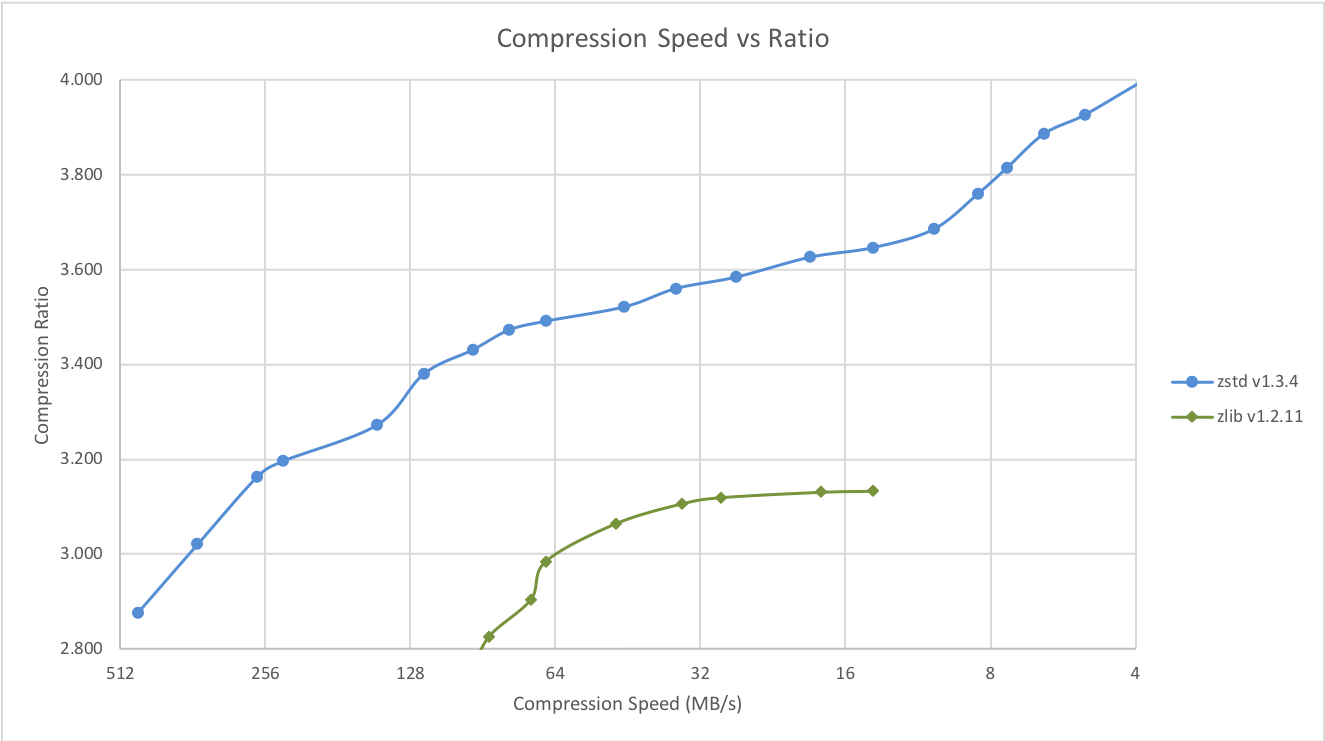
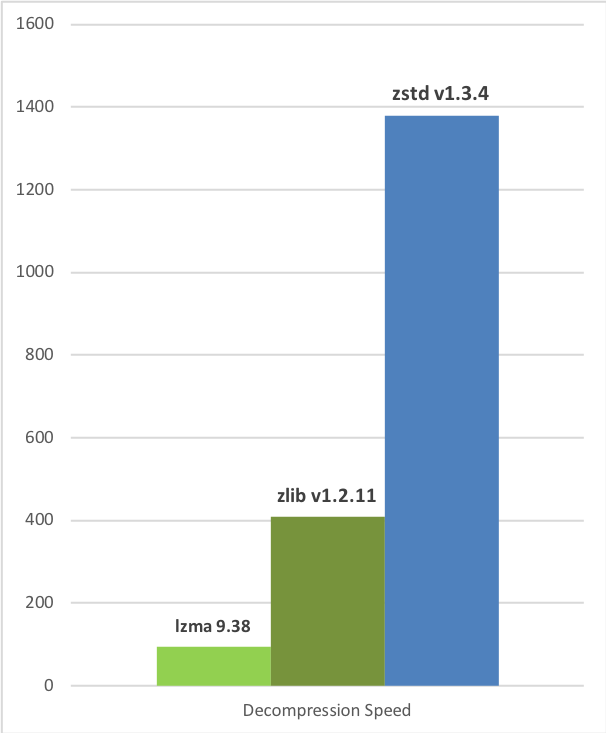
Zstandard can also offer stronger compression ratios at the cost of compression speed. Speed vs Compression trade-off is configurable by small increments. Decompression speed is preserved and remains roughly the same at all settings, a property shared by most LZ compression algorithms, such as zlib or lzma. The following tests were run on a server running Linux Debian (Linux version 4.14.0-3-amd64) with a Core i7-6700K CPU @ 4.0GHz, using lzbench, an open-source in-memory benchmark by @inikep compiled with gcc 7.3.0, on the Silesia compression corpus.
Compression Speed vs Ratio
Decompression Speed
 A few other algorithms can produce higher compression ratios at slower speeds, falling outside of the graph. For a larger picture including slow modes, click here.
Small Data Compression
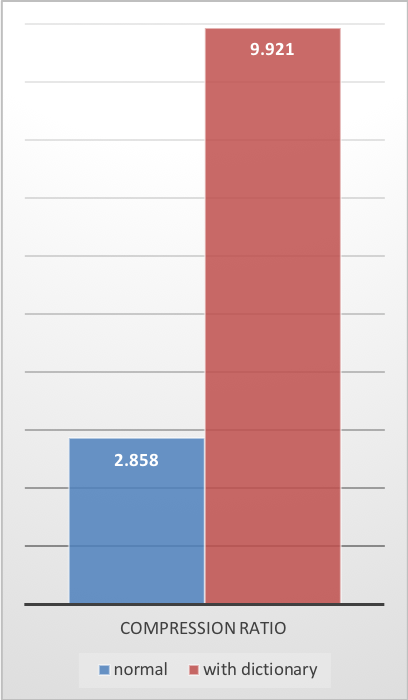
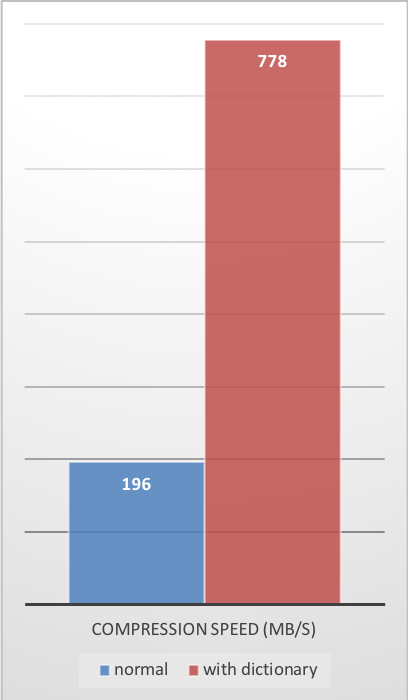
Previous charts provide results applicable to typical file and stream scenarios (several MB). Small data comes with different perspectives. The smaller the amount of data to compress, the more difficult it is to compress. This problem is common to all compression algorithms, and reason is, compression algorithms learn from past data how to compress future data. But at the beginning of a new data set, there is no “past” to build upon. To solve this situation, Zstd offers a training mode, which can be used to tune the algorithm for a selected type of data. Training Zstandard is achieved by providing it with a few samples (one file per sample). The result of this training is stored in a file called “dictionary”, which must be loaded before compression and decompression. Using this dictionary, the compression ratio achievable on small data improves dramatically. The following example uses thegithub-users sample set, created from github public API. It consists of roughly 10K records weighing about 1KB each.
Compression Ratio
Compression Speed
Decompression Speed
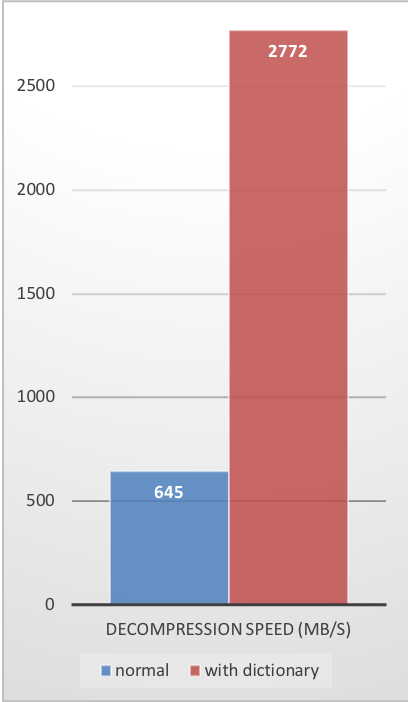 These compression gains are achieved while simultaneously providing faster compression and decompression speeds.
Training works if there is some correlation in a family of small data samples. The more data-specific a dictionary is, the more efficient it is (there is no universal dictionary). Hence, deploying one dictionary per type of data will provide the greatest benefits. Dictionary gains are mostly effective in the first few KB. Then, the compression algorithm will gradually use previously decoded content to better compress the rest of the file.
These compression gains are achieved while simultaneously providing faster compression and decompression speeds.
Training works if there is some correlation in a family of small data samples. The more data-specific a dictionary is, the more efficient it is (there is no universal dictionary). Hence, deploying one dictionary per type of data will provide the greatest benefits. Dictionary gains are mostly effective in the first few KB. Then, the compression algorithm will gradually use previously decoded content to better compress the rest of the file.
Dictionary Compression How To
-
Create the dictionary
-
Compress with dictionary
-
Decompress with dictionary