Overview
This guide walks you through creating your first Spec-Driven Development project using Spec Kit. You’ll go from installation to a complete specification, implementation plan, and working code.Time to complete: 15-20 minutesWhat you’ll build: A photo album organizer application with drag-and-drop functionality
Prerequisites
Before starting, ensure you have:- Completed the Installation steps
- An AI coding assistant installed (Claude Code, Copilot, etc.)
- Basic familiarity with your terminal and Git
The 6-Step Process
Spec-Driven Development follows a structured workflow:Step 1: Initialize Your Project
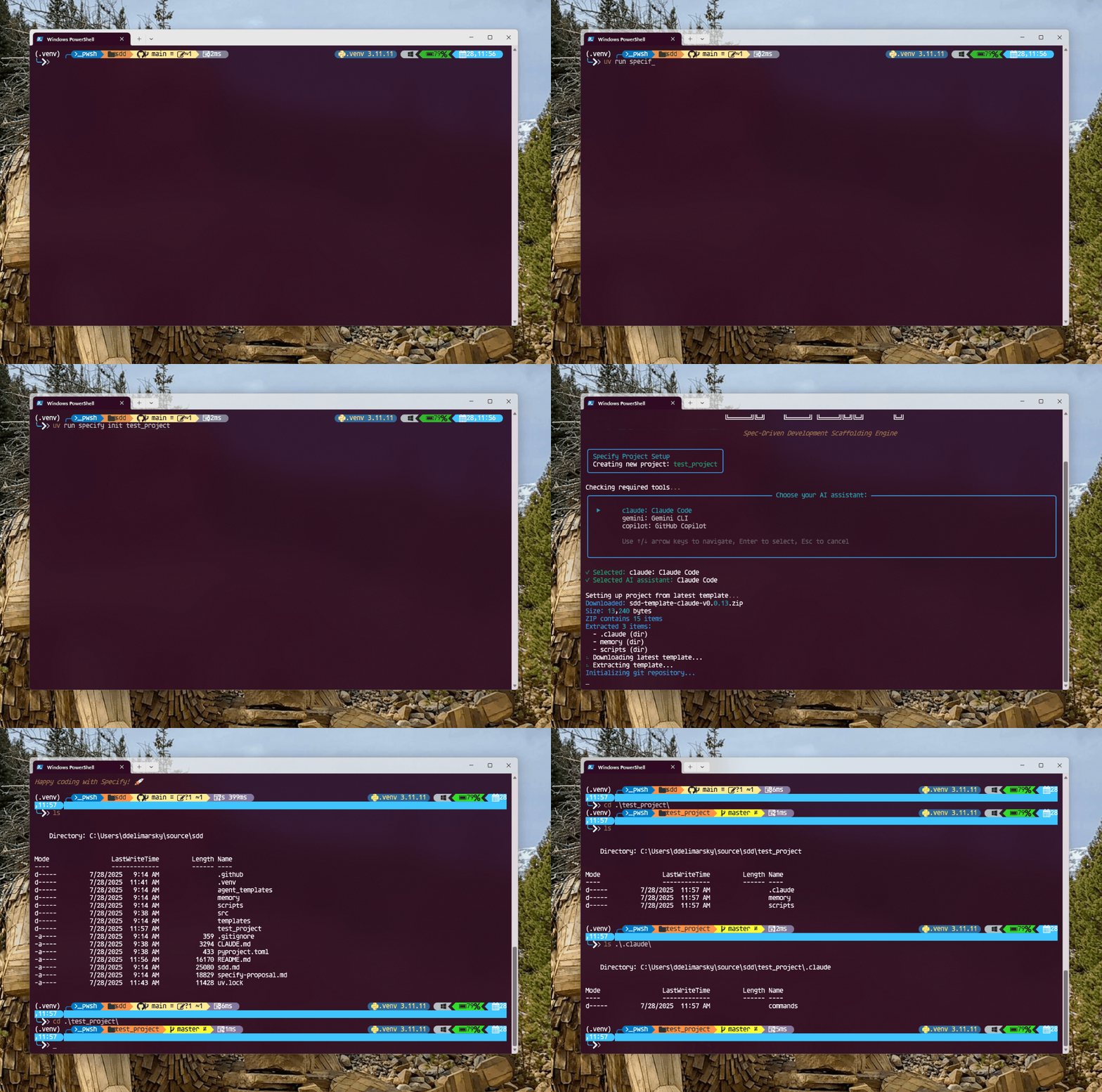
Create a new project directory and initialize Spec Kit:- Creates
.specify/directory with templates and scripts - Sets up agent-specific command files (e.g.,
.claude/commands/) - Initializes Git repository (unless
--no-gitspecified) - Configures both Bash and PowerShell script variants
Context Awareness: Spec Kit commands automatically detect the active feature based on your current Git branch (e.g.,
001-photo-albums). To work on different specifications, simply switch Git branches.Step 2: Launch Your AI Assistant
Open your AI coding assistant in the project directory:/speckit.constitution/speckit.specify/speckit.clarify/speckit.plan/speckit.tasks/speckit.implement
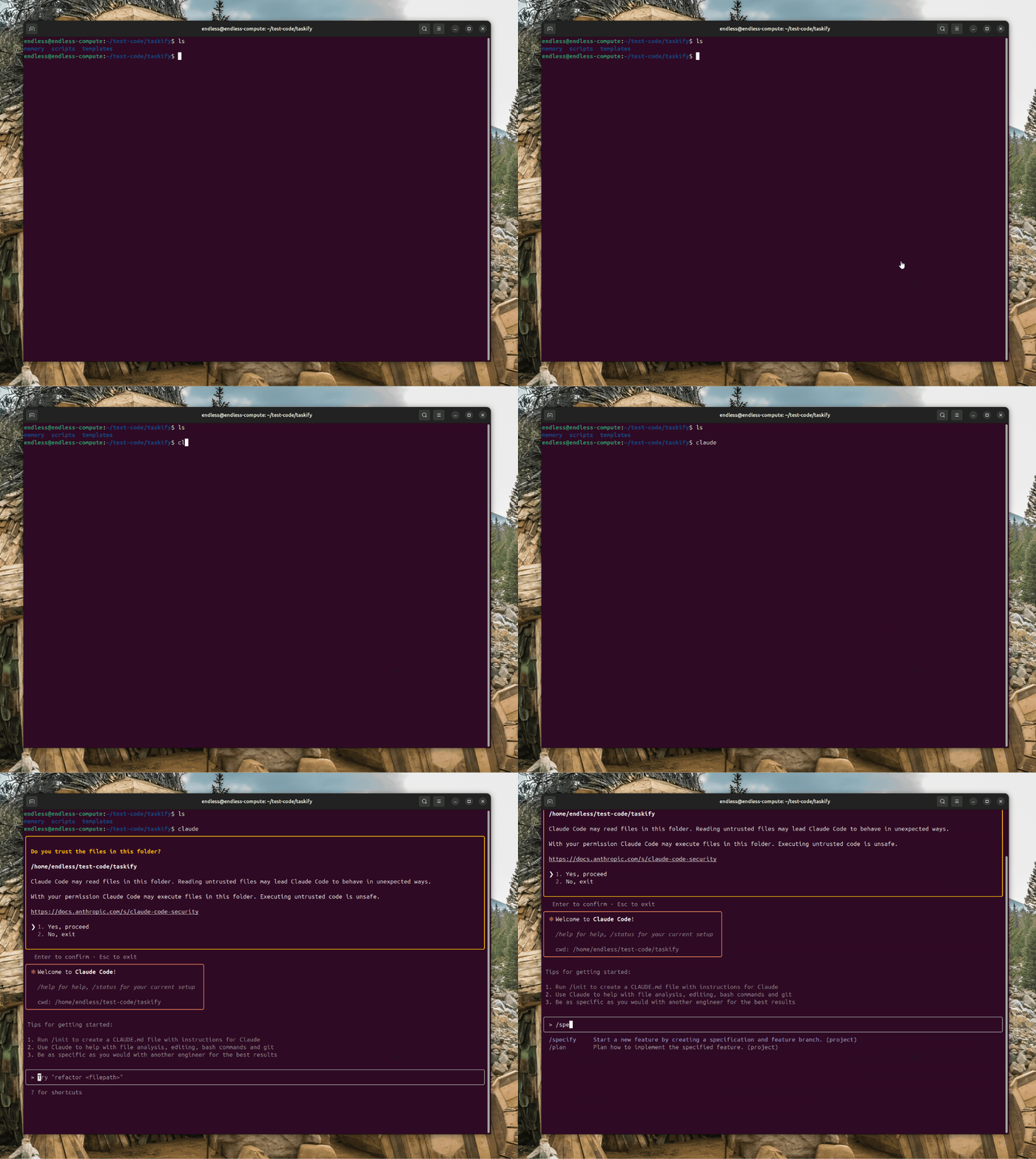
Step 3: Establish Project Constitution
Use the/speckit.constitution command to create your project’s governing principles:
.specify/memory/constitution.mdwith your foundational guidelines- Principles that the AI agent references during specification, planning, and implementation
- A versioned document that guides all technical decisions
Example Constitution Output
Example Constitution Output
Step 4: Create Your Specification
Use the/speckit.specify command to describe what you want to build. Focus on the what and why, not the tech stack:
- AI analyzes your description and generates a concise feature name (e.g.,
photo-album-organizer) - Checks for existing branches/specs and assigns the next feature number (e.g.,
001) - Creates a new Git branch:
001-photo-album-organizer - Generates a specification file:
.specify/specs/001-photo-album-organizer/spec.md - Creates a quality checklist to validate specification completeness
Example Specification Sections
Example Specification Sections
The generated specification includes:
- Feature Overview: High-level description and objectives
- User Scenarios: Concrete examples of how users interact with the feature
- Functional Requirements: Detailed, testable requirements
- Success Criteria: Measurable outcomes (technology-agnostic)
- Key Entities: Data models and relationships
- Edge Cases: Boundary conditions and error scenarios
- Assumptions: Documented reasonable defaults
- Out of Scope: Explicit boundaries of what won’t be built
Step 5: Clarify Requirements
Use the/speckit.clarify command to resolve ambiguities through structured questioning:
- AI scans the specification for
[NEEDS CLARIFICATION]markers - Presents questions with multiple-choice options and implications
- You provide answers (e.g., “Q1: A, Q2: Custom - store metadata in SQLite, Q3: B”)
- AI updates the specification with your answers
- Re-validates the specification checklist
View Sample Clarification
View Sample Clarification
Step 6: Generate Technical Plan
Use the/speckit.plan command to define your tech stack and architecture:
Implementation Plan
.specify/specs/001-photo-album-organizer/plan.mdTechnical architecture, technology choices, and implementation phasesData Model
.specify/specs/001-photo-album-organizer/data-model.mdEntity definitions, relationships, and database schemaAPI Contracts
.specify/specs/001-photo-album-organizer/contracts/API specifications, endpoints, and interface definitionsQuick Start Guide
.specify/specs/001-photo-album-organizer/quickstart.mdHow to run, test, and validate the implementationStep 7: Break Down Into Tasks
Use the/speckit.tasks command to generate an actionable task list:
- Tasks organized by user story/implementation phase
- Dependency ordering (models → services → endpoints → UI)
- Parallel execution markers
[P]for independent tasks - File path specifications for each task
- Test-driven development structure
- Checkpoint validations after each phase
Example Task Structure
Example Task Structure
Step 8: Validate with Analysis
(Optional) Use/speckit.analyze to cross-check consistency:
- All spec requirements are addressed in the plan
- All plan components map back to requirements
- No orphaned tasks or missing coverage
- Constitution compliance throughout
Step 9: Execute Implementation
Use the/speckit.implement command to build your feature:
Step 10: Test and Iterate
After implementation completes:-
Run the application following the quickstart guide:
-
Test key scenarios from the specification:
- Create new albums
- Add photos to albums
- Drag and drop photos between albums
- Reorganize album order
- Test with hundreds of photos for performance
- Resolve runtime errors by copying browser console errors back to your AI assistant
-
Create a pull request (if using GitHub):
Key Principles
Be Explicit
Clearly articulate what you’re building and why, with concrete examples
Separate Concerns
Don’t focus on tech stack during specification—keep it technology-agnostic
Iterate and Refine
Use
/speckit.clarify to resolve ambiguities before planningTrust the Process
Let the AI handle implementation details after providing clear specifications
Common Pitfalls
Phased Implementation Strategy
For complex projects, implement in phases to avoid overwhelming the AI agent’s context:Example phased approach for photo organizer:
- Phase 1: Basic album creation, photo import, simple grid view
- Phase 2: Drag-and-drop for photos and albums
- Phase 3: Virtual scrolling and performance optimizations
- Phase 4: Search, filtering, and advanced organization features
Next Steps
Complete Methodology
Deep dive into the full Spec-Driven Development process
CLI Reference
Explore all available commands, flags, and options
Supported Agents
Learn about all compatible AI coding assistants
Advanced Patterns
Explore advanced workflows and best practices
Example Projects
Explore these example specifications and implementations:- Taskify: Team productivity platform with Kanban boards (See README examples)
- Photo Organizer: Album management with drag-and-drop (This quickstart)
- Custom integrations: Check the examples directory for more
Getting Help
If you encounter issues:- Check the troubleshooting section in the Installation guide
- Review command documentation in the CLI Reference
- Open a GitHub issue with details about your problem: github.com/github/spec-kit/issues
Remember: Spec-Driven Development is about amplifying human creativity, not replacing it. You provide the vision and critical thinking; the AI handles the mechanical translation to code.