LIBERO: Lifelong Learning Benchmark
LIBERO is a benchmark for studying lifelong robot learning — the ability of robots to continuously learn and adapt alongside their users over time.
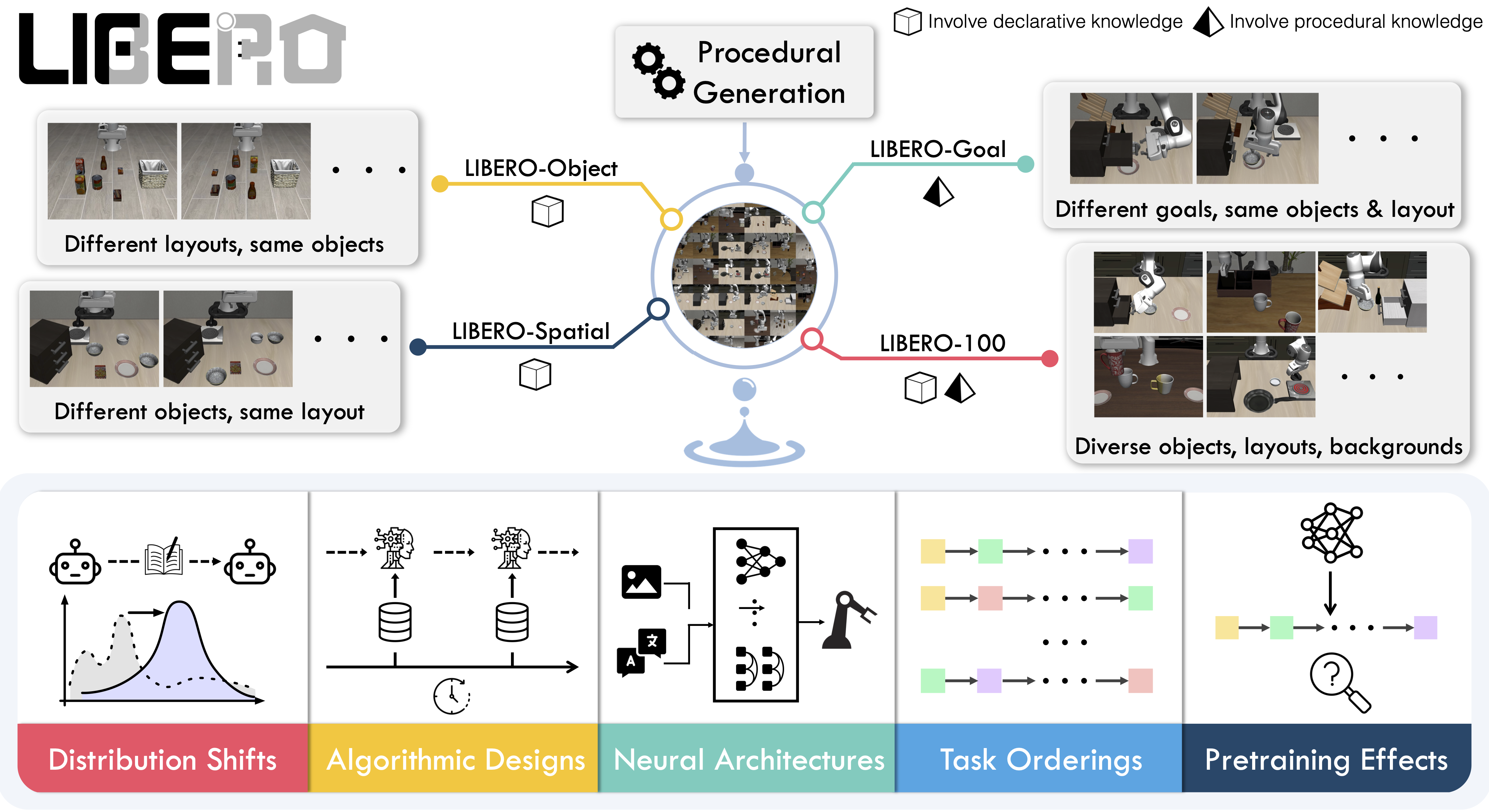
Overview
LIBERO addresses the challenge of lifelong learning in decision making (LLDM) — enabling robots to become truly personalized helpers by continuously adapting to new tasks and environments.
The benchmark provides 130 tasks across five suites, focusing on knowledge transfer and generalization:
- LIBERO-Spatial (
libero_spatial) – Spatial reasoning tasks
- LIBERO-Object (
libero_object) – Object manipulation tasks
- LIBERO-Goal (
libero_goal) – Goal-conditioned tasks
- LIBERO-90 (
libero_90) – 90 short-horizon tasks from LIBERO-100
- LIBERO-Long (
libero_10) – 10 long-horizon tasks from LIBERO-100
These suites provide standardized evaluation for comparing different lifelong learning algorithms fairly.
Installation
After installing LeRobot:
pip install -e ".[libero]"
Set the MuJoCo rendering backend before running:export MUJOCO_GL=egl # For headless servers
Evaluation
Single-Suite Evaluation
Evaluate a policy on one LIBERO suite:
lerobot-eval \
    --policy.path=your-policy-id \
    --env.type=libero \
    --env.task=libero_object \
    --eval.batch_size=2 \
    --eval.n_episodes=3
--env.task: Suite name (libero_object, libero_spatial, libero_goal, libero_10, libero_90)--env.task_ids: Specific task IDs to run (e.g., [0,1,2]). Omit to run all tasks--eval.batch_size: Number of parallel environments--eval.n_episodes: Total episodes to run
Multi-Suite Evaluation
Benchmark across multiple suites:
lerobot-eval \
    --policy.path=your-policy-id \
    --env.type=libero \
    --env.task=libero_object,libero_spatial \
    --eval.batch_size=1 \
    --eval.n_episodes=2
Control Modes
LIBERO supports two control parameterizations:
# Relative control (default)
--env.control_mode=relative

# Absolute control
--env.control_mode=absolute
Training
Dataset
Use the preprocessed LIBERO dataset compatible with LeRobot:
👉 HuggingFaceVLA/libero
This dataset includes:
- Properly formatted observation keys (
observation.images.image, observation.images.image2)
- Normalized state observations
- Task descriptions for VLA training
For reference, the original dataset by Physical Intelligence:
👉 physical-intelligence/libero
Training Example
lerobot-train \
    --policy.type=smolvla \
    --policy.repo_id=${HF_USER}/libero-test \
    --policy.load_vlm_weights=true \
    --dataset.repo_id=HuggingFaceVLA/libero \
    --env.type=libero \
    --env.task=libero_10 \
    --output_dir=./outputs/ \
    --steps=100000 \
    --batch_size=4 \
    --eval.batch_size=1 \
    --eval.n_episodes=1 \
    --eval_freq=1000
- Use
--policy.load_vlm_weights=true for vision-language models
- Set
--env.task to the suite(s) you want to train on
- Adjust
--batch_size based on available GPU memory
- Use
--eval_freq to control online evaluation frequency
Observation and Action Spaces
Observations
LIBERO environments provide:
{
    "observation.images.image": torch.Tensor,    # Main camera (agentview)
    "observation.images.image2": torch.Tensor,   # Wrist camera (eye-in-hand)
    "observation.state": torch.Tensor,           # Robot state (optional)
    "task": List[str]                           # Task descriptions
}
obs_type="pixels": Only camera imagesobs_type="pixels_agent_pos": Images + robot state (end-effector, joints, gripper)
LeRobot enforces the .images.* prefix for visual features. Ensure your
policy config input_features use matching keys. Dataset metadata must follow
this convention during evaluation.
Actions
- Space:
Box(-1, 1, shape=(7,), dtype=float32)
- Dimensions: 6-DoF end-effector delta + 1-DoF gripper
- Control modes: Relative (delta) or absolute positions
Environment Configuration
from lerobot.envs.configs import LiberoEnv
from lerobot.envs.factory import make_env

# Configure LIBERO environment
config = LiberoEnv(
    task="libero_10",                          # Task suite
    task_ids=[0, 1, 2],                        # Specific tasks (optional)
    episode_length=500,                        # Max steps per episode
    obs_type="pixels_agent_pos",               # Observation type
    camera_name="agentview_image,robot0_eye_in_hand_image",  # Cameras
    control_mode="relative",                   # Control parameterization
    init_states=True,                          # Use predefined init states
    observation_height=360,                    # Image height
    observation_width=360,                     # Image width
)

# Create environments
env_dict = make_env(config, n_envs=4)
Camera Configuration
LIBERO supports multiple camera views:
# Single camera
camera_name="agentview_image"

# Multiple cameras (comma-separated)
camera_name="agentview_image,robot0_eye_in_hand_image"
agentview_image → observation.images.imagerobot0_eye_in_hand_image → observation.images.image2
Episode Length
Default episode lengths per suite (based on training demos):
TASK_SUITE_MAX_STEPS = {
    "libero_spatial": 280,   # Longest demo: 193 steps
    "libero_object": 280,    # Longest demo: 254 steps
    "libero_goal": 300,      # Longest demo: 270 steps
    "libero_10": 520,        # Longest demo: 505 steps
    "libero_90": 400,        # Longest demo: 373 steps
}
episode_length parameter if needed.
Reproducing π0.5 Results
We reproduce Physical Intelligence’s π0.5 results on LIBERO:
Finetuned Model
👉 lerobot/pi05_libero_finetuned
Starting from Physical Intelligence’s base model, we finetuned for 6k steps in bfloat16 with:
Evaluation Command
lerobot-eval \
    --output_dir=/logs/ \
    --env.type=libero \
    --env.task=libero_spatial,libero_object,libero_goal,libero_10 \
    --eval.batch_size=1 \
    --eval.n_episodes=10 \
    --policy.path=lerobot/pi05_libero_finetuned \
    --policy.n_action_steps=10 \
    --env.max_parallel_tasks=1
We set n_action_steps=10, matching the original OpenPI implementation.
Results
LeRobot implementation:
| Model | LIBERO Spatial | LIBERO Object | LIBERO Goal | LIBERO 10 | Average |
|---|
| π0.5 | 97.0 | 99.0 | 98.0 | 96.0 | 97.5 |
| Model | LIBERO Spatial | LIBERO Object | LIBERO Goal | LIBERO 10 | Average |
|---|
| π0.5 | 98.8 | 98.2 | 98.0 | 92.4 | 96.85 |
Code Examples
Basic Usage
from lerobot.envs.factory import make_env
from lerobot.envs.configs import LiberoEnv
import torch

# Create LIBERO environment
config = LiberoEnv(task="libero_spatial")
env_dict = make_env(config, n_envs=1)

# Get environment
suite_name = next(iter(env_dict))
vec_env = env_dict[suite_name][0]

# Run episodes
obs, info = vec_env.reset()
for _ in range(1000):
    # Random actions
    actions = torch.rand(1, 7) * 2 - 1  # Range [-1, 1]
    obs, rewards, terminated, truncated, info = vec_env.step(actions)

    if terminated.any() or truncated.any():
        obs, info = vec_env.reset()

vec_env.close()
Multi-Task Evaluation
from lerobot.envs.factory import make_env
from lerobot.envs.configs import LiberoEnv

# Create environment with specific tasks
config = LiberoEnv(
    task="libero_10",
    task_ids=[0, 1, 2, 3],  # Evaluate on first 4 tasks only
)

env_dict = make_env(config, n_envs=2)  # 2 parallel envs per task

# Access specific task
suite_name = "libero_10"
task_id = 0
vec_env = env_dict[suite_name][task_id]

print(f"Evaluating {suite_name} task {task_id}")
obs, info = vec_env.reset()
# ... run evaluation ...
With Policy Inference
from lerobot.policies import make_policy
from lerobot.envs.factory import make_env
from lerobot.envs.configs import LiberoEnv
import torch

# Load policy
policy = make_policy(
    "lerobot/pi05_libero_finetuned",
    device="cuda"
)

# Create environment
config = LiberoEnv(task="libero_object")
env_dict = make_env(config, n_envs=1)
suite_name = next(iter(env_dict))
vec_env = env_dict[suite_name][0]

# Evaluate
obs, info = vec_env.reset()
success_count = 0
episodes = 10

for episode in range(episodes):
    obs, info = vec_env.reset()
    done = False

    while not done:
        with torch.no_grad():
            actions = policy.select_action(obs)
        obs, rewards, terminated, truncated, info = vec_env.step(actions)
        done = terminated.any() or truncated.any()

        if done and info.get("is_success", [False])[0]:
            success_count += 1

print(f"Success rate: {success_count / episodes * 100:.1f}%")
vec_env.close()
Memory Optimization
Reduce memory usage by:
config = LiberoEnv(
    observation_height=256,  # Lower than default 360
    observation_width=256,
    obs_type="pixels",      # Skip state observations if not needed
)
Parallel Evaluation
Maximize throughput:
lerobot-eval \
    --policy.path=your-policy \
    --env.type=libero \
    --env.task=libero_spatial \
    --eval.batch_size=4 \    # Run 4 envs in parallel
    --eval.n_episodes=40      # Total episodes
Headless Rendering
For servers without display:
export MUJOCO_GL=egl  # GPU-accelerated headless rendering
# or
export MUJOCO_GL=osmesa  # CPU-based rendering
Troubleshooting
Import Errors
If LIBERO import fails:
pip install -e ".[libero]"
Rendering Issues
If you see rendering errors:
# Try different backends
export MUJOCO_GL=egl
# or
export MUJOCO_GL=osmesa
Camera Name Errors
Ensure camera names match LIBERO conventions:
agentview_image (main camera)robot0_eye_in_hand_image (wrist camera)
Episode Length Timeouts
If tasks timeout, increase episode length:
config = LiberoEnv(
    task="libero_10",
    episode_length=600,  # Increase from default 520
)
See Also