Overview
The graphic below shows an example use case for meta transactions. Alice owns an amount of the fungible token$FT and wants to transfer some to John by calling ft_transfer("john", 10) on an account named FT.
The problem is, Alice has no NEAR tokens. She only has a NEAR account that someone else funded for her and she owns the private keys.
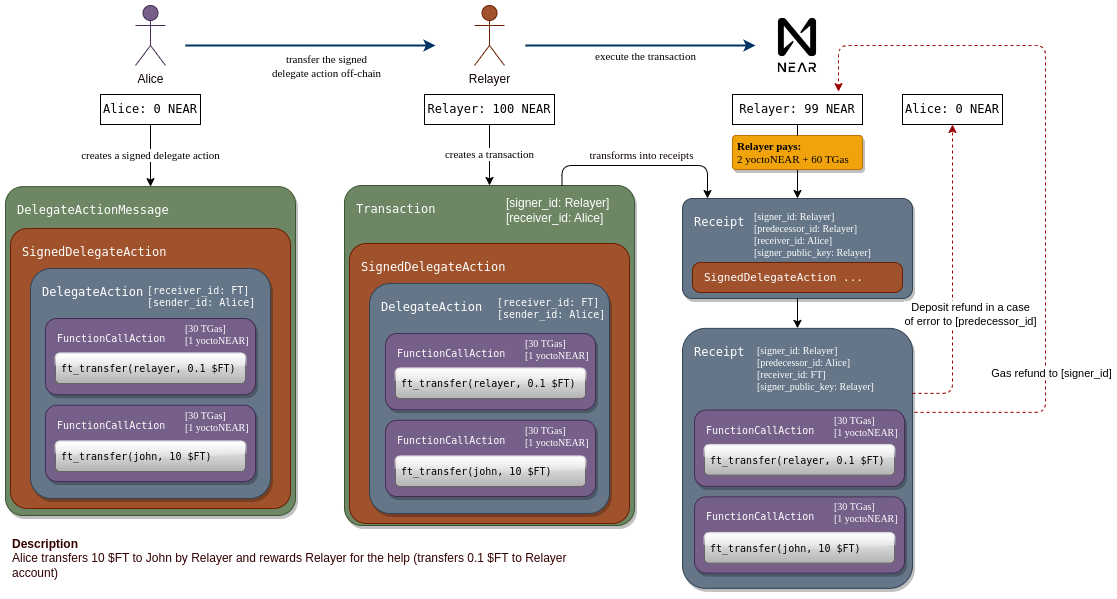 With meta transactions, Alice can create a
 DelegateAction, which is similar to a transaction. She signs the DelegateAction and forwards it (off-chain) to a relayer. The relayer wraps it in a transaction, of which the relayer is the signer and therefore pays the gas costs.
If the inner actions have an attached token balance, this is also paid for by the relayer.
SignedDelegateAction is converted to an action receipt and forwarded to Alice’s account, which verifies the signature and valid nonce. If all checks pass, a new action receipt with the inner actions is sent to FT, where the ft_transfer call finally executes.
Why Use a Relayer?
There are multiple reasons to use a relayer:New Users
Your users are new to NEAR and don’t have any gas to cover transactions.
FT Payment
Users have only a Fungible Token balance and can use the FT to pay for gas.
Seamless Onboarding
Enterprises can onboard existing users onto NEAR without them worrying about gas costs and seed phrases.
Transaction Queue
The relayer acts as a queue for low urgency transactions during high network activity.
Asset Control
Limit where users spend assets while allowing them custody and ownership.
Capital Efficiency
Use a global pool of capital instead of allocating gas to each user individually.
Capital Efficiency Example
Understanding Capital Efficiency
Understanding Capital Efficiency
Without a relayer, if your business has 1M users, they would need to be allocated 0.25 NEAR each to cover gas costs, totalling 250k NEAR. However, only ~10% of users would actually use the full allowance, leaving a large amount unused.Using a relayer, you can allocate 50k NEAR as a global pool of capital for your users, which can be refilled on an as-needed basis.
Relayer Architecture
A basic relayer consists of a web server housing a funded NEAR account. This account receives an encoded signed transaction, which can be decoded into aSignedDelegate format and transmitted on-chain.
 The client generates a
 SignedDelegateAction (a signed message that hasn’t yet been sent), encodes it, and transmits it to this server, where it will be relayed onto the blockchain.
Building a Relayer
Implement Endpoints
Add endpoints to receive encoded
SignedDelegateAction transactions from clients.Deserialize and Send
Deserialize the signed transaction and send it to the NEAR network using your relayer account.
Relayer Server Example
- near-api-js
- @near-relay/server
Here’s a simple Express endpoint that deserializes the body, instantiates the relayer account, and sends the transaction:
server.ts
Requires
near-api-js >= 3.0.4, @near-js/transactions >= 1.1.2, and @near-js/accounts >= 1.0.4Client Implementation
- near-api-js
- @near-relay/client
Create an arbitrary smart contract call, sign but don’t send the transaction, then forward to the relayer:
client.ts
Advanced Topics
High Volume Parallel Processing
When running a relayer that handles a large number of transactions, you will quickly run into a nonce collision problem.Understanding Nonce Collisions
Understanding Nonce Collisions
At the protocol level, transactions have a unique number (nonce) that helps mitigate replay attacks. Each key on an account has its own nonce, expected to increase with each signature.When multiple transactions are sent from the same access key simultaneously, their nonces might collide. If transactions are processed out of order, some will fail.Solution: Sign each transaction with a different key. Adding multiple full access keys to the NEAR account used for relaying (up to 20 keys) can make a significant difference.
Gating the Relayer
In production applications, you want to gate the relayer to only be used in certain cases. This can be accomplished by specifying constraints inside theSignedDelegate.delegateAction object:
Rust Relayer Server
The open-source Rust reference implementation of a Relayer server offers comprehensive features:Meta Transactions
Sign and send Meta Transactions to cover gas costs while users maintain custody
Contract Whitelisting
Only pay for users interacting with certain contracts
Allowances
Specify gas cost allowances for all accounts or per-user basis
OAuth Integration
Require unique OAuth tokens for user registration (sybil resistance)
Key Rotation
Prevent nonce race conditions with multiple keys
FastAuth SDK
Integrate with FastAuth for seamless authentication
Basic Setup
Install Rust
Create NEAR Account
Create a NEAR account with sufficient balance to cover gas costs
If you’re integrating with FastAuth or using shared storage, make sure to enable feature flags:
Redis Setup (Optional)
Only needed if you intend to use whitelisting, allowances, and OAuth functionality.
Install Redis
Install Redis on your machine or use a Docker setup
Use Cases
The examples folder on GitHub contains configuration files for different use cases:No Filters
No Filters
A relayer that covers gas for all user transactions to all contracts. Should only be used with a secure backend.Config:
no_filters.tomlBasic Whitelist
Basic Whitelist
Covers gas for user transactions to interact with a whitelisted set of contracts.Config:
basic_whitelist.tomlRedis with Allowances
Redis with Allowances
Covers gas up to an allowance specified in Redis. Requires OAuth token for signup (sybil resistance).Config:
redis.tomlFastAuth Integration
FastAuth Integration
Configuration for FastAuth SDK integration with shared storage and whitelisted senders.Config:
fastauth.tomlPay with Fungible Tokens
Pay with Fungible Tokens
Ensures FTs are sent to a burn address to cover the equivalent gas amount.Config:
pay_with_ft.tomlWhitelist Senders
Whitelist Senders
Covers gas for a whitelisted set of users’ transactions.Config:
whitelist_senders.tomlShared Storage
Shared Storage
Exchange Withdraw
Exchange Withdraw
For exchanges to cover user withdraw fees when withdrawing stablecoins on NEAR.Config:
exchange_withdraw.tomlLimitations
Gas and Balance Refunds
Gas Refunds
Gas refund receipts work exactly like normal transactions. At every step, the difference between the pessimistic gas price and the actual gas price is computed and refunded. Gas refunds go to the signer of the original transaction (the relayer).Balance Refunds
The protocol sends balance refunds to the predecessor (sender) of the receipt. If an inner action requires an attached balance and the transaction fails execution, the predecessor is the user (not the relayer), so the user receives the refund.Relayer implementations must be aware of this, as there is a financial incentive for users to submit meta transactions with high balances attached that will fail execution.
Function Call Access Keys
Function Call Access Keys are limited to signing transactions for specific methods on a specific contract. They can have an allowance limiting the amount of tokens spent on gas fees. However, this limit can be circumvented by using meta transactions.When a
DelegateAction is processed, the access key is checked against the receiver and methods called. If allowed, the action executes. However, the allowance is not checked since all costs are covered by the relayer.Resources
NEP-366 Specification
Official specification for meta transactions
Rust Relayer Server
Open-source reference implementation
API Specification
Complete relayer server API docs
Example Configurations
Sample configs for various use cases