Overview
System
The system is a GitHub-based issue management workflow designed to automate the lifecycle of an issue. It leverages Serverless Workflow (SW) DSL to handle various stages, from assignment and development to review and closure.Actors
- QA Team: Creates and provides details for issues.
- Development Team: Works on resolving issues.
- Reviewers: Evaluate the work done by the development team.
- GitHub API: External system for managing and updating issue states.
Goals
- Automate Issue Management: Streamline the process from issue creation to closure, reducing manual tasks and ensuring consistent handling.
- Facilitate Collaboration: Coordinate between different teams (QA, Dev, Reviewers) through automated task assignments and notifications.
- Ensure Integrity: Implement error handling to avoid common pitfalls, like assigning reviewers who are also the developers of the issue.
Preconditions
- The workflow assumes a GitHub repository where issues are tracked.
- Teams and roles (QA, Dev, Reviewer) are predefined and recognized by the system.
- Relevant GitHub events are configured to trigger the workflow.
Scenario
Triggers
The workflow is triggered when a new issue is created in the GitHub repository by a member of the QA team.Flow Breakdown
-
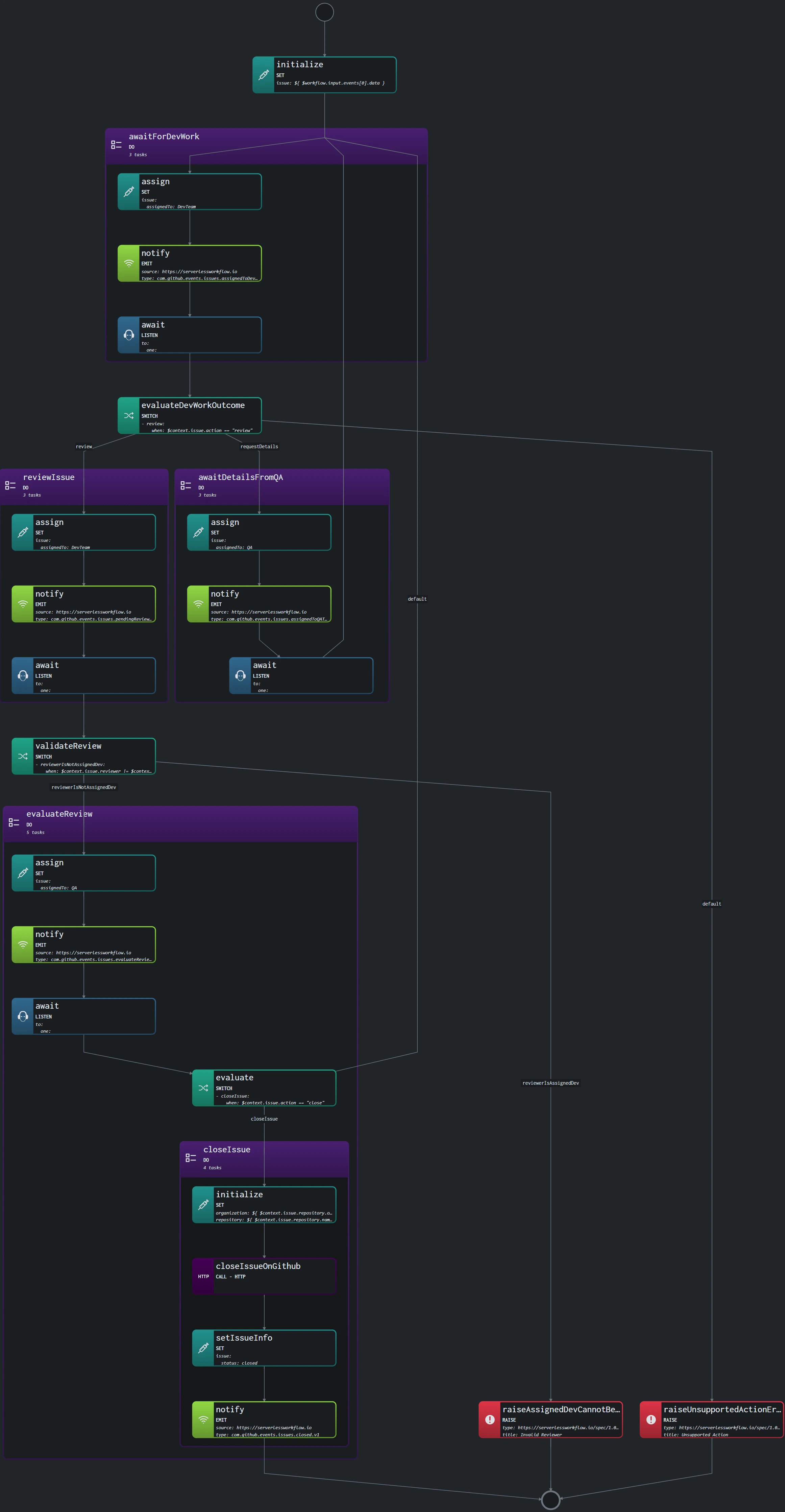
Initialization:
- The workflow starts by capturing the issue details from the trigger event and storing them in the workflow context.
-
Assign to Development Team:
- The issue is assigned to the development team, and a notification is emitted. The workflow then waits for the development work to be completed.
-
Evaluate Development Outcome:
- The workflow evaluates the development outcome based on the data returned. It decides the next steps, such as sending the issue for review or requesting more details.
-
Review Process:
- The issue is assigned to a reviewer (excluding the developer who worked on it). A notification is sent out, and the workflow waits for the review to be completed.
-
Issue Closure:
- Upon successful review, the workflow triggers a GitHub API call to close the issue. A final notification is sent to confirm the closure.
-
Error Handling:
- The workflow includes steps to handle errors, such as when an unsupported action is taken, or a developer is incorrectly assigned as a reviewer.
Visualization
The following diagram represents the high-level flow of the workflow: