
What is DVC?
Data Version Control (DVC) is a command-line tool and VS Code extension designed to help you develop reproducible machine learning projects. Think of it as “Git for data” — it brings version control capabilities to large files, datasets, and ML models while leveraging Git for code and pipeline tracking.DVC is an open-source tool distributed under the Apache 2.0 license, maintained by Iterative and used by thousands of ML practitioners worldwide.
Why Use DVC?
Machine learning projects face unique challenges that traditional version control systems weren’t designed to handle:Data is Too Large for Git
Datasets often exceed gigabytes or terabytes, making them impractical to store in Git repositories.
Models Need Versioning
ML models are binary artifacts that evolve through experimentation and need proper version tracking.
Reproducibility is Critical
You need to reproduce any experiment, model, or result from any point in your project’s history.
Collaboration is Complex
Teams need to share large datasets and models without bloating repositories or manual file transfers.
Core Features
1. Version Your Data and Models
DVC stores version information about your data in Git, while the actual files live in a cache or remote storage.When you run
dvc add, DVC creates a .dvc file containing metadata (like a hash of your data) and adds the actual data file to .gitignore. This keeps your Git repository clean while maintaining full version control.2. Build Reproducible Pipelines
DVC pipelines connect your code and data into a computational graph, tracking dependencies and outputs.3. Track Experiments Locally
Run and compare multiple experiments without servers or external tools.4. Share Data Seamlessly
Configure remote storage once, then push and pull data like you do with Git.How DVC Works
DVC uses three key concepts to enable data version control:Git for Metadata
DVC stores lightweight
.dvc files in Git that contain metadata about your data (file hashes, locations, dependencies).Cache for Data
Actual data files are stored in a local
.dvc/cache directory using content-addressable storage (files are named by their hash).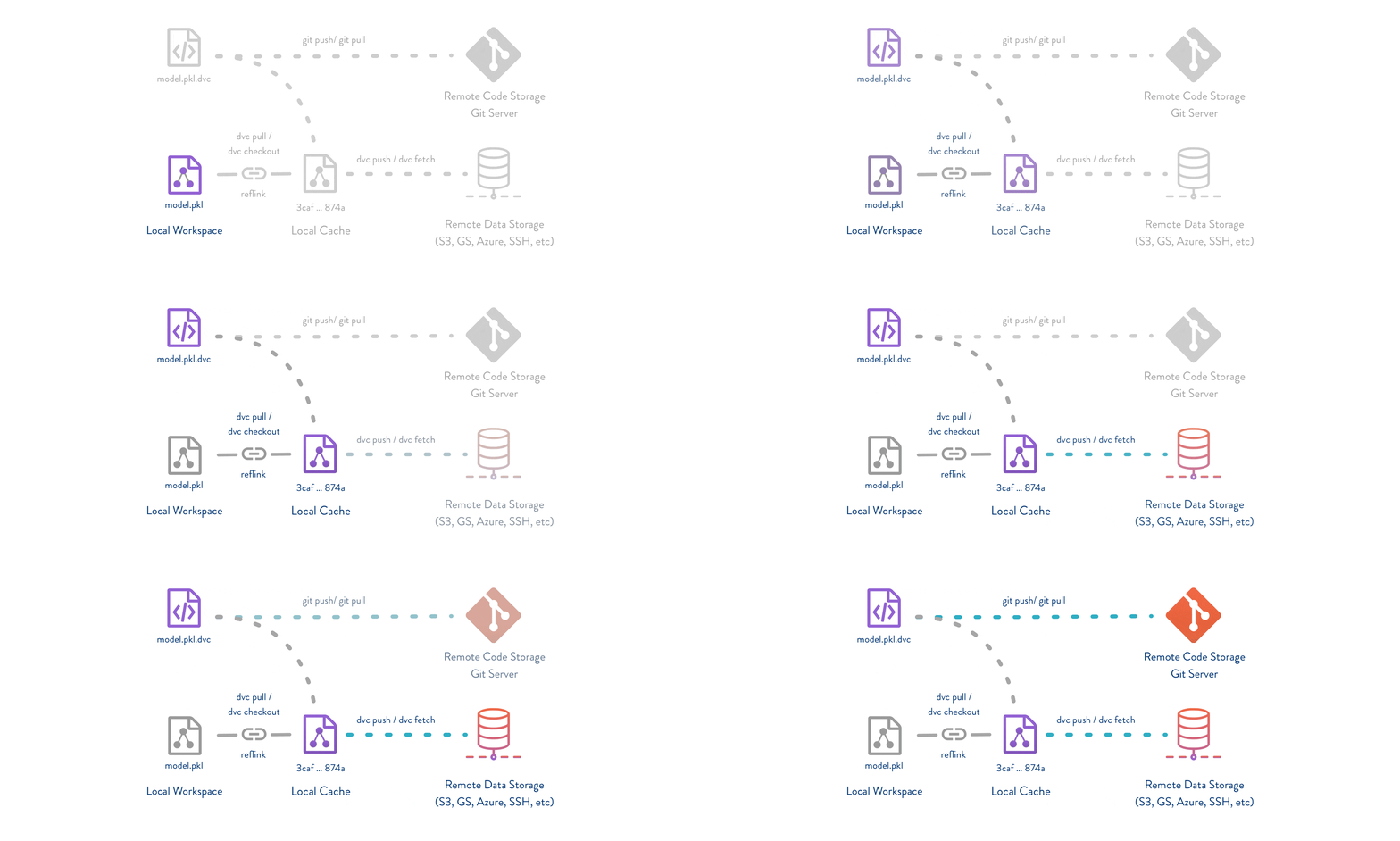
- Your Git repository stays lightweight (only metadata)
- Data is deduplicated automatically
- You can work offline with cached data
- Remote storage is flexible and cost-effective
Key Analogies
If you’re familiar with other tools, here’s how DVC compares:Git for Data
Git for Data
Like Git-LFS but without requiring a special server. DVC works with any cloud storage or SSH server, and integrates seamlessly with your Git workflow.
Makefiles for ML
Makefiles for ML
DVC pipelines are like Makefiles for machine learning. They describe how data and model artifacts are built from code and other data, with automatic dependency tracking.
Local Experiment Tracking
Local Experiment Tracking
Instead of MLflow or Weights & Biases servers, DVC turns your machine into an experiment management platform using Git as the backend.
What DVC Doesn’t Do
Use Cases
DVC excels in these scenarios:- Solo ML practitioners who want to version experiments and maintain reproducibility
- ML teams collaborating on shared datasets and models
- Research projects requiring reproducible results for publications
- Production ML systems where model provenance and data lineage are critical
- Model registries needing to track which data and code produced each model
Integration Ecosystem
DVC works alongside your existing tools:Git Platforms
GitHub, GitLab, Bitbucket — DVC leverages your existing Git workflow
Cloud Storage
AWS S3, Azure Blob, Google Cloud Storage, and 10+ other storage types
VS Code Extension
Visual interface for experiments, plots, and data management
CI/CD Systems
Jenkins, GitHub Actions, GitLab CI — automate model training and testing
Getting Started
Ready to try DVC? Here’s what to do next:Install DVC
Set up DVC on your system using pip, conda, brew, or other package managers.
Quick Start Tutorial
Follow our hands-on tutorial to track data, build pipelines, and push to remote storage.
Command Reference
Explore all available DVC commands and their options.
Python API
Learn how to use DVC programmatically in your Python scripts.
Community and Support
Join thousands of ML practitioners using DVC:- Discord Community — Get help and share ideas
- Discussion Forum — In-depth technical discussions
- GitHub Issues — Report bugs and request features
- Twitter — Stay updated with news and tips