 The Block Editor is a modern paradigm for WordPress site building and publishing. It uses a modular system of blocks to compose and format content and is designed to create rich and flexible layouts for websites and digital products.
What is the block editor?
The block editor introduces a modular approach to pages and posts: each piece of content in the editor, from a paragraph to an image gallery to a headline, is its own block. And just like physical blocks, WordPress blocks can be added, arranged, and rearranged, allowing WordPress users to create media-rich pages in a visually intuitive way. A block is a discrete element such as a paragraph, heading, media, or embed. Each block is treated as a separate element with individual editing and format controls. When all these components are pieced together, they make up the content of the page or post, which is then stored in the WordPress database.Key features
Modular design
Build content with reusable, composable blocks that can be arranged and customized to create any layout.
Visual editing
Create rich, media-enhanced pages with an intuitive visual interface that shows your content as it will appear.
Developer platform
Extend the editor with a rich set of APIs, custom blocks, and integrations using modern JavaScript.
Open source
Built by the WordPress community and maintained with transparency as part of the Gutenberg project.
Get started
Installation
Set up your development environment and install the required tools to start building blocks.
Quickstart
Create your first custom block in minutes with our step-by-step quickstart guide.
Block Editor Handbook
Explore the official handbook for comprehensive tutorials, API references, and guides.
Live demo
Try the block editor in action with a live demo instance.
Core editor elements
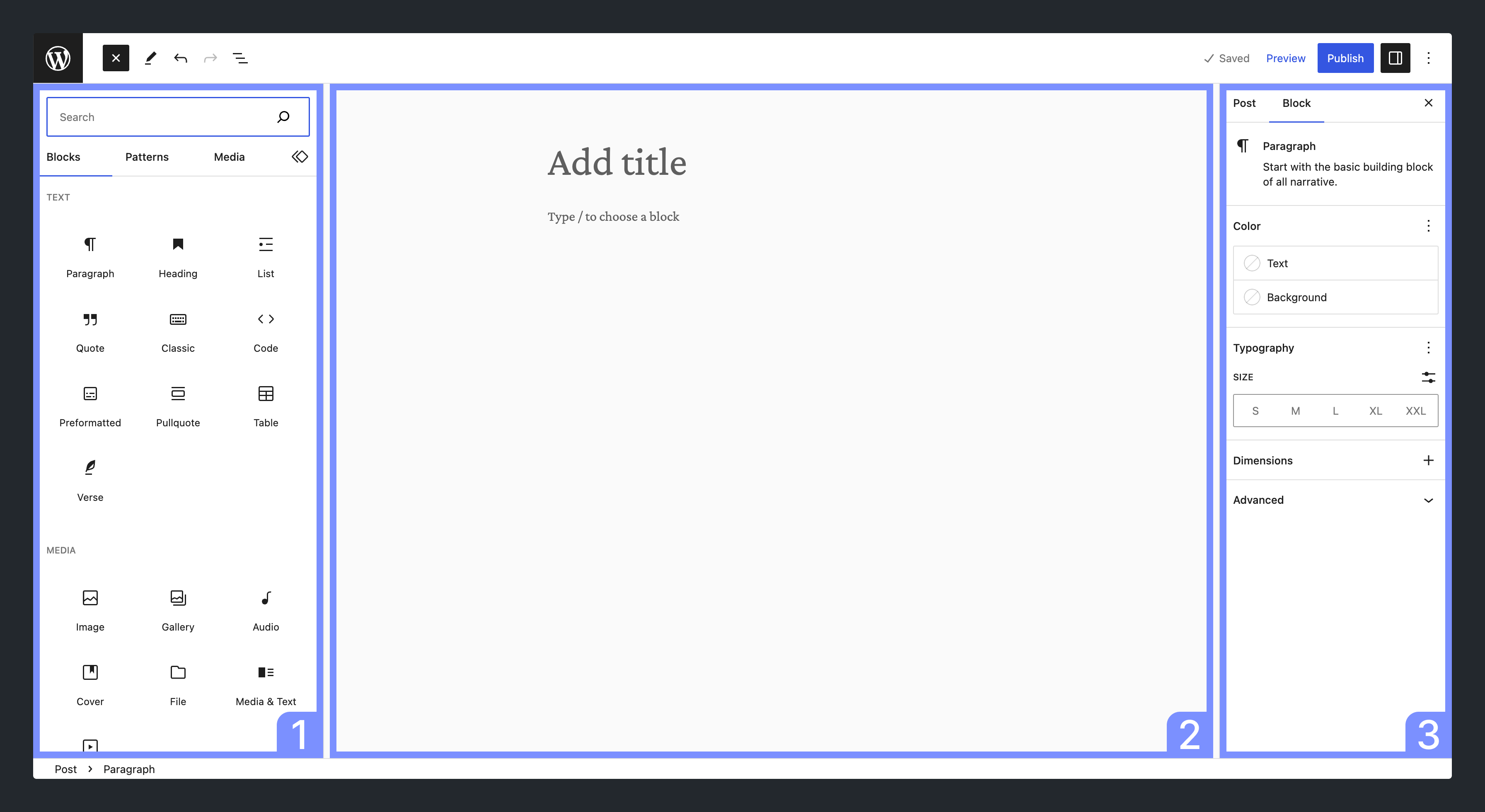
The Block Editor consists of three primary elements:- Inserter - A panel for inserting blocks into the content canvas
- Content canvas - The content editor, which holds content created with blocks
- Settings panel - A panel for configuring a block’s settings when selected or the settings of the post
Platform architecture
The editor is built as a powerful developer platform with a rich feature set:- Package layering - Three editor layers:
block-editor(generic, WordPress-agnostic) →editor(WordPress post-type-aware) →edit-post/edit-site(full screens) - Data layer - Uses
@wordpress/data(Redux-like stores) for state management - Block data model - Blocks are in-memory tree structures during editing, serialized as HTML with comment delimiters
- Modularity - Packages available both as npm packages and WordPress scripts
The block editor is the result of the Gutenberg project, which aims to revolutionize the WordPress editing experience across editing, customization, collaboration, and multilingual capabilities.