The Real Clean Architecture uses a Package by Component modularization strategy, organizing code into feature-driven modules with clear dependencies and responsibilities.
Modularization provides:
  • Faster compilation - Only changed modules need to be rebuilt
  • Better separation of concerns - Modules enforce architectural boundaries
  • Parallel development - Teams can work on different modules independently
  • Code reusability - Modules can be shared across platforms (Kotlin Multiplatform)

Module Types

The project defines four distinct types of modules:
1

Library Modules

Reusable utilities that provide infrastructure services like caching, networking, and testing helpers.Examples: cache, httpclient, foundations, viewmodelCharacteristics:
  • No business logic
  • Highly reusable
  • Often Kotlin Multiplatform
  • Minimal dependencies
2

Component Modules

Feature-specific modules containing domain and data layers for a business capability.Examples: cart-component, product-component, user-component, wishlist-componentCharacteristics:
  • Pure Kotlin or Kotlin Multiplatform
  • Framework-independent
  • Fast compilation (no Android dependencies)
  • Contain domain models, repositories, and use cases
3

UI Modules

Feature-specific modules containing the presentation layer for a screen or UI component.Examples: cart-ui, plp-ui, wishlist-ui, onboarding-uiCharacteristics:
  • Android-specific (uses Compose)
  • Depends on corresponding component module
  • Contains ViewModels and Composables
  • Can aggregate multiple components
4

App Module

Central orchestrator that integrates all modules and handles navigation and dependency injection.Example: appCharacteristics:
  • Depends on all UI modules
  • Contains CompositionRoot for DI
  • Handles navigation
  • Application entry point

Module Structure

Here’s the complete module structure as defined in settings.gradle.kts:
settings.gradle.kts
rootProject.name = "Real Clean Architecture in Android"
include(":app")
include(":foundations")
include(":user-component")
include(":cache")
include(":httpclient")
include(":cache-test")
include(":onboarding-ui")
include(":flow-test-observer")
include(":viewmodel")
include(":coroutines-test-dispatcher")
include(":product-component")
include(":money-component")
include(":wishlist-component")
include(":cart-component")
include(":designsystem")
include(":plp-ui")
include(":wishlist-ui")
include(":cart-ui")
include(":main-ui")
include(":money-ui")

Library Modules

Library modules provide reusable infrastructure:

cache

Key-value storage abstraction with Flow-based reactive updatesDependencies: Kotlin Multiplatform, Coroutines, SerializationUsed by: All component modules that need persistence

httpclient

HTTP client abstraction for network requestsDependencies: KtorUsed by: Component modules that fetch remote data

foundations

Core utilities and language extensionsExample: Answer<T, E> type for error handlingDependencies: None (pure Kotlin)

viewmodel

ViewModel utilities without tight framework couplingUsed by: All UI modules

designsystem

Reusable UI components and themeDependencies: Jetpack ComposeUsed by: All UI modules

cache-test

Test doubles for cache moduleUsed by: Component module tests

flow-test-observer

Utilities for testing Flow emissionsUsed by: All tests that work with Flows

coroutines-test-dispatcher

JUnit rules for coroutine testingUsed by: All tests using coroutines

Example: Cache Library Module

cache/build.gradle.kts
plugins {
    alias(libs.plugins.kotlin.multiplatform)
    alias(libs.plugins.kotlin.serialization)
}

kotlin {
    jvmToolchain(17)
    jvm()
    iosX64()
    iosArm64()
    iosSimulatorArm64()
    sourceSets {
        commonMain {
            dependencies {
                implementation(libs.multiplatform.settings)
                implementation(libs.multiplatform.settings.serialization)
                implementation(libs.kotlin.serialization)
                implementation(libs.coroutines.core)
            }
        }
        commonTest {
            dependencies {
                implementation(libs.kotlin.test)
                implementation(libs.multiplatform.settings.test)
                implementation(project(":flow-test-observer"))
            }
        }
    }
}
Library modules are Kotlin Multiplatform, supporting JVM, iOS (x64, arm64, simulator). This enables code sharing and faster compilation.

Component Modules

Component modules encapsulate business features with domain and data layers:

Cart Component

Structure:
cart-component/
├── src/
│   ├── commonMain/kotlin/
│   │   ├── domain/
│   │   │   ├── model/
│   │   │   │   ├── Cart.kt
│   │   │   │   └── CartItem.kt
│   │   │   ├── repository/
│   │   │   │   └── CartRepository.kt
│   │   │   └── usecase/
│   │   │       ├── AddCartItemUseCase.kt
│   │   │       ├── UpdateCartItemUseCase.kt
│   │   │       ├── ObserveUserCartUseCase.kt
│   │   │       └── CartUseCases.kt
│   │   ├── data/
│   │   │   ├── model/
│   │   │   │   └── JsonCartCacheDto.kt
│   │   │   └── repository/
│   │   │       └── RealCartRepository.kt
│   │   └── di/
│   │       └── CartComponentAssembler.kt
│   └── commonTest/kotlin/
│       └── [tests]
└── build.gradle.kts
Dependencies:
cart-component/build.gradle.kts
plugins {
    alias(libs.plugins.kotlin.multiplatform)
    alias(libs.plugins.kotlin.serialization)
}

kotlin {
    jvmToolchain(17)
    jvm()
    iosX64()
    iosArm64()
    iosSimulatorArm64()
    sourceSets {
        commonMain {
            dependencies {
                implementation(libs.coroutines.core)
                implementation(libs.kotlin.serialization)
                implementation(project(":cache"))
                implementation(project(":money-component"))
                implementation(project(":user-component"))
            }
        }
        commonTest {
            dependencies {
                implementation(libs.kotlin.test)
                implementation(libs.coroutines.test)
                implementation(project(":cache-test"))
                implementation(project(":flow-test-observer"))
            }
        }
    }
}
Component modules depend only on:
  • Other component modules (for shared domain models)
  • Library modules (for infrastructure)
  • Never on UI modules or the app module

Component Assembler Pattern

Each component exposes its use cases through an assembler:
cart-component/src/commonMain/kotlin/com/denisbrandi/androidrealca/cart/di/CartComponentAssembler.kt
class CartComponentAssembler(
    private val cacheProvider: CacheProvider,
    private val getUser: GetUser
) {
    private val cartRepository by lazy {
        RealCartRepository(cacheProvider)
    }

    val updateCartItem: UpdateCartItem by lazy {
        UpdateCartItemUseCase(getUser, cartRepository)
    }

    val observeUserCart: ObserveUserCart by lazy {
        ObserveUserCartUseCase(getUser, cartRepository)
    }
    
    val addCartItem: AddCartItem by lazy {
        AddCartItemUseCase(getUser, cartRepository, updateCartItem)
    }
}
Assemblers:
  • Encapsulate component wiring
  • Expose only use case interfaces (not implementations)
  • Use lazy initialization for efficiency
  • Apply Dependency Inversion Principle

UI Modules

UI modules contain presentation logic and Compose screens:

Cart UI Module

Dependencies:
cart-ui/build.gradle.kts
plugins {
    alias(libs.plugins.android.library)
    alias(libs.plugins.compose.compiler)
    alias(libs.plugins.screenshot)
}

android {
    namespace = "com.denisbrandi.androidrealca.cart.ui"
    compileSdk = 36
    // ...
    buildFeatures {
        compose = true
    }
}

dependencies {
    implementation(project(":foundations"))
    implementation(project(":money-component"))
    implementation(project(":cart-component"))  // Depends on component
    implementation(project(":money-ui"))
    implementation(project(":viewmodel"))
    implementation(project(":designsystem"))
    
    implementation(libs.coroutines.core)
    implementation(libs.lifecycle.viewmodel)
    
    implementation(platform(libs.androidx.compose.bom))
    implementation(libs.androidx.ui.tooling.preview)
    implementation(libs.androidx.material3)
    
    implementation(libs.coil.compose)
    
    testImplementation(libs.junit)
    testImplementation(libs.coroutines.test)
    testImplementation(project(":flow-test-observer"))
}
Structure:
cart-ui/
├── src/
│   ├── main/java/
│   │   ├── presentation/
│   │   │   ├── view/
│   │   │   │   └── CartScreen.kt
│   │   │   └── viewmodel/
│   │   │       ├── CartViewModel.kt
│   │   │       └── RealCartViewModel.kt
│   │   └── di/
│   │       └── CartUIAssembler.kt
│   ├── test/java/
│   │   └── [tests]
│   └── screenshotTest/kotlin/
│       └── [screenshot tests]
└── build.gradle.kts
UI modules:
  • Are Android-specific (not multiplatform)
  • Depend on component modules for business logic
  • Can aggregate multiple components (e.g., plp-ui uses product-component, wishlist-component, and cart-component)
  • Never contain domain or data logic

App Module

The app module orchestrates the entire application: Dependencies:
  • All UI modules
  • All component modules (for assemblers)
  • Library modules for infrastructure
Responsibilities:

Composition Root

Wires up all dependencies and creates assemblers
class CompositionRoot private constructor(
    applicationContext: Context
) {
    private val cacheProvider by lazy {
        AndroidCacheProvider(applicationContext)
    }
    private val httpClient by lazy {
        RealHttpClientProvider.getClient()
    }
    // Component assemblers
    private val userComponentAssembler by lazy {
        UserComponentAssembler(httpClient, cacheProvider)
    }
    private val cartComponentAssembler by lazy {
        CartComponentAssembler(cacheProvider, userComponentAssembler.getUser)
    }
    // UI assemblers
    val cartUIAssembler by lazy {
        CartUIAssembler(cartComponentAssembler)
    }
    // ...
}

Navigation

Manages navigation between screens
@Composable
fun RootNavigation(
    isUserLoggedIn: Boolean
) {
    val navController = rememberNavController()
    NavHost(
        navController = navController,
        startDestination = if (isUserLoggedIn) "main" else "onboarding"
    ) {
        composable("onboarding") { /* ... */ }
        composable("main") { /* ... */ }
        composable("cart") { /* ... */ }
    }
}

Module Dependency Graph

Here’s how modules depend on each other (library modules omitted for clarity): Module Dependencies Key observations:
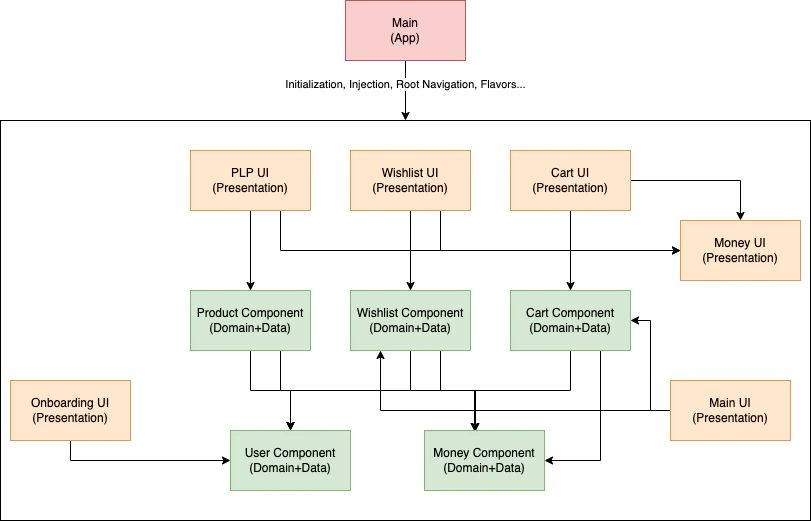
Component modules can depend on other component modules:
  • cart-componentuser-component, money-component
  • wishlist-componentuser-component, money-component
  • product-componentmoney-component
This is acceptable because they’re at the same architectural layer.
UI modules depend on component modules:
  • cart-uicart-component, money-component
  • plp-uiproduct-component, wishlist-component, cart-component
Dependencies flow from presentation → domain/data.
The dependency graph is acyclic. Component modules never depend on UI modules, and the app module sits at the top.

Benefits of Modularization

1

Faster Build Times

Component modules compile much faster than Android modules because they don’t depend on the Android framework.Example: cart-component compiles ~3-5x faster than cart-uiGradle can also build independent modules in parallel.
2

Enforced Boundaries

Module dependencies enforce architectural rules at compile time.Example: You can’t accidentally use an Android class in a component module - it won’t compile.
3

Code Reusability

Component modules are Kotlin Multiplatform, enabling iOS, desktop, or backend reuse.Example: The cart-component can be used in an iOS app without modification.
4

Independent Testing

Each module can be tested in isolation with focused test suites.Example: Test cart-component with pure unit tests (no Android dependencies).
5

Parallel Development

Teams can work on different modules without conflicts.Example: One team works on cart-ui while another works on product-component.
6

Smaller APK Size

Unused modules can be excluded, and ProGuard/R8 can optimize more effectively.

Module Naming Convention

Pattern: [feature]-[type]
  • feature: cart, product, user, wishlist
  • type: component (domain + data), ui (presentation), or omitted for libraries
Examples:
  • cart-component - Cart feature’s domain and data layers
  • cart-ui - Cart feature’s presentation layer
  • cache - Library module (no type suffix)

When to Create a New Module

Create a new module when:

New Feature

Adding a significant business capabilityExample: Adding checkout functionality → checkout-component + checkout-ui

Shared Logic

Multiple features need the same infrastructureExample: Analytics needed across features → analytics library module

Platform Sharing

Business logic should work across platformsExample: Shared business rules → component module with Kotlin Multiplatform

Build Performance

A module is becoming too large and slowing buildsExample: Split a large feature into sub-features
Don’t over-modularize!For small projects, excessive modules add complexity without benefit. This project demonstrates the pattern, but smaller apps might not need this level of modularization.Start simple and modularize as the codebase grows.

Summary

The modularization strategy:
  1. Library modules provide reusable infrastructure
  2. Component modules encapsulate features with domain + data layers (Kotlin Multiplatform)
  3. UI modules handle presentation with Android/Compose
  4. App module orchestrates everything with navigation and DI
This structure ensures:
  • Clean architectural boundaries
  • Fast build times
  • Platform independence for business logic
  • Clear dependency flow
  • Easy testing and maintenance

Next Steps

Component Examples

Explore complete component implementations

App Module

Learn how the composition root wires modules together

Testing Strategy

See how modules enable focused testing

Library Modules

Understand module build configurations

Dependency Injection

Learn how the composition root wires modules together

Testing Strategy

See how modules enable focused testing

Library Modules

Explore shared library modules

Build docs developers (and LLMs) love