Core Principles
This architecture is built on three fundamental pillars:Separation of Concerns
Clear boundaries between domain, data, and presentation layers
Dependency Rule
Dependencies point inward toward the domain layer
Framework Independence
Domain logic is free from Android framework dependencies
Architecture Layers
The application is organized into three distinct layers, each with specific responsibilities:Domain Layer
Contains business logic, entities, and use cases. This layer is completely framework-independent and written in pure Kotlin/Kotlin Multiplatform.Key Components:
- Business entities (e.g.,
Cart,Product,User) - Repository interfaces
- Use cases that orchestrate business logic
- Domain-specific types and validation
Data Layer
Implements repository interfaces and handles data operations. Manages caching, network calls, and data transformation.Key Components:
- Repository implementations
- Data transfer objects (DTOs)
- Data source abstractions
- Data mapping logic
Dependency Flow
The architecture follows the Dependency Inversion Principle, ensuring that dependencies flow from outer layers toward the domain core:The domain layer defines interfaces (contracts), while outer layers provide implementations. This allows the core business logic to remain independent of implementation details.
Real-World Example: Cart Feature
Let’s see how the layers work together in the cart feature:Domain Layer
Defines the business entity and repository contract:cart-component/src/commonMain/kotlin/com/denisbrandi/androidrealca/cart/domain/model/Cart.kt
cart-component/src/commonMain/kotlin/com/denisbrandi/androidrealca/cart/domain/repository/CartRepository.kt
Data Layer
Implements the repository interface:cart-component/src/commonMain/kotlin/com/denisbrandi/androidrealca/cart/data/repository/RealCartRepository.kt
Presentation Layer
Consumes use cases to display data:cart-ui/src/main/java/com/denisbrandi/androidrealca/cart/presentation/viewmodel/RealCartViewModel.kt
Module Dependency Graph
The project uses a modular architecture with clear dependency boundaries: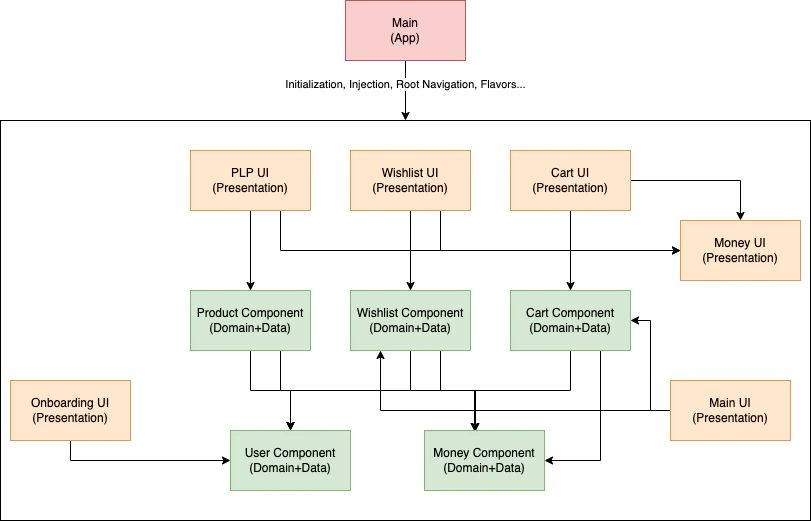
Library modules (cache, httpclient, etc.) are omitted from the diagram for clarity. Component modules contain domain and data layers, while UI modules handle presentation.
Key Benefits
Testability
Testability
Each layer can be tested independently. Domain logic is tested with pure unit tests, while data and presentation layers use test doubles and mocks.Example test repository:
Maintainability
Maintainability
Clear separation of concerns makes it easy to locate and modify code. Each module has a single, well-defined responsibility.
Scalability
Scalability
New features can be added as independent modules without affecting existing code. The modular structure supports parallel development.
Platform Independence
Platform Independence
Component modules use Kotlin Multiplatform, enabling code sharing across platforms. They compile faster since they don’t depend on the Android framework.
Next Steps
Clean Architecture Deep Dive
Explore the three layers in detail with real code examples
SOLID Principles
Learn how SOLID principles are applied throughout the codebase
Modularization Strategy
Understand the Package by Component approach and module types
Component Examples
See complete component implementations