Overview
Hatch is a Firecracker-based microVM platform designed for agentic workloads. It provides a REST API for lifecycle management, wake-on-request capabilities, snapshot/restore for idle VMs, and subdomain-based reverse proxy routing.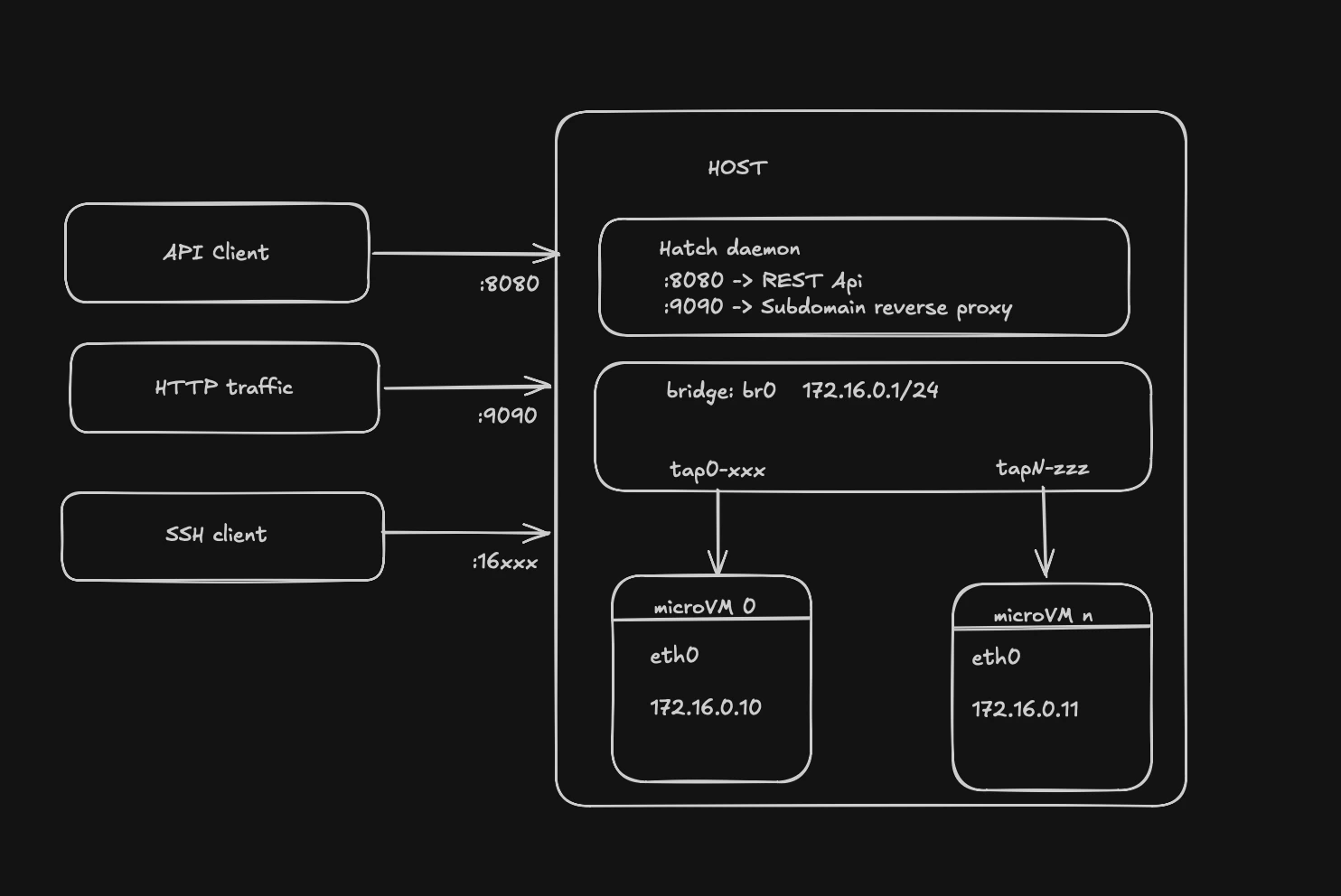
Core Components
Hatch’s architecture consists of several integrated components working together to provide serverless VM capabilities:hatchd
Main daemon process that orchestrates all VM operations and exposes the REST API on port 8080
VM Manager
Manages VM lifecycle (create, stop, delete, snapshot, restore) and owns networking singletons
Proxy Server
Subdomain-based reverse proxy on port 9090 that routes HTTP requests to VMs and handles wake-on-request
SSH Gateway
TCP proxy that forwards SSH connections to VMs and can wake snapshotted VMs on connection attempts
PostgreSQL
Stores VM metadata, proxy routes, snapshot records, and image catalog
S3 Storage
Stores snapshot artifacts (memory dumps, CPU state, disk deltas) for VM pause/resume
Request Flow
HTTP Request Flow
Subdomain extraction
Proxy extracts subdomain (
my-agent) from Host header and looks up route in databaseVM state check
Proxy checks VM state:
- Running: proceed to proxy
- Snapshotted: wake VM if
auto_wake: true, then proxy - Other states: return error
Wake if needed
If VM is snapshotted:
- Acquire per-VM mutex to serialize concurrent wake requests
- Download snapshot from S3 (memory, vmstate, disk delta)
- Reconstruct rootfs from base image + delta
- Re-establish networking (TAP device, DHCP, iptables)
- Load snapshot into new Firecracker process
SSH Connection Flow
Wake if snapshotted
If VM is snapshotted, restore it before forwarding connection (client sees slow handshake)
Data Persistence Layer
PostgreSQL Schema
The database stores:- VMs table: VM metadata (ID, state, image_id, vcpu_count, mem_mib, guest_ip, guest_mac, ssh_port, work_dir)
- Images table: Base image catalog (kernel path, rootfs path, boot args)
- Routes table: Proxy route mappings (subdomain → vm_id, target_port, auto_wake flag)
- Snapshots table: Snapshot records (S3 keys for memory/vmstate/disk, VM config JSON, size, timestamp)
S3 Storage Structure
Snapshots are stored in S3-compatible storage with the following structure:Local Filesystem
Each VM gets a work directory:Component Interactions
The VM Manager is the central orchestrator. All components interact with it:
- Proxy calls
vmm.Restore()for wake-on-HTTP - SSH Gateway calls
vmm.Restore()for wake-on-SSH - Idle Monitor calls
vmm.Snapshot()for auto-pause - API handlers call
vmm.CreateAndStart(),vmm.Stop(),vmm.Delete()
Concurrency Control
Hatch uses several synchronization mechanisms:- Per-VM wake mutex (
sync.Mapin proxy and SSH gateway): Prevents concurrent restore operations for the same VM - IP allocator mutex: Serializes IP allocation from the bridge subnet pool
- DHCP server mutex: Protects dnsmasq hosts file writes and reload signals
- SSH port map mutex: Guards the in-memory SSH port allocation table
Startup Reconciliation
On startup, the Manager reconciles orphaned resources from previous runs:
This ensures Hatch always starts from a clean, known-good state.