What is Hatch?
Hatch is a wrapper around Firecracker for spinning up microVMs, designed for agentic workloads. It provides a REST API for lifecycle management, wake-on-request, snapshot/restore for idle VMs, and subdomain-based reverse proxy.Quickstart
Get up and running with Hatch in minutes
Installation
Detailed setup and configuration guide
Key Features
REST API
Full lifecycle management via HTTP API - create, stop, snapshot, restore, and delete VMs with simple curl commands
Wake-on-Request
Freeze idle VMs to zero compute and wake them transparently on HTTP requests or SSH connections
Snapshot/Restore
Save VM state to S3-compatible storage and restore VMs to exactly where they were paused
Subdomain Routing
Route HTTP traffic to VMs by subdomain with automatic wake for snapshotted instances
SSH Forwarding
Dedicated host ports for SSH access with automatic wake-on-SSH for snapshotted VMs
Idle Auto-Snapshot
Automatically snapshot idle VMs to save compute resources
Architecture Overview
Hatch orchestrates Firecracker microVMs with a full networking stack, reverse proxy, and snapshot management.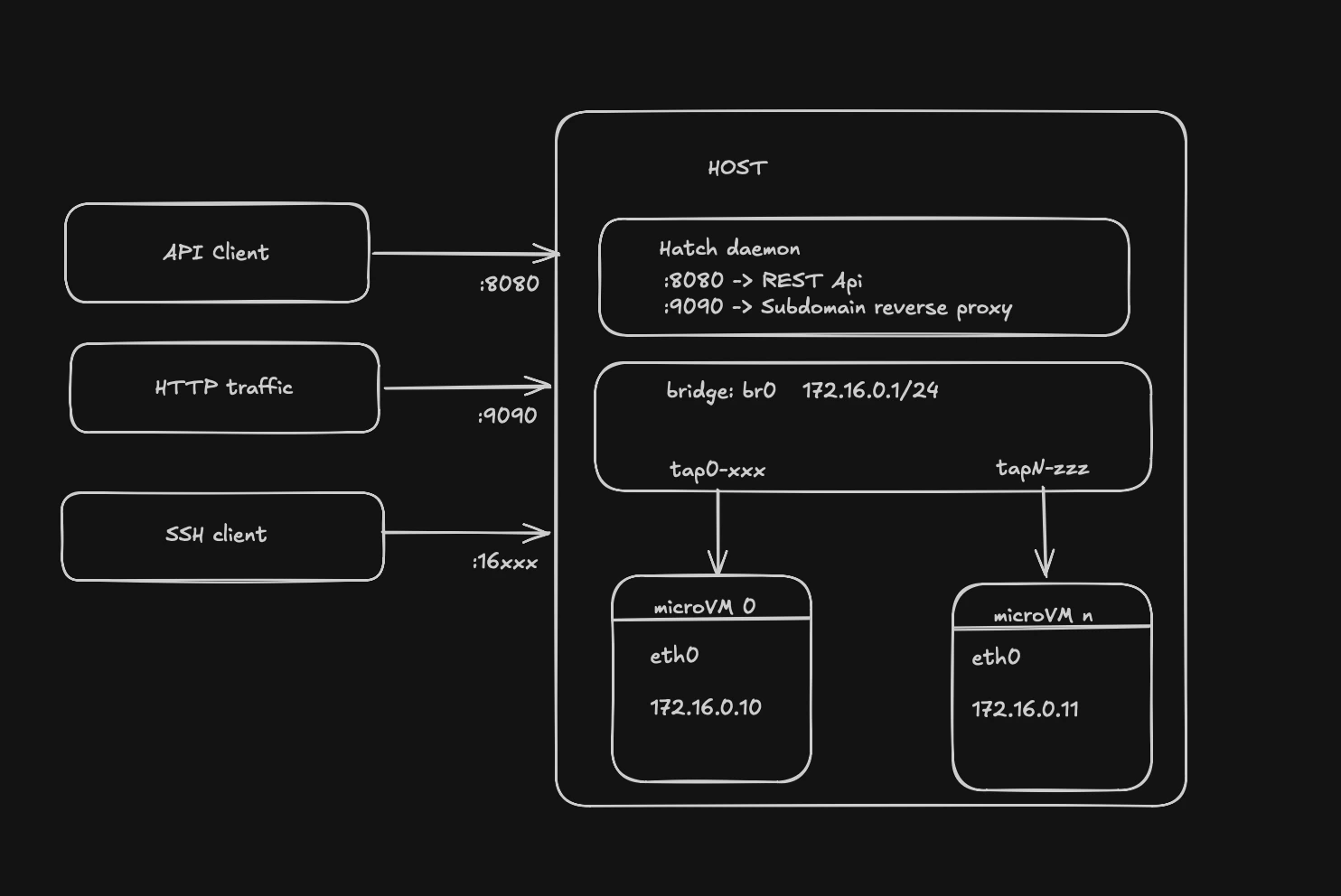
Core Components
VM ManagerManages the Firecracker process lifecycle, networking setup (bridge, TAP devices), and resource allocation. API Server (
:8080)HTTP API for VM lifecycle operations - create, list, stop, delete, snapshot, restore, and route management. Reverse Proxy (
:9090)Subdomain-based routing to VMs with wake-on-request support. Requests to
my-agent.hatch.local are proxied to the corresponding VM.
SSH GatewayPort forwarding for SSH access with wake-on-SSH capability. Each networked VM gets a dedicated host port. Idle Monitor
Background loop that tracks VM activity and automatically snapshots idle VMs to S3. Snapshot Storage
S3-compatible storage for VM snapshots (memory, CPU state, and disk delta).
Use Cases
Agentic Workloads
Hatch is designed for AI agents that need isolated, ephemeral compute environments:- Development agents that need a full Linux environment to run code and tests
- Task automation requiring isolated execution contexts
- Multi-tenant workloads where each user gets their own VM
- On-demand compute that scales to zero when idle
Serverless VMs
The wake-on-request pattern enables serverless-style VMs:- Idle VMs are snapshotted and frozen (zero compute cost)
- HTTP requests or SSH connections automatically wake VMs
- VMs resume from exactly where they were paused
- No cold start - VMs restore with full state intact
How It Works
Next Steps
Quickstart
Create your first VM in 5 minutes
Installation Guide
Full installation and configuration details