
CLIP Overview
CLIP (Contrastive Language-Image Pre-training) is a neural network trained on image-text pairs that learns visual concepts from natural language supervision. OpenCLIP is an open-source implementation that enables training and using CLIP models at scale.Architecture
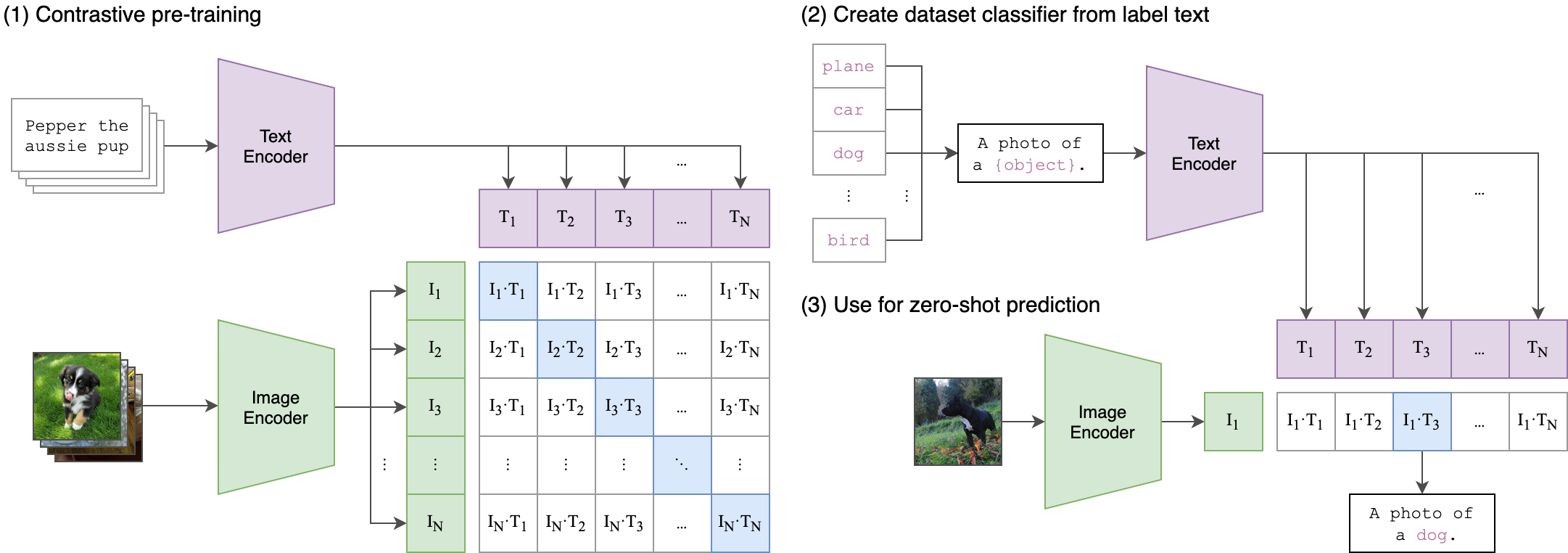
CLIP uses a dual encoder architecture consisting of two separate towers:- Vision Encoder - Processes images into fixed-dimensional feature vectors
- Text Encoder - Processes text into the same dimensional feature space
Vision Encoder
The vision encoder transforms images into feature embeddings. OpenCLIP supports multiple vision architectures:- Vision Transformer (ViT) - Default architecture, divides image into patches
- ResNet variants - Convolutional neural networks (ModifiedResNet)
- ConvNeXt - Modern convolutional architectures
- Custom architectures - Via timm integration
src/open_clip/model.py:133-206:
Text Encoder
The text encoder processes text descriptions into embeddings. It uses a Transformer architecture with:- Token embeddings
- Positional embeddings
- Multi-head self-attention layers
- Feed-forward networks
- Optional HuggingFace models (RoBERTa, etc.)
src/open_clip/model.py:209-262:
Contrastive Pre-training Objective
CLIP is trained using a contrastive learning objective that aligns image and text representations:- Batch Construction - Sample N (image, text) pairs
- Encoding - Pass images through vision encoder, texts through text encoder
- Similarity Matrix - Compute N×N cosine similarities between all image-text pairs
- Contrastive Loss - Maximize similarity for correct pairs, minimize for incorrect pairs
- Push matching image-text pairs closer together in embedding space
- Push non-matching pairs further apart
Image-Text Similarity Scoring
Once trained, CLIP computes similarity between any image and text through:1. Encode Both Modalities
2. Compute Cosine Similarity
Fromsrc/open_clip/model.py:347-354:
3. Temperature Scaling
Thelogit_scale parameter controls the sharpness of the similarity distribution:
- Higher temperature (lower scale) → softer, more uniform probabilities
- Lower temperature (higher scale) → sharper, more peaked probabilities
np.log(1 / 0.07) ≈ 2.66 (learned during training)
Key Properties
Joint Embedding Space
Both vision and text encoders project into the same dimensional space (typically 512 or 768 dimensions), enabling direct comparison.Zero-Shot Capability
CLIP can classify images into categories it wasn’t explicitly trained on by comparing image embeddings with text embeddings of class names. See Zero-Shot Classification.Flexibility
CLIP can be used for:- Image classification (zero-shot or with prompts)
- Image-text retrieval
- Visual question answering
- Image captioning (with additional decoder, e.g., CoCa)
Training in OpenCLIP
OpenCLIP supports large-scale training with:- Multi-GPU distributed training - Up to 1024 GPUs tested
- Multiple data sources - WebDataset format for billion-scale datasets
- Efficient batch construction - Local loss and gradient gathering
- Mixed precision - FP16/BF16 for faster training
Reference
Original CLIP Paper: Radford, A., Kim, J. W., Hallacy, C., Ramesh, A., Goh, G., Agarwal, S., … & Sutskever, I. (2021). Learning Transferable Visual Models From Natural Language Supervision. ICML 2021. 📄 arXiv:2103.00020 OpenCLIP Paper: Cherti, M., Beaumont, R., Wightman, R., Wortsman, M., Ilharco, G., Gordon, C., … & Jitsev, J. (2023). Reproducible scaling laws for contrastive language-image learning. CVPR 2023. 📄 arXiv:2212.07143Next Steps
Contrastive Learning
Deep dive into the loss function and training objective
Zero-Shot Classification
Learn how CLIP classifies without task-specific training