
Overview

This quickstart guide will help you:
  1. Run the AI Gateway locally
  2. Make your first API call to an LLM
  3. Add routing rules and guardrails
Prerequisites: You’ll need Node.js installed and an API key from any LLM provider (OpenAI, Anthropic, etc.)

Step 1: Start the Gateway

The fastest way to run the gateway is using npx:
npx @portkey-ai/gateway
The Gateway is now running on http://localhost:8787/v1The Gateway Console is available at http://localhost:8787/public/
For production deployments, see the installation guide for Docker, Kubernetes, and cloud options.

Step 2: Make Your First Request

Now let’s send a request through the gateway. The gateway provides an OpenAI-compatible API, so you can use any OpenAI SDK or HTTP client.
# pip install -qU portkey-ai

from portkey_ai import Portkey

# OpenAI compatible client
client = Portkey(
    base_url="http://localhost:8787/v1",  # Your local gateway
    provider="openai",  # or 'anthropic', 'bedrock', 'groq', etc
    Authorization="sk-***"  # Your provider API key
)

# Make a request through your AI Gateway
response = client.chat.completions.create(
    messages=[{"role": "user", "content": "What's the weather like?"}],
    model="gpt-4o-mini"
)

print(response.choices[0].message.content)
Success! You just made your first request through the AI Gateway.

View Your Logs

Open the Gateway Console at http://localhost:8787/public/ to see all your requests and responses in one place: Gateway Console showing request logs

Step 3: Add Routing & Guardrails

Now let’s add some production-ready features. Configs allow you to create routing rules, add reliability, and setup guardrails.

Add Automatic Retries

config = {
    "retry": {
        "attempts": 5
    }
}

# Attach the config to the client
client = client.with_options(config=config)

response = client.chat.completions.create(
    model="gpt-4o-mini",
    messages=[{"role": "user", "content": "Hello!"}]
)
Failed requests will automatically retry up to 5 times with exponential backoff.

Add Output Guardrails

Validate and filter LLM responses:
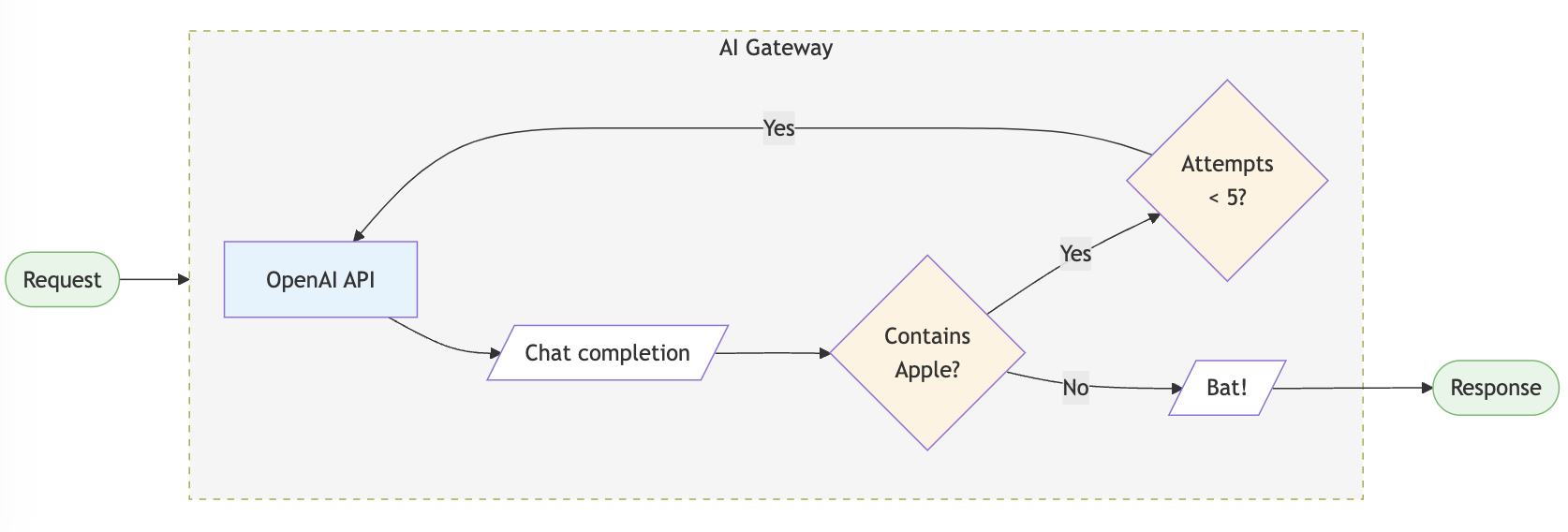
config = {
    "retry": {"attempts": 5},
    "output_guardrails": [{
        "default.contains": {
            "operator": "none",
            "words": ["Apple"]
        },
        "deny": True
    }]
}

client = client.with_options(config=config)

response = client.chat.completions.create(
    model="gpt-4o-mini",
    messages=[{"role": "user", "content": "Reply randomly with Apple or Bat"}]
)

# This will always respond with "Bat" since the guardrail denies "Apple"
Request flow through Portkey's AI gateway

Setup Fallback Routing

Automatically failover to a backup provider:
config = {
    "strategy": {
        "mode": "fallback"
    },
    "targets": [
        {
            "provider": "openai",
            "api_key": "sk-***"
        },
        {
            "provider": "anthropic",
            "api_key": "sk-ant-***"
        }
    ]
}

client = client.with_options(config=config)

# If OpenAI fails, the request automatically goes to Anthropic
response = client.chat.completions.create(
    model="gpt-4o-mini",
    messages=[{"role": "user", "content": "Hello!"}]
)
Make sure both providers support the model you’re requesting, or specify different models in the config.

Load Balancing

Distribute requests across multiple API keys:
config = {
    "strategy": {
        "mode": "loadbalance"
    },
    "targets": [
        {
            "provider": "openai",
            "api_key": "sk-key1-***",
            "weight": 0.7
        },
        {
            "provider": "openai",
            "api_key": "sk-key2-***",
            "weight": 0.3
        }
    ]
}

client = client.with_options(config=config)

# 70% of requests use key1, 30% use key2

Supported Libraries & Frameworks

The AI Gateway works with all major libraries and frameworks:

Python SDK

Use the Portkey Python SDK

JavaScript SDK

Use the Portkey JS/TS SDK

OpenAI SDKs

Use native OpenAI SDKs

LangChain

Integrate with LangChain

LlamaIndex

Integrate with LlamaIndex

REST API

Use any HTTP client

What’s Next?

You’re now ready to explore more advanced features:

Explore Config Options

Learn about all available config options for routing and guardrails

Supported Providers

See the full list of 250+ supported LLMs

Production Deployment

Deploy to production with Docker, Kubernetes, or cloud providers

Advanced Features

Explore caching, streaming, multi-modal, and more

Need Help?

Join Discord

Get help from the community

View Examples

Browse cookbook examples
Enterprise Users: Looking for advanced security, governance, and compliance features? Check out the enterprise version.

Build docs developers (and LLMs) love