

Fail-over
Fail-over is a backup operational mode in which the functions of a system component are assumed by secondary system components when the primary becomes unavailable.Active-passive
With active-passive fail-over, heartbeats are sent between the active and the passive server on standby. If the heartbeat is interrupted, the passive server takes over the active’s IP address and resumes service. The length of downtime is determined by whether the passive server is already running in ‘hot’ standby or whether it needs to start up from ‘cold’ standby. Only the active server handles traffic. Active-passive failover can also be referred to as master-slave failover.In hot standby, the passive server is already running and ready to take over immediately. In cold standby, the passive server needs to be started up, which takes longer.
Active-active
In active-active, both servers are managing traffic, spreading the load between them. If the servers are public-facing, the DNS would need to know about the public IPs of both servers. If the servers are internal-facing, application logic would need to know about both servers. Active-active failover can also be referred to as master-master failover.Active-active provides better resource utilization since both servers handle traffic, but it requires more complex configuration and coordination.
Disadvantages: failover
Complexity:- Fail-over adds more hardware and additional complexity
- More components that can fail
- Requires monitoring and automation
- There is a potential for loss of data if the active system fails before any newly written data can be replicated to the passive
- If both systems think they are active, data corruption can occur
Replication
Replication involves keeping multiple copies of data on different nodes to ensure availability and durability.Master-slave replication
The master serves reads and writes, replicating writes to one or more slaves, which serve only reads. Slaves can also replicate to additional slaves in a tree-like fashion. If the master goes offline, the system can continue to operate in read-only mode until a slave is promoted to a master or a new master is provisioned.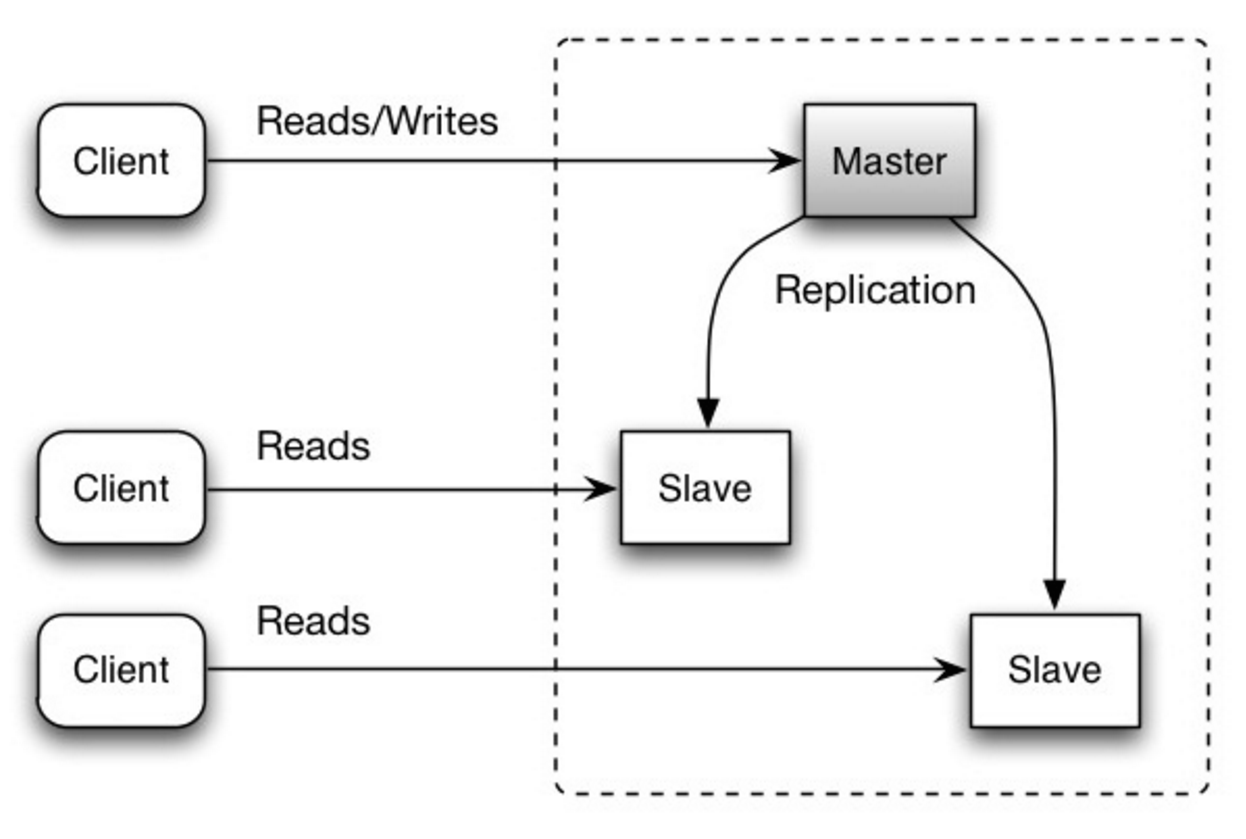 Source: Scalability, availability, stability, patterns
Advantages
- Read scalability: Can add more slave nodes to handle read traffic
- Backup: Slaves can serve as backups of the data
- Analytics: Can run analytics queries on slaves without impacting the master
Disadvantages
- Complexity: Additional logic is needed to promote a slave to a master
- Replication lag: Slaves may be slightly behind the master
- Write bottleneck: All writes must go through the master
Master-master replication
Both masters serve reads and writes and coordinate with each other on writes. If either master goes down, the system can continue to operate with both reads and writes.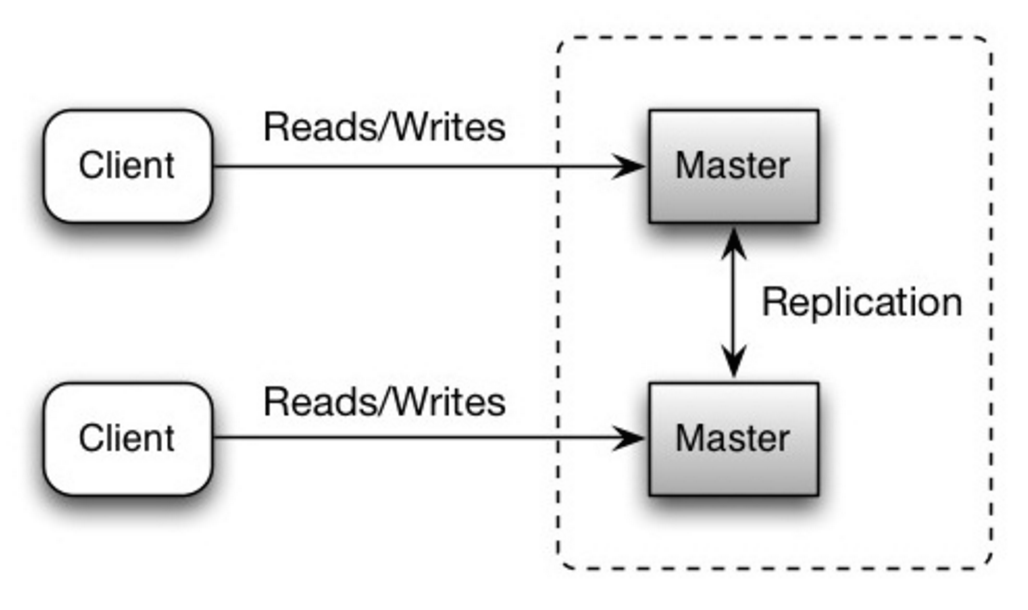 Source: Scalability, availability, stability, patterns
Advantages
- Write scalability: Can distribute writes across multiple masters
- High availability: If one master fails, the other can handle all traffic
- Geographic distribution: Can place masters in different regions for lower latency
Disadvantages
- Load balancing: You’ll need a load balancer or you’ll need to make changes to your application logic to determine where to write
- Consistency: Most master-master systems are either loosely consistent (violating ACID) or have increased write latency due to synchronization
- Conflict resolution: Conflict resolution comes more into play as more write nodes are added and as latency increases
General disadvantages: replication
Data loss:- There is a potential for loss of data if the master fails before any newly written data can be replicated to other nodes
- Writes are replayed to the read replicas. If there are a lot of writes, the read replicas can get bogged down with replaying writes and can’t do as many reads
- The more read slaves, the more you have to replicate, which leads to greater replication lag
- On some systems, writing to the master can spawn multiple threads to write in parallel, whereas read replicas only support writing sequentially with a single thread
- Replication adds more hardware and additional complexity
Availability in numbers
Availability is often quantified by uptime (or downtime) as a percentage of time the service is available. Availability is generally measured in number of 9s—a service with 99.99% availability is described as having four 9s.99.9% availability - three 9s
| Duration | Acceptable downtime |
|---|---|
| Downtime per year | 8h 45min 57s |
| Downtime per month | 43m 49.7s |
| Downtime per week | 10m 4.8s |
| Downtime per day | 1m 26.4s |
99.99% availability - four 9s
| Duration | Acceptable downtime |
|---|---|
| Downtime per year | 52min 35.7s |
| Downtime per month | 4m 23s |
| Downtime per week | 1m 5s |
| Downtime per day | 8.6s |
Each additional “9” becomes exponentially more expensive to achieve. Going from 99.9% to 99.99% is significantly harder than going from 99% to 99.9%.
Availability in parallel vs in sequence
If a service consists of multiple components prone to failure, the service’s overall availability depends on whether the components are in sequence or in parallel.In sequence
Overall availability decreases when two components with availability < 100% are in sequence:Foo and Bar each had 99.9% availability, their total availability in sequence would be 99.8%.
When components are in sequence (one depends on the other), the overall availability is the product of individual availabilities. This means the total availability is always lower than the least available component.
In parallel
Overall availability increases when two components with availability < 100% are in parallel:Foo and Bar each had 99.9% availability, their total availability in parallel would be 99.9999%.
Redundancy through parallel components dramatically improves availability. This is why critical systems often have multiple redundant components.