Dracula for tmux
A dark theme for tmux that brings the iconic Dracula color palette to your terminal multiplexer. Beautiful, functional, and highly customizable.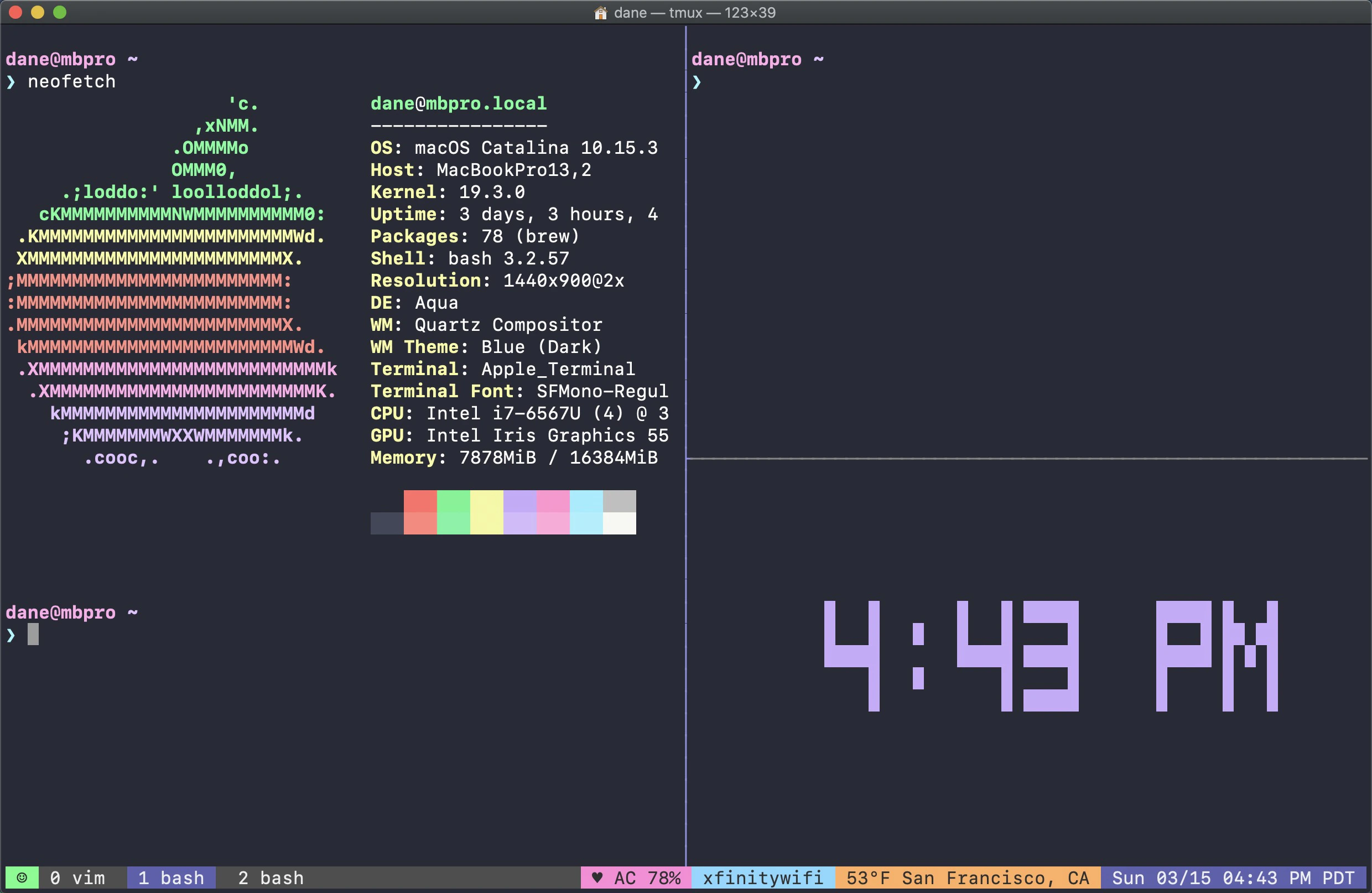
Why Dracula for tmux?
Dracula for tmux transforms your terminal multiplexer into a beautiful, informative workspace with rich status bar plugins and seamless integration with your development workflow.Quick installation
Get started in minutes with tpm or Nix
Extensive plugins
50+ built-in widgets for system monitoring and integrations
Highly customizable
Full control over colors, icons, and layout
Active community
Join the Dracula community on Discord
Key features
Dracula for tmux includes powerful features that make your terminal experience both beautiful and productive:Display and appearance
- Powerline support - Beautiful separators with Powerline or Nerd Font icons
- Fully custom color theming - Override any color to match your preferences or use alternative themes like Catppuccin or Gruvbox
- Prefix indicator - Status bar changes color when prefix key is active (green to yellow)
- Window management - List of windows with current window highlighted
System monitoring
- CPU usage - Display percentage or load average
- RAM usage - System and/or tmux server memory consumption
- GPU stats - Usage, power draw, and VRAM for NVIDIA, AMD, Intel, and Apple Silicon
- Battery status - Percentage, charging status with icons
- System temperature - Monitor CPU temperature
- System uptime - How long your system has been running
Developer tools
- Git integration - Branch name, status, and repository info
- Kubernetes context - Current cluster and namespace
- Terraform workspace - Active workspace indicator
- SSH session info - Username, hostname, and port
- Current working directory - Path of active pane
Network and connectivity
- Connection status - WiFi SSID or ethernet status
- Bandwidth monitoring - Real-time upload/download speeds
- Public IP address - Your current public IP
- Network ping - Latency to configured server
- VPN status - Connection indicator with Tailscale support
Time and location
- Date and time - Customizable format with timezone
- Weather information - Current temperature and forecast icon
- Location display - Based on network with customizable format
Media playback
- Spotify integration - Track info via spotify-tui or Spotify Player
- Music Player Daemon - MPD status display
- Playerctl support - Generic media player integration
- macOS native players - Spotify, Apple Music, and browser players
Advanced features
- Custom scripts - Add your own status widgets
- Pane synchronization indicator - Visual feedback when panes are synced
- Refresh rate control - Configure update frequency per widget
- Kerberos TGT expiration - Monitor ticket expiration
- Libre Freestyle 3 readings - CGM data display
- Compact mode - Responsive layout for narrow terminals
Compatibility
Dracula for tmux is compatible with:- Operating Systems: macOS and Linux (FreeBSD support in development)
- tmux version: 3.1b and higher
- Font requirements: Optional Powerline or Nerd Fonts for enhanced icons
Next steps
Installation
Install with tpm or Nix
Quick start
Get up and running in 5 minutes
Community and support
Join the Dracula community:- Twitter - Updates about themes and new releases
- GitHub Discussions - Questions and discussion
- Discord - Hang out with the community