In this lesson, we will discuss some advanced concurrency patterns in Go. Often, these patterns are used in combination in real-world applications.
Generator Pattern
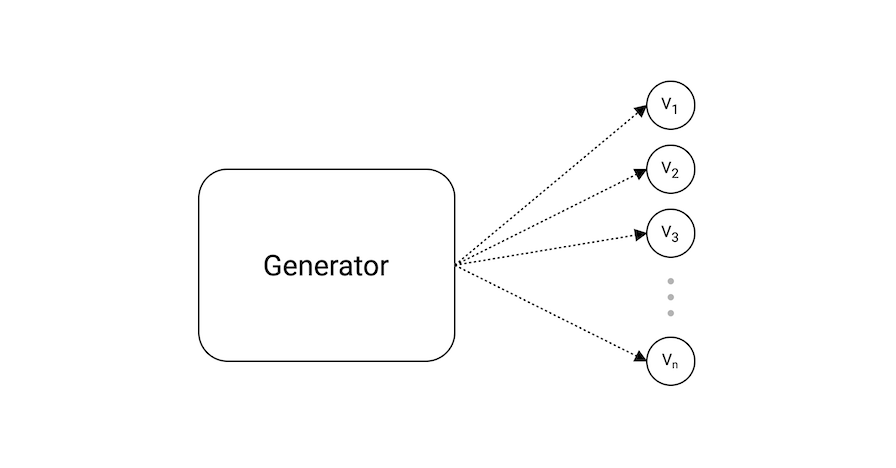 The generator pattern is used to generate a sequence of values which is used to produce some output.
In our example, we have a
The generator pattern is used to generate a sequence of values which is used to produce some output.
In our example, we have a generator function that simply returns a channel from which we can read the values.
This works on the fact that sends and receives block until both the sender and receiver are ready. This property allowed us to wait until the next value is requested.
package main

import "fmt"

func main() {
	ch := generator()

	for i := 0; i < 5; i++ {
		value := <-ch
		fmt.Println("Value:", value)
	}
}

func generator() <-chan int {
	ch := make(chan int)

	go func() {
		for i := 0; ; i++ {
			ch <- i
		}
	}()

	return ch
}
$ go run main.go
Value: 0
Value: 1
Value: 2
Value: 3
Value: 4
This is similar behavior to yield in JavaScript and Python.
Fan-In Pattern
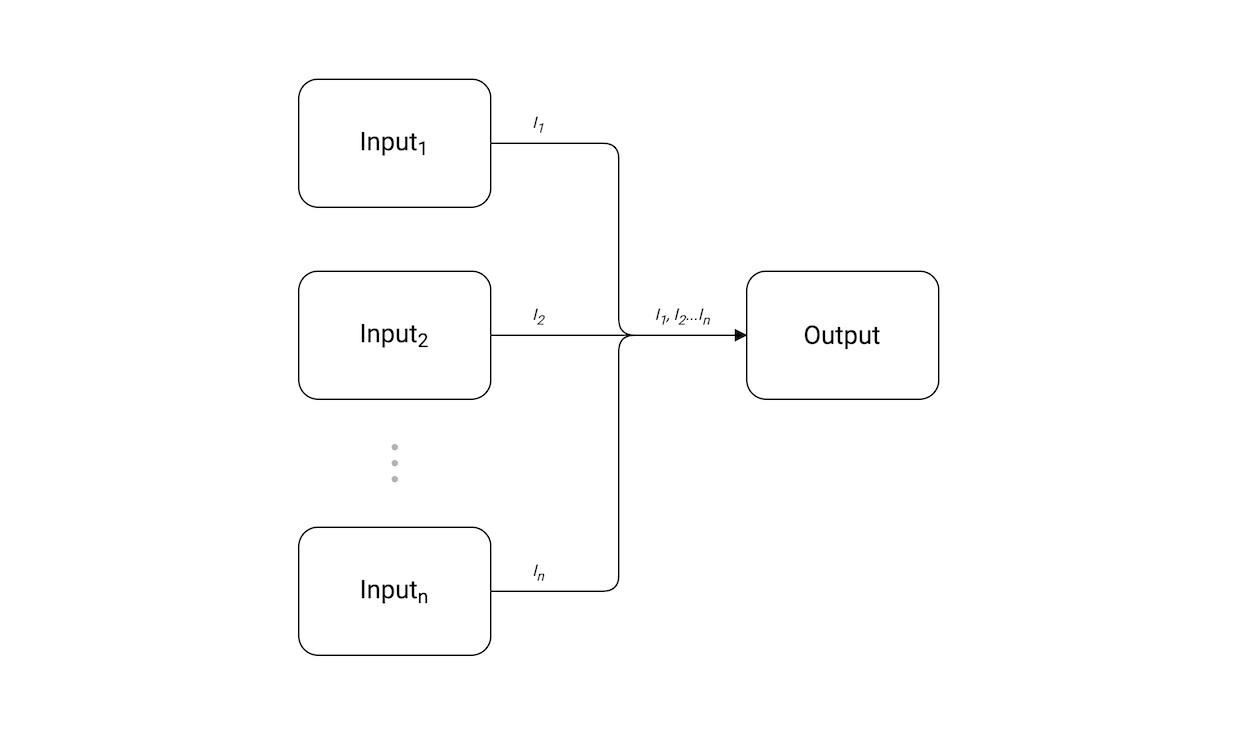 The fan-in pattern combines multiple inputs into one single output channel. Basically, we multiplex our inputs.
In our example, we create the inputs
The fan-in pattern combines multiple inputs into one single output channel. Basically, we multiplex our inputs.
In our example, we create the inputs i1 and i2 using the generateWork function. Then we use our variadic function fanIn to combine values from these inputs to a single output channel from which we can consume values.
package main

import (
	"fmt"
	"sync"
)

func main() {
	i1 := generateWork([]int{0, 2, 6, 8})
	i2 := generateWork([]int{1, 3, 5, 7})

	out := fanIn(i1, i2)

	for value := range out {
		fmt.Println("Value:", value)
	}
}

func fanIn(inputs ...<-chan int) <-chan int {
	var wg sync.WaitGroup
	out := make(chan int)

	wg.Add(len(inputs))

	for _, in := range inputs {
		go func(ch <-chan int) {
			for {
				value, ok := <-ch

				if !ok {
					wg.Done()
					break
				}

				out <- value
			}
		}(in)
	}

	go func() {
		wg.Wait()
		close(out)
	}()

	return out
}

func generateWork(work []int) <-chan int {
	ch := make(chan int)

	go func() {
		defer close(ch)

		for _, w := range work {
			ch <- w
		}
	}()

	return ch
}
$ go run main.go
Value: 0
Value: 1
Value: 2
Value: 6
Value: 8
Value: 3
Value: 5
Value: 7
Note that the order of input will not be guaranteed with the fan-in pattern.
Fan-Out Pattern
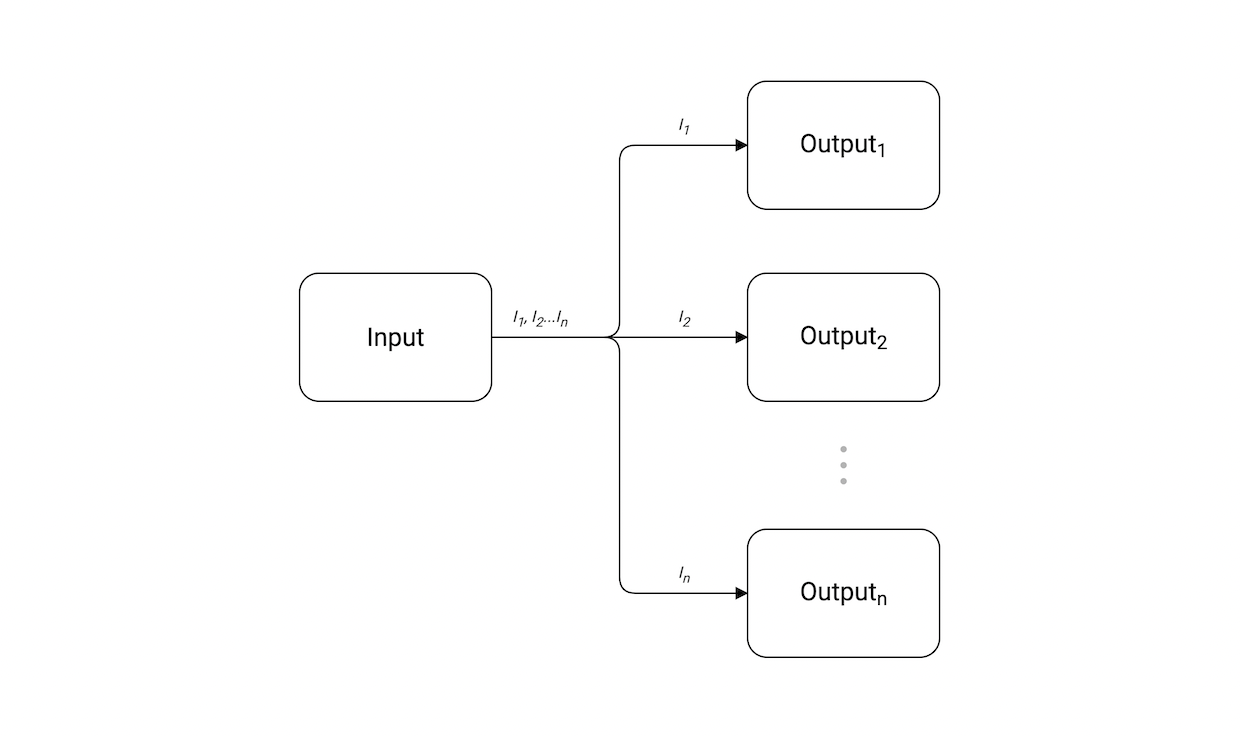 Fan-out patterns allow us to essentially split our single input channel into multiple output channels. This is a useful pattern to distribute work items into multiple uniform actors.
In our example, we break the input channel into 4 different output channels. For a dynamic number of outputs, we can merge outputs into a shared “aggregate” channel and use
Fan-out patterns allow us to essentially split our single input channel into multiple output channels. This is a useful pattern to distribute work items into multiple uniform actors.
In our example, we break the input channel into 4 different output channels. For a dynamic number of outputs, we can merge outputs into a shared “aggregate” channel and use select.
package main

import "fmt"

func main() {
	work := []int{1, 2, 3, 4, 5, 6, 7, 8}
	in := generateWork(work)

	out1 := fanOut(in)
	out2 := fanOut(in)
	out3 := fanOut(in)
	out4 := fanOut(in)

	for range work {
		select {
		case value := <-out1:
			fmt.Println("Output 1 got:", value)
		case value := <-out2:
			fmt.Println("Output 2 got:", value)
		case value := <-out3:
			fmt.Println("Output 3 got:", value)
		case value := <-out4:
			fmt.Println("Output 4 got:", value)
		}
	}
}

func fanOut(in <-chan int) <-chan int {
	out := make(chan int)

	go func() {
		defer close(out)

		for data := range in {
			out <- data
		}
	}()

	return out
}

func generateWork(work []int) <-chan int {
	ch := make(chan int)

	go func() {
		defer close(ch)

		for _, w := range work {
			ch <- w
		}
	}()

	return ch
}
$ go run main.go
Output 1 got: 1
Output 2 got: 3
Output 4 got: 4
Output 1 got: 5
Output 3 got: 2
Output 3 got: 6
Output 3 got: 7
Output 1 got: 8
The fan-out pattern is different from pub/sub patterns.
Pipeline Pattern
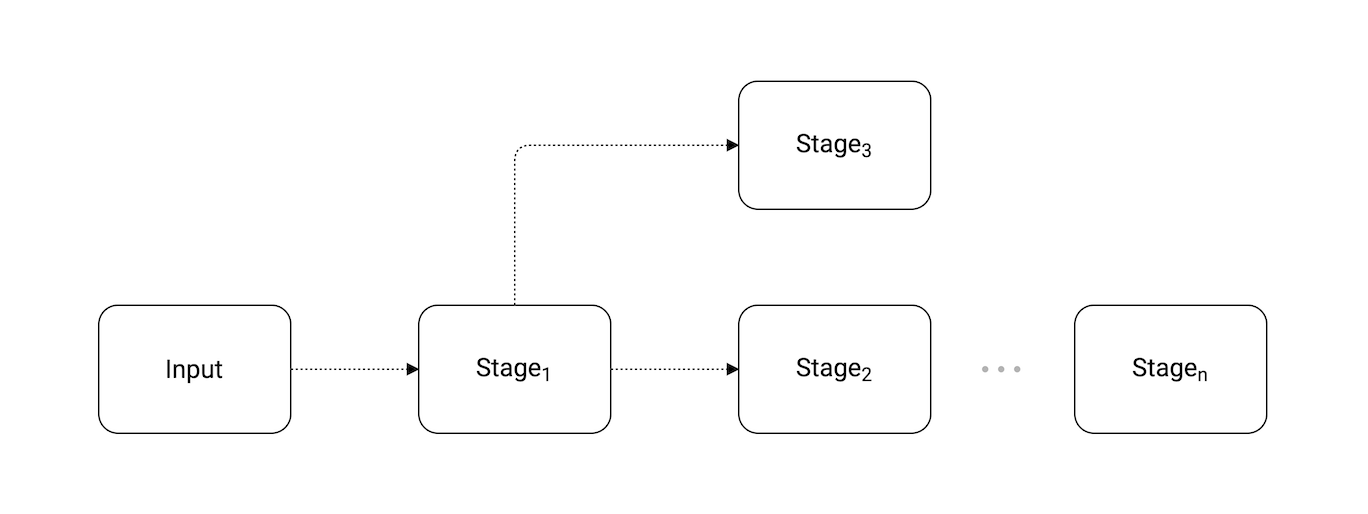 The pipeline pattern is a series of stages connected by channels, where each stage is a group of goroutines running the same function.
In each stage, the goroutines:
The pipeline pattern is a series of stages connected by channels, where each stage is a group of goroutines running the same function.
In each stage, the goroutines:
- Receive values from upstream via inbound channels
- Perform some function on that data, usually producing new values
- Send values downstream via outbound channels
Each stage has any number of inbound and outbound channels, except the first and last stages, which have only outbound or inbound channels, respectively. The first stage is sometimes called the source or producer; the last stage is the sink or consumer.
Benefits
By using a pipeline, we separate the concerns of each stage, which provides numerous benefits such as:
- Modify stages independent of one another
- Mix and match how stages are combined independently of modifying the stage
Example
In our example, we have defined three stages: filter, square, and half:
package main

import (
	"fmt"
	"math"
)

func main() {
	in := generateWork([]int{0, 1, 2, 3, 4, 5, 6, 7, 8})

	out := filter(in) // Filter odd numbers
	out = square(out) // Square the input
	out = half(out)   // Half the input

	for value := range out {
		fmt.Println(value)
	}
}

func filter(in <-chan int) <-chan int {
	out := make(chan int)

	go func() {
		defer close(out)

		for i := range in {
			if i%2 == 0 {
				out <- i
			}
		}
	}()

	return out
}

func square(in <-chan int) <-chan int {
	out := make(chan int)

	go func() {
		defer close(out)

		for i := range in {
			value := math.Pow(float64(i), 2)
			out <- int(value)
		}
	}()

	return out
}

func half(in <-chan int) <-chan int {
	out := make(chan int)

	go func() {
		defer close(out)

		for i := range in {
			value := i / 2
			out <- value
		}
	}()

	return out
}

func generateWork(work []int) <-chan int {
	ch := make(chan int)

	go func() {
		defer close(ch)

		for _, w := range work {
			ch <- w
		}
	}()

	return ch
}
$ go run main.go
0
2
8
18
32
Pipelines are a powerful pattern for building complex data processing systems with clean separation of concerns.
Worker Pool Pattern
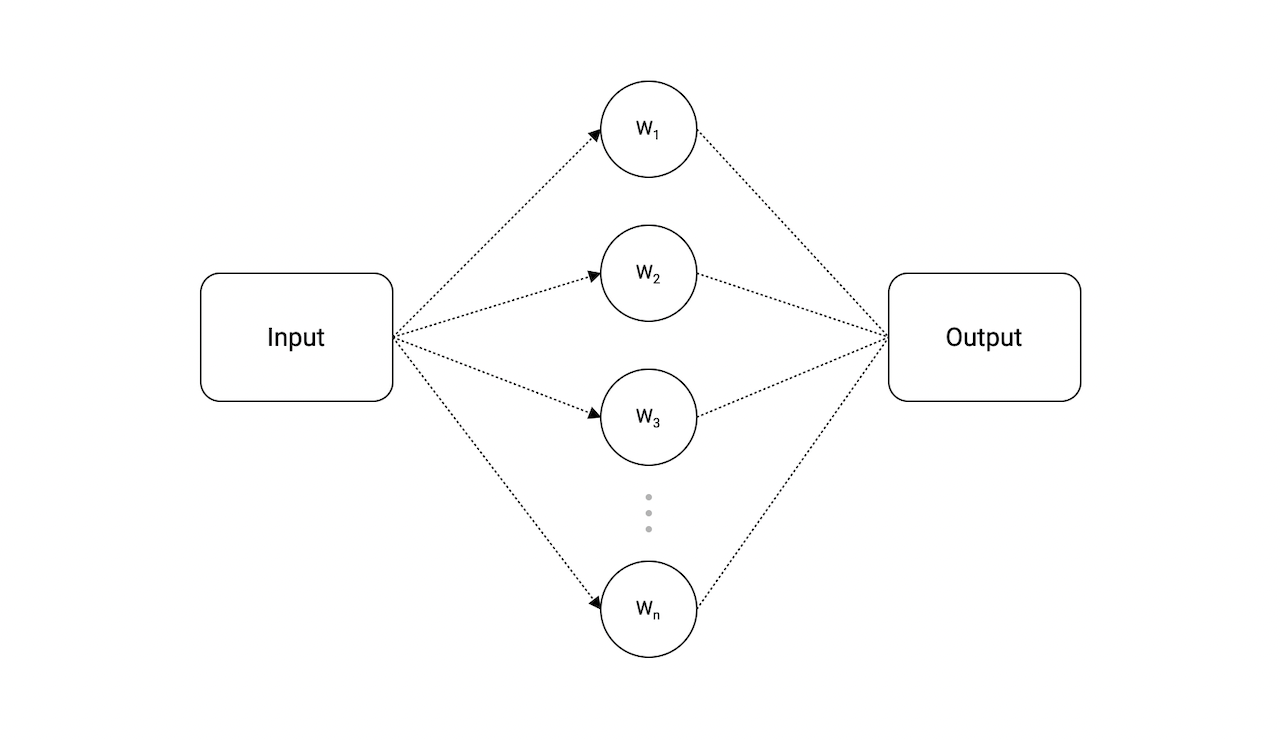 The worker pool is a really powerful pattern that lets us distribute work across multiple workers (goroutines) concurrently.
In our example, we have a
The worker pool is a really powerful pattern that lets us distribute work across multiple workers (goroutines) concurrently.
In our example, we have a jobs channel to which we will send our jobs and a results channel where our workers will send the results once they’ve finished doing the work.
After that, we can launch our workers concurrently and simply receive the results from the results channel.
package main

import (
	"fmt"
	"sync"
)

const totalJobs = 4
const totalWorkers = 2

func main() {
	jobs := make(chan int, totalJobs)
	results := make(chan int, totalJobs)

	for w := 1; w <= totalWorkers; w++ {
		go worker(w, jobs, results)
	}

	// Send jobs
	for j := 1; j <= totalJobs; j++ {
		jobs <- j
	}

	close(jobs)

	// Receive results
	for a := 1; a <= totalJobs; a++ {
		<-results
	}

	close(results)
}

func worker(id int, jobs <-chan int, results chan<- int) {
	var wg sync.WaitGroup

	for j := range jobs {
		wg.Add(1)

		go func(job int) {
			defer wg.Done()

			fmt.Printf("Worker %d started job %d\n", id, job)

			// Do work and send result
			result := job * 2
			results <- result

			fmt.Printf("Worker %d finished job %d\n", id, job)
		}(j)
	}

	wg.Wait()
}
$ go run main.go
Worker 2 started job 4
Worker 2 started job 1
Worker 1 started job 3
Worker 2 started job 2
Worker 2 finished job 1
Worker 1 finished job 3
Worker 2 finished job 2
Worker 2 finished job 4
Ideally, totalWorkers should be set to runtime.NumCPU() which gives us the number of logical CPUs usable by the current process.
Queuing Pattern
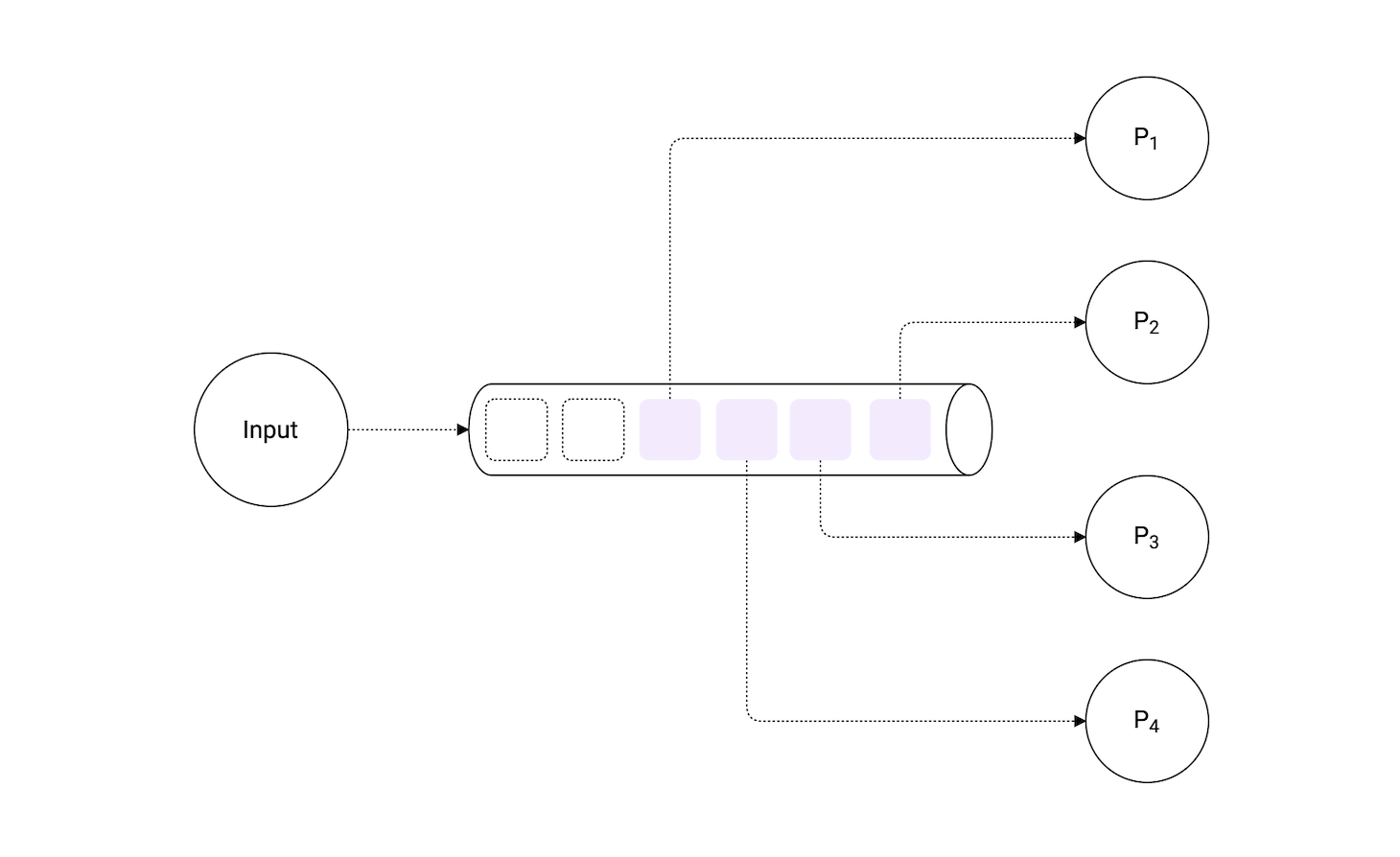 The queuing pattern allows us to process
 n number of items at a time.
In our example, we use a buffered channel to simulate queue behavior. We simply send an empty struct to our queue channel and wait for it to be released by the previous process so that we can continue.
This is because sends to a buffered channel block only when the buffer is full and receives block when the buffer is empty.
Here, we have total work of 10 items and we have a limit of 2. This means we can process 2 items at a time.
package main

import (
	"fmt"
	"sync"
	"time"
)

const limit = 2
const work = 10

func main() {
	var wg sync.WaitGroup

	fmt.Println("Queue limit:", limit)
	queue := make(chan struct{}, limit)

	wg.Add(work)

	for w := 1; w <= work; w++ {
		process(w, queue, &wg)
	}

	wg.Wait()

	close(queue)
	fmt.Println("Work complete")
}

func process(work int, queue chan struct{}, wg *sync.WaitGroup) {
	queue <- struct{}{}

	go func() {
		defer wg.Done()

		time.Sleep(1 * time.Second)
		fmt.Println("Processed:", work)

		<-queue
	}()
}
$ go run main.go
Queue limit: 2
Processed: 1
Processed: 2
Processed: 4
Processed: 3
Processed: 5
Processed: 6
Processed: 8
Processed: 7
Processed: 9
Processed: 10
Work complete
Notice how our queue channel is of type struct{} as an empty struct occupies zero bytes of storage.
Error Handling in Concurrent Code
When working with concurrent patterns, proper error handling becomes crucial. Here are some common approaches:
Using Error Channels
One approach is to use a dedicated error channel:
func worker(id int, jobs <-chan int, results chan<- int, errors chan<- error) {
	for j := range jobs {
		result, err := doWork(j)
		if err != nil {
			errors <- fmt.Errorf("worker %d: %w", id, err)
			continue
		}
		results <- result
	}
}
Using Result Structs
Another approach is to combine results and errors in a struct:
type Result struct {
	Value int
	Err   error
}

func worker(id int, jobs <-chan int, results chan<- Result) {
	for j := range jobs {
		value, err := doWork(j)
		results <- Result{Value: value, Err: err}
	}
}
Always handle errors properly in concurrent code. Ignoring errors in goroutines can lead to silent failures that are difficult to debug.
Additional Patterns
Some additional patterns that might be useful to know:
- Tee channel - Splits one input into two identical outputs
- Bridge channel - Consumes a channel of channels and produces a single channel
- Ring buffer channel - Circular buffer implementation using channels
- Bounded parallelism - Limits the number of concurrent operations
These patterns can be combined to build sophisticated concurrent systems. Start simple and add complexity only when needed.