“Don’t communicate by sharing memory, share memory by communicating.” - Rob Pike
What is a Goroutine?
A goroutine is a lightweight thread of execution that is managed by the Go runtime and essentially lets us write asynchronous code in a synchronous manner. It is important to know that they are not actual OS threads and the main function itself runs as a goroutine. A single thread may run thousands of goroutines in them by using the Go runtime scheduler which uses cooperative scheduling. This implies that if the current goroutine is blocked or has been completed, the scheduler will move the other goroutines to another OS thread. Hence, we achieve efficiency in scheduling where no routine is blocked forever.Creating a Goroutine
We can turn any function into a goroutine by simply using thego keyword:
Fork-Join Model
Go uses the idea of the fork-join model of concurrency behind goroutines. The fork-join model essentially implies that a child process splits from its parent process to run concurrently with the parent process. After completing its execution, the child process merges back into the parent process. The point where it joins back is called the join point.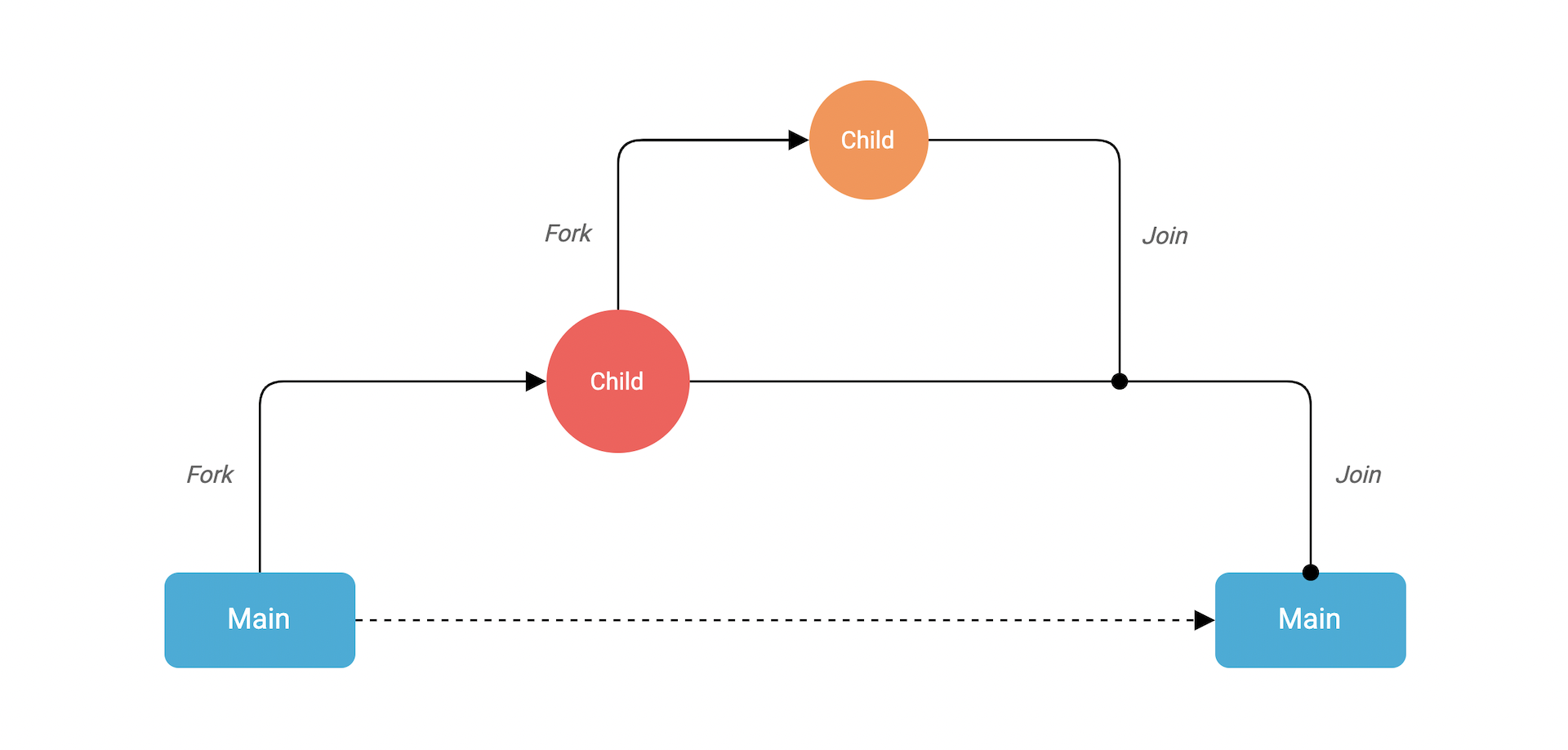
Example
Now, let’s write some code and create our own goroutine:speak function call is prefixed with the go keyword. This will allow it to run as a separate goroutine. And that’s it, we just created our first goroutine. It’s that simple!
Let’s run this:
time.Sleep function?
Properties and Best Practices
Here are some important properties and best practices for working with goroutines:Goroutine Properties
- Goroutines are extremely lightweight, starting at only a few kilobytes and growing as needed
- Creating goroutines has minimal overhead compared to OS threads
- Goroutines are multiplexed onto OS threads by the Go runtime
- The Go scheduler uses cooperative scheduling - goroutines yield control voluntarily
Best Practices
-
Always coordinate goroutine completion: Use channels or synchronization primitives (like
sync.WaitGroup) to ensure goroutines complete properly - Handle panics: A panic in a goroutine will crash the entire program if not recovered
- Avoid shared memory when possible: Use channels to communicate between goroutines
- Be mindful of goroutine lifecycles: Make sure goroutines don’t leak (run forever unintentionally)
- Don’t create too many goroutines: While goroutines are lightweight, creating millions of them can still cause issues
In the next lesson, we’ll learn about channels, which provide a better way to coordinate goroutines and share data between them.