Known Conflicts
The following websites are known to have issues when Page Assist’s automatic CORS fix is enabled:Intel Driver & Support Assistant
May not load or function correctly with CORS fix enabled.
Box Tools Website
Can experience authentication or loading issues.
If you discover other websites that conflict with Page Assist, please report them on GitHub so they can be documented.
Solution: Disable Automatic CORS Fix
If Page Assist is causing issues with other websites, you can disable the automatic CORS fix feature.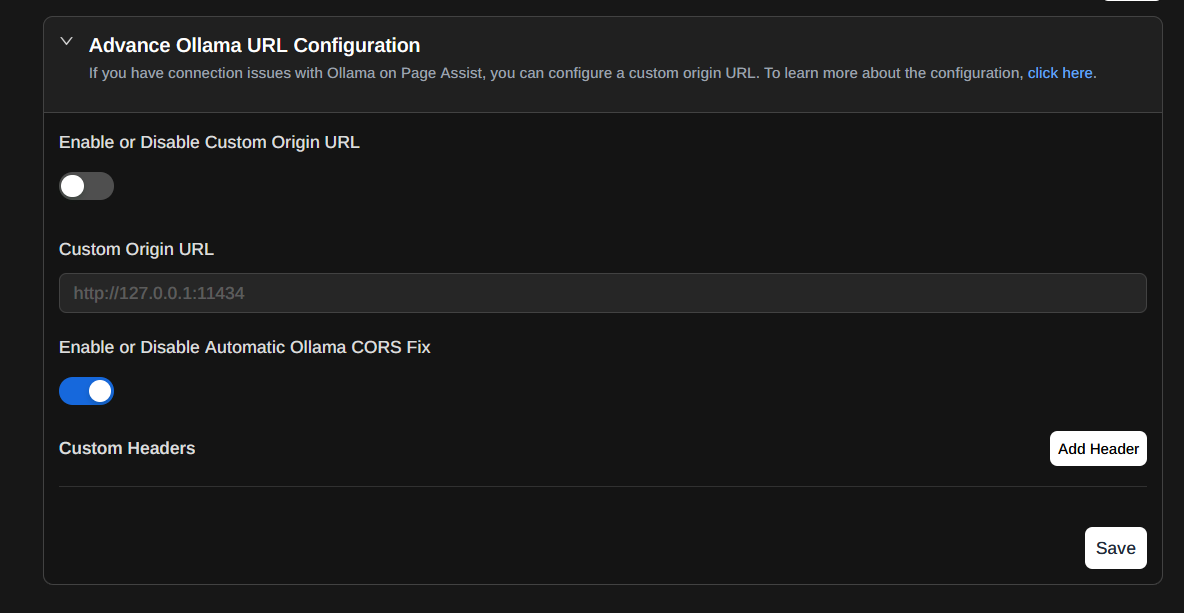
Fix 403 Errors After Disabling CORS Fix
Once you disable the automatic CORS fix, you’ll need to configure Ollama to accept connections from browser extensions. You can do this by setting theOLLAMA_ORIGINS environment variable.
- Windows
- macOS
- Linux
- Docker
Open Environment Variables
- Open the Start menu and search for “Environment Variables”
- Click “Edit the system environment variables”
Setting
OLLAMA_ORIGINS=* allows Ollama to accept requests from any origin. This resolves CORS issues but is less restrictive. For production environments, consider specifying exact origins instead of using *.Alternative: Selective Disabling
If you only experience issues on specific websites, you can:-
Temporarily disable Page Assist on those websites:
- Right-click the Page Assist icon
- Look for “Disable on this site” or similar option
- The extension won’t run on that specific website
-
Use different browser profiles:
- Create a separate browser profile for websites that conflict
- Keep Page Assist disabled in that profile
- Use your main profile with Page Assist for normal browsing
Troubleshooting Extension Conflicts
Website still not working after disabling CORS fix
Website still not working after disabling CORS fix
If disabling the CORS fix doesn’t resolve the issue:
- Clear browser cache: The website may have cached the modified headers
- Hard refresh: Press
Ctrl+Shift+R(orCmd+Shift+Ron Mac) - Disable Page Assist entirely: Temporarily disable the extension to confirm it’s the cause
- Check other extensions: Another extension might be causing the conflict
Getting 403 errors after setting OLLAMA_ORIGINS
Getting 403 errors after setting OLLAMA_ORIGINS
If you still see 403 errors after configuring the environment variable:
- Verify the variable is set: Check that
OLLAMA_ORIGINSis actually set in your environment - Confirm Ollama restart: Make sure you restarted Ollama after setting the variable
- Check Ollama logs: Look for CORS-related messages in the logs
- Try alternative syntax: Some systems may require
OLLAMA_ORIGINS="*"with quotes
Need both CORS fix and website compatibility
Need both CORS fix and website compatibility
If you need Page Assist to work while also using conflicting websites:Option 1: Toggle as needed
- Disable CORS fix when using conflicting websites
- Re-enable when you need to use Page Assist
- Keep
OLLAMA_ORIGINS=*set permanently
- Create one profile with Page Assist enabled (with CORS fix)
- Create another profile without Page Assist for conflicting websites
- Switch between profiles as needed
- Set
OLLAMA_ORIGINS=*on your system - Disable Page Assist’s CORS fix permanently
- Both Page Assist and other websites will work
Security concerns with OLLAMA_ORIGINS=*
Security concerns with OLLAMA_ORIGINS=*
Setting
OLLAMA_ORIGINS=* allows any origin to connect to your Ollama instance:For local-only use:- This is generally safe if Ollama only binds to localhost (127.0.0.1)
- Other machines on your network cannot access it
- Consider specifying exact origins instead of
* - Example:
OLLAMA_ORIGINS="chrome-extension://your-extension-id,https://your-app.com" - Use a reverse proxy with authentication for production deployments
- Implement firewall rules to restrict access
Reporting New Conflicts
If you discover a website that conflicts with Page Assist, please help the community by reporting it:- Open an issue on GitHub
- Include:
- The website URL that’s affected
- What functionality breaks
- Browser and version
- Page Assist version
- Whether disabling the CORS fix resolves it
Related Resources
Connection Issues
Troubleshoot Ollama connectivity problems
Common Problems
Solutions to other frequent issues