This page introduces the basic concepts and terminology used in @tanstack/solid-form. Understanding these concepts will help you work effectively with the library.

Form Options

You can create reusable form options that can be shared between multiple forms using the formOptions function:
const formOpts = formOptions({
  defaultValues: {
    firstName: '',
    lastName: '',
    hobbies: [],
  } as Person,
})

Form Instance

A Form Instance represents an individual form and provides methods and properties for working with it. You create a form instance using the createForm hook.

Using createForm with formOptions

const form = createForm(() => ({
  ...formOpts,
  onSubmit: async ({ value }) => {
    // Do something with form data
    console.log(value)
  },
}))

Standalone createForm

You can also create a form instance without using formOptions:
const form = createForm<Person>(() => ({
  onSubmit: async ({ value }) => {
    // Do something with form data
    console.log(value)
  },
  defaultValues: {
    firstName: '',
    lastName: '',
    hobbies: [],
  },
}))
The createForm hook in Solid accepts a function that returns the configuration. This is important for proper reactivity.

Field

A Field represents a single form input element. Fields are created using the form.Field component with a render prop pattern:
<form.Field
  name="firstName"
  children={(field) => (
    <input
      name={field().name}
      value={field().state.value}
      onBlur={field().handleBlur}
      onInput={(e) => field().handleChange(e.target.value)}
    />
  )}
/>
In Solid, the field parameter is a function that returns the field API. Always call it as field() to access the current state and methods.

Field State

Each field has its own state with metadata about the field’s current status:
const {
  value,
  meta: { errors, isValidating },
} = field().state

Field Metadata States

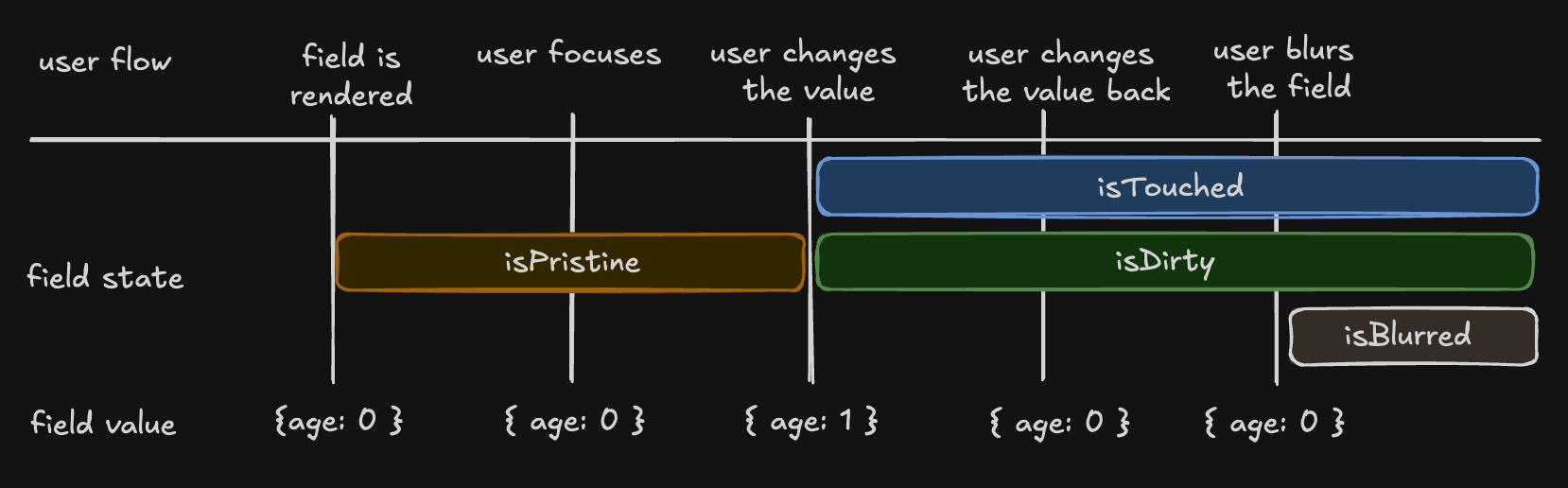
There are four key states that track user interaction:
  • isTouched - Set after the user changes the field or blurs it
  • isDirty - Set after the field’s value has been changed (even if reverted). Opposite of isPristine
  • isPristine - True until the user changes the field value. Opposite of isDirty
  • isBlurred - Set after the field has been blurred
const { isTouched, isDirty, isPristine, isBlurred } = field().state.meta
Field states

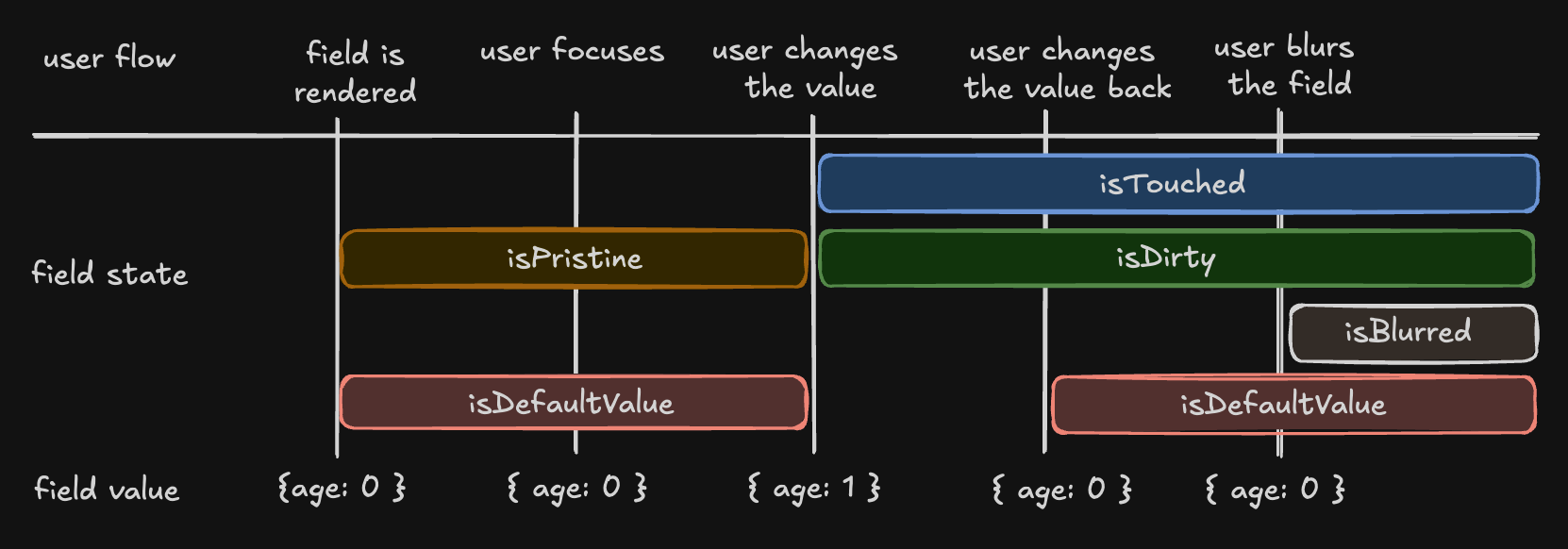
Understanding ‘isDirty’ States

TanStack Form uses a persistent dirty state model: Persistent dirty state (TanStack Form)
  • A field remains ‘dirty’ once changed, even if reverted to the default value
  • Similar to Angular Form and Vue FormKit
Non-Persistent dirty state (Other libraries)
  • A field is ‘dirty’ only if its value differs from the default
  • Used by React Hook Form, Formik, and Final Form
To support non-persistent dirty state, use the isDefaultValue flag:
const { isDefaultValue, isTouched } = field().state.meta

// Re-create non-persistent dirty functionality
const nonPersistentIsDirty = !isDefaultValue
Field states extended

Field API

The Field API provides methods for working with the field’s state:
<input
  name={field().name}
  value={field().state.value}
  onBlur={field().handleBlur}
  onInput={(e) => field().handleChange(e.target.value)}
/>
Key methods:
  • handleChange(value) - Update the field value
  • handleBlur() - Mark the field as blurred
  • state.value - Access the current value
  • state.meta - Access field metadata

Validation

@tanstack/solid-form provides both synchronous and asynchronous validation:
<form.Field
  name="firstName"
  validators={{
    onChange: ({ value }) =>
      !value
        ? 'A first name is required'
        : value.length < 3
          ? 'First name must be at least 3 characters'
          : undefined,
    onChangeAsync: async ({ value }) => {
      await new Promise((resolve) => setTimeout(resolve, 1000))
      return value.includes('error') && 'No "error" allowed in first name'
    },
  }}
  children={(field) => (
    <>
      <input
        name={field().name}
        value={field().state.value}
        onBlur={field().handleBlur}
        onInput={(e) => field().handleChange(e.target.value)}
      />
      <p>{field().state.meta.errors[0]}</p>
    </>
  )}
/>

Validation with Standard Schema Libraries

TanStack Form supports the Standard Schema specification:
  • Zod (v3.24.0 or higher)
  • Valibot (v1.0.0 or higher)
  • ArkType (v2.1.20 or higher)
  • Yup (v1.7.0 or higher)
import { z } from 'zod'

<form.Field
  name="firstName"
  validators={{
    onChange: z.string().min(3, 'First name must be at least 3 characters'),
    onChangeAsyncDebounceMs: 500,
    onChangeAsync: z.string().refine(
      async (value) => {
        await new Promise((resolve) => setTimeout(resolve, 1000))
        return !value.includes('error')
      },
      {
        message: 'No "error" allowed in first name',
      },
    ),
  }}
  children={(field) => (
    <>
      <input
        name={field().name}
        value={field().state.value}
        onBlur={field().handleBlur}
        onInput={(e) => field().handleChange(e.target.value)}
      />
      <p>{field().state.meta.errors[0]}</p>
    </>
  )}
/>

Reactivity

@tanstack/solid-form offers multiple ways to subscribe to form and field state changes:

Using form.useStore

const firstName = form.useStore((state) => state.values.firstName)

Using form.Subscribe

<form.Subscribe
  selector={(state) => ({
    canSubmit: state.canSubmit,
    isSubmitting: state.isSubmitting,
  })}
  children={(state) => (
    <button type="submit" disabled={!state().canSubmit}>
      {state().isSubmitting ? '...' : 'Submit'}
    </button>
  )}
/>
These methods allow you to optimize your form’s rendering performance by only updating components when necessary.

Array Fields

Array fields allow you to manage lists of values within a form. Use the mode="array" prop:
<form.Field
  name="hobbies"
  mode="array"
  children={(hobbiesField) => (
    <div>
      Hobbies
      <div>
        <Show
          when={hobbiesField().state.value.length > 0}
          fallback={'No hobbies found.'}
        >
          <Index each={hobbiesField().state.value}>
            {(_, i) => (
              <div>
                <form.Field
                  name={`hobbies[${i}].name`}
                  children={(field) => (
                    <div>
                      <label for={field().name}>Name:</label>
                      <input
                        id={field().name}
                        name={field().name}
                        value={field().state.value}
                        onBlur={field().handleBlur}
                        onInput={(e) => field().handleChange(e.target.value)}
                      />
                      <button
                        type="button"
                        onClick={() => hobbiesField().removeValue(i)}
                      >
                        Remove
                      </button>
                    </div>
                  )}
                />
              </div>
            )}
          </Index>
        </Show>
      </div>
      <button
        type="button"
        onClick={() =>
          hobbiesField().pushValue({
            name: '',
            description: '',
          })
        }
      >
        Add hobby
      </button>
    </div>
  )}
/>
Available array methods:
  • pushValue(value) - Add an item to the end
  • removeValue(index) - Remove an item at index
  • swapValues(indexA, indexB) - Swap two items
  • moveValue(from, to) - Move an item from one index to another
  • insertValue(index, value) - Insert at a specific index
  • replaceValue(index, value) - Replace an item at index
  • clearValues() - Remove all items

Next Steps

  • Validation - Deep dive into form validation
  • Arrays - Learn more about working with array fields

Build docs developers (and LLMs) love