@tanstack/svelte-form. Understanding these concepts will help you work effectively with forms in Svelte.
Form Options
You can create reusable form options using theformOptions function. This allows you to share configuration between multiple forms:
Form Instance
A form instance represents an individual form and provides methods for managing form state. You create a form instance using thecreateForm function.
Creating a Form Instance
ThecreateForm function returns a reactive Svelte store that automatically updates your UI:
Using Form Options
You can create a form instance from previously defined form options:Field
A field represents a single form input element. Fields are created using theform.Field component with Svelte’s snippet syntax.
Creating a Field
Theform.Field component accepts a name prop and a children snippet that receives a field object:
Field API Methods
The field object provides methods to interact with the field:field.handleChange(value)- Update the field’s valuefield.handleBlur()- Mark the field as blurredfield.state.value- Get the current field valuefield.pushValue(item)- Add an item to an array fieldfield.removeValue(index)- Remove an item from an array fieldfield.insertValue(index, item)- Insert an item at a specific positionfield.replaceValue(index, item)- Replace an itemfield.swapValues(indexA, indexB)- Swap two itemsfield.moveValue(from, to)- Move an item to a different position
Field State
Each field maintains its own state accessible viafield.state:
Field Metadata
The metadata tracks user interaction with the field:isTouched- Set after the user changes or blurs the fieldisDirty- Set after the field’s value has been changed, even if reverted to default (opposite ofisPristine)isPristine- True until the user changes the field value (opposite ofisDirty)isBlurred- Set after the field has been blurred
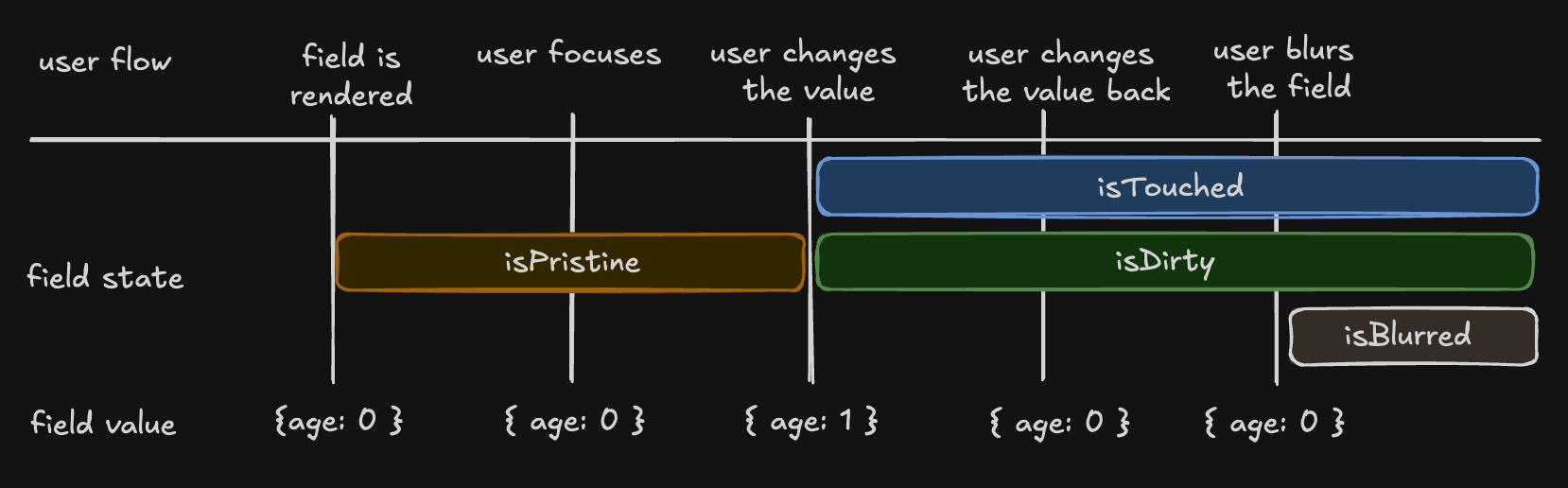
Understanding isDirty
TanStack Form uses a persistentdirty state model:
- A field becomes
isDirty: truewhen its value changes - It remains
isDirty: trueeven if you revert to the default value - This matches the behavior of Angular Forms and Vue FormKit
isDefaultValue flag:
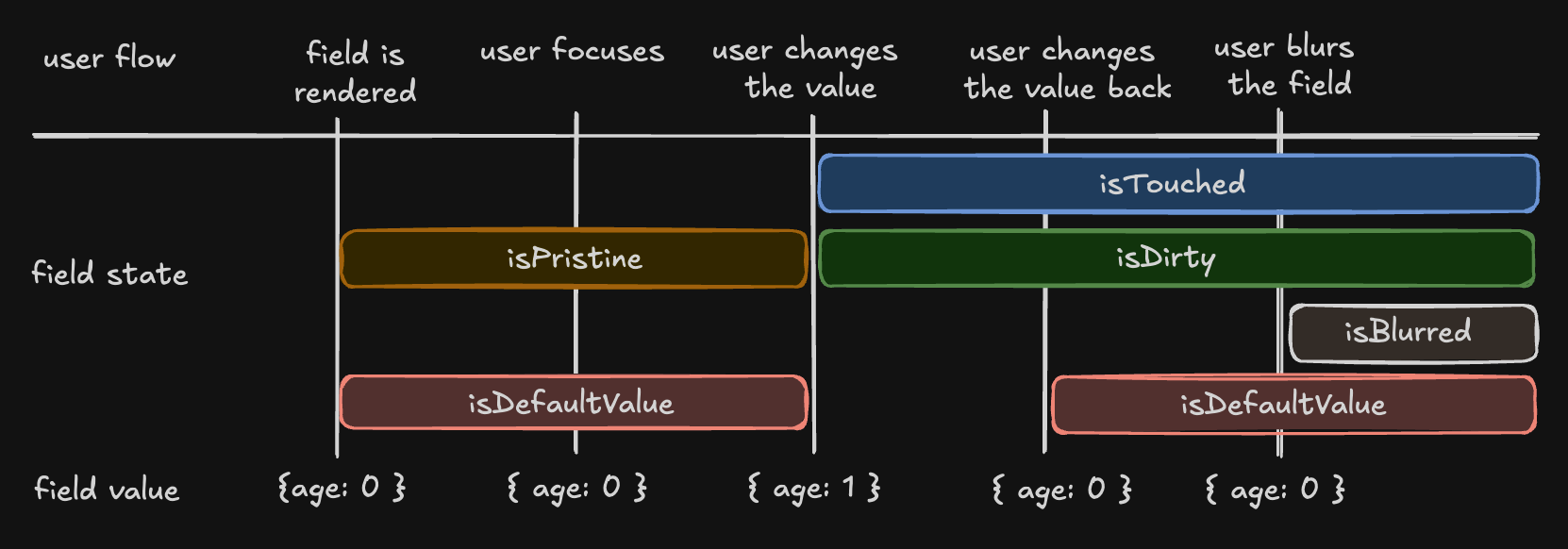
Validation
Fields support both synchronous and asynchronous validation through thevalidators prop:
Schema Validation
TanStack Form supports Standard Schema libraries:- Zod (v3.24.0 or higher)
- Valibot (v1.0.0 or higher)
- ArkType (v2.1.20 or higher)
- Yup (v1.7.0 or higher)
Reactivity with useStore
Theform.useStore hook allows you to subscribe to specific form state for optimized rendering:
Subscribe Component
Theform.Subscribe component provides another way to subscribe to form state:
Array Fields
Manage lists of values using array fields withmode="array":
Form State
Access global form state to control submission and display form-level information:Next Steps
- Learn about Form Validation techniques
- Explore Array Fields in depth
- Check the API Reference for complete documentation