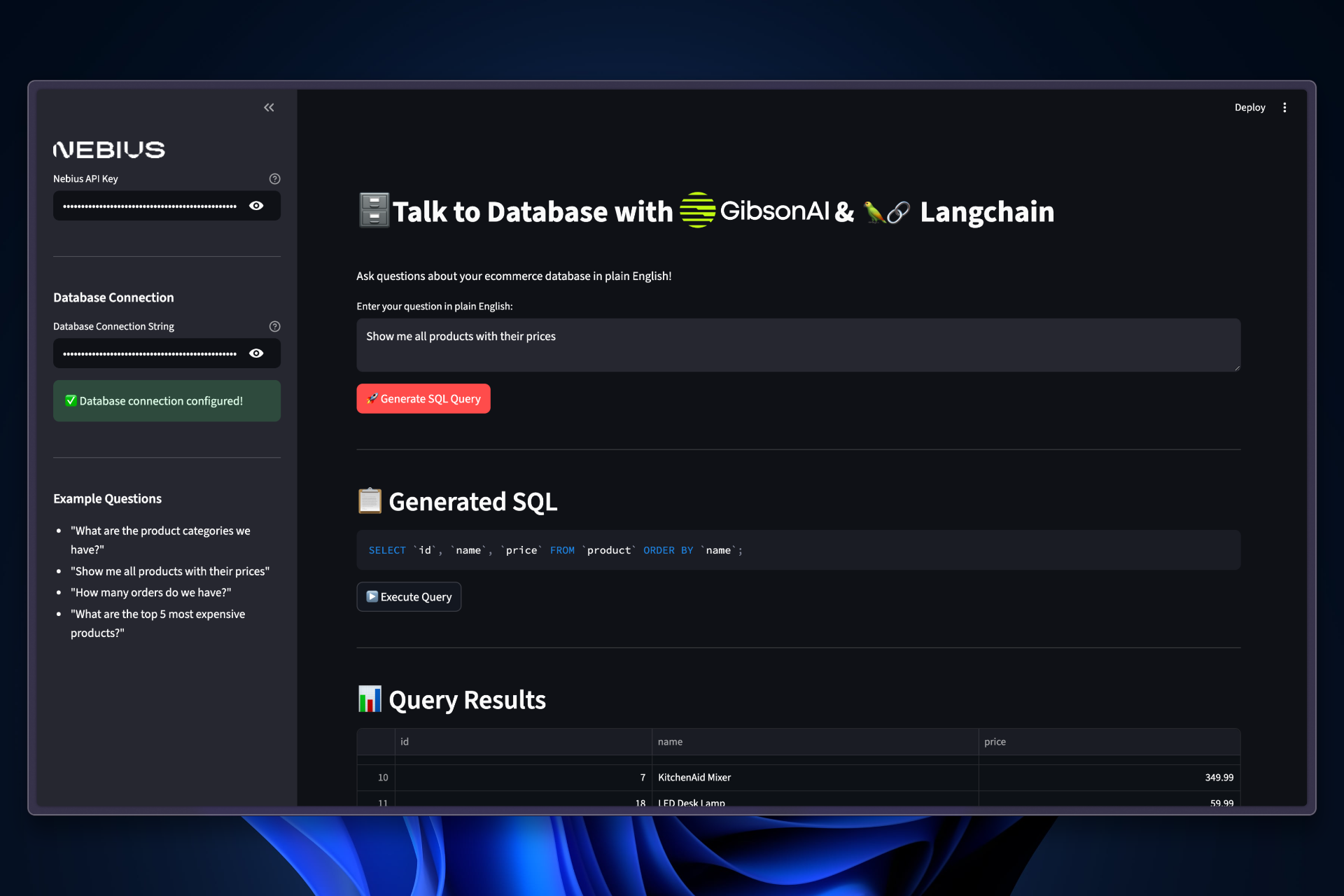
Overview Talk to Your DB is a powerful AI-powered database query tool that translates natural language questions into SQL queries using Nebius AI. This application makes database operations accessible to non-technical users by allowing them to interact with MySQL databases using plain English.
Features
Natural Language Ask database questions in plain English
AI SQL Generation Automatically converts questions to SQL queries
Interactive Results View query results in clean, sortable tables
Business Insights Get AI-generated explanations of results
Query History Track all previous queries and results
SQL Preview Review generated SQL before execution
Easy Config Simple setup with API keys and connection strings
Secure SSL-enabled database connections
Prerequisites
Python 3.10+ Python 3.10 or higher required
MySQL Database MySQL database with access credentials
Installation
Clone the Repository
git clone https://github.com/Arindam200/awesome-ai-apps.git
cd simple_ai_agents/talk_to_db
Configure Environment
Create a .env file: NEBIUS_API_KEY=your_nebius_api_key
Usage
Configure Settings
In the sidebar:
Enter your Nebius API Key
Enter your Database Connection String :
mysql://username:password@host/database
Ask Questions
Type questions in plain English:
“What are the product categories we have?”
“Show me all products with their prices”
“How many orders do we have?”
Review SQL
Review the generated SQL query before execution
Execute Query
Click “Execute Query” to see results
Get Explanation
Click “Explain Results” for AI-generated insights
Implementation Database Connection The application uses a modular architecture with separate layers:
# database.py import pymysql from urllib.parse import urlparse def parse_connection_string ( connection_string ): """Parse MySQL connection string""" parsed = urlparse(connection_string) return { 'host' : parsed.hostname, 'user' : parsed.username, 'password' : parsed.password, 'database' : parsed.path[ 1 :], 'port' : parsed.port or 3306 , 'ssl' : { 'ssl' : True } } def execute_query ( sql_query ): """Execute SQL query and return results""" try : connection = pymysql.connect( ** db_config) with connection.cursor() as cursor: cursor.execute(sql_query) results = cursor.fetchall() return results, None except Exception as e: return None , str (e)
AI SQL Translation The AI layer uses LangChain with Nebius AI:
# ai_services.py from langchain_nebius import ChatNebius from langchain_core.prompts import ChatPromptTemplate from langchain_core.output_parsers import StrOutputParser import os # Database schema information DB_SCHEMA = """ Database: Ecommerce (MySQL) Tables: - category (id, uuid, name, description, date_created, date_updated) - product (id, uuid, name, description, price, stock_quantity, category_id) - user (id, uuid, name, email, address) - order (id, uuid, user_id, total_amount, status, order_date) - order_item (id, order_id, product_id, quantity, unit_price) Relationships: - product.category_id -> category.id - order.user_id -> user.id - order_item.order_id -> order.id - order_item.product_id -> product.id """ def get_llm (): """Get the Nebius LLM instance""" return ChatNebius( model = "zai-org/GLM-4.5-Air" , temperature = 0.1 , top_p = 0.95 , api_key = os.getenv( "NEBIUS_API_KEY" ), ) def translate_to_sql ( natural_question ): """Translate natural language to SQL""" llm = get_llm() prompt = ChatPromptTemplate.from_messages([ ( "system" , """ You are a MySQL SQL expert. Convert natural language questions to MySQL queries. Database Schema: {db_schema} Rules: 1. Use appropriate JOINs when needed 2. Use MySQL syntax with backticks for identifiers 3. Include LIMIT 100 for large result sets 4. Return ONLY the SQL query, no explanations Example: Question: "What are the product categories we have?" SELECT `id`, `name`, `description` FROM `category` ORDER BY `name`; """ ), ( "human" , "Question: {question} \n\n Generate the SQL query:" ) ]) chain = prompt | llm | StrOutputParser() sql_query = chain.invoke({ "db_schema" : DB_SCHEMA , "question" : natural_question, }) return sql_query.strip()
Result Explanation Generate natural language explanations of query results:
def explain_results ( results , original_question ): """Generate plain English explanation of results""" llm = get_llm() results_text = json.dumps(results, indent = 2 , default = str ) prompt = ChatPromptTemplate.from_messages([ ( "system" , """ You are a helpful database assistant. Explain query results in plain English. Rules: 1. Be conversational and clear 2. Summarize key findings 3. Provide statistics for many results 4. Highlight interesting patterns 5. Keep it concise but informative """ ), ( "human" , """ Original Question: {question} Query Results: {results} Please explain these results in plain English: """ ) ]) chain = prompt | llm | StrOutputParser() explanation = chain.invoke({ "question" : original_question, "results" : results_text }) return explanation.strip()
Project Structure talk_to_db/ ├── app.py # Streamlit web interface ├── database.py # Database connection and query execution ├── ai_services.py # AI-powered SQL generation and explanation ├── requirements.txt # Python dependencies ├── assets/ │ ├── demo.png # Demo screenshot │ ├── langchain.png # LangChain logo │ ├── gibson.svg # GibsonAI logo │ └── nebius.png # Nebius logo └── README.md # Documentation
Supported Operations Query Types
SELECT Queries Data retrieval and analysis SELECT * FROM products WHERE price > 100
Complex JOINs Multi-table queries SELECT p . name , c . name as category FROM product p JOIN category c ON p . category_id = c . id
Aggregations COUNT, SUM, AVG operations SELECT COUNT ( * ) as total FROM orders
Filtering WHERE clauses and conditions SELECT * FROM orders WHERE status = 'completed'
Example Questions Products
Orders
Users
Analytics
“What are the product categories we have?”
“Show me all products with their prices”
“What are the top 5 most expensive products?”
“Which products are out of stock?”
“Find the most popular product categories”
“How many orders do we have?”
“What’s the total revenue from completed orders?”
“Show me recent orders with customer details”
“What’s the average order value?”
“Find orders from the last week”
“Show me all users who made orders”
“How many active customers do we have?”
“List users with their order counts”
“Find customers with no orders”
“What’s the customer distribution by region?”
“What’s our best-selling product?”
“Show me sales trends by category”
“Which products have the highest profit margin?”
“Find customers with the highest lifetime value”
“Show me order fulfillment rates”
Database Connection The application supports MySQL databases. Connection string format:
mysql://username:password@host/database
Example Connections Local MySQL
Remote MySQL
Cloud MySQL
mysql://root:password@localhost/ecommerce
SSL connections are automatically enabled for enhanced security.
Architecture Modular Design
UI Layer (app.py)
Streamlit interface for user interactions
Input handling
Result display
Configuration management
Database Layer (database.py)
Connection management and query execution
Connection string parsing
Query execution
Error handling
AI Layer (ai_services.py)
Natural language processing and SQL generation
SQL translation
Result explanation
LangChain integration
Workflow
User Input
User enters question: “What are the top 5 most expensive products?”
AI Translation
AI generates SQL: SELECT id, name, price FROM product ORDER BY price DESC LIMIT 5
Review
User reviews the generated SQL query
Execution
Query is executed against the database
Results Display
Results shown in interactive table
Explanation
AI explains results: “These are your 5 most expensive products, ranging from X t o X to Xt o Security Features
SSL Connections Automatic SSL for database connections
API Key Security Keys stored securely via environment variables
Connection String Masking Passwords hidden in UI inputs
Query Validation SQL injection protection via AI generation
Troubleshooting
Error: Cannot connect to databaseSolutions:
Verify connection string format
Check database credentials
Ensure database is accessible from your network
Verify port is correct (default: 3306)
Issue: Generated SQL doesn’t workSolutions:
Rephrase your question more clearly
Check if table/column names are correct
Review the database schema
Try a simpler query first
Error: Nebius API key invalidSolution:
Verify API key is correctly entered
Check for extra spaces or characters
Ensure key has sufficient credits
Get a new key if needed
Issue: Query takes too longSolutions:
Add LIMIT clause to large result sets
Optimize database indexes
Simplify complex JOINs
Check database performance
Best Practices
Clear Questions Ask specific, well-formed questions for better SQL generation
Review SQL Always review generated SQL before execution
Start Simple Begin with simple queries before complex ones
Use History Reference previous queries for consistency
Limitations Important Considerations:
Currently supports SELECT queries only (read-only operations)
Works with MySQL databases
AI-generated SQL may need review for complex queries
Large result sets are automatically limited to 100 rows
Requires stable internet connection for AI services
Next Steps
LangChain Nebius Explore LangChain integration
Nebius AI Learn about Nebius AI models
GibsonAI Get managed database connections
Advanced Features Add support for other databases (PostgreSQL, etc.)