
Overview

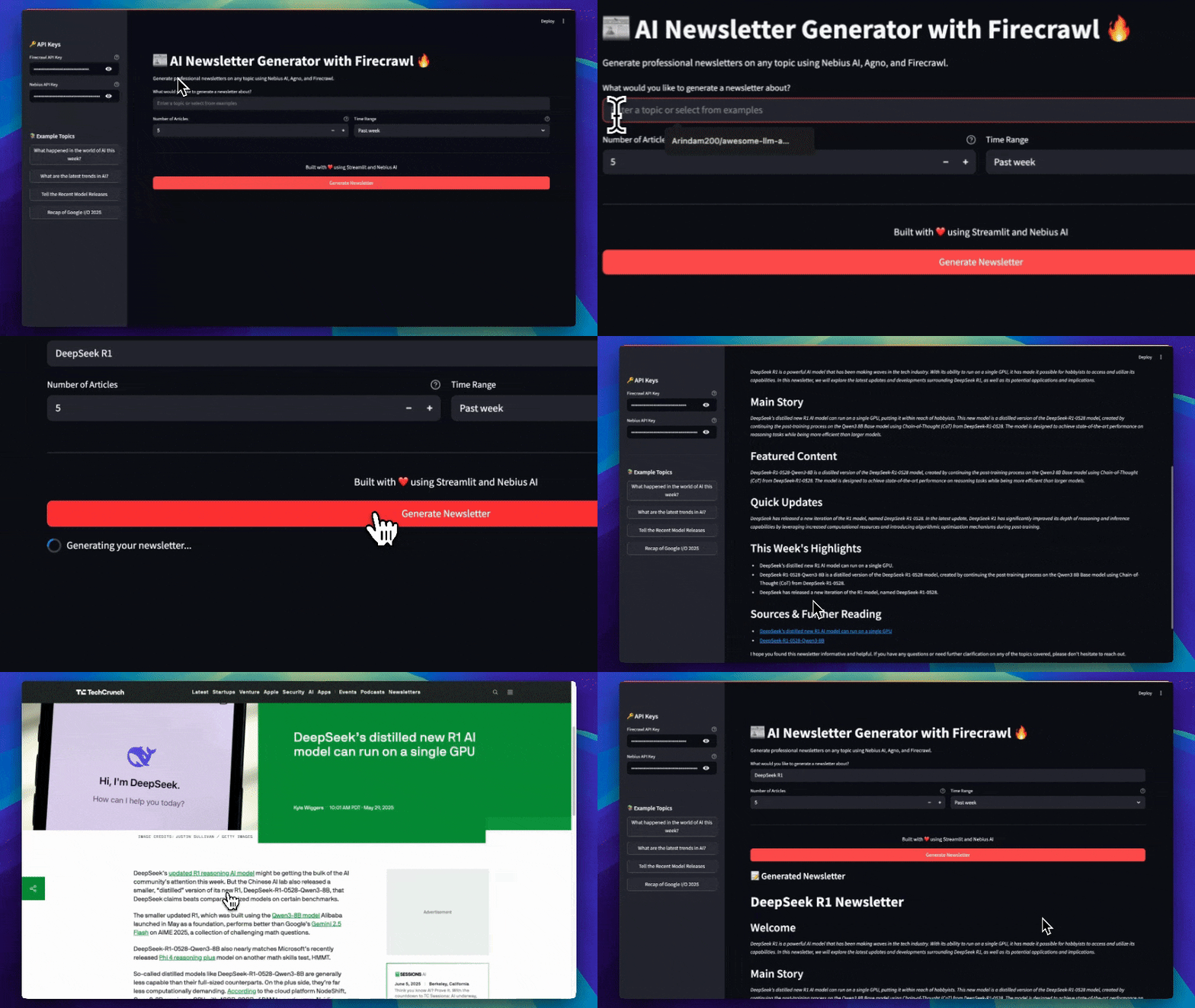
The Newsletter Generator is a powerful AI-powered application that researches, analyzes, and creates professional newsletters on any topic using Nebius AI, Agno, and Firecrawl. It leverages advanced AI models to deliver well-structured, up-to-date newsletters with the latest information from the web. Newsletter Generator Demo
Features

Real-time Research

Web research using Firecrawl for latest articles and sources

AI Content Generation

Powered by Nebius AI (Llama-3.1-70B-Instruct)

Professional Formatting

Newsletter structure in markdown with proper formatting

Customizable Search

Configure number of articles and time range

Download Support

Export newsletters in markdown format

Example Topics

Quick-start with pre-built topic examples

How It Works

1

Topic Research

The agent uses Firecrawl to search for recent, authoritative articles and sources on your chosen topic.
2

Content Analysis

Extracts key insights, trends, and expert opinions from the gathered articles.
3

Newsletter Generation

Synthesizes information into a well-structured newsletter using Nebius AI, following a professional template.
4

Download & Share

Download the generated newsletter in markdown format for easy sharing or publishing.

Prerequisites

Python 3.10+

Python 3.10 or higher required

Nebius AI API

Firecrawl API

Installation

1

Clone the Repository

git clone https://github.com/Arindam200/awesome-ai-apps.git
cd simple_ai_agents/newsletter_agent
2

Create Virtual Environment (Recommended)

python -m venv venv
source venv/bin/activate  # On Windows: venv\Scripts\activate
3

Install Dependencies

Using pip:
pip install -r requirements.txt
Or using uv (recommended):
uv sync
4

Configure Environment

Create a .env file in the project root:
FIRECRAWL_API_KEY=your_firecrawl_api_key
NEBIUS_API_KEY=your_nebius_api_key

Implementation

Newsletter Agent Configuration

The core of the newsletter generator is built using the Agno framework with specialized tools:
from agno.agent import Agent
from agno.models.nebius import Nebius
from agno.tools.firecrawl import FirecrawlTools
from agno.storage.sqlite import SqliteStorage
import os
from dotenv import load_dotenv

load_dotenv()

# Get API keys from environment
FIRECRAWL_API_KEY = os.getenv("FIRECRAWL_API_KEY")
NEBIUS_API_KEY = os.getenv("NEBIUS_API_KEY")

# Newsletter Research Agent
newsletter_agent = Agent(
    model=Nebius(
        id="meta-llama/Meta-Llama-3.1-70B-Instruct",
        api_key=NEBIUS_API_KEY
    ),
    tools=[
        FirecrawlTools(
            search=True,
            formats=["markdown", "links"],
            search_params={
                "limit": 2,
                "tbs": "qdr:w",  # Past week
            },
        ),
    ],
    description="""You are NewsletterResearch-X, an elite research assistant 
    specializing in discovering and extracting high-quality content for 
    compelling newsletters.""",
    instructions=[
        "Use firecrawl_search to find recent articles about the topic",
        "Extract key insights, trends, and expert opinions",
        "Create compelling headlines and engaging content",
        "Follow the newsletter template structure",
        "Maintain proper attribution and citation"
    ],
    markdown=True,
    show_tool_calls=True,
    storage=SqliteStorage(
        table_name="newsletter_agent",
        db_file="tmp/newsletter_agent.db",
    )
)

Newsletter Generation Function

The main function that orchestrates the newsletter creation:
def NewsletterGenerator(
    topic: str, 
    search_limit: int = 5, 
    time_range: str = "qdr:w"
) -> Dict[str, Any]:
    """
    Generate a newsletter based on the given topic and search parameters.
    
    Args:
        topic: The topic to generate the newsletter about
        search_limit: Maximum number of articles to search and analyze
        time_range: Time range for article search (e.g., "qdr:w" for past week)
    
    Returns:
        Processed newsletter content with structured metadata
    """
    try:
        # Update search parameters
        newsletter_agent.tools[0].search_params.update({
            'limit': search_limit,
            'tbs': time_range
        })
        
        response = newsletter_agent.run(topic)
        return response
    except Exception as e:
        raise RuntimeError(f'Newsletter generation failed: {e}') from e

Usage

1

Start the Application

streamlit run app.py
Open your browser at http://localhost:8501
2

Enter API Keys

Enter your API keys in the sidebar (or set them in the .env file)
3

Choose a Topic

Enter a topic or select from example topics:
  • Latest developments in AI
  • Cryptocurrency market trends
  • Tech industry news
  • Climate change updates
4

Configure Parameters

Set search parameters:
  • Number of articles (2-10)
  • Time range (past day, week, month)
5

Generate Newsletter

Click “Generate Newsletter” and wait for results
6

Download

Download the generated newsletter in markdown format

Newsletter Structure

The generated newsletters follow this professional structure:
# [Compelling Subject Line]

## Welcome
[Engaging hook and context]

## [Main Story]
[Key insights and analysis]
[Expert quotes and statistics]

## Featured Content
[Deeper exploration]
[Real-world examples]

## Quick Updates
[Actionable insights]
[Expert recommendations]

## This Week's Highlights
- [Notable update 1]
- [Important news 2]
- [Key development 3]

## Sources & Further Reading
[Properly attributed sources with links]

Technical Details

Architecture

UI Layer

Streamlit interface for user interactions

Agent Layer

Agno agent framework for workflow orchestration

Research Layer

Firecrawl for real-time web research

AI Layer

Nebius AI for content generation

Storage

The agent uses SQLite for persistent storage:
storage=SqliteStorage(
    table_name="newsletter_agent",
    db_file="tmp/newsletter_agent.db",
)
This maintains conversation context and agent history across sessions.

Search Parameters

Customize the Firecrawl search behavior:
ParameterDescriptionDefault
limitNumber of articles to search2
tbsTime range (qdr:d=day, qdr:w=week, qdr:m=month)“qdr:w”
formatsOutput formats[“markdown”, “links”]
The time-based search parameter tbs uses Google search syntax:
  • qdr:d - Past 24 hours
  • qdr:w - Past week
  • qdr:m - Past month
  • qdr:y - Past year

Project Structure

newsletter_agent/
├── app.py              # Streamlit web interface
├── main.py             # Core agent workflow and newsletter generation logic
├── requirements.txt    # Python dependencies
├── demo.gif            # Demo animation
├── tmp/
│   └── newsletter_agent.db  # Local database for agent storage
└── README.md           # Documentation

Example Workflow

Here’s what happens when you generate a newsletter:
1

User Input

User enters “Latest developments in AI” as the topic
2

Web Research

Firecrawl searches for recent articles from the past week
3

Content Extraction

Agent extracts key information from 5 authoritative sources
4

Analysis

AI identifies trends, patterns, and expert opinions
5

Synthesis

Nebius AI generates structured newsletter content
6

Formatting

Content is formatted following the professional template
7

Output

User receives polished newsletter with sources and citations

Best Practices

Topic Selection

Choose specific, focused topics for better results

Article Limit

Start with 5-7 articles for comprehensive coverage

Time Range

Use past week for trending topics, past month for analysis

Review Output

Always review generated content before publishing

Troubleshooting

Ensure both FIRECRAWL_API_KEY and NEBIUS_API_KEY are correctly set in your .env file.
Try adjusting the time range or broadening your topic. Check your Firecrawl API key validity.
Reduce the number of articles or check your internet connection.
Ensure the tmp/ directory exists and has write permissions.

Next Steps

Agno Framework

Learn more about Agno’s capabilities

Firecrawl API

Explore Firecrawl documentation

Nebius AI

Discover Nebius AI models

Advanced Features

Add custom templates and styling

Build docs developers (and LLMs) love