Memory Hierarchy
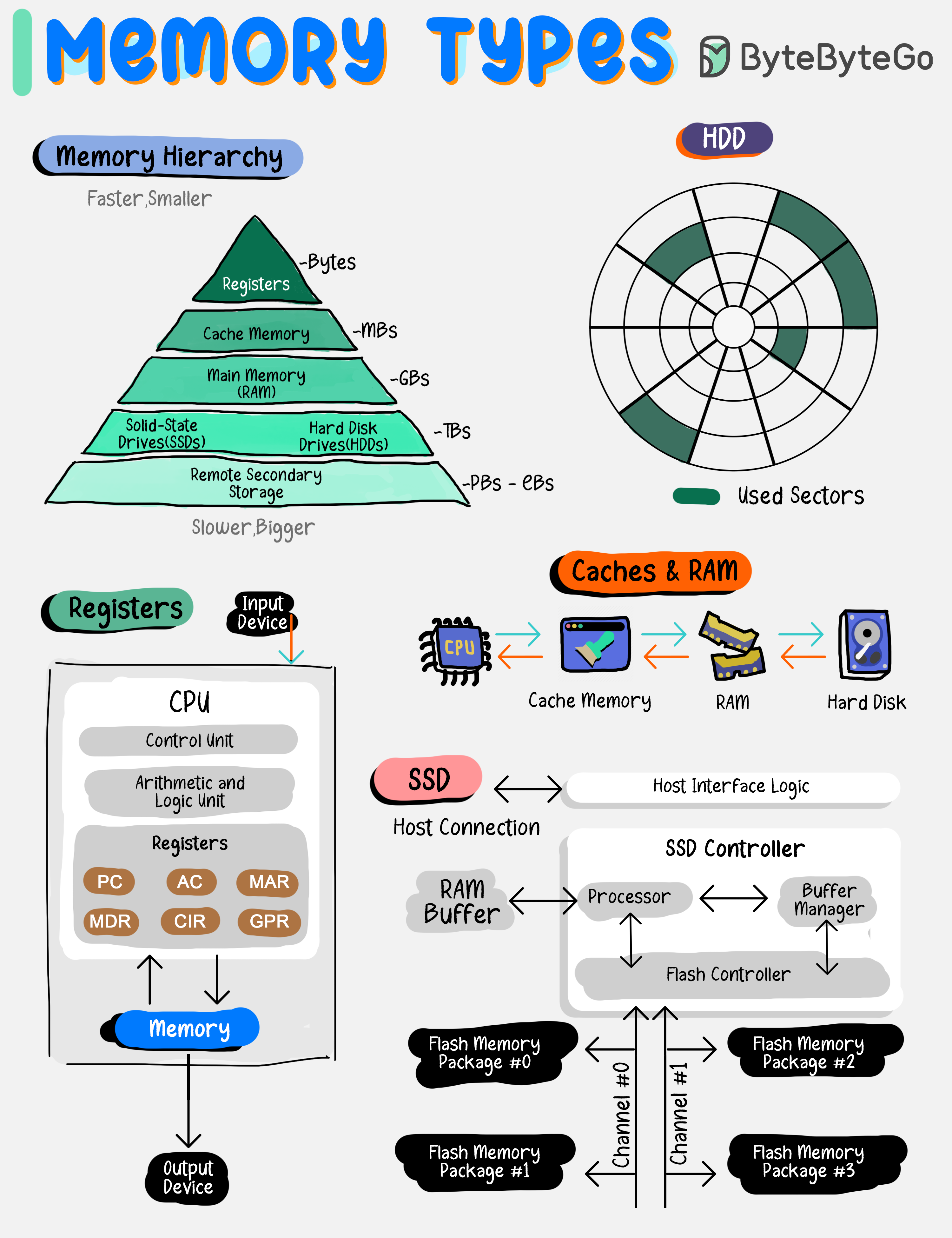 Memory types vary by speed, size, and function, creating a multi-layered architecture that balances cost with the need for rapid data access.
By grasping the roles and capabilities of each memory type, developers and system architects can design systems that effectively leverage the strengths of each storage layer, leading to improved overall system performance and user experience.
Memory types vary by speed, size, and function, creating a multi-layered architecture that balances cost with the need for rapid data access.
By grasping the roles and capabilities of each memory type, developers and system architects can design systems that effectively leverage the strengths of each storage layer, leading to improved overall system performance and user experience.
Common Memory Types
Registers
Registers
Tiny, ultra-fast storage within the CPU for immediate data access.
- Speed: Fastest
- Size: Smallest (bytes)
- Location: Inside CPU
- Use Case: Active instruction execution
Caches
Caches
Small, quick memory located close to the CPU to speed up data retrieval.
- Speed: Very fast
- Size: Small (KB to MB)
- Levels: L1, L2, L3 cache
- Use Case: Frequently accessed data
Main Memory (RAM)
Main Memory (RAM)
Larger, primary storage for currently executing programs and data.
- Speed: Fast
- Size: Moderate (GB)
- Volatile: Data lost on power off
- Use Case: Active program execution
Solid-State Drives (SSDs)
Solid-State Drives (SSDs)
Fast, reliable storage with no moving parts, used for persistent data.
- Speed: Moderate
- Size: Large (GB to TB)
- Persistent: Data retained
- Use Case: Operating systems, applications
Hard Disk Drives (HDDs)
Hard Disk Drives (HDDs)
Mechanical drives with large capacities for long-term storage.
- Speed: Slower
- Size: Very large (TB)
- Cost: Lower per GB
- Use Case: Bulk storage, backups
Remote Secondary Storage
Remote Secondary Storage
Offsite storage for data backup and archiving, accessible over a network.
- Speed: Slowest
- Size: Unlimited
- Access: Network-dependent
- Use Case: Backups, archives, disaster recovery
Process vs Thread
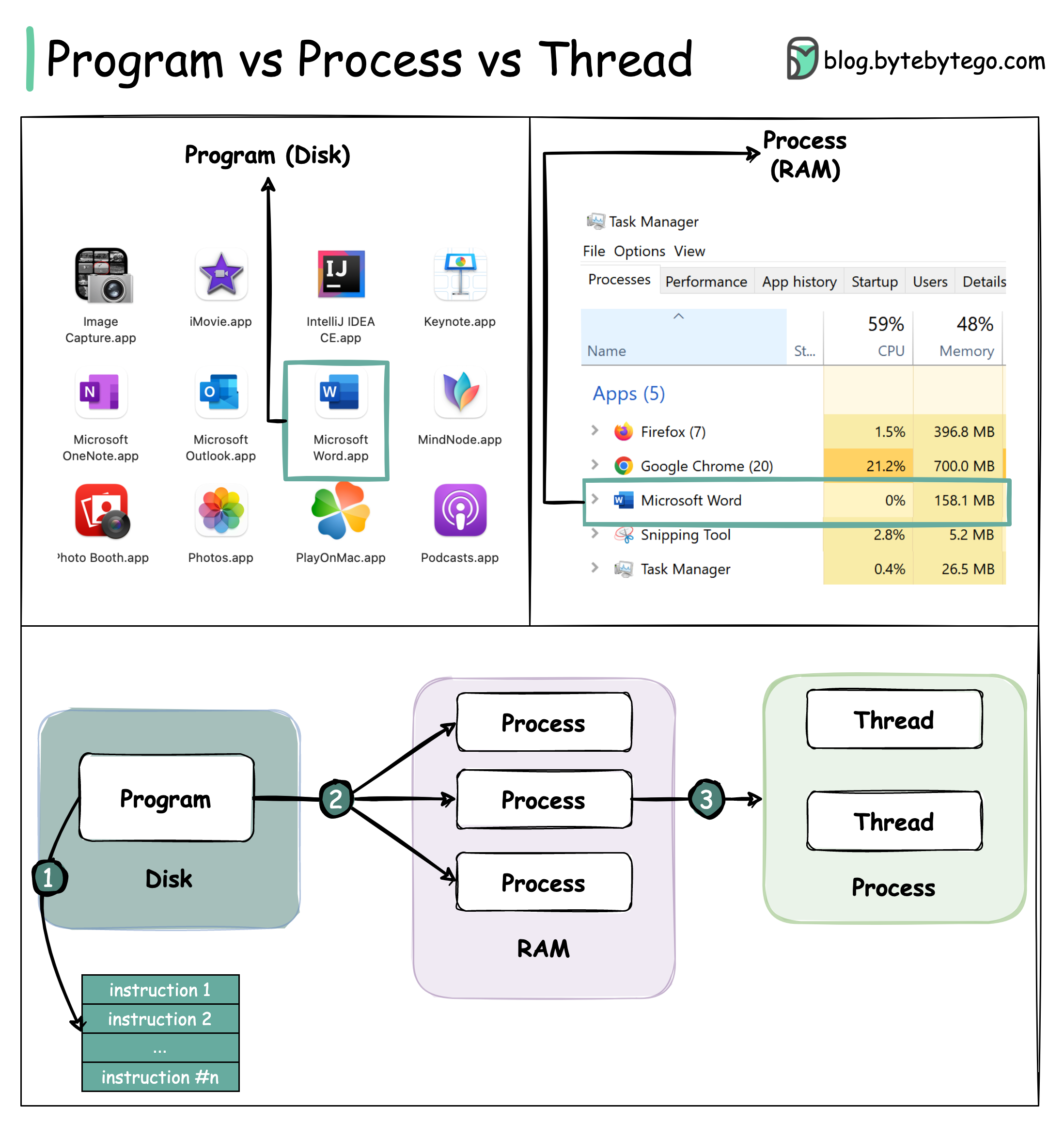
Understanding Programs, Processes, and Threads
To better understand this question, let’s first take a look at what a Program is. A Program is an executable file containing a set of instructions and passively stored on disk. One program can have multiple processes. For example, the Chrome browser creates a different process for every single tab. A Process means a program is in execution. When a program is loaded into the memory and becomes active, the program becomes a process. The process requires some essential resources such as registers, program counter, and stack. A Thread is the smallest unit of execution within a process.The Relationship Flow
Key Differences
Independence
Processes are usually independent, while threads exist as subsets of a process.
Memory
Each process has its own memory space. Threads that belong to the same process share the same memory.
Weight
A process is a heavyweight operation. It takes more time to create and terminate.
Context Switching
Context switching is more expensive between processes.
Performance Tip: Inter-thread communication is faster for threads since they share the same memory space.
Memory Management
Paging vs Segmentation
- Paging
- Segmentation
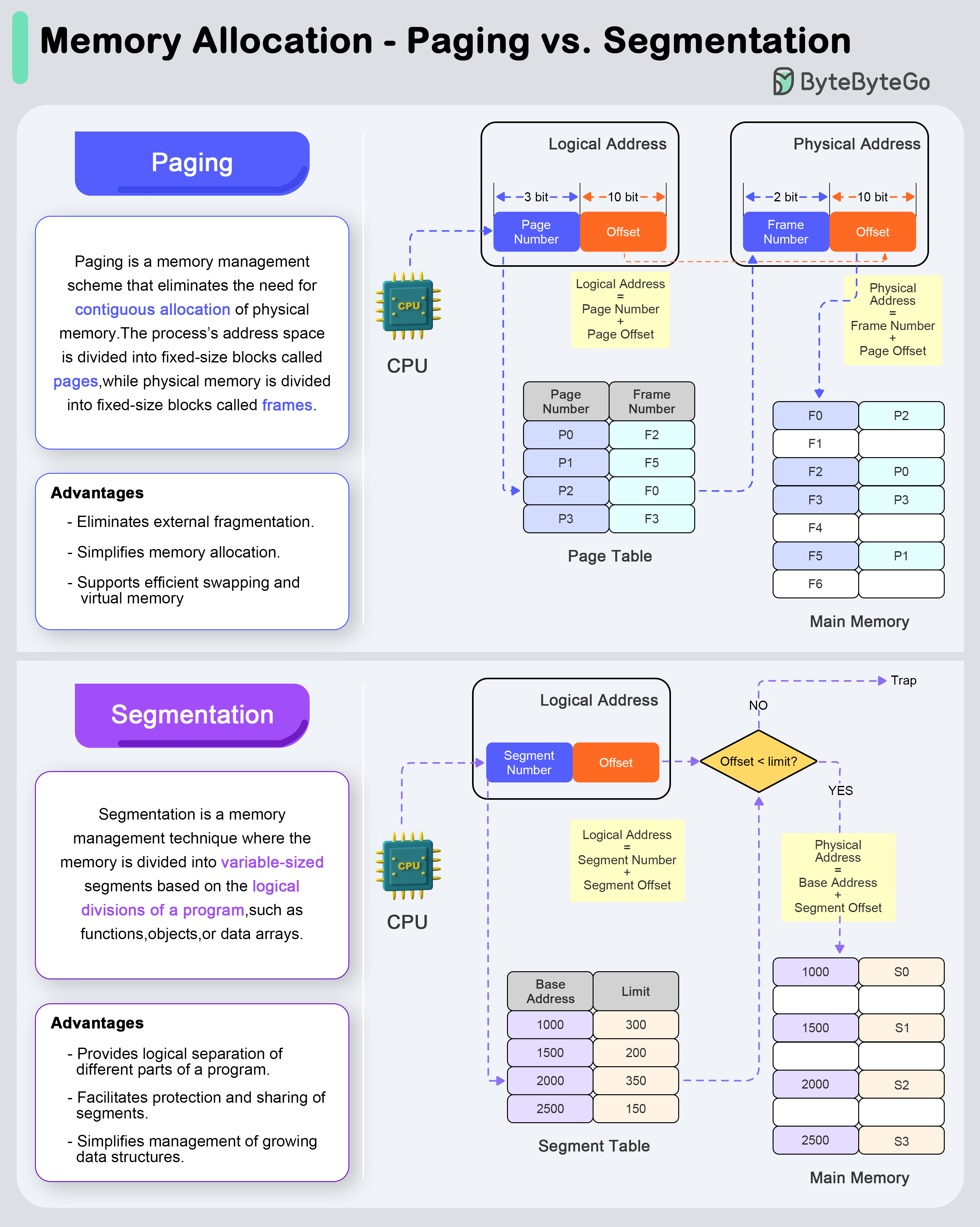
Paging is a memory management scheme that eliminates the need for contiguous allocation of physical memory. The process’s address space is divided into fixed-size blocks called pages, while physical memory is divided into fixed-size blocks called frames.Address Translation Process:
- Logical Address Space: The logical address (generated by the CPU) is divided into a page number and a page offset.
- Page Table Lookup: The page number is used as an index into the page table to find the corresponding frame number.
- Physical Address Formation: The frame number is combined with the page offset to form the physical address in memory.
- Eliminates external fragmentation
- Simplifies memory allocation
- Supports efficient swapping and virtual memory
Concurrency vs Parallelism
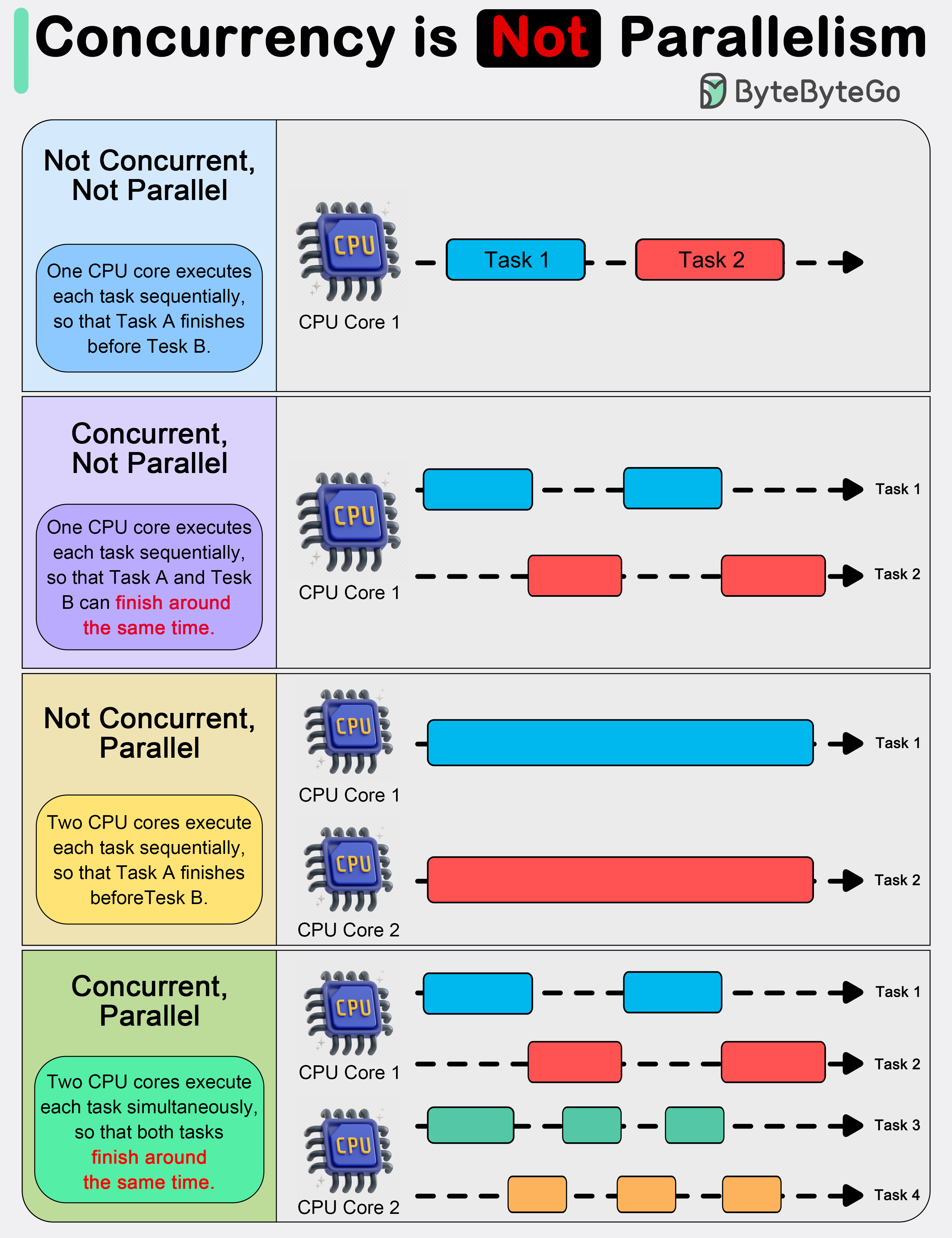 In system design, it is important to understand the difference between concurrency and parallelism.
As Rob Pike (one of the creators of GoLang) stated: “Concurrency is about dealing with lots of things at once. Parallelism is about doing lots of things at once.” This distinction emphasizes that concurrency is more about the design of a program, while parallelism is about the execution.
In system design, it is important to understand the difference between concurrency and parallelism.
As Rob Pike (one of the creators of GoLang) stated: “Concurrency is about dealing with lots of things at once. Parallelism is about doing lots of things at once.” This distinction emphasizes that concurrency is more about the design of a program, while parallelism is about the execution.
Concurrency
About Dealing With
Concurrency is about dealing with multiple things at once. It involves structuring a program to handle multiple tasks simultaneously, where the tasks can start, run, and complete in overlapping time periods, but not necessarily at the same instant.Key Points:- About program design and composition
- Can work on single-core processors
- Useful for I/O-bound operations
- Enables responsiveness
- Web servers handling multiple requests
- UI applications remaining responsive
- File I/O operations
- Network communication
Parallelism
About Doing
Parallelism refers to the simultaneous execution of multiple computations. It is the technique of running two or more tasks or computations at the same time, utilizing multiple processors or cores within a computer to perform several operations concurrently.Key Points:- About program execution
- Requires multiple processing units
- Useful for CPU-bound operations
- Increases throughput
- Heavy mathematical computations
- Data analysis
- Image processing
- Real-time processing
How Computer Programs Execute
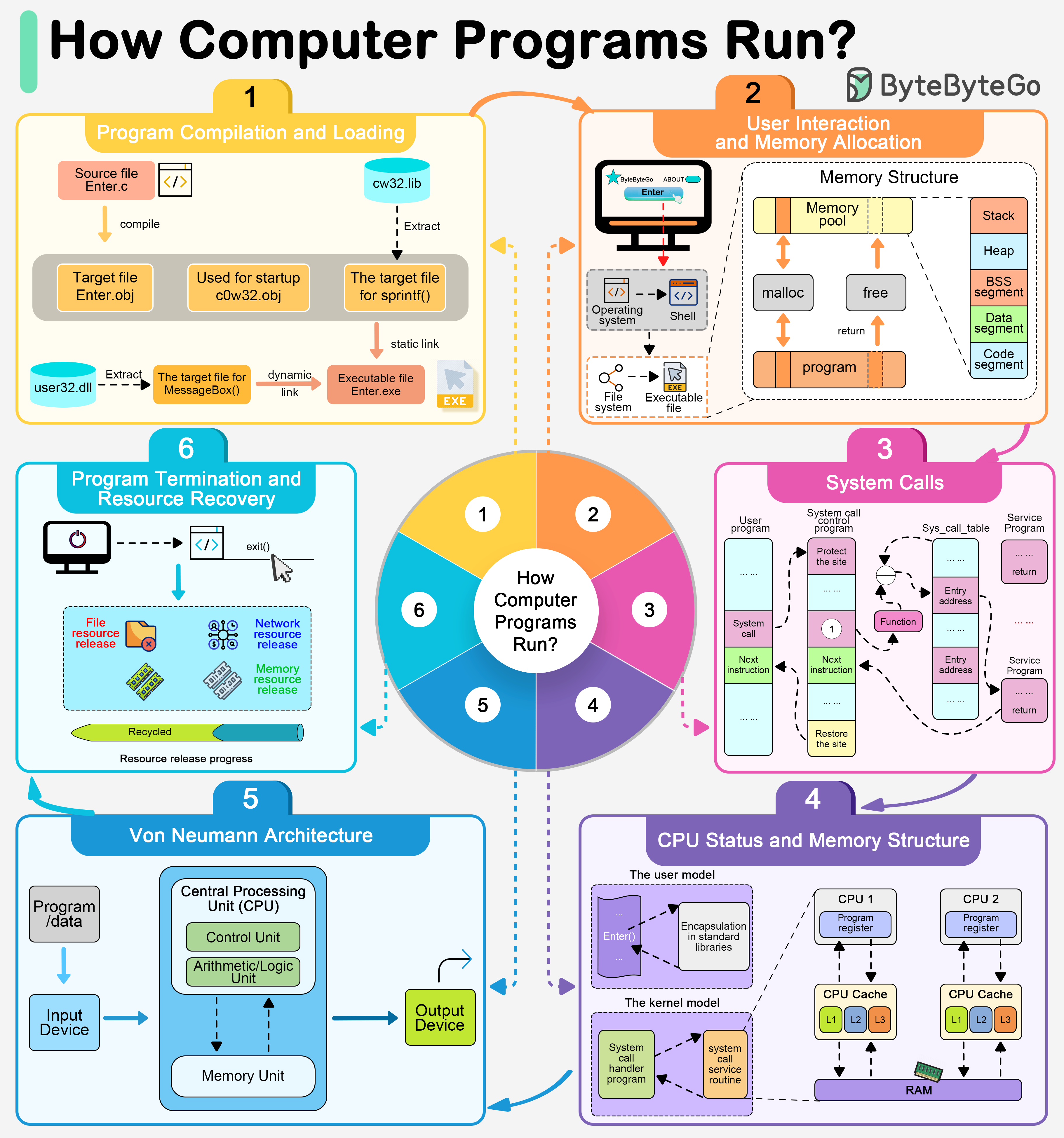
Execution Flow
User Interaction
By double-clicking a program, a user is instructing the operating system to launch an application via the graphical user interface.
Program Preloading
Once the execution request has been initiated, the operating system first retrieves the program’s executable file. The operating system locates this file through the file system and loads it into memory in preparation for execution.
Dependency Resolution
Most modern applications rely on a number of shared libraries, such as dynamic link libraries (DLLs). These dependencies must be resolved and loaded.
Memory Allocation
The operating system is responsible for allocating space in memory for the program’s code, data, and stack.
Runtime Initialization
After allocating memory, the operating system and execution environment (e.g., Java’s JVM or the .NET Framework) will initialize various resources needed to run the program.
Execution Begin
The entry point of a program (usually a function named
main) is called to begin execution of the code written by the programmer.Von Neumann Architecture
In the Von Neumann architecture, the CPU executes instructions stored in memory, following the fetch-decode-execute cycle.
Key Takeaways
Memory Hierarchy
Understanding the trade-offs between speed, size, and cost across different memory types is crucial for system design.
Process Management
Know when to use processes vs threads based on isolation needs, resource sharing, and performance requirements.
Memory Management
Both paging and segmentation have their place - paging for simplicity and efficiency, segmentation for logical organization.
Concurrency Patterns
Design for concurrency to handle multiple tasks; leverage parallelism to speed up computation-heavy operations.