Overview
The first step sets up your build environment by creating the initial configuration file (seed.conf) and defining the three main directory locations:
- SRC: Where source files will be downloaded
- BLD: Where temporary build files will be stored
- BIN: Where compiled libraries will be installed
Running the Configuration
Navigate to EASY_HOME
Open Terminal and navigate to the directory where you downloaded/cloned Miele-LXIV Easy:Replace
$EASY_HOME with the actual path to your Miele-LXIV Easy directory.Run the build script
Since
seed.conf doesn’t exist yet, running build.sh will automatically launch the configuration interface:Configure your settings
The kconfig-mconf interface will appear. Here you can: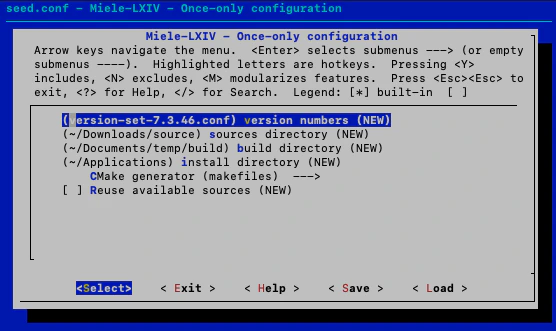
- Review and accept the default directory paths (recommended)
- Or define your own custom paths if needed
- Select your version set file (use the default unless you have specific requirements)
Recommendation: If you’re setting up for the first time, accept all defaults to get a tried and tested configuration.
What Happens
When you complete this step:- The
seed.conffile is created in$EASY_HOME - A
log/directory is created for capturing build logs - Your directory paths and version selections are saved
- A timestamp is appended to the configuration
The kconfig-mconf Interface
The configuration interface uses the same tool that Linux uses for kernel configuration. It provides:- Navigation: Use arrow keys to move through options
- Selection: Press Space to toggle options, Enter to select menus
- Help: Press
?on any option to see detailed help text - Save: Writes your configuration to files
- Exit: Leaves the configuration interface
Configuration File Location
After completion, you’ll find:Verifying Configuration
You can verify your configuration was created successfully:Common Settings
Directory Paths
Directory Paths
The configuration will ask you to define:
CONFIG_SRC_DIR: Source directory pathCONFIG_BLD_DIR: Build directory pathCONFIG_BIN_DIR: Install/binaries directory path
Version Set
Version Set
The version set file defines which versions of all third-party libraries will be downloaded and built. The default version set has been tested and is recommended.
Generator
Generator
Choose between Xcode (recommended) or Unix Makefiles as the CMake generator.
Troubleshooting
Next Step
Step 2: Download Sources
Now that your build environment is configured, proceed to download the third-party library sources.