Overview
Step 2 downloads all required third-party library source code from various repositories. This includes DCMTK, VTK, ITK, and numerous support libraries. Patches are automatically applied where necessary.What Gets Downloaded
The download step retrieves source archives for:- DCMTK - DICOM Toolkit (with Miele-LXIV patches)
- VTK - Visualization Toolkit
- ITK - Insight Segmentation and Registration Toolkit
- OpenJPEG - JPEG 2000 codec (with patches)
- OpenSSL - Cryptography library
- libjpeg - JPEG image library
- libpng - PNG image library
- libtiff - TIFF image library
- libxml2 - XML parsing library
- libiconv - Character encoding conversion
- zlib - Compression library
- GLEW - OpenGL Extension Wrangler Library (optional)
- GLM - OpenGL Mathematics library (optional)
- Jasper - Image processing library
- Miele-LXIV - The main application source code
Running the Download
Open the configuration menu
From your This launches the kconfig-mconf interface.
$EASY_HOME directory, run:Enable 'Download sources'
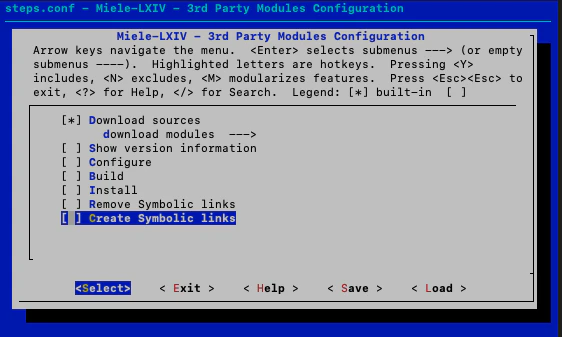
In the configuration menu:
- Navigate to “Download sources”
- Press Space to enable it (it should show
[*]) - Optionally, enter the submenu to select which specific libraries to download (all are enabled by default)
- Disable all other steps (Configure, Build, Install, etc.) if they’re enabled
Expected Output
As the script runs, you’ll see output like:Patches Applied
Some libraries receive Miele-LXIV specific patches:- DCMTK: Custom modifications for Miele-LXIV integration
- OpenJPEG: Compatibility patches
patch/ directory and are applied automatically during the download step.
Download Sources
Libraries are downloaded from:- DCMTK: OFFIS DICOM server (dicom.offis.de)
- VTK/ITK: Kitware repositories
- OpenJPEG: uclouvain GitHub
- Image libraries: Official project sites
- Miele-LXIV: GitHub repository
Directory Structure After Download
Your SRC directory will contain:Actual version numbers depend on your version set configuration from Step 1.
Download Time
Estimated time: 15-30 minutes depending on your internet connection Total download size is approximately 500MB-1GB of compressed source archives.Verification
Verify the downloads completed successfully:Troubleshooting
wget command not found
wget command not found
Install wget using Homebrew:
Download fails or times out
Download fails or times out
- Check your internet connection
- Some corporate networks may block certain download sites
- Try running the download step again - it will skip already downloaded files
Patch application fails
Patch application fails
This usually means:
- The source version doesn’t match the patch
- The patch was already applied
What’s Next
Step 3: Build and Install
With all sources downloaded, you’re ready to compile and install the libraries.