The gr.Interface class can handle four different kinds of demos, depending on whether you need inputs, outputs, or both.

Interface types overview

Gradio supports:
  1. Standard demos - separate inputs and outputs (e.g., image classifier, speech-to-text)
  2. Output-only demos - no input, only output (e.g., unconditional image generation)
  3. Input-only demos - no output, only input (e.g., save uploads to database)
  4. Unified demos - same components for input and output (e.g., text autocomplete)
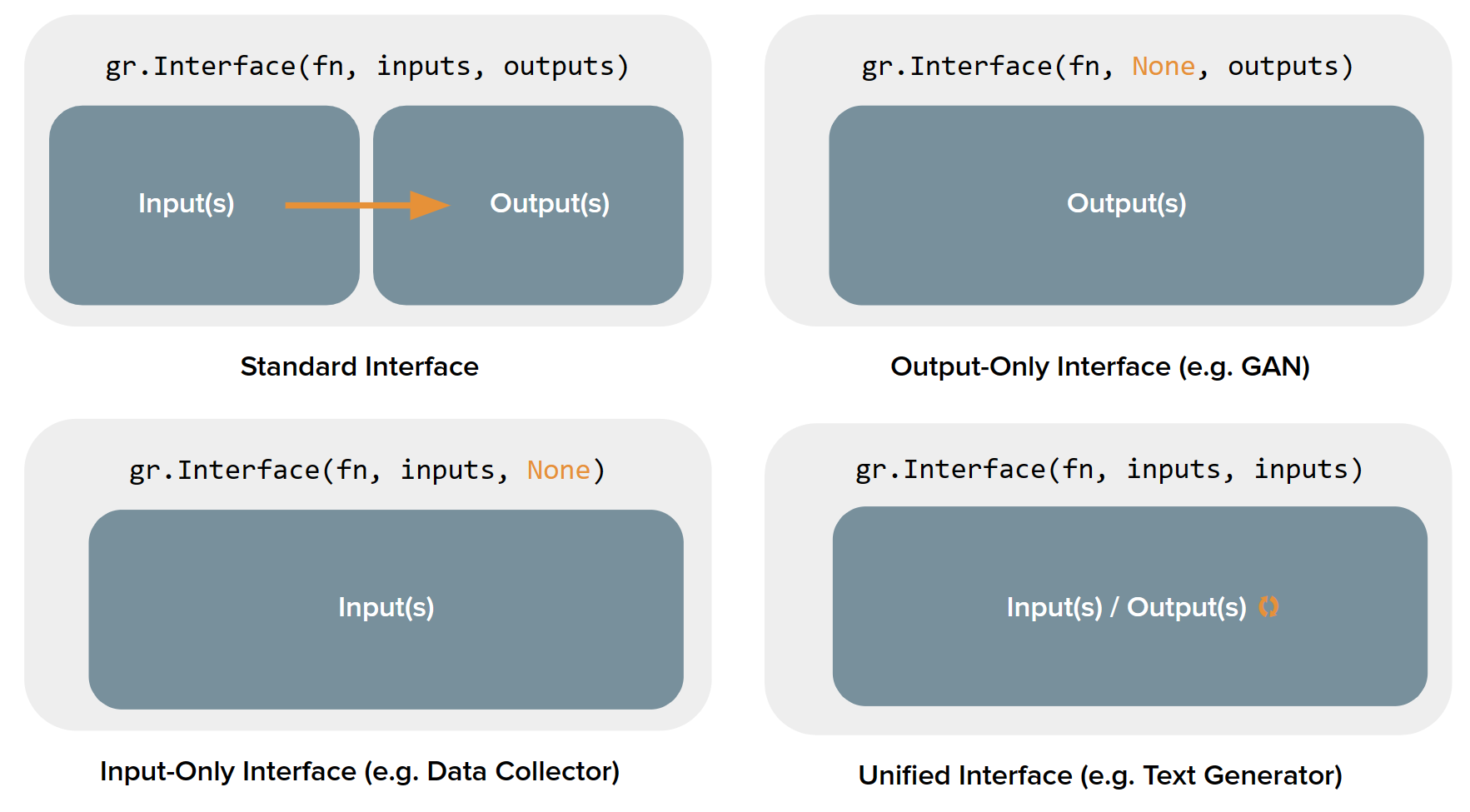
Depending on the type, the user interface looks different: Interface types visualization

Standard demos

Standard demos have both input and output components. Set both the inputs and outputs parameters:
import numpy as np
import gradio as gr

def sepia(input_img):
    sepia_filter = np.array([
        [0.393, 0.769, 0.189],
        [0.349, 0.686, 0.168],
        [0.272, 0.534, 0.131]
    ])
    sepia_img = input_img.dot(sepia_filter.T)
    sepia_img /= sepia_img.max()
    return sepia_img

demo = gr.Interface(
    sepia,
    inputs=gr.Image(),
    outputs="image"
)

demo.launch()
This creates a standard interface with:
  • Input component on the left
  • Submit button
  • Output component on the right

Common use cases

  • Image classification
  • Text translation
  • Speech-to-text transcription
  • Question answering
  • Image-to-image transformations

Output-only demos

Output-only demos don’t take any input but produce output. Set inputs=None:
import time
import gradio as gr

def fake_gan():
    time.sleep(1)
    images = [
        "https://images.unsplash.com/photo-1507003211169-0a1dd7228f2d",
        "https://images.unsplash.com/photo-1554151228-14d9def656e4",
        "https://images.unsplash.com/photo-1542909168-82c3e7fdca5c",
    ]
    return images

demo = gr.Interface(
    fn=fake_gan,
    inputs=None,
    outputs=gr.Gallery(label="Generated Images", columns=2),
    title="FD-GAN",
    description="This is a demo of image generation."
)

demo.launch()
The interface shows:
  • A “Generate” button (instead of “Submit”)
  • Only the output component
  • No input components

Common use cases

  • Unconditional image generation (GANs)
  • Random quote generators
  • Daily predictions
  • Noise generation
  • Any function that requires no user input

Input-only demos

Input-only demos take input but produce no visible output. Set outputs=None:
import random
import string
import gradio as gr

def save_image_random_name(image):
    random_string = ''.join(random.choices(string.ascii_letters, k=20)) + '.png'
    image.save(random_string)
    print(f"Saved image to {random_string}!")

demo = gr.Interface(
    fn=save_image_random_name,
    inputs=gr.Image(type="pil"),
    outputs=None,
)

demo.launch()
The interface shows:
  • Only input components
  • A submit button
  • No output components

Common use cases

  • Save uploads to a database
  • Submit feedback forms
  • Log data for analytics
  • Trigger external processes
  • Any function where the output isn’t meant for display

Unified demos

Unified demos use the same component for both input and output. The output overwrites the input:
import gradio as gr

def generate_text(prompt):
    # Simulate text generation by adding to the prompt
    return prompt + " (generated continuation...)"

demo = gr.Interface(
    generate_text,
    inputs=gr.Textbox(lines=5, label="Input Text"),
    outputs=gr.Textbox(lines=5, label="Input Text"),
)

demo.launch()
To create a unified interface, set inputs and outputs to the same component instance.
Here’s the correct way:
import gradio as gr

textbox = gr.Textbox(lines=5)

def text_generation(text):
    return text + " [AI generated continuation]"

demo = gr.Interface(
    text_generation,
    inputs=textbox,
    outputs=textbox,  # Same instance
)

demo.launch()
The interface shows:
  • A single component that serves as both input and output
  • Output replaces the input when function completes
  • Useful for iterative transformations

Common use cases

  • Text autocomplete/generation
  • Image enhancement (input image → enhanced image)
  • Code formatting/refactoring
  • Translation with same text box
  • Any iterative refinement task

Detecting interface type

Gradio automatically detects the interface type based on your configuration:
from gradio.data_classes import InterfaceTypes

# Standard: different inputs and outputs
if inputs and outputs and inputs != outputs:
    interface_type = InterfaceTypes.STANDARD

# Output-only: no inputs
if not inputs and outputs:
    interface_type = InterfaceTypes.OUTPUT_ONLY

# Input-only: no outputs
if inputs and not outputs:
    interface_type = InterfaceTypes.INPUT_ONLY

# Unified: same components for input and output
if inputs == outputs:
    interface_type = InterfaceTypes.UNIFIED

When to use each type

1

Standard interfaces

Use when you have a clear transformation: input → processing → outputMost common type for machine learning models.
2

Output-only interfaces

Use when your function generates content without user inputPerfect for generative models that don’t need conditioning.
3

Input-only interfaces

Use when you need to collect data without showing resultsGreat for data collection, logging, or backend operations.
4

Unified interfaces

Use when input and output are the same type and output should replace inputBest for iterative refinement or enhancement tasks.

Beyond the four types

If none of these types fit your needs, you’ll want to use gr.Blocks() instead, which provides:
  • Multiple functions with different input/output combinations
  • Custom layouts and arrangements
  • More complex interactivity
  • Conditional visibility
  • State management across multiple components
See the Blocks documentation for more advanced use cases.

Complete examples

import gradio as gr

def classify_image(img):
    return {"cat": 0.7, "dog": 0.2, "bird": 0.1}

demo = gr.Interface(
    classify_image,
    inputs=gr.Image(),
    outputs=gr.Label(num_top_classes=3),
    title="Image Classifier",
    description="Upload an image to classify it"
)

demo.launch()
import gradio as gr
import numpy as np

def generate_random_image():
    return np.random.randint(0, 255, (100, 100, 3), dtype=np.uint8)

demo = gr.Interface(
    generate_random_image,
    inputs=None,
    outputs=gr.Image(),
    title="Random Art Generator"
)

demo.launch()
import gradio as gr

def save_feedback(name, rating, comments):
    with open("feedback.txt", "a") as f:
        f.write(f"{name}: {rating}/5 - {comments}\n")
    print(f"Saved feedback from {name}")

demo = gr.Interface(
    save_feedback,
    inputs=[
        gr.Textbox(label="Name"),
        gr.Slider(1, 5, label="Rating"),
        gr.Textbox(label="Comments", lines=3)
    ],
    outputs=None,
    title="Feedback Form"
)

demo.launch()
import gradio as gr

textbox = gr.Textbox(lines=10, label="Text Editor")

def format_text(text):
    # Simple formatting: uppercase first letter of sentences
    return ". ".join([s.strip().capitalize() for s in text.split(".")])

demo = gr.Interface(
    format_text,
    inputs=textbox,
    outputs=textbox,
    title="Text Formatter"
)

demo.launch()

Next steps

Interface class

Learn more about the Interface class

Blocks

Build more complex interfaces with Blocks

Examples

Working with examples in interfaces

Reactive interfaces

Create live and streaming interfaces