What is Memori Cloud?
Memori is a memory layer for LLM applications, agents, and copilots. It continuously captures interactions, extracts structured knowledge, and intelligently ranks, decays, and retrieves the relevant memories. So your AI remembers the right things at the right time across every session.Why Choose Memori Cloud?
With the Memori Cloud platform at app.memorilabs.ai, you skip all database configuration. Sign up, get a Memori API key, and start building AI agents with memory in minutes.Zero Configuration
No database setup needed. Connect your LLM client with an API key and start building memories immediately.LLM Provider Support
Memori Cloud supports major LLM providers with sync, async, streamed, and unstreamed modes:- OpenAI - Chat Completions & Responses API
- Anthropic - Claude models
- Google Gemini - Gemini models
- Grok (xAI) - Grok models
- AWS Bedrock - via LangChain
ChatBedrock
Framework Integration
Native support for popular AI frameworks:- LangChain - Seamless integration with LangChain chains
- Agno - Built-in Agno support
- Pydantic AI - Type-safe AI development
Advanced Augmentation
Background AI processing extracts facts, preferences, and relationships from your conversations automatically:- Attributes - User characteristics and properties
- Events - Important occurrences and milestones
- Facts - Verified information and details
- Preferences - User likes and dislikes
- Relationships - Connections between entities
- Rules - Behavioral patterns and constraints
- Skills - Capabilities and expertise
Semantic Recall
Semantic search surfaces the right memories at the right time. Memories are ranked by relevance and importance, with intelligent decay so older or less relevant facts recede — so your AI stays contextually aware without clutter.Use manual recall when you need to display memories in your UI, build custom prompts, or debug. Automatic recall happens seamlessly during LLM calls.
Core Concepts
| Concept | Description | Example |
|---|---|---|
| Entity | Person, place, or thing (like a user) | entity_id="user_123" |
| Process | Your agent, LLM interaction, or program | process_id="support_agent" |
| Session | Groups LLM interactions together | Auto-generated UUID, manually manageable |
| Augmentation | Background AI enhancement of memories | Auto-runs after wrapped LLM calls |
| Recall | Retrieve relevant memories from previous interactions | Auto-injects recalled memories |
Architecture Overview
The diagram shows three lanes: your app, the Memori SDK, and Memori Cloud. Your app calls the LLM normally, Memori captures context on the response path, and memory processing continues in the background. Synchronous capture: Conversation messages are sent to Memori Cloud while your normal LLM flow continues. Recall injection: Relevant memories are fetched from managed storage and injected into later prompts. Async augmentation: Memori Cloud extracts facts, preferences, rules, events, and relationships from conversations without blocking your app.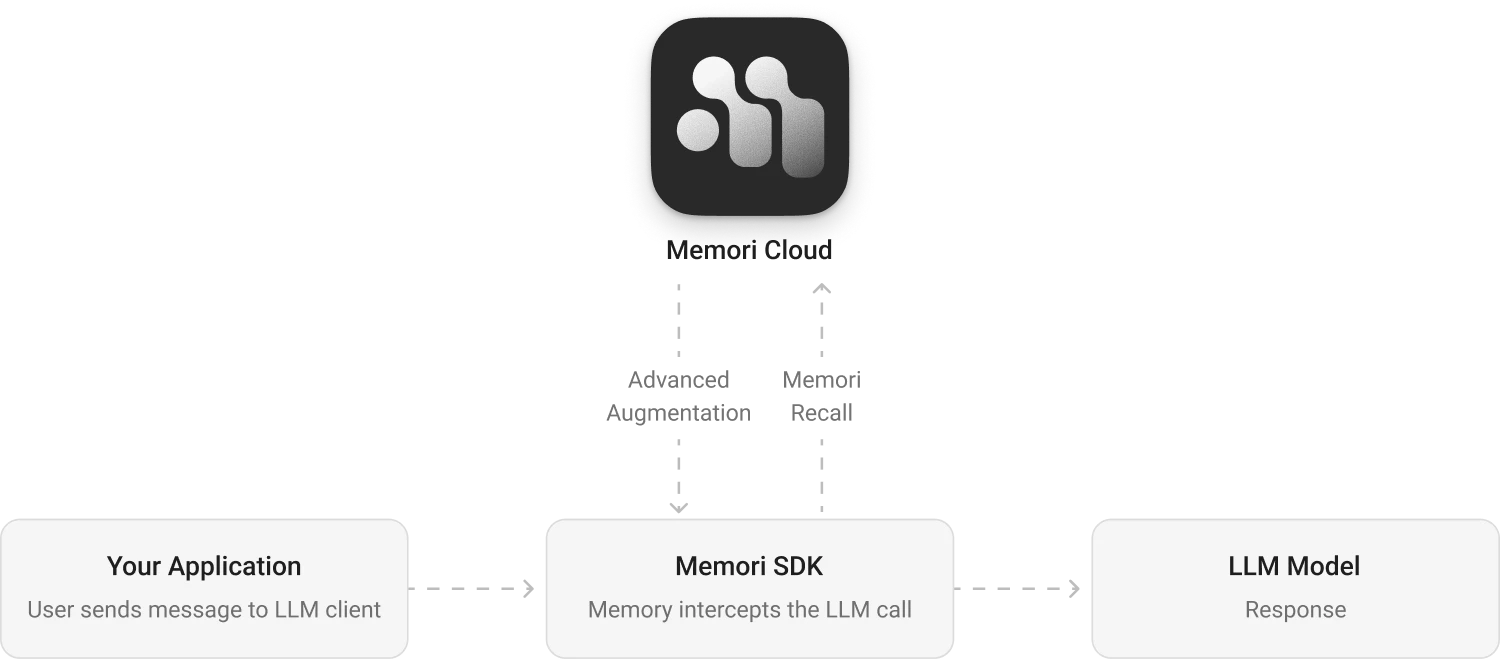
Memory Usage Plans
| Plan | Memories Created / month | Memories Recalled / month |
|---|---|---|
| Free (with API key) | 5,000 | 15,000 |
| Starter | 25,000 | 100,000 |
| Pro | 150,000 | 500,000 |
| Enterprise | Custom | Custom |
Next Steps
Install Memori
Get started by installing the Memori SDK and setting up your API key.Go to Installation →
Quick Start
Build your first memory-enabled application in under 3 minutes.Go to Quick Start →
Explore the Dashboard
Manage API keys, test memories, and monitor usage in the dashboard.Go to Dashboard →