Architecture
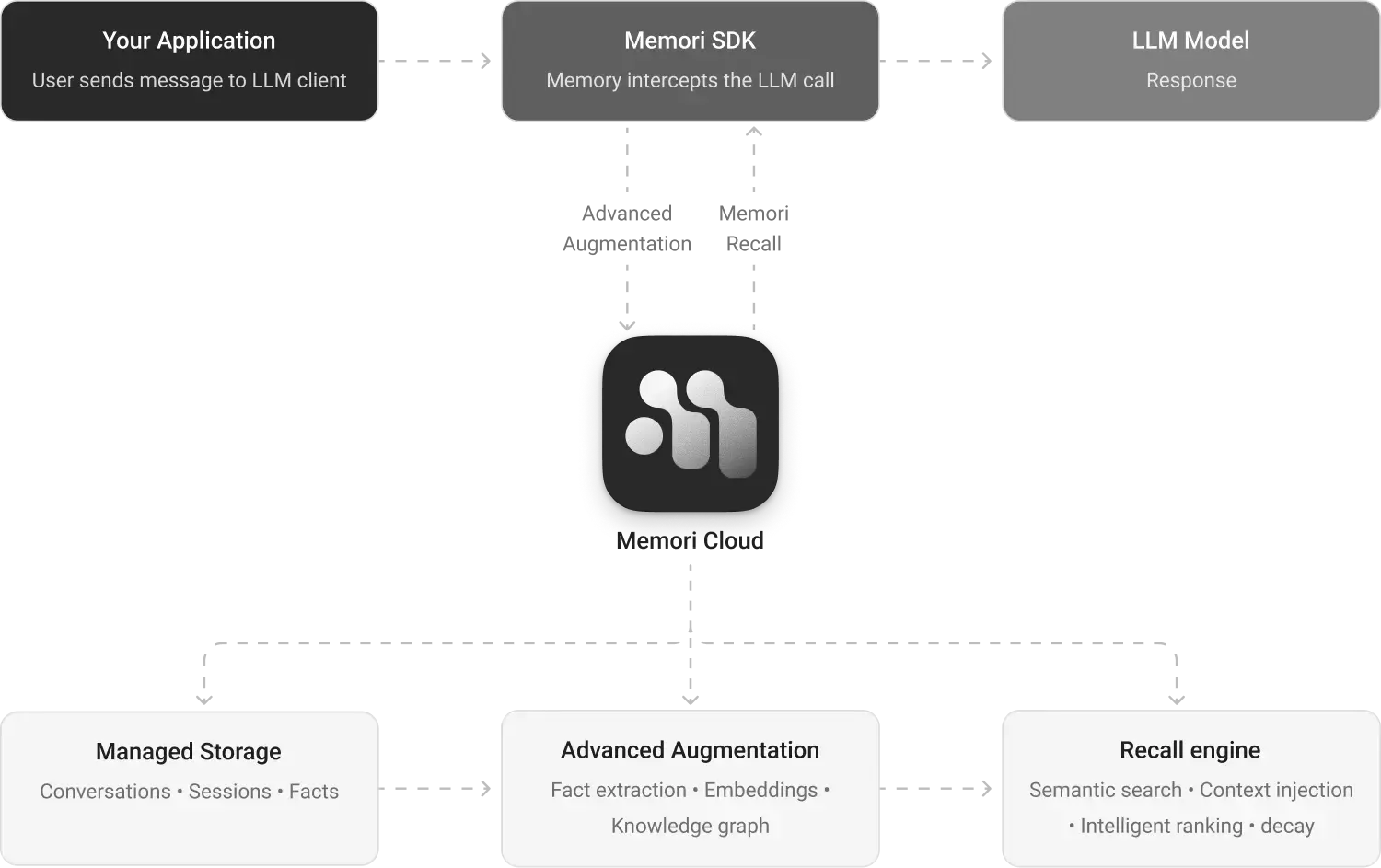
Memori is a modular memory platform for AI applications. Connect your LLM client, set attribution, and Memori handles the rest — storage, augmentation, knowledge graph construction, and recall.System Overview
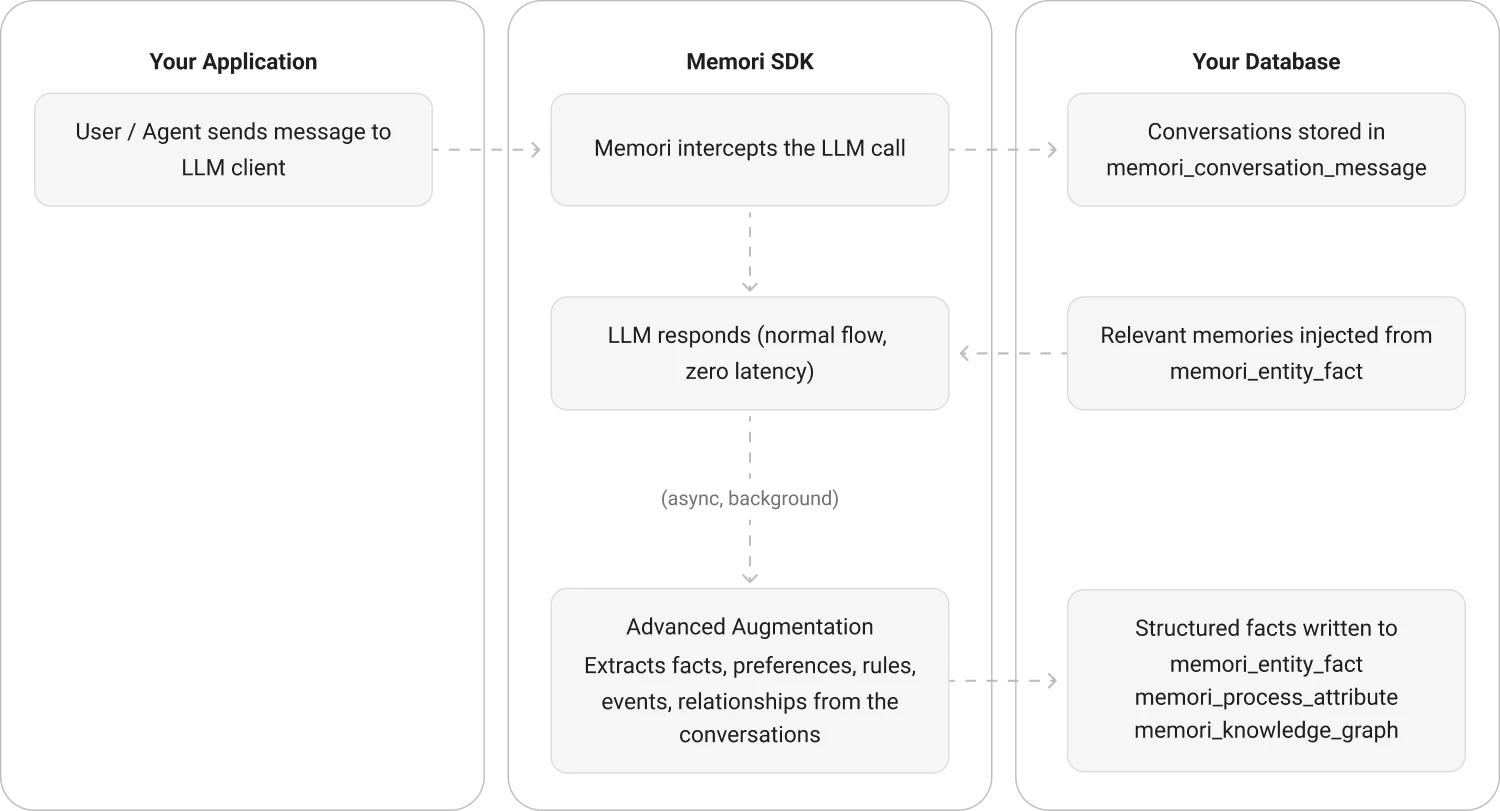
Memori operates in two deployment modes: Memori Cloud (managed service) and BYODB (bring your own database).Memori Cloud Architecture
BYODB Architecture
Core Components
Memori SDK
The integration layer between your app and memory storage. It provides:- LLM Wrappers — Transparent interception of LLM calls for OpenAI, Anthropic, Google, XAI, and more
- Attribution System — Tags every memory with entity, process, and session metadata
- Recall API — Retrieves relevant memories via semantic search
- Configuration — Tunable parameters for recall, embeddings, and augmentation
memori/):
__init__.py:73-180— MainMemoriclass with attribution and recall methodsllm/— LLM provider wrappers and registrymemory/— Memory capture, augmentation, and recall logic
Storage Layer
Memori supports multiple storage backends through an adapter pattern: Adapters (auto-detected based on connection type):- SQLAlchemy — Works with
sessionmakerfrom SQLAlchemy - Django ORM — Integrates with Django’s database layer
- DB-API 2.0 — Standard Python database connections (e.g.,
sqlite3.connect()) - MongoDB — NoSQL document storage
- PostgreSQL, MySQL, MariaDB, Oracle
- SQLite (for development and testing)
- CockroachDB, OceanBase
- MongoDB
memori/storage/
Advanced Augmentation Engine
Processes raw conversations into structured memory through:- Conversation Analysis — Reads user and assistant messages from the LLM exchange
- Memory Extraction — Uses AI to identify facts, preferences, skills, and attributes
- Semantic Triple Generation — Extracts subject-predicate-object relationships for knowledge graphs
- Embedding Generation — Creates vector embeddings for semantic search
- Deduplication — Merges similar memories and increments mention counts
- Runs asynchronously with configurable worker pools (default: 50 workers)
- Uses batched database writes (batch size: 100, timeout: 0.1s)
- Queue-based processing to avoid blocking the main request path
- Automatic retry with exponential backoff on transient failures
memori/memory/augmentation/
_manager.py:34-211— Augmentation manager and async processingaugmentations/memori/_augmentation.py— Core extraction logic
Recall Engine
Surfaces relevant memories at the right time: Semantic Search Process:- Embed the query using the configured embedding model
- Load up to
recall_embeddings_limitfacts from storage (default: 1000) - Use FAISS with cosine similarity (L2-normalized inner product) to rank facts
- Filter by
recall_relevance_threshold(default: 0.1) - Return top N facts (default: 5)
- Uses
IndexFlatIPfor exact similarity search - L2 normalization for cosine similarity
- Dimension matching between query and stored embeddings
memori/memory/recall.py:37-227— Recall implementationmemori/search/_faiss.py:81-122— FAISS similarity search
Connection Management
Memori uses a context manager pattern for database connections:Data Flow
1. Conversation Capture
Every LLM call through the wrapped client is captured:- Entity ID, Process ID, Session ID
- Conversation ID (groups messages within a session)
- Individual messages with roles (user, assistant, system)
2. Attribution Tracking
Attribution is cached to avoid repeated database lookups:3. Asynchronous Augmentation
After conversation capture, augmentation runs in the background:4. Context Recall
On each LLM call, Memori automatically injects relevant memories:Configuration Options
Key configuration parameters in theConfig class (memori/_config.py):
| Parameter | Default | Description |
|---|---|---|
recall_embeddings_limit | 1000 | Max embeddings to load for similarity search |
recall_facts_limit | 5 | Default number of facts to return |
recall_relevance_threshold | 0.1 | Minimum similarity score to include a fact |
session_timeout_minutes | 30 | Session idle timeout |
request_num_backoff | 5 | Number of retry attempts on API failures |
request_backoff_factor | 1 | Exponential backoff multiplier |
request_secs_timeout | 5 | Request timeout in seconds |
embeddings.model | all-MiniLM-L6-v2 | Embedding model name |
debug_truncate | True | Truncate long content in debug logs |
Deployment Modes
Memori Cloud
BYODB (Bring Your Own Database)
CockroachDB Support
Memori detects CockroachDB automatically:Thread Safety
Memori uses aThreadPoolExecutor (default: 15 workers) for async operations and manages connections safely across threads.
Each thread should create its own
Memori instance with its own connection to ensure thread safety.