Kyle Finken
Engineering
Share this article
Kyle Finken
Engineering
Share this article

API keys were the only way to use your own Claude organization until now
Until now, Enterprise teams running Mintlify's docs AI on their own Claude organization had to generate a Claude API key, paste it into bring your own model settings, and rotate it on their security schedule.
Link once, billed to your Claude organization
Linked billing replaces the shared key with an approval step. An admin sets the billing method to linked billing, then reviews and approves the link. Anthropic then bills Claude API usage from that project directly to your Claude organization, on your existing terms. Admins can set a monthly spend limit and unlink at any time, and API keys are still supported. Read more in Anthropic's announcement.
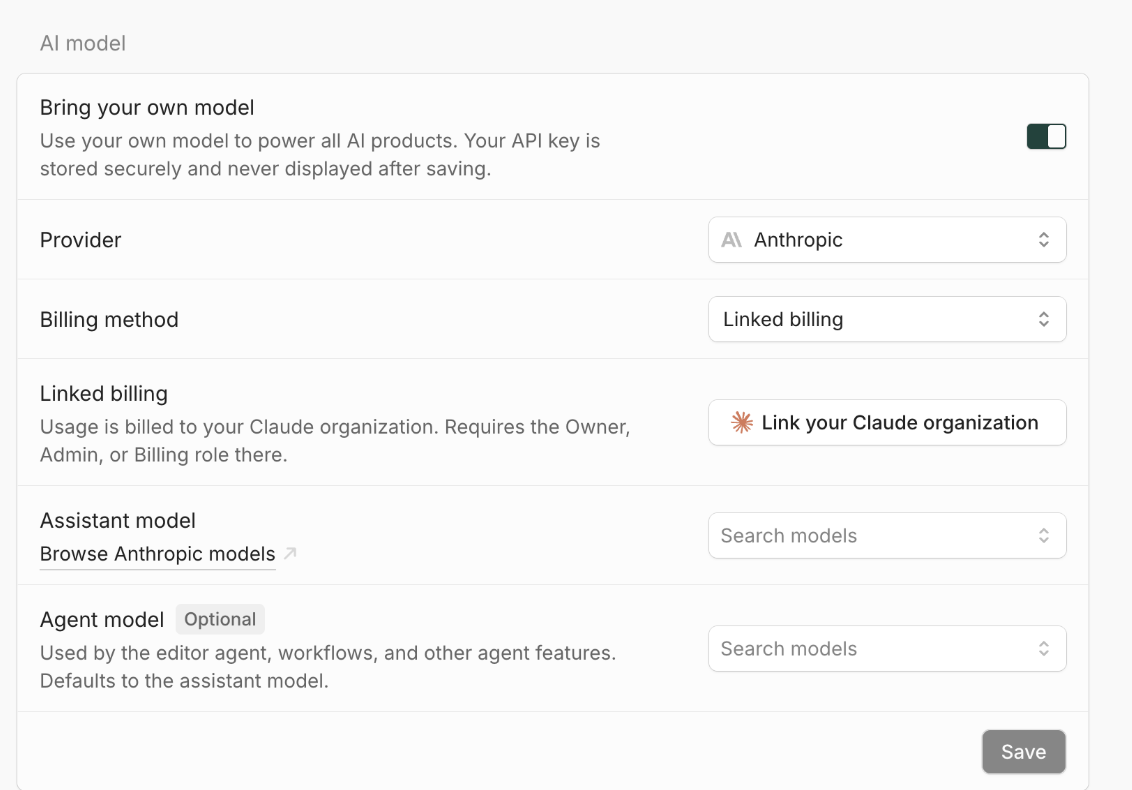
One link covers the assistant, the Mintlify agent, Autopilot, and automations.
Get started
Linked billing is available to Enterprise customers with bring your own model on their contract. It works with Claude Platform organizations billed directly by Anthropic.
- Open API keys in your dashboard and select your project.
- In AI model, turn on Bring your own model, choose Anthropic, and set the billing method to Linked billing.
- Click Link your Claude organization and approve the link. You need to be an Owner, Admin, or Billing admin in your Claude organization.
See the bring your own model docs for full setup. Not on Enterprise yet? Talk to sales.
More blog posts to read
Who reads developer docs now
The first Mintlify Research post: which agents read developer docs, which ones are new, what they look for, and how we measured it.
November 12, 2026Kyle Finken
Engineering
We gave agents better instructions
We built a CLI command that gives coding agents current Mintlify guidance, and at first it changed nothing. One line in AGENTS.md, plus tighter guidance, took Claude Sonnet's pass rate on our hardest tasks from about one in five to every run.
November 10, 2026Harkirat Chahal
Growth