Run a help center that answers questions before they become tickets
4 minutes read
Share this article
Share this article
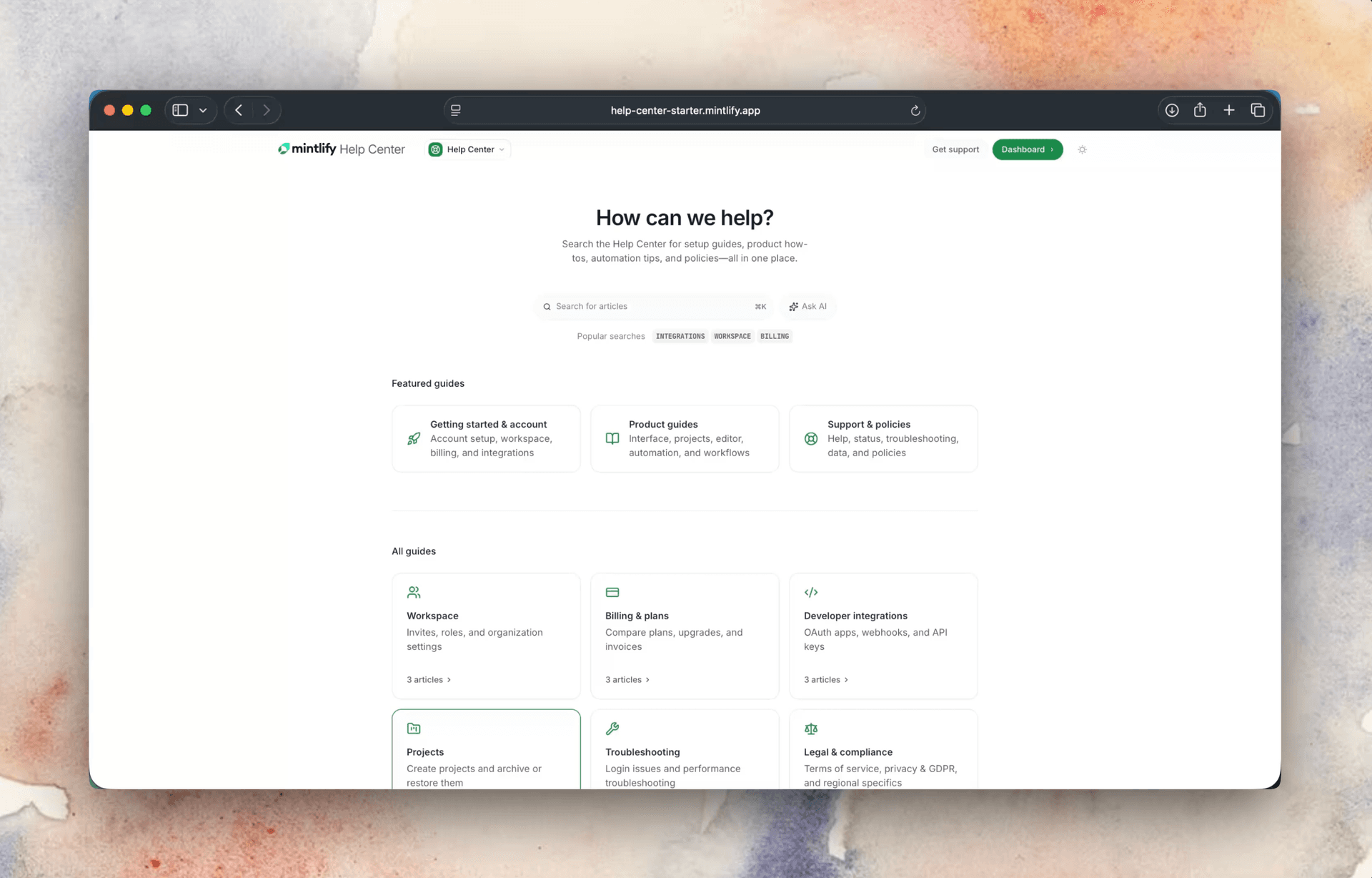
Most help centers fail not because the content is bad, but because keyword search can't bridge the gap between how users think and how articles are titled. Mintlify's semantic search and built-in AI assistant answer questions on the spot, before they become tickets. Lovable, Perplexity, Kalshi, and Loops use Mintlify to run help centers that actually deflect volume.
You've written the articles, organized the categories, published the FAQs. And the tickets keep coming: the same questions, over and over, from users who never found what you wrote.
Every one of those tickets represents a user who wanted to self-serve and couldn't. It also represents a cost: someone on your team spending time answering a question that already has an answer somewhere on your site. The content usually exists. Keyword search can't bridge the gap between how users think and how articles are titled.
Mintlify addresses the finding problem. Semantic search matches user intent to content. An AI assistant answers questions before they become tickets. Analytics show exactly where users fall through.
Users find answers on their first search
Support teams watch it happen constantly: a user searches "why isn't my thing working" and gets zero results, concludes the answer doesn't exist, and opens a ticket. The article that would have answered them was titled "Troubleshooting connection errors."
The search understands what users mean, not just what they typed. It matches intent to content, so a user who searches "I can't log in" finds your article on authentication even if neither of those words appears in the title.
Lovable reduced support ticket volume after switching to Mintlify. With a lean team supporting millions of users during explosive growth, they needed answers to surface before tickets formed.
Captions serves customers in 180+ countries, fielding thousands of inbound messages per month. Switching from Intercom unlocked multilingual semantic search their previous help center couldn't handle. Now they serve 100K+ monthly help center views, with far fewer ending in a ticket.
A question gets answered before it becomes a ticket
When a user types a question into your help center, the AI assistant tries to answer it on the spot, drawing from your published content and citing the source. If the user wants more, it links to the full article. The answer comes from what you've actually written. Users get a direct response, and your team gets one fewer ticket.
Perplexity uses the built-in AI assistant to handle developer questions in their help center, keeping them out of the support queue.
"With a lean team, Lovable needed a way to scale guidance and answer questions without getting buried in support tickets."
Start free. No credit card required. Set up your help center and start deflecting tickets today.
You see exactly where users fall through
Most help centers are black boxes. Content goes in, tickets come out, and no one knows why.
Analytics surface what's broken: searches that returned no results, articles that get consistent negative feedback, pages where users read halfway through and leave. You know which gaps to fill and which articles to rewrite.
Kalshi uses Mintlify analytics to identify which product areas generate the most unanswered searches and prioritizes documentation there before tickets spike.
"By the time knowledge issues become visible, they're already expensive."
— David Hou, Decagon
Feedback surfaces gaps before tickets form
Every article can carry a feedback widget. Users rate it. That signal goes into your dashboard. You see, at a glance, which content is working and which isn't, without waiting for tickets to make the pattern visible.
The right content reaches the right user
Not everything belongs in front of every user. You gate premium content, internal notes, or plan-specific documentation by role, plan, or SSO. Your free users see what they need. Your enterprise customers see what they've paid for.
Live in a day
A help center that looks thrown together doesn't earn trust. Mintlify's default design is clean, readable, and professional. Users feel like they're in good hands before they've read a single word. You don't need a design sprint.
Loops launched a help center on Mintlify in a day, without design work or frontend engineering. Their support team owns the content; the infrastructure was already there.
"For beginners learning to build software, a clear, modern experience can be the difference between giving up and getting started."
— Lovable
"Mintlify is what you use when you can't afford for docs to cost you deals."
— Simon Wenet, Metronome
Trusted by 20,000+ companies. 50M monthly users. Teams at Anthropic, Coinbase, Microsoft, Perplexity, Stripe, Lovable, Kalshi, and Orb use Mintlify to make their products understandable.
Your help center should work for you
Stop answering tickets that your help center was supposed to handle.
Start free. No credit card required.
Set up your help center today. No design work required.
More blog posts to read

Rise of the Knowledge Engineer
Agents are one of the largest audiences for company knowledge, accounting for 66% of measured web traffic across documentation powered by Mintlify. The emerging role responsible for keeping that knowledge accurate and retrievable is the knowledge engineer.
September 16, 2026David Isquick
Product Marketing
Highlights from the 2026 State of Knowledge Report
AI agents overtook humans as the primary readers across Mintlify-powered sites. In August alone, agents made 257 million web requests compared to 131 million human page loads, which means agent traffic now outnumbers human traffic by nearly 2:1.
September 16, 2026Lauren Volpi
Marketing