How we eliminated cold starts for 72M monthly page views with edge caching
7 minutes read
Nick Khami
Engineering
Share this article
Nick Khami
Engineering
Share this article

Mintlify powers documentation for tens of thousands of developer sites, serving 72 million monthly page views. Every pageload matters when millions of developers and AI agents depend on your platform for technical information.
We had a problem. Nearly one in four visitors experienced slow cold starts when accessing documentation pages. Our existing Next.js ISR caching solution could not keep up with deployment velocity that kept climbing as our engineering team grew.
We ship code updates multiple times per day and each deployment invalidated the entire cache across all customer sites. This post walks through how we architected a custom edge caching layer to decouple deployments from cache invalidation, bringing our cache hit rate from 76% to effectively 100%.
Solution
We achieved our goal of fully eliminating cold starts and used a veritable smorgasbord of Cloudflare products to get there.
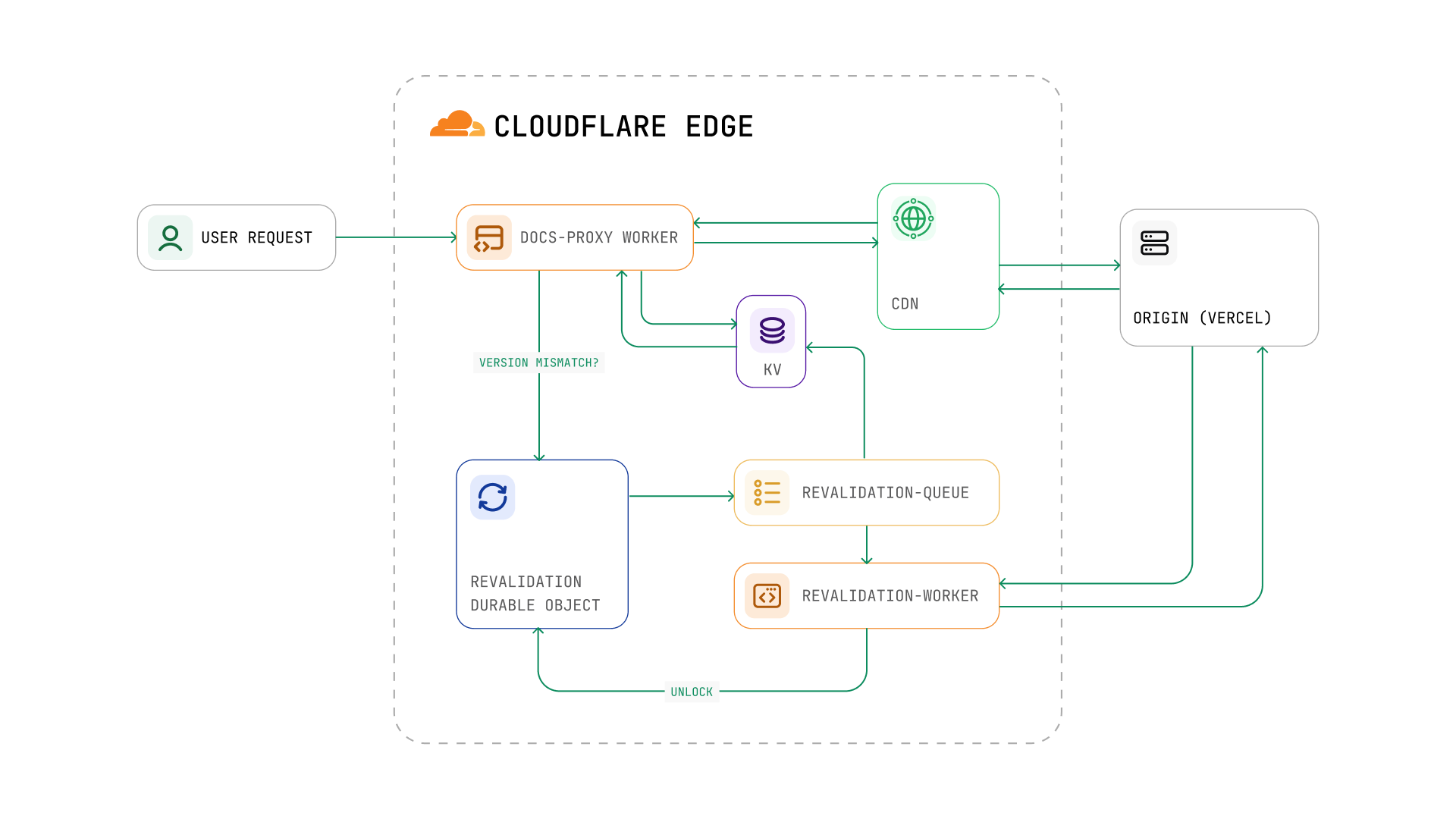
| Component | Purpose |
|---|---|
| Workers | docs-proxy handles requests; revalidation-worker consumes the queue |
| KV | Store deployment configs, version IDs, connected domains |
| Durable Objects | Global singleton coordination for revalidation locks |
| Queues | Async message processing for cache warming |
| CDN Cache | Edge caching with custom cache keys via fetch with cf options |
| Zones/DNS | Route traffic to workers |
We could have built a similar system on any hyperscaler, but leaning on Cloudflare's CDN expertise, especially for configuring tiered cache, was a huge help.
It is important that you understand the difference between two key terms which I use throughout the following solution explanation.
- Revalidations are a reactive process triggered when we detect a version mismatch at request time (e.g., after we deploy new code)
- Prewarming is a proactive process triggered when customers update their documentation content, before any user requests it
Both ultimately warm the cache by fetching pages, but they differ in when and why they're triggered. More on this in sections 2 through 4 below.
1. The Proxy Layer
We placed a Cloudflare Worker in front of all traffic to Mintlify hosted sites. It proxies every request and contains business logic for both updating and using the associated cache. When a request comes in, the worker proceeds through the following steps.
- Determines the deployment configuration for the requested host
- Builds a unique
cache keybased on the path, deployment ID, and request type - Leverages Cloudflare's edge cache with a 15-day TTL for successful responses
Our cache key structure shown below. The cachePrefix roughly maps to the name of a particular customer, deploymentId identifies which Vercel deployment to proxy to, path is needed to know the correct page to fetch and then contentType functions such that we can store both html and rsc variants for every page.
`${cachePrefix}/${deploymentId}/${path}#${kind}:${contentType}`;
For example: acme/dpl_abc123/getting-started:html and acme/dpl_abc123/getting-started:rsc.
2. Automatic Version Detection and Revalidation
The most innovative aspect of our solution is automatic version mismatch detection.
When we deploy a new version of our Next.js client to production, Vercel sends a deployment.succeeded webhook. Our backend receives this and writes the new deployment ID to Cloudflare's KV.
KV.put('DEPLOY:{projectId}:id', deploymentId);
Then, when user requests come through the docs-proxy worker, it extracts version information from the origin response headers and compares it against the expected version in KV.
gotVersion = originResponse.headers['x-version'];
projectId = originResponse.headers['x-vercel-project-id'];

wantVersion = KV.get('DEPLOY:{projectId}:id');

shouldRevalidate = wantVersion != gotVersion;
When a version mismatch is detected, the worker automatically triggers revalidation in the background using ctx.waitUntil(). The user gets the previously cached stale version immediately. Meanwhile, cache warming of the new version happens asynchronously in the background.
We do not start serving the new version of pages until we have warmed all paths in the sitemap. Since, when you load a new version of any given page after an update, you have to make sure that all subsequent navigations also fetch that same version. If you were on v2 and then randomly saw v1 designs when navigating to a new page it would be jarring and worse than them loading slowly.
3. The Revalidation Coordinator
Our first concern when triggering revalidations for sites was that we were going to create a race condition where we had multiple updates in parallel for a given customer and start serving traffic for both new and old versions at the same time.
We decided to use Cloudflare's Durable Objects (DO) as a lock around the update process to prevent this. We execute the following steps during every attempted revalidation trigger.
- Check the
DOstorage for any inflight updates, ignore the trigger if there is one - Write to the
DOstorage to track that we are starting an update and "lock" - Queue a message containing the
cachePrefix,deploymentId, and host info for the revalidation worker to process - Wait for the revalidation worker to report completion, then "unlock" by deleting the
DOstate
We also added a failsafe where we automatically delete the DO's data and unlock in step 1 if it has been held for 30 minutes. We know from our analytics that no update should take that long and it is a safe timeout.
4. Revalidation Worker
Cloudflare Queues make it easy to attach a worker that can consume and process messages, so we have a dedicated revalidation worker that handles both prewarming (proactive) and version revalidation (reactive). Using a queue to control the rate of cache warming requests was mission critical since without it, we'd cause a thundering herd that takes down our own databases.
Each queue message contains the full context for a deployment: cachePrefix, deploymentId, and either a list of paths or enough info to fetch them from our sitemap API. The worker then warms all pages for that deployment before reporting completion.
// Get paths from message or fetch from sitemap API
paths = message.paths ?? fetchSitemap(cachePrefix)

// Process in batches of 6 (Cloudflare's concurrent connection limit)
for batch in chunks(paths, 6):
  awaitAll(
    batch.map(path =>
      // Warm both HTML and RSC variants
      for variant in ["html", "rsc"]:
        cacheKey = "{cachePrefix}/{deploymentId}/{path}#{variant}"
        headers = { "X-Cache-Key": cacheKey }
        if variant == "rsc":
          headers["RSC"] = "1"
        fetchWithRetry(originUrl, headers)
    )
  )
Once all paths are warmed, the worker reads the current doc version from the coordinator's DO storage to ensure we're not overwriting a newer version with an older one. If the version is still valid, it updates the DEPLOYMENT:{domain} key in KV for all connected domains and notifies the coordinator that cache warming is complete. The coordinator only unlocks after receiving this completion signal.
5. Proactive Prewarming on Content Updates
Beyond reactive revalidation, we also proactively prewarm caches when customers update their documentation. After processing a docs update, our backend calls the Cloudflare Worker's admin API to trigger prewarming:
POST /admin/prewarm HTTP/1.1
Host: workerUrl
Content-Type: application/json

{
  "paths": ["/docs/intro", "/docs/quickstart", "..."],
  "cachePrefix": "acme/42",
  "deploymentId": "dpl_abc123",
  "isPrewarm": true
}
The admin endpoint accepts batch prewarm requests and queues them for processing. It also updates the doc version in the coordinator's DO to prevent older versions from overwriting newer cached content.
This two-pronged approach ensures caches stay warm through both:
- reactive revalidation system triggered when our code deployments create version mismatches
- proactive prewarming triggered when customers update their documentation content
Results
We have successfully moved our cache hit rate to effectively 100% based on monitoring logs from the Cloudflare proxy worker over the past 2 weeks. Our system solves for revalidations due to both documentation content updates and new codebase deployments in the following ways.
For code changes affecting sites (revalidation)
- Vercel webhook notifies our backend of the new deployment
- Backend writes the new deployment ID to Cloudflare KV
- The first user request detects the version mismatch
- Revalidation triggers in the background
- The coordinator ensures only one cache warming operation runs globally
- All pages get cached at the edge with the new version
For customer docs updates (prewarming)
- Update workflow completes processing
- Backend proactively triggers prewarming via admin API
- All pages are warmed before users even request them
Our system is also self-healing. If a revalidation fails, the next request will trigger it again. If a lock gets stuck, alarms clean it up automatically after 30 minutes. And because we cache at the edge with a 15-day TTL, even if the origin goes down, users still get fast responses from the cache. Improving reliability as well as speed!
Word to the Wise
If you're running a dynamic site and chasing P99 latency at the origin, consider whether that's actually the right battle. We spent weeks trying to optimize ours (RSCs, multiple databases, signed S3 URLs) and the system was too complicated to debug meaningfully.
The breakthrough came when we stopped trying to make dynamic requests faster and instead made them not happen at all. Push your dynamic site towards being static wherever possible. Cache aggressively, prewarm proactively, and let the edge do what it's good at.
More blog posts to read
Bring your own skills to the Mintlify agent
You can now upload custom skills to the agent in the web editor. Give it your style guide, review checklist, or page templates once, and it uses them whenever a task calls for them.
October 23, 2026David Isquick
Product Marketing
Autopilot: Always-on agent for self-updating docs
Autopilot is an always-on agent that reads your code and the context around it, drafts doc updates when something changes, and opens a pull request for your review.
October 20, 2026David Isquick
Product Marketing