How to write release notes (templates and changelog guide)
Harkirat Chahal
Growth
Share this article
Harkirat Chahal
Growth
Share this article

This guide explains the difference between release notes and changelogs, walks through a repeatable writing process, and provides templates for product and API releases. It also covers how to keep changelog entries accurate throughout the shipping workflow and where to publish release updates.
Release notes explain a specific release in clear, user-facing language. They tell readers what changed, why the update affects them, and what action they need to take. A changelog keeps the chronological record behind those updates, with dated entries that help developers, support teams, and AI coding tools understand how a product or API has changed across versions.
Along the way, it shows where to publish release updates and how Mintlify helps teams keep changelogs connected to their docs through dated entries, tag filtering, search, navigation, and RSS subscriptions.
Release notes versus changelog
Use this comparison to decide what belongs in a release note, what belongs in a changelog, and how both should support the same release workflow.
| Comparison point | Release notes | Changelog |
|---|---|---|
| Main purpose | Explain the release in user-friendly language so readers understand the update's impact and the next action to take. | Maintain a chronological record of product or API changes so teams and users can trace what changed across versions. |
| Primary readers | Customers, end users, developers using the product, admins, and other readers who need to understand the release quickly. | Developers, support teams, customer-facing teams, integrators, auditors, and AI coding tools that need a reliable change history. |
| Scope | One release, launch, version, or scheduled release roundup. | All notable changes across the product or API over time. |
| Level of detail | Focuses on the changes users need to understand, adopt, enable, or prepare for. | Includes more granular technical detail, version context, dated entries, deprecations, removals, fixes, and behavior changes. |
| Writing style | Clear, benefit-led, and action-oriented. Each item should explain the user impact in plain language. | Precise, structured, and technical. Each entry should be short enough to scan but specific enough to support debugging and migration. |
| Typical structure | Highlights, New, Improved, Fixed, Breaking Changes, Deprecated, and links to docs or migration guides. | Date, version, and categories such as Added, Changed, Fixed, Deprecated, Removed, and Security. |
| Timing | Published per version, per launch, or on a predictable weekly or biweekly cadence. | Updated continuously as changes ship, usually as part of the pull request, docs update, or release workflow. |
| Best source material | Launch briefs, merged product work, customer-facing changes, feature docs, migration guides, and support notes. | Merged PRs, closed tickets, API changes, bug fixes, deprecations, dependency changes, and documentation updates. |
| What belongs | New features, user-visible improvements, important fixes, breaking changes, migration steps, and links to relevant documentation. | Every notable product or API change that should remain searchable over time, including small fixes and technical behavior changes. |
| What to leave out | Internal refactors, branch names, ticket IDs, vague engineering notes, and changes with no user-visible effect. | Marketing copy, launch positioning, long explanations, roadmap teasers, and content that belongs in a release announcement. |
| Breaking changes | Should appear near the top with clear labels, action steps, deadlines, and migration links. | Should be recorded under the right version with the changed behavior, replacement path, and removal timeline. |
| Role of links | Sends readers to docs, migration guides, demos, support pages, API reference, or the full changelog entry. | Connects the change record to release notes, pull requests, API reference pages, migration guides, and related docs. |
| Publishing location | Works best when published near the docs, product updates, dashboard notifications, email announcements, or customer channels. | Works best when published inside the documentation site, versioned docs, developer portal, or repository-backed docs workflow. |
| Maintenance owner | Usually owned by product marketing, product, docs, developer relations, or a shared release owner. | Usually maintained by engineering, docs, product, or the person closest to the shipped change. |
| Reader question answered | What changed in this release, why should I care, and what should I do next? | What changed in the product or API, when did it change, and which version introduced the change? |
| Relationship between both | Release notes summarize the most important changes and guide the reader toward adoption or migration. | The changelog provides the detailed record that release notes can link to and summarize during each publishing cycle. |
What good release notes include
Good release notes help readers understand the release without requiring them to translate internal project language. Each item should make the change clear, explain the user impact, and point readers to the next step when action is needed.
Lead with user value: Ticket numbers, branch names, and internal codenames do not help readers understand a release. Start with the outcome users will notice, then add technical details only when they help readers apply the change correctly.
Group changes by type: Use consistent categories such as New, Improved, and Fixed. Add Deprecated, Removed, or Breaking Changes when a release includes changes that affect compatibility or require user action. Clear categories make the update easier to scan.
Show readers the next step: A feature announcement should tell readers what changed and where to go next. For example, instead of saying "Webhook retries are now configurable," write, "Webhook retries are now configurable. Set a retry policy in Settings > Webhooks to reduce dropped events."
Flag breaking changes early: Any change that requires migration, configuration updates, or client-side work should appear near the top of the release note. Add a clear label, the required action, the deadline when relevant, and a link to the migration guide.
Link to the right documentation: Every major feature, API change, migration step, or deprecation should link to the page where readers can act on the update.
Keep the format consistent: Readers should be able to scan one release note the same way they scanned the previous one. A consistent structure also makes it easier for product, engineering, support, and docs teams to contribute without having to rewrite the format each time.
Here is the difference in practice.
Before, commit-log style:
- Merged PR #4712: refactor auth middleware
- JIRA-2291: fix null pointer in export svc
- Added flag for batch mode
After, reader-friendly:
Fixed: CSV exports no longer fail when a project contains archived items.
New: Batch mode processes up to 10,000 records per request. Enable it with the batch=true query parameter. See the batch docs.
Both examples describe the same release work, but only the second version gives readers the context they need to understand the update and act on it.
How to write release notes step by step
Release notes become easier to write when each release follows the same path from shipped change to published update.
Step 1: gather what shipped
Start with merged PRs, closed tickets, launch plans, support notes, and product updates. Collect more than you expect to publish, because it is easier to remove internal work than recover a missed user-facing change after the release note is live.
Step 2: sort changes into categories
Place each change under New, Improved, Fixed, Deprecated, Removed, or Breaking Changes. Keep the release note focused on updates readers can see, use, configure, or prepare for. Internal refactors, dependency bumps, and backend cleanup usually belong in the changelog, not the release note.
Step 3: write each item with impact and action
Each release note item should explain the user-visible change and the next step. For example, a new setting should mention where to enable it, an API change should link to the reference page, and a migration notice should point to the guide readers need before upgrading.
Step 4: put breaking changes first
Any update that requires migration, client changes, configuration updates, or deadline-based action should appear near the top. Give it a clear label, explain the required action, and link to the migration guide or API reference.
Step 5: add useful links
Link every major release item to the relevant docs, changelog entry, migration guide, demo, API reference, or support page. Links turn the release note into a path readers can follow, especially when a change requires setup or deeper technical context.
Step 6: publish on a predictable cadence
Choose a cadence that matches the way your team ships. Continuous teams often use weekly or biweekly roundups, while versioned products usually publish per release. The cadence should be predictable enough for users, support teams, and internal stakeholders to know where to find the latest update.
Release notes templates
Use the templates below as starting points, then add, remove, or reword any section that does not apply to the release.
Product release notes template
The product release notes template works best for feature launches, UI improvements, bug fixes, and scheduled product updates. Keep the highlight short, group changes by type, and link each major item to the relevant documentation or support resource.
[Product Name] v[X.Y.Z] - [Release Name, optional]
Released: [Date]

Highlights
[One or two sentences on the most important change in this release
and who benefits from it.]

New
- [Feature name]: [What it does and the benefit.]
  [What to do: where to find it or how to enable it.] [Docs link]
- [Feature name]: [Benefit.] [Action.] [Docs link]

Improved
- [Area]: [What changed and how the experience is better.]
- [Area]: [Improvement.] [Any action needed.]

Fixed
- [Bug description in user terms: what was broken, now resolved.]
- [Bug description.]

Coming Soon (optional)
[One or two lines on what is next, if you preview roadmap items.]

Full details in the changelog. Questions? [Support link]
API release notes template
The API release notes should make required action impossible to miss. Put breaking changes first, clearly name the affected endpoints or fields, include the migration path, and link to the API reference, changelog, and status page where relevant.
[API Name] v[X.Y.Z]
Released: [Date] · Applies to: [API version/endpoints]

⚠ Breaking Changes
> Action required by [date, if applicable].
- [Endpoint or field]: [What changed, e.g., renamed, removed,
  new required parameter.]
  Migration: [Exact steps or link to migration guide.]

New
- [Endpoint/parameter/feature]: [What it enables.]
  [Request example or docs link.]

Improved
- [Endpoint or behavior]: [Change and effect, e.g., latency,
  limits, response shape.]

Fixed
- [Endpoint]: [Incorrect behavior, now corrected. Note any
  response changes clients might observe.]

Deprecated
- [Endpoint or field]: Deprecated as of v[X.Y.Z].
  Removal planned for v[X.Y.Z]. Use [replacement] instead. [Guide]

Changelog: [link] · API reference: [link] · Status: [link]
Changelog entry template
The changelog entry template is intentionally compact. Use it to record dated, versioned changes in a consistent format, then expand the most important entries into release notes when you publish a user-facing update.
[Date] - v[X.Y.Z]

Added
- [Change, one line, precise.]

Changed
- [Change. Note prior behavior if relevant.]

Fixed
- [Fix, one line.]

Deprecated / Removed
- [Item, replacement, timeline.]
How to keep a changelog up to date
A changelog stays accurate when writing the update is part of the release workflow itself, so nobody has to remember it after shipping.
Keep changelog updates close to the code and docs: A changelog maintained with your documentation can be updated in the same pull request as the product or API change. This keeps release communication tied to the work being shipped and reduces the chance of missing entries during a busy release cycle.
Write the entry while the context is fresh: Make the changelog entry part of the definition of done for each user-visible change. The engineer, PM, or docs owner closest to the work should write a short entry before the release moves forward, while the affected behavior, endpoint, feature, or fix is still clear.
Use one consistent format: A predictable structure makes the changelog easier to scan and easier to maintain. Use dated, versioned entries with categories such as Added, Changed, Fixed, Deprecated, and Removed, then keep each line specific enough to support debugging, migration, and release review.
Make the changelog easy to find: Link the changelog from your docs navigation, release notes, product footer, and relevant API reference pages. Add an RSS feed so users, support teams, and internal stakeholders can subscribe to updates. Mintlify supports changelog pages with dated entries, tag filtering, and RSS feeds, so teams can publish updates within the same docs experience users already visit.
Connect changelog entries to release notes: Each release note should link to the relevant changelog entry, and each changelog entry should be written clearly enough to roll up into a user-facing release summary. The changelog preserves the detailed record, while the release note turns the most important changes into adoption guidance.
Where to publish release notes and changelogs
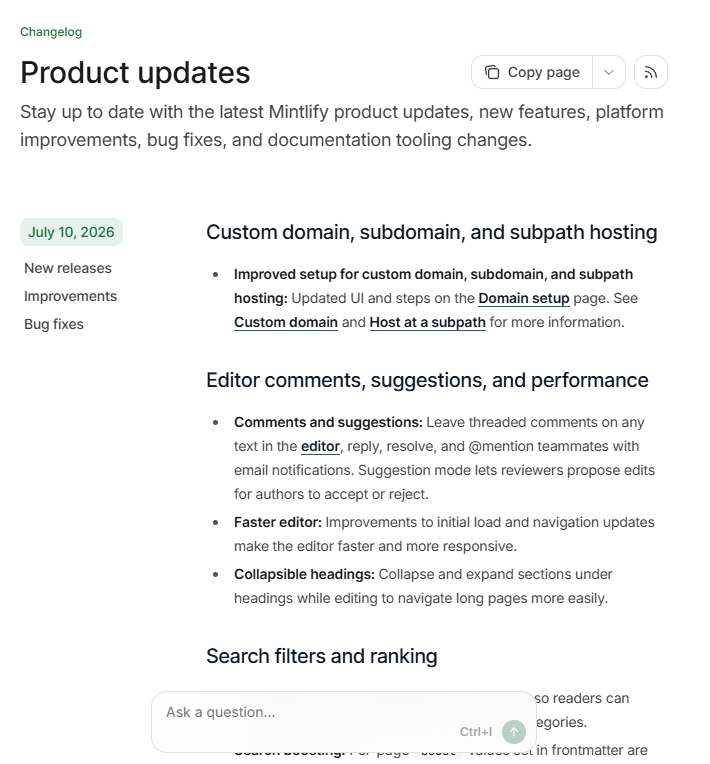
Release notes and changelogs work best when readers can find them from the same place they already use to learn the product. For most teams, that means publishing them inside the documentation site, linking them from the product, and connecting each update to the relevant docs, API reference, migration guide, or support page.
A separate CMS, wiki, or announcement-only channel can create gaps between what shipped and what the docs say. When release updates go live with the docs, they use the same navigation, search, review, and publishing process as the rest of the documentation. The changelog can remain technical and versioned, while the release notes can summarize the update and link readers to the pages where they can act on it.
Mintlify gives release content a permanent home within the docs, so product updates, API changes, migration guidance, and reference pages stay connected in a single searchable experience. Teams can publish changelogs, link each release to the appropriate documentation, and make it easier for users, developers, support teams, and AI tools to discover updates.
Publish release notes and changelogs with Mintlify →
Frequently Asked Questions
What is a changelog?
A changelog is the product's change history. It gives teams a reliable place to check when a feature, fix, deprecation, removal, or API behavior change was introduced, which makes it useful for debugging, support, customer communication, and technical research.
What is the difference between release notes and a changelog?
Release notes translate a release into a clear update for readers, while a changelog keeps the dated, versioned record behind it. The easiest way to separate them is by intent: release notes help users understand and act on the latest update, while a changelog lets teams trace product history over time.
How do you write good release notes?
Good release notes start from the reader's context, not the team's internal task list. Explain the visible change, name the affected feature or workflow, add migration details when needed, and link readers to the page where they can learn, configure, upgrade, or troubleshoot.
How often should you publish release notes?
The best cadence is the one your team can keep consistently. Fast-moving products usually work better with weekly or biweekly roundups, while versioned products can publish around major releases. In Mintlify, keeping changelogs within the docs makes it easier for teams to maintain that cadence because updates stay close to the documentation workflow.
What should release notes include?
Release notes should provide enough context for readers to understand the release without having to read every ticket or pull request. Cover the release name or version, the most important changes, compatibility notes, migration steps, and links to docs, API reference pages, support resources, or the full changelog.
More to read

Developer documentation best practices: a practical checklist
Learn the best practices for writing great developer docs.
July 10, 2026Peri Langlois
Head of Product Marketing

Documentation diagrams: when to use them and how to keep them accurate
Most documentation diagrams are outdated or unnecessary. Learn when diagrams genuinely help users and how diagrams-as-code tools like Mermaid keep them from going stale.
March 12, 2026Ethan Palm
Technical Writing