Overview
Chat applications like WhatsApp, Facebook Messenger, and Discord serve billions of messages daily. This case study explores two approaches to building a chat application: a simplified 1-to-1 chat using Redis pub/sub, and a more comprehensive production-grade architecture.Approach 1: Simple Chat with Redis
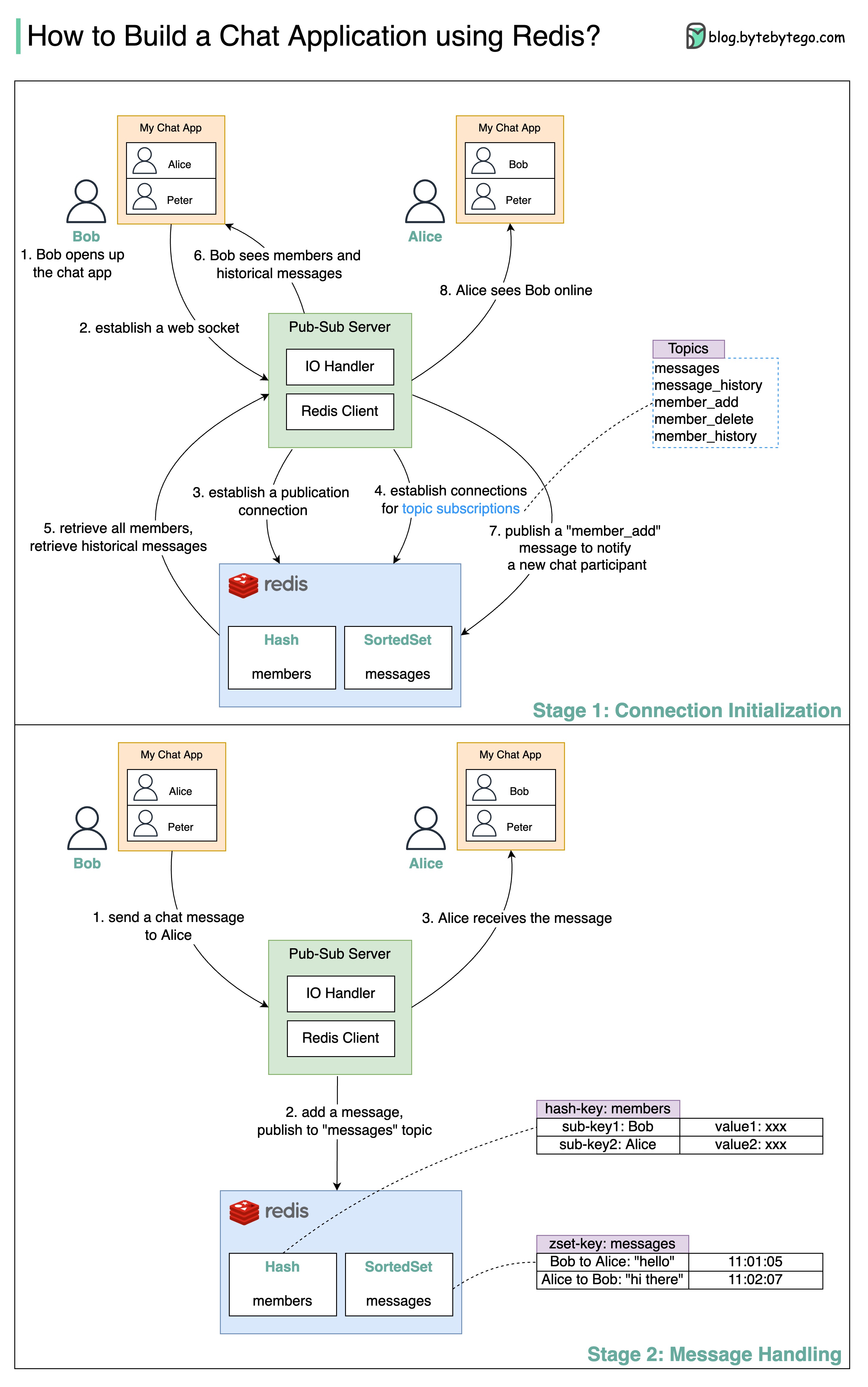 A simple chat application can leverage Redis pub/sub functionality for real-time messaging.
Stage 1: Connection Initialization
Let’s walk through how Bob connects to the chat application:Client Connection
Steps 1-2: Bob opens the chat application. A WebSocket connection is established between the client and the server for bidirectional, real-time communication.
Redis Setup
Steps 3-4: The pub-sub server establishes multiple connections to Redis:
- One connection to update Redis data models and publish messages to topics
- Multiple connections to subscribe and listen for updates on different topics
Initial Data Load
Steps 5-6: Bob’s client requests:
- Chat member list (who’s available)
- Historical message list (previous conversations)
Stage 2: Message Handling
When Bob sends a message to Alice:Persist & Publish
Step 2: The server performs two operations:
- Adds the message to a Redis SortedSet using
ZADD(sorted by timestamp) - Publishes the message to the
messagestopic for subscribers
Limitations of Redis Approach
Approach 2: Production-Grade Architecture
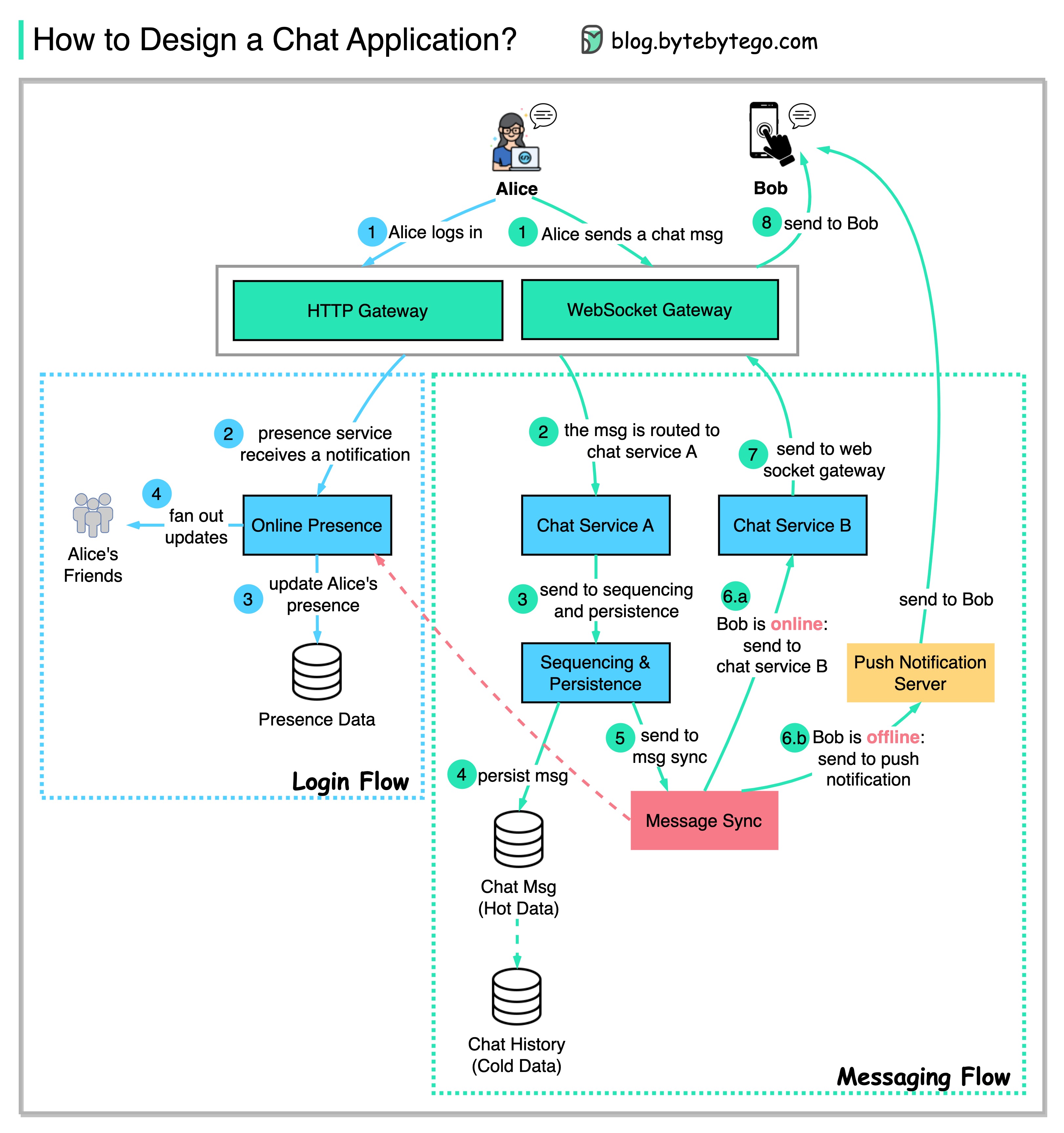 A scalable chat application for millions of users requires a more sophisticated architecture.
User Login Flow
Establish Connection
Step 1: Alice logs in and establishes a WebSocket connection with the server. The connection is stateful and persistent.
Messaging Flow
When Alice sends a message to Bob:Send Message
Steps 1-2: Alice sends a chat message to Bob. The message is routed to Chat Service A (the service instance handling Alice’s connection).
Generate ID & Persist
Steps 3-4:
- Message is sent to the Sequencing Service, which generates a globally unique, ordered message ID
- Message is persisted in the Message Store (database) for durability and history
Queue for Delivery
Step 5: The message is sent to the Message Sync Queue to be synchronized to Bob’s chat service.
Check Recipient Status
Step 6: The Message Sync Service checks Bob’s presence:If Bob is online:
- Message is sent to Chat Service B (handling Bob’s connection)
- Delivered via WebSocket in real-time
- Message is sent to the Push Notification Server
- Push notification sent to Bob’s device
Key Components Explained
Chat Service (Stateful)
Chat Service (Stateful)
Purpose: Maintain WebSocket connections with clientsCharacteristics:
- Each instance handles thousands of concurrent WebSocket connections
- Routes incoming messages to appropriate services
- Delivers outgoing messages to connected clients
- Must be horizontally scalable
- Session affinity: Same client should reconnect to same instance
- Connection state management
- Graceful handling of disconnections
Presence Service
Presence Service
Purpose: Track online/offline status of usersFeatures:
- Real-time status updates
- Last seen timestamps
- User availability (online, away, busy, offline)
- Heartbeat mechanism to detect disconnections
Sequencing Service
Sequencing Service
Purpose: Generate globally unique, ordered message IDsWhy needed:
- Ensure messages appear in correct order across all clients
- Provide unique identifier for each message
- Enable efficient message synchronization
- Snowflake ID: Timestamp + machine ID + sequence number
- Database sequence: Use database auto-increment (limited scalability)
- Distributed ID generator: Services like Twitter Snowflake or Instagram’s ID generator
Message Store
Message Store
Purpose: Persist all messages for history and recoveryRequirements:
- High write throughput (millions of messages per second)
- Fast retrieval of recent messages
- Long-term storage of message history
- Support for pagination
- Cassandra: High write throughput, good for time-series data
- MongoDB: Flexible schema, good query capabilities
- HBase: Scalable, column-oriented storage
Message Sync Queue
Message Sync Queue
Purpose: Decouple message sending from deliveryBenefits:
- Handle bursts of messages
- Retry failed deliveries
- Support offline delivery
- Enable message ordering guarantees
Design Tradeoffs
WebSocket vs. HTTP Polling
WebSocket vs. HTTP Polling
WebSocket (Chosen):
- ✅ True real-time, bidirectional communication
- ✅ Lower latency
- ✅ Less bandwidth overhead
- ❌ More complex to scale (stateful connections)
- ❌ Requires connection state management
- ✅ Simple to implement
- ✅ Stateless, easier to scale
- ❌ Higher latency
- ❌ Wasteful (polling empty results)
Push vs. Pull for Message Delivery
Push vs. Pull for Message Delivery
Push (Chosen):
- ✅ Instant delivery when recipient is online
- ✅ Better user experience
- ❌ Requires maintaining connections
- ✅ Simpler architecture
- ✅ Client controls polling frequency
- ❌ Higher latency
- ❌ Increased server load from constant polling
Synchronous vs. Asynchronous Message Processing
Synchronous vs. Asynchronous Message Processing
Asynchronous (Chosen):
- ✅ Better scalability
- ✅ Handles traffic spikes
- ✅ Decouples components
- ❌ More complex architecture
- ❌ Eventual consistency
- ✅ Simpler to reason about
- ✅ Immediate consistency
- ❌ Tight coupling
- ❌ Harder to scale
Scalability Considerations
Horizontal Scaling
Chat Services
Run multiple instances behind a load balancer. Use consistent hashing for session affinity.
Message Store
Shard by user ID or conversation ID. Use replication for high availability.
Message Queue
Partition by conversation ID. Scale consumers independently of producers.
Presence Service
Use distributed cache (Redis Cluster) for high-speed reads/writes.
Handling Group Chats
Group chats introduce additional complexity: Challenges:- Message must be delivered to N recipients (fan-out)
- Large groups (thousands of members)
- Read receipts and typing indicators
Message Fan-out
When a message is sent to a group:
- Persist once in message store
- Create N queue entries (one per recipient)
- Each recipient’s chat service pulls their messages
Key Technologies
WebSocket
Real-time, bidirectional communication between client and server
Redis
Presence service, caching, pub/sub for simple implementations
Cassandra/HBase
Message storage with high write throughput
Kafka
Message queue for async processing and delivery
Snowflake IDs
Globally unique, time-ordered message identifiers
Push Notification
Deliver messages to offline users (APNs, FCM)
Summary
Building a chat application requires careful consideration of:Start simple with Redis pub/sub for prototypes or low-scale applications. As you grow, migrate to a distributed architecture with dedicated services for chat, presence, and message delivery.