Overview
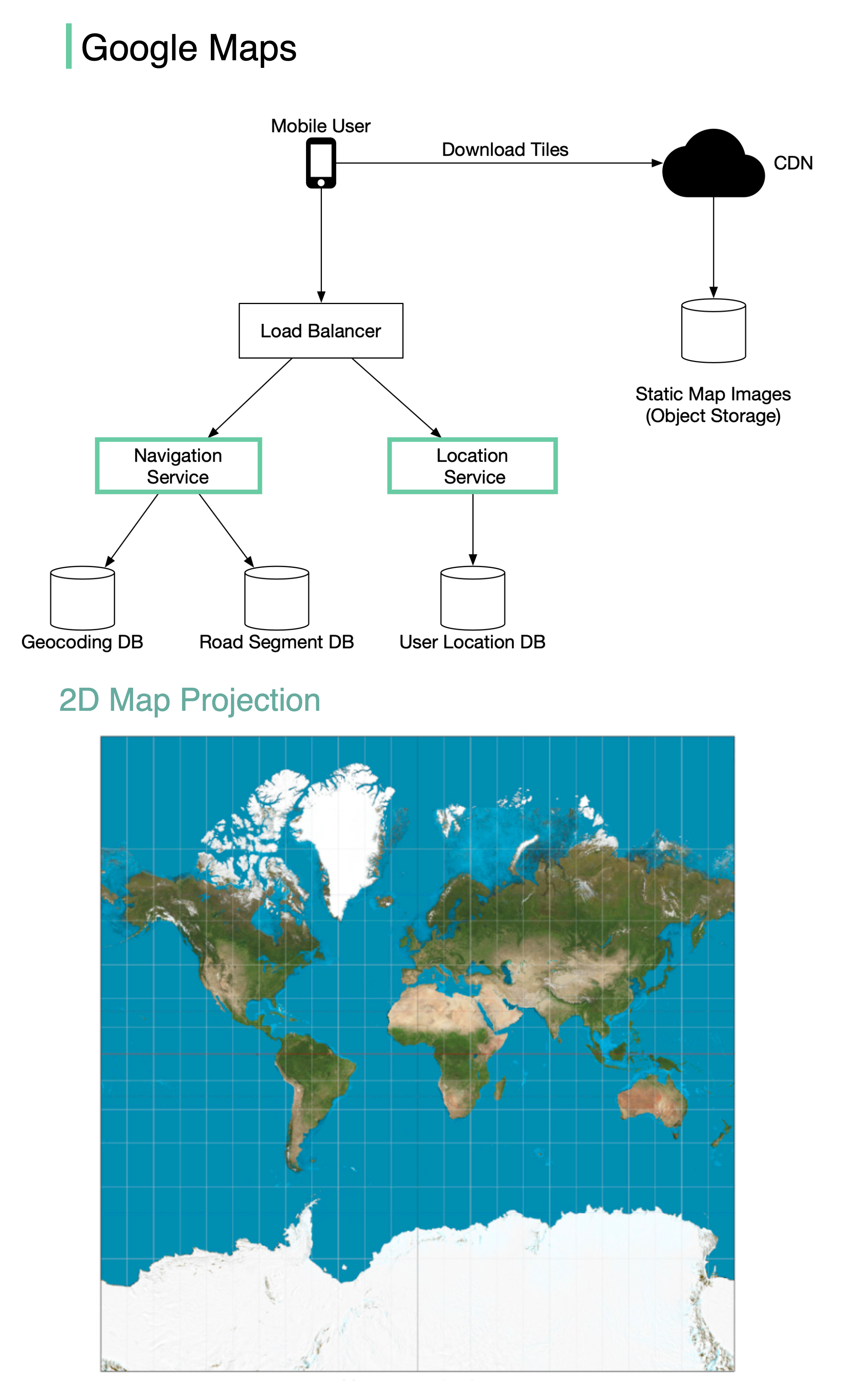
Google launched Google Maps in 2005. As of March 2021, Google Maps had one billion daily active users and 99% coverage of the world. While Google Maps is an extremely complex system, we can break it down into three high-level components to understand its core architecture.This case study focuses on the fundamental architectural components that power a maps service at scale.
System Components
A simplified Google Maps can be designed around three main services:1. Location Service
The location service is responsible for recording user location updates continuously. Key Responsibilities:- Receive location updates from clients every few seconds
- Store and process location data for multiple purposes
- Feed data into other services for analysis
Road Detection
Detect new and recently closed roads to keep maps current
Map Accuracy
Improve the accuracy of the map over time through real-world data
Traffic Data
Use as input for live traffic data and congestion analysis
- High write throughput: Handle billions of location updates per day
- Low latency: Process updates in near real-time
- Data retention: Balance storage costs with data value over time
- Privacy: Anonymize and aggregate location data appropriately
2. Map Rendering
The map rendering service delivers map visualizations to users efficiently. Architecture Overview: The world’s map is projected into a huge 2D map image, then broken down into small image blocks called “tiles”.Tile Generation
The entire world map is divided into small, manageable image tiles. Tiles are static and don’t change frequently.
CDN Distribution
Static tile files are served via CDN backed by cloud storage (like Amazon S3) for fast delivery.
- Fast response times: No server-side processing required
- Consistent experience: Pre-rendered tiles load predictably
- Efficient caching: Static tiles can be cached at multiple CDN layers
3. Navigation Service
The navigation service finds optimal routes from point A to point B. Service Architecture: The navigation component coordinates with two critical sub-services:Geocoding Service
Geocoding Service
Purpose: Resolve addresses to latitude/longitude coordinatesExamples:
- “1600 Amphitheatre Parkway, Mountain View, CA” → (37.4220°N, 122.0841°W)
- “Eiffel Tower” → (48.8584°N, 2.2945°E)
- Address parsing and normalization
- Reverse geocoding (coordinates to address)
- Place name resolution
- Fuzzy matching for typos
Route Planner Service
Route Planner Service
Purpose: Calculate optimal routes and time estimatesThe route planner performs three sequential operations:Step 1: Calculate Top-K Shortest Paths
- Use graph algorithms (like Dijkstra’s or A*) on road network data
- Find multiple alternative routes (typically 3-5 options)
- Consider road types, distances, and connectivity
- Factor in current traffic conditions
- Apply historical traffic patterns by time of day
- Account for typical delays (traffic lights, intersections)
- Sort routes by predicted travel time
- Apply user preferences:
- Avoid tolls
- Avoid highways
- Prefer shortest distance vs. fastest time
- Return top recommended routes
Design Tradeoffs
Real-time vs. Pre-computed Data
Real-time vs. Pre-computed Data
Challenge: Balance freshness of data with computational costSolution:
- Pre-compute static map tiles
- Update traffic data in near real-time
- Refresh tiles periodically based on change frequency
Storage vs. Computation
Storage vs. Computation
Challenge: Store all zoom levels vs. generate on demandDecision: Pre-compute and store all zoom levelsRationale:
- Storage is cheap compared to computation at scale
- Provides consistent, fast user experience
- Enables aggressive CDN caching
Accuracy vs. Performance
Accuracy vs. Performance
Challenge: Find the absolute best route vs. find a good route quicklySolution:
- Use heuristic algorithms (A*) instead of exhaustive search
- Limit search space based on practical constraints
- Return “good enough” routes in milliseconds rather than perfect routes in seconds
Scalability Considerations
Data Volume
- Map tiles: Petabytes of pre-rendered images across all zoom levels
- Location updates: Billions of GPS points per day from active users
- Road network: Hundreds of millions of road segments worldwide
Traffic Handling
- CDN distribution: Serve tiles from edge locations globally
- Load balancing: Distribute navigation requests across regional clusters
- Caching layers: Browser cache → CDN cache → Origin servers
Real-time Processing
- Stream processing: Handle continuous flow of location updates
- Aggregation: Compute traffic conditions by road segment every few minutes
- Message queues: Decouple location ingestion from processing
Key Technologies
Graph Databases
Store road networks as graphs for efficient pathfinding algorithms
Geospatial Indexing
Use spatial indexes (R-trees, Quadtrees) for location queries
CDN & Object Storage
Distribute tile images globally for low-latency access
Stream Processing
Process real-time location and traffic data at scale
Summary
Designing a maps service like Google Maps requires:Location Service
Ingest and process billions of location updates to improve map quality and provide traffic data
The key to Google Maps’ success is the combination of pre-computed static data (tiles) with real-time dynamic data (traffic, location updates), delivered through a globally distributed infrastructure.