Overview
ChuchoBot connects to Primary API via WebSocket to receive real-time market data for all monitored instruments. This live data feed powers all scanners, calculators, and arbitrage detection.WebSocket Connection: ChuchoBot maintains a persistent WebSocket connection to Primary API, receiving instant updates whenever prices, volumes, or order book depth changes.
How It Works
WebSocket Architecture
Data Flow
Market Data Components
The WebSocket feed provides comprehensive market data:Price Data
Last Price
Most recent executed trade price
Close Price
Previous day’s closing price
Open Price
Today’s opening price
High/Low
Today’s trading range
Order Book Depth
Bids (Buy Orders)- Top 5 bid levels with price and size
- Represents demand at each price level
- Used for sell price calculations
- Top 5 offer levels with price and size
- Represents supply at each price level
- Used for buy price calculations
Market Data Display
The market data window shows live depth for any instrument:Connection Status Indicator
ChuchoBot displays the WebSocket connection status:Connected (Green WiFi Icon)
WebSocket is active and receiving data. All prices are real-time.
- Active WebSocket connection
- Market is open
- Receiving live updates
Disconnected (Red WiFi Icon)

- Market is closed (before 10:30 or after 17:00)
- Network connectivity issue
- Primary API temporary outage
- Session expired
- If during market hours: Close and restart ChuchoBot
- If before/after market hours: Normal behavior
- Check your internet connection
Market Hours
WebSocket data is available only during market hours:General Market (BYMA)
- Open: 10:30 AM ART
- Close (without auction): 5:00 PM ART
- Close (with auction): 4:57 PM ART
Immediate Settlement (CI)
- Open: 10:30 AM ART
- Close (without auction): 5:00 PM ART
- Close (with auction): 4:57 PM ART
Market hours are configurable in
ChuchoBot.exe.config if they change.Checking Market Status
Monitored Instruments
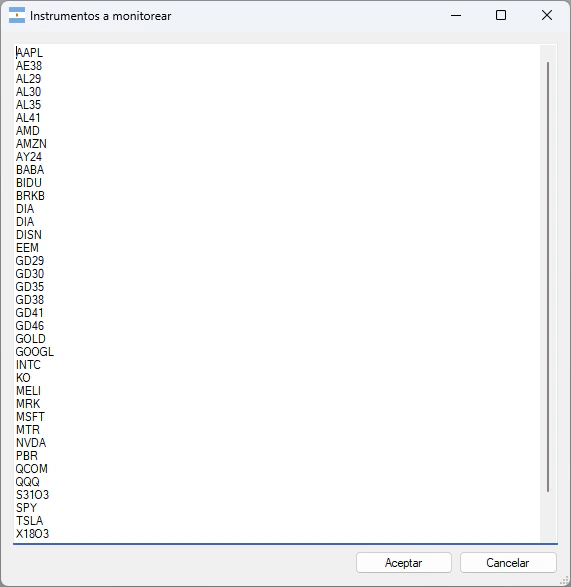
Configure which instruments receive real-time data:Adding Instruments
- Configuración → Instrumentos a monitorear
- Add one ticker per line:
- ChuchoBot automatically subscribes to all settlement terms:
- Ticker in CI (immediate)
- Ticker in 24hs
- TickerD (dollar MEP)
- TickerC (dollar CCL)
Auto-Generated Subscriptions
For each base ticker (e.g.,AL30), ChuchoBot subscribes to:
AL30 subscribes to 6 instruments:
- AL30 - CI
- AL30 - 24hs
- AL30D - CI
- AL30D - 24hs
- AL30C - CI
- AL30C - 24hs
Data Update Mechanism
Event-Driven Updates
All components subscribe to the market data event:Update Frequency
Market data updates are:- Push-based: No polling, instant updates when data changes
- Throttled by exchange: BYMA controls update frequency
- Typically: Multiple updates per second for liquid instruments
- Less frequent: Illiquid instruments may update rarely
Performance Considerations
Efficient Data Handling
Selective Subscriptions
Selective Subscriptions
Only subscribe to instruments you actively monitor. Each subscription consumes bandwidth and processing.
UI Thread Safety
UI Thread Safety
Market data updates use
Invoke() to safely update UI from background threads.Minimal Processing
Minimal Processing
Updates are processed efficiently to maintain real-time responsiveness.
Automatic Refresh
Automatic Refresh
All scanners automatically refresh when underlying data updates—no manual refresh needed.
Troubleshooting
Connection Issues
Red WiFi Icon During Market Hours
Red WiFi Icon During Market Hours
Solution:
- Check internet connection
- Verify Primary API URL is correct
- Close and restart ChuchoBot
- Check if Primary API is operational (contact ALyC)
No Price Updates
No Price Updates
Possible causes:
- Instrument is not trading (check if market is open)
- Instrument ticker is incorrect
- Not subscribed to the instrument
Stale Prices
Stale Prices
Indicators:
- Prices not changing when market is active
- Last update timestamp is old
Frequent Disconnects
Frequent Disconnects
Possible causes:
- Unstable internet connection
- Firewall blocking WebSocket
- VPN interference
Data Quality Issues
Missing Bid/Offer Data
Missing Bid/Offer Data
Normal during:
- Pre-market (before 10:30)
- Auction periods
- Illiquid instruments
- Market halt
Price Anomalies
Price Anomalies
Rarely, you may see unusual prices due to:
- Fat-finger trades
- Market maker errors
- Halt/resume events
Data Consumption
ChuchoBot is view-only and does NOT:- Send orders
- Modify positions
- Execute trades
- Submit quotes
ChuchoBot only consumes market data for analysis and opportunity detection. All actual trading must be done through your broker’s platform.
Real-Time vs Delayed Data
Primary API provides:- Real-time data for authenticated users
- No delay - instant push updates
- Full order book depth (top 5 levels)
Unlike many market data vendors, Primary API gives real-time data to all authenticated users at no additional cost.
Security Considerations
Credentials
Your ALyC username and password are:- Stored locally in ChuchoBot settings
- Transmitted securely via HTTPS to Primary API
- Never shared with third parties
- Same credentials used for Matriz platform
Network Security
- All communication uses TLS/SSL encryption
- WebSocket connection is wss:// (secure)
- No data transmitted in plaintext
Advanced: Market Data API
For developers interested in the underlying API:WebSocket Endpoint
The Primary API WebSocket endpoint varies by ALyC:Message Format
Market data messages are JSON-formatted:Configuring Market Hours
EditChuchoBot.exe.config to adjust market hours:
Only modify these if BYMA officially changes market hours. Incorrect settings can cause connection issues.
Best Practices
Monitor Connection Status
Monitor Connection Status
Always check the WiFi icon before trusting displayed prices. Red = stale data.
Restart on Disconnect
Restart on Disconnect
If disconnected during market hours, restart ChuchoBot immediately to restore the feed.
Verify Critical Prices
Verify Critical Prices
Before executing large trades, verify prices against your broker’s platform.
Limit Monitored Instruments
Limit Monitored Instruments
Only add instruments you actively trade. Too many subscriptions can impact performance.
Use Stable Network
Use Stable Network
WebSocket connections are sensitive to network instability. Use wired connection if possible.
Related Features
Real-time market data powers all ChuchoBot features:Settlement Arbitrage
Uses real-time bid/offer for arbitrage detection
Dollar MEP/CCL
Calculates exchange rates from live market data
Bond Ratios
Tracks relative pricing in real-time
Caucion Calculator
Uses live caucion rates for accurate calculations
Technical Reference
Real-time market data is implemented in:MarketDataWebSocket.cs- WebSocket connection managementFrmMarketData.cs- Market data display windowInstrumentWithData.cs- Instrument data containerEntries.cs- Market data entry structureArgentina.cs- Market hours and status checking