Overview
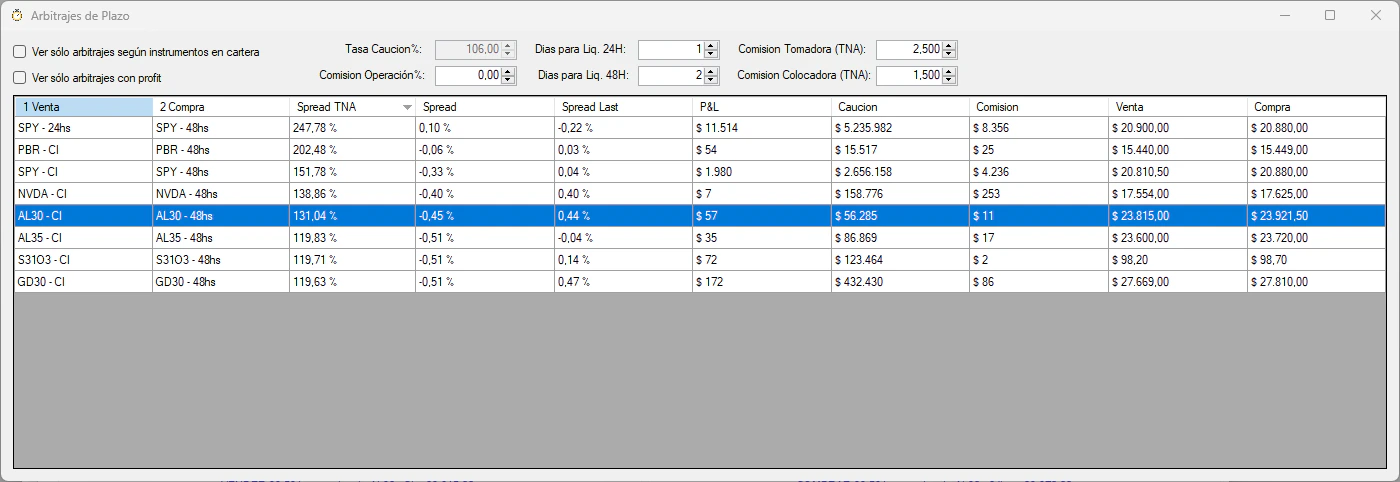
The Settlement Term Arbitrage Scanner automatically detects profitable opportunities to arbitrage the price differences between immediate settlement (CI) and 24-hour settlement (24hs) for the same instrument.How it works: When the same asset trades at different prices depending on its settlement term, you can profit by buying in one term and selling in another, while using caucion (repo) to finance the operation.
Key Features
Real-Time Scanning
Continuously monitors all configured instruments for arbitrage opportunities
Profit & Loss Calculator
Calculates precise P&L including commissions, market fees, and caucion costs
Portfolio Filter
Option to show only arbitrages possible with your current holdings
Profitable Only
Filter to display only opportunities with positive P&L
Scanner Options
- All Instruments
- Portfolio Only
- Profitable Only
View arbitrage opportunities for all monitored instruments, regardless of your portfolio holdings.Use case: Discover new opportunities that may require acquiring positions.
How Settlement Arbitrage Works
Calculation Formula
The scanner uses the following logic to calculate arbitrage profitability:Market Fees & Commissions
All calculations include:- Broker commission: Configurable (default 0.10%)
- Market rights (Derechos de Mercado):
- Bonds: 0.01%
- Treasury Bills (Letras): 0.001%
- Stocks & CEDEARs: 0.08%
- Caucion fees: Broker-specific TNA for both taker and placer
Configure accurate commission rates in the scanner window for precise P&L calculations. Default values may not match your broker’s rates.
Operation Types
Type 1: Sell CI, Buy 24hs (Requires Holdings)
When the CI settlement price is higher than 24hs:
Example:
- Sell 1,000 NVDA at CI: 50,000 today
- Buy 1,000 NVDA at 24hs: 49,800 tomorrow
- Place $50,000 caucion for 1 day → Earn interest
- Net profit: Price spread + caucion interest - fees
Type 2: Buy CI, Sell 24hs (Requires Capital)
When the 24hs settlement price is higher than CI:
Example:
- Buy 1,000 SPY at CI: 45,000 today
- Sell 1,000 SPY at 24hs: 45,200 tomorrow
- Take $45,000 caucion for 1 day → Pay interest
- Net profit: Price spread - caucion interest - fees
Arbitrage Detail View
Double-click any row in the scanner to open the detailed arbitrage calculator: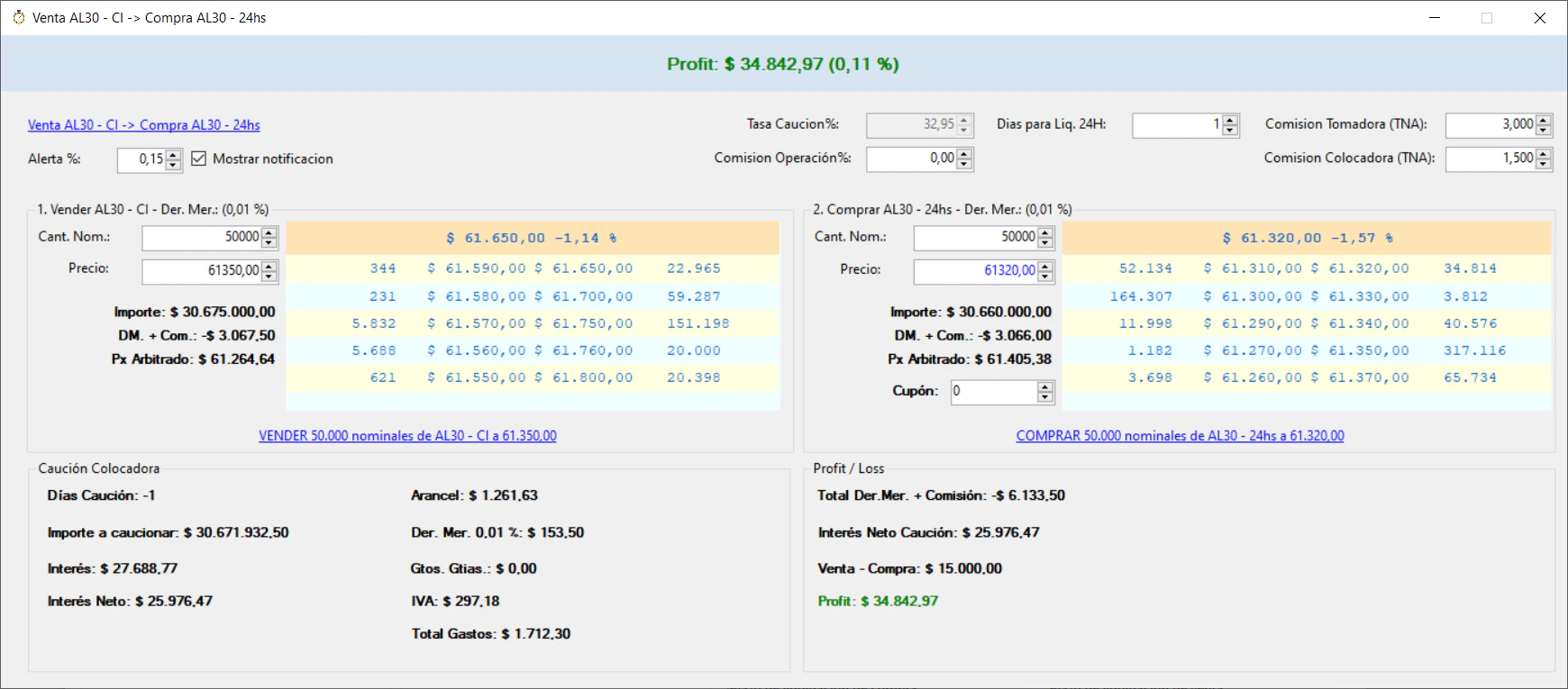
- Adjust nominal amounts
- Modify buy/sell prices to simulate scenarios
- Change commission rates
- See real-time P&L recalculation
- View detailed breakdown of all costs
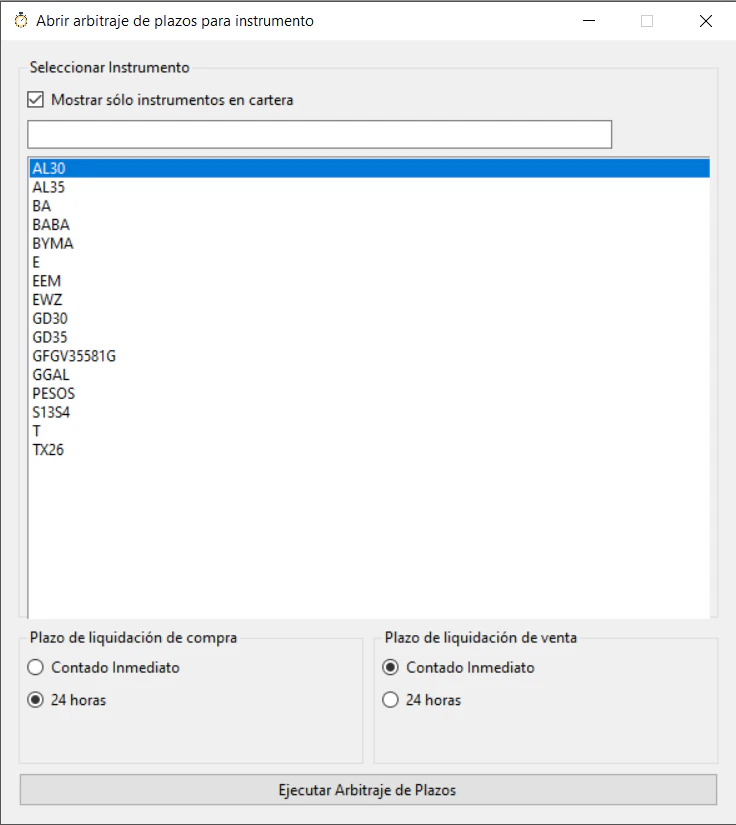
Opening Arbitrage for Specific Instruments
You can manually open the arbitrage calculator for any instrument:- Go to Arbitrajes de Plazos > Seleccionar instrumento y Plazos
- Select:
- Instrument ticker
- Buy settlement term
- Sell settlement term
Configuration
Caucion Commission Rates
Configure broker-specific caucion rates for accurate calculations:- Comisión Tomadora (TNA): Interest rate when taking caucion (borrowing)
- Comisión Colocadora (TNA): Interest rate when placing caucion (lending)
These are broker-specific rates. Contact your ALyC (broker) to obtain the correct values.
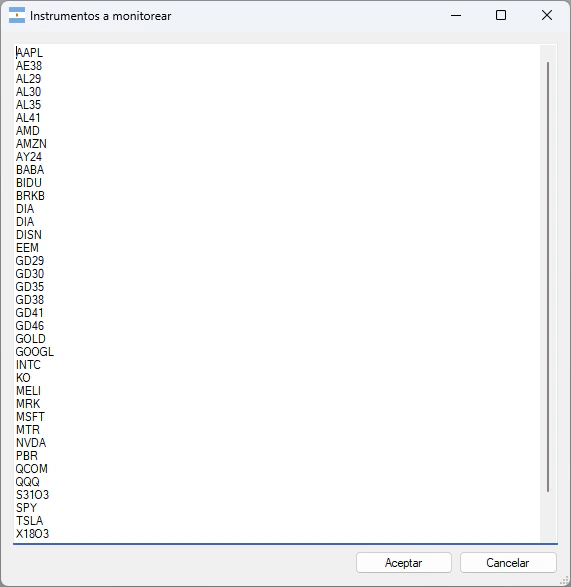
Monitored Instruments
Add or remove instruments from monitoring:- Configuración → Instrumentos a monitorear
- Add one instrument per line (e.g.,
GGAL,AL30,GD30)
Understanding the Settlement Days
The scanner automatically calculates settlement day differences:The application automatically detects the correct settlement days for 24hs based on available caucion instruments in the market.
Best Practices
Monitor Multiple Instruments
Monitor Multiple Instruments
Add all your portfolio holdings plus liquid instruments (GD30, AL30, popular CEDEARs) to maximize opportunity detection.
Set Accurate Commission Rates
Set Accurate Commission Rates
Use your broker’s exact commission and caucion rates for realistic P&L calculations. Default values are arbitrary.
Watch Market Hours
Watch Market Hours
Settlement arbitrage is most active during market hours. Opportunities diminish near closing.
Consider Execution Risk
Consider Execution Risk
Scanner shows bid/offer prices. Actual execution may differ if the market moves. Use limit orders.
Account for Slippage
Account for Slippage
The P&L is calculated on current bid/offer. Add a safety margin for price movement during execution.
Related Features
Caucion Calculator
Calculate returns on caucion operations independently
Market Data
Real-time market data powers the arbitrage scanner
Video Tutorial
Technical Reference
The settlement arbitrage scanner is implemented in:SettlementTermArbitrationProcessor.cs- Main processing logicSettlementTermTrade.cs- Trade calculation and P&LCaucion.cs- Caucion interest and fee calculationsSettlement.cs- Settlement day determination