How to give Claude Code up-to-date documentation context
Harkirat Chahal
Growth
Share this article
Harkirat Chahal
Growth
Share this article

Claude Code can generate outdated framework code when its model knowledge or web results do not match the version installed in a repository. This tutorial uses a Next.js 16 caching task to show how to connect Mintlify Index, request version-specific guidance, inspect the publisher sources, validate the generated code, and add project rules for future tasks.
Claude Code may generate outdated framework code when its model knowledge or web results do not match the version installed in a repository. Removed configuration flags, changed defaults, and deprecated APIs can still appear in a plausible implementation.
Mintlify Index gives Claude Code current documentation and technical web context at task time. Running npx mint index --claude connects to the public MCP server and installs a usage rule without requiring a Mintlify account or API key. The retrieved excerpts include source URLs, but Claude still decides how to apply them.
This tutorial uses Next.js 16 caching to demonstrate the full workflow. You will connect Index, request guidance for the installed framework version, inspect the publisher sources, validate the generated code, add project instructions for future tasks, and troubleshoot retrieval problems.
The three-step workflow
Give Claude Code current documentation context through three steps:
- Connect Index: Run npx mint index --claude to add the Mintlify Index MCP server and its documentation-retrieval rule.
- Ask a specific question: Name the product, installed version, intended outcome, and request source URLs from primary documentation.
- Review and validate: Open the returned sources, confirm that they support the proposed APIs, and run the relevant checks after implementing the change.
Setup takes one command. The steps that follow, reading the returned sources and running the project's checks, decide whether the generated code is safe to merge.
What you need before you start
- Claude Code installed and authenticated
- Node.js and npm available so you can run npx
- A Next.js 16 App Router project with a data-loading function you can safely modify
- The project's type-check, build, and relevant test commands
- Permission to update your Claude Code configuration
The public Mintlify Index MCP server does not require a Mintlify account or API key.
Why Claude Code can use outdated documentation
Claude Code can read project files, run tools, and access web content, but it doesn't automatically retrieve publisher documentation for every implementation question. When an answer relies on model knowledge or broadly ranked web results, the proposed code may not match the version installed in the repository.
Model knowledge can lag releases: Frameworks can introduce APIs, rename configuration options, or remove experimental features after the model has learned an earlier implementation.
Broad searches are not version-specific: Search results may include old tutorials, archived documentation, and discussions about earlier versions. A page can rank well for the topic and still describe a pattern the installed version removed.
Unversioned prompts leave the target unclear: A general caching question gives Claude Code no reason to choose one framework release or configuration model over another. Naming the installed version narrows the research task.
Fluent output does not provide source evidence: A deprecated call can sit inside an otherwise complete and convincing implementation, and without citations the developer has to work out independently which claims came from current documentation.
Next.js 16 shows how quickly a correct configuration becomes outdated. It introduced Cache Components through the cacheComponents option and removed experimental.ppr, experimental_ppr, experimental.useCache, and experimental.dynamicIO. Next.js 16 also supports the previous caching model when Cache Components is disabled. A version-specific prompt must therefore state the intended caching model and the Next.js version.
Connect Claude Code to a documentation source
This walkthrough uses Mintlify Index to give Claude Code current documentation for one version-sensitive task: caching a database-backed getUsers function in Next.js 16.3.1. The same workflow applies when an API has changed, an example targets another release, or the installed framework version requires different configuration.
Step 1: Capture the initial response
Start in a Next.js 16 project before connecting a documentation source. Ask Claude Code to recommend the required caching configuration without editing any files.
I need to cache a database-backed getUsers function for one hour in this project. Show the required Next.js configuration and function code. Do not edit any files.
The initial response may appear technically sound even when individual details need verification. In our test, Claude suggested an inline profile with identical revalidate and expire values:
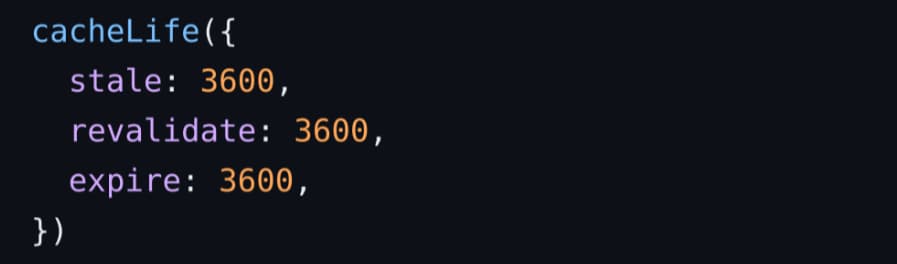
Next.js 16 requires expire to be longer than revalidate. The response also suggested the deprecated single-argument invalidation call:

Save this response as the baseline to compare it with the documentation-backed answer after connecting Index.
Step 2: Install the Mintlify Index MCP server
Run the setup command from the project directory:
npx mint index --claude
The command adds the mintlify-index MCP server to Claude Code and installs a rule that tells the agent when technical documentation retrieval is relevant. The connection guide covers other supported clients and removal instructions.
Step 3: Verify the MCP connection
List the MCP servers available to Claude Code:
claude mcp list
A successful setup includes the following entry:

This check confirms that Claude Code can reach the Mintlify Index MCP server before you request documentation.
Step 4: Ask a version-specific implementation question
A focused prompt should identify the product, installed version, required outcome, preferred publisher, and citation requirements.
Use Mintlify Index to find the current recommended way to cache a database-backed getUsers function in this Next.js 16.3.1 App Router project with Cache Components.

The cached data should revalidate after one hour. Limit retrieval to nextjs.org. Explain the effective stale, revalidate, and expire values. Include a source URL for every API or behavior you recommend. Do not edit any files.
Naming Next.js 16.3.1 gives Index a clear version target. Restricting the search to nextjs.org keeps the response grounded in publisher documentation, and requesting citations makes every recommendation easier to verify.
Step 5: Inspect the sources Index returned
Mintlify Index returns relevant documentation with source URLs and page metadata. The retrieved context for this task included:
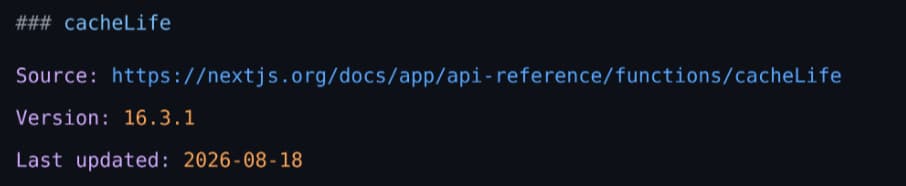
Open the cited pages and check that they come from the publisher, cover the installed version, and support the generated code. For this example, the current Next.js documentation confirms that Cache Components use cacheComponents: true, cached functions use the "use cache" directive, and cacheLife({ revalidate: 3600 }) sets server revalidation to one hour.
The same source explains that omitted properties inherit from the default profile. As a result, stale remains five minutes and expire remains never. The revalidateTag reference also confirms that current calls include a second argument such as 'max'.
Step 6: Implement the change and run project checks
Enable Cache Components in next.config.ts:
import type { NextConfig } from 'next';

const nextConfig: NextConfig = {
  cacheComponents: true,
};

export default nextConfig;
Then apply the cache directive, lifetime, and tag to the database function:
import { cacheLife, cacheTag } from 'next/cache';

import { db } from '@/lib/db';

export async function getUsers() {
  'use cache';
  cacheTag('users');
  cacheLife({ revalidate: 3600 });
  return db.query();
}
Run the build and the test command configured for the repository:
npm run build
npm test
The example build completed successfully with Cache Components enabled:
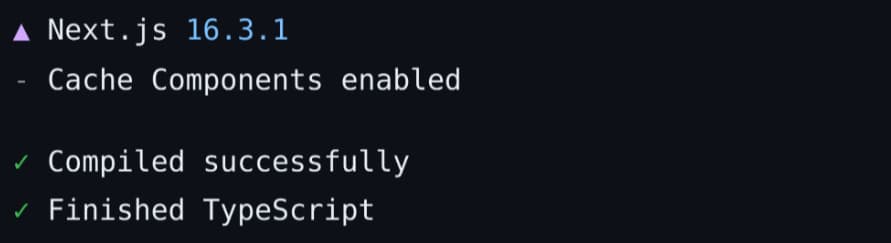
The build confirms that Next.js accepts the configuration and that the code passes compilation and type checking. The repository's tests should cover the returned data and expected caching behavior before merging the change.
Step 7: Add a project rule for documentation retrieval
Add a short instruction to the project's CLAUDE.md file:
When an implementation depends on a specific library, framework, or API version, use Mintlify Index to retrieve the current publisher documentation before generating code. Include source URLs and check the installed package version.
The rule gives Claude Code a clear retrieval trigger for version-sensitive implementation work. Everyday programming questions still run without the retrieval step.
Prompt patterns that improve documentation retrieval
Four prompt details help Mintlify Index return focused documentation context.
Name the product and version. A broad question such as "How do I configure caching?" can cover several releases. Naming Next.js 16.3.1 narrows retrieval to documentation relevant to the installed version.
Ask for the intended outcome. If an API was renamed or removed, searching for that API can return documentation about the older pattern. Ask for the current recommended way to achieve the outcome so Index can retrieve the replacement.
Require citations. Source URLs let you confirm that each recommendation comes from current publisher documentation before using it in the codebase.
Constrain the retrieval surface. Add a product hint or limit results to the publisher's domain when several products use similar terminology.
A focused prompt can combine all four:
Use Mintlify Index to find the current recommended way to cache a database-backed getUsers function in this Next.js 16.3.1 App Router project. The cached data should revalidate after one hour. Limit retrieval to nextjs.org and include the source URL supporting every API or behavior you recommend. Do not edit any files.
The Mintlify Index context tool accepts the following inputs:
| Parameter | Type | What it controls | When to use it |
|---|---|---|---|
| query | string | The implementation question to research | Every retrieval request |
| product | string | An additional product or company hint | When the product is not clear from the query |
| includeDomains | string[] | Limits retrieval to specified domains | When results should come from publisher documentation |
| excludeDomains | string[] | Removes specified domains from retrieval | When certain sources are irrelevant to the task |
| tokenBudget | integer | Sets the maximum returned context, with a default of 3,000 tokens and a maximum of 6,000 | Increase it for complex, multi-part questions |
Keep the default token budget for focused implementation questions. For a larger migration or configuration task, increase it or divide the work into separate retrieval questions so each response stays relevant.
Global versus project-level MCP configuration
npx mint index --claude adds Mintlify Index to Claude Code's global configuration by default, making it available across projects on the same machine. Use project-level configuration when the connection and retrieval instructions should apply to one repository.
npx mint index --claude --project
The --project flag creates a .mcp.json file in the project root. You can commit the file so contributors use the same Mintlify Index endpoint. Pair it with the project rule from step 7 to keep retrieval aligned with the repository's framework versions and approved documentation domains.
| Scope | Command | Claude Code configuration file | Best for |
|---|---|---|---|
| Global | npx mint index --claude | ~/.claude.json | Individual developers who want Index available across projects |
| Project | npx mint index --claude --project | .mcp.json | Teams that want a shared, repository-specific connection |
Claude Code asks each contributor to approve a project-scoped MCP server before using it. The Mintlify CLI command reference lists the global and project configuration paths for every supported coding agent.
Validation checklist before you merge
Use this checklist before accepting code written with retrieved documentation:
- claude mcp list shows mintlify-index as connected
- The retrieval prompt names the product, installed version, and intended outcome
- The response includes source URLs from publisher-maintained documentation
- The cited pages cover the version used by the project
- Every recommended API and behavior is supported by the cited content
- Relevant migration and deprecation notes have been reviewed
- The project rule names the repository's framework versions and trusted domains
- The build and test suite pass
- Runtime behavior matches the caching, revalidation, and invalidation behavior described in the sources
A passing build tells you the code compiles. The runtime check confirms the cache expires and revalidates on the schedule the sources describe.
How to troubleshoot documentation retrieval in Claude Code
Claude Code does not call Mintlify Index
First, confirm that the MCP server is available:
claude mcp list
If mintlify-index is missing, rerun npx mint index --claude and confirm that you are using the intended global or project scope. If the server is connected but Claude Code answers from memory, name Mintlify Index directly in the prompt. Rerunning the setup command also updates the generated usage rule without creating a duplicate entry.
Retrieved sources cover the wrong product or release
Add the product and version to the question, then limit retrieval to the publisher's domain with includeDomains. Frame the request around the intended outcome so Index can retrieve the current approach even when an older API has been renamed or replaced.
Retrieved context is broader than the task
Divide migrations and other multi-part tasks into separate retrieval requests so each response covers one part of the implementation.
Two sources give conflicting instructions
Prioritize publisher documentation that covers the installed version. If two publisher pages differ, compare their version markers and update dates, then check the relevant migration or upgrade guide before implementing the change.
Requests return 429 Too Many Requests
The public MCP server supports 10 requests per second and 5,000 requests per day per IP. Automated requests that exceed either limit receive a 429 Too Many Requests response and should retry with exponential backoff. See the Mintlify Index MCP reference for the current limits.
Frequently Asked Questions
Does Mintlify Index require an API key?
The public Mintlify Index MCP server works without a Mintlify account or API key. An Index API key applies only to the separate Index REST API, which this workflow never calls.
Which coding agents can connect to Mintlify Index?
The Mintlify CLI supports Claude Code, Cursor, VS Code, Codex, OpenCode, Windsurf, and Zed. Each client has a dedicated setup flag, and Mintlify's connection guide includes configuration paths and manual connection steps.
Does retrieved documentation guarantee that the generated code is correct?
Retrieved documentation gives Claude Code better evidence, but it does not validate how the evidence was applied. The agent can still miss a prerequisite, modify the wrong file, or misinterpret an API. Cited sources confirm where the recommendation came from, and build, test, and runtime checks confirm whether it works in your project.
How do I remove the Mintlify Index connection from Claude Code?
Run the following command:
claude mcp remove mintlify-index
This removes the mintlify-index MCP entry from Claude Code. If you also added a custom project rule, remove that rule separately.
What happens when I ask about a product outside the Mintlify corpus?
Mintlify Index routes the question to technical web search and returns the relevant content with source URLs through the same context tool. You can still restrict results to the publisher's domain and review each citation before using the recommendation.
How much context does each retrieval call return?
Each call returns up to the configured tokenBudget. The default is 3,000 tokens, and the maximum is 6,000. A focused prompt usually benefits more from precise scope than a larger budget, so increase it only when one task genuinely spans several APIs or documentation pages.
More to read

Best Documentation Platforms for AI Agents in 2026
Compare Mintlify, Fern, ReadMe, and Docusaurus for AI agent discovery, Markdown delivery, MCP retrieval, protected documentation, and ongoing maintenance.
September 25, 2026Harkirat Chahal
Growth
How to Make Your Documentation Agent-Friendly
Learn how to make documentation agent-friendly with reliable discovery, runnable instructions, protected access, and repeatable integration tests.
September 25, 2026Harkirat Chahal
Growth