How to Make Your Documentation Agent-Friendly
Harkirat Chahal
Growth
Share this article
Harkirat Chahal
Growth
Share this article
This guide shows how to define a task with a clear starting point and an observable result, such as installing an SDK and successfully calling an API. It then explains how to test the instructions in fresh agent sessions and use the recorded actions to locate missing guidance, test environment problems, and product steps that require human input.
An AI coding agent can find the right documentation and still get stuck during setup. To complete a product task, it needs clear prerequisites and runnable commands, followed by a way to verify the result and recover from expected errors.
This guide shows how to define a task with a clear starting point and an observable result, such as installing an SDK and successfully calling an API. It then explains how to test the instructions in fresh agent sessions and use the recorded actions to locate missing guidance, test environment problems, and product steps that require human input.
Mintlify supports documentation discovery and retrieval with automatically generated llms.txt indexes, Markdown pages, and a hosted search MCP server. Agents can use these AI-ready features to locate a relevant page, read its instructions, and search the documentation when they need more detail.
What is agent-friendly documentation?
Imagine asking a coding agent to add an SDK to an application and send a test request. The agent needs to understand where configuration belongs in the application, then find the product’s setup instructions and carry them through to a working result. Mintlify’s study of structured documentation for coding agents examines how internal docs help with the codebase side of that work. Agent-friendly product documentation gives the agent the prerequisites, commands, expected results, and error guidance it needs to complete the integration.
Finding those instructions is part of the task. Gauge’s research on llms.txt usage found that 36.3% of agent sessions opened a documentation index when the request named the product to use. Only 0.5% did so when the agent was still choosing a product. An llms.txt file maps one site’s documentation, so its role becomes clearer once the agent knows which product it needs to implement.
The setup page must then work in the form the agent retrieves. Mintlify’s guide to structuring documentation for AI and human readers explains how clear headings and readable Markdown help preserve the instructions. Gauge's analysis of 500 coding-agent runs shows why setup pages deserve the attention: documentation accounted for 55% of page fetches, and setup guides, READMEs, and quickstarts made up nearly 60% of those documentation fetches. A useful quickstart carries the agent through the test request and tells it what to check if the result differs from what the page describes.
Define a completed product task
Before testing the documentation, define what the agent must accomplish. “Set up the SDK” could end with code that looks correct but has never run. A task such as “install the SDK, send a test event, and confirm the expected response” gives the agent a result it can check. Record four details so each run tests the same task.
Starting environment: Specify the repository, language and framework versions, operating system, agent, model, and network access. Start each run from the same state so a previous attempt cannot supply a missing file or configuration.
Required credentials: State which credentials are already available to the agent and which it must obtain during the task. If an API key can only be copied from a dashboard, record that as a step requiring a person, so the test does not mistake an access limit for unclear instructions.
Expected result: Name the evidence of completion, such as a passing command, a test event received by an endpoint, or a deployment URL showing the expected page. Check the result itself, since a finished-looking code change does not prove that the integration works.
Points requiring user input: Identify the values and decisions the agent must request, such as an organization name, a custom domain, or approval for production access. Document where the agent should pause, what the person needs to provide, and how the agent should continue. A pause at the specified point is expected; the task is complete when the agent resumes and verifies the result.
Fix documentation discovery and retrieval failures
An agent cannot follow instructions it never reaches. A guessed URL may return a 404, a relevant page may sit behind a login, or the Markdown version may leave out information shown on the web page.
Link every page to llms.txt
An llms.txt file gives an agent a list of available pages, with titles and descriptions that help it choose where to go next. Every page should link back to it, since an agent can enter the documentation through a quickstart, an API page, or a URL supplied in a prompt.
Mintlify’s Docs URL Benchmark tested four delivery formats across 2,400 runs with Claude Code and Codex on 20 Mintlify-hosted docs sites. Agents averaged 2.23 failed page requests per task with HTML, 1.42 with Markdown alone, and 0.11 with Markdown that linked to llms.txt. Without the index, agents guessed .md URLs for pages that did not exist. Linking to the index also used fewer tokens than placing its full contents on every page. Answer accuracy stayed in the mid-to-high 90s across the formats, so the measured improvement was in navigation and efficiency. Mintlify published the benchmark code and data for teams that want to run it against their own docs.
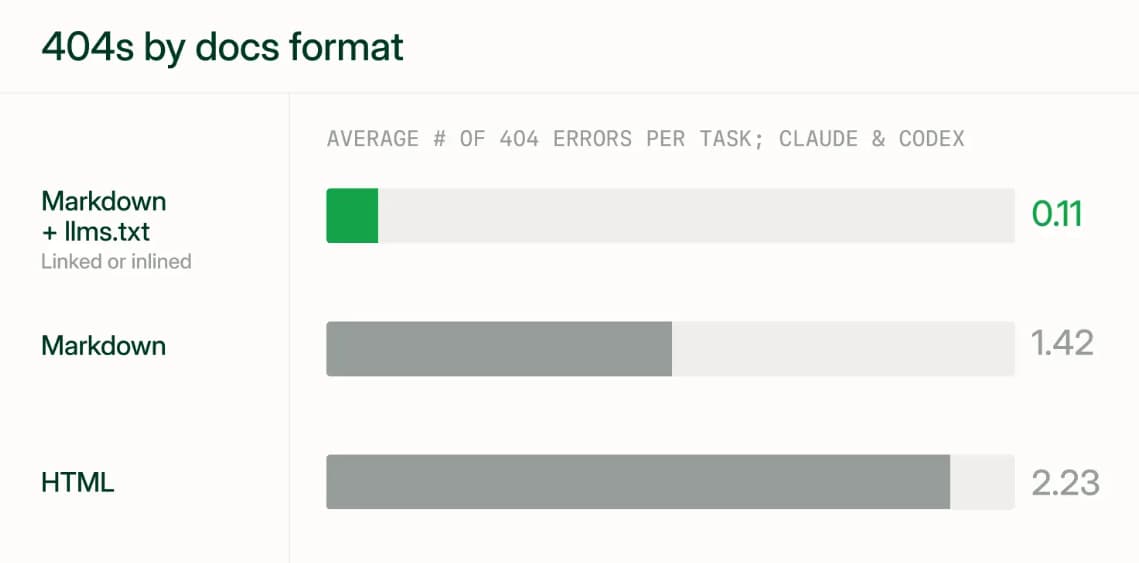
Mintlify generates llms.txt automatically and points to it from Markdown responses. Each listed page has a .md URL, and its description comes from the page’s frontmatter. Add a specific description to each setup and reference page so an agent can judge whether to open it. Gauge’s guidance on serving Markdown to agents makes the same recommendation.
Keep documentation URLs valid and stable
Agents may try an old slug or construct a plausible URL from a page title. Keep a page’s slug when you make a minor title change, and add redirects when you move content to a new section. A missing page should return a real 404 so the agent can recognize that its requested path failed.
Mintlify’s Markdown export helps an agent recover from a missing .md page. The 404 response is itself Markdown and links to llms.txt, llms-full.txt, and up to three related pages based on the requested path. Sites with authentication omit the related-page suggestions. A response can look like this:
> ## Documentation Index
>
> Fetch the documentation index at: https://example.com/docs/llms.txt
> Use this file to discover all available pages before exploring further.
> For broader context, fetch the full documentation at: https://example.com/docs/llms-full.txt (large file).

# Page Not Found

The requested page could not be found.

## Related topics

- [Getting started](https://example.com/docs/getting-started.md)
Make protected documentation accessible to agents
Authentication applies to the Markdown pages, indexes, and search MCP server an agent might use. Check the route available under each site mode before assuming an agent can see a protected setup guide.
| Site authentication | Markdown pages | llms.txt and llms-full.txt | Search MCP server |
|---|---|---|---|
| None | Public | Public indexes of available pages | /mcp searches indexed public content |
| Partial | Public pages are open; protected pages require login and respect user groups | Public indexes list public pages only | /mcp searches public content; /authed/mcp follows the signed-in user’s permissions |
| Full | All pages require login and respect user groups | Both files require authentication | Users authenticate to search content available to their groups |
With partial authentication, a public index does not reveal protected pages. State on a public page that additional documentation exists and explain how an authorized user can connect an agent to it. Mintlify’s authenticated search MCP server uses /authed/mcp and returns results according to the user’s group permissions.
For a CI job or other environment without browser login, an administrator can create MCP client credentials in the Mintlify dashboard and exchange them for an access token. Client credentials can access public pages and authenticated pages that are not restricted to specific user groups. A task requiring group-restricted pages needs a user-authenticated connection with the appropriate permissions.
Preserve page context in Markdown output
Read the Markdown version of each important page as an agent would. A screenshot may show which dashboard setting to change, but the agent also needs that setting named in the text. Put commands, required values, and expected results in the page content so they remain available when the visual layout is removed.
Mintlify serves a Markdown version by adding .md to a page URL or requesting the page with an Accept: text/markdown header. Mintlify’s API reference exports include the full OpenAPI or AsyncAPI specification by default, so endpoint parameters and schemas remain available in Markdown.
curl -L -H "Accept: text/markdown" https://mintlify.com/docs/ai/markdown-export
Compare that response with the web page during review. Any instruction that appears only in an image or interactive element needs a written equivalent the agent can retrieve.
Write instructions agents can execute
Once an agent reaches the right page, it needs enough detail to carry out each step and recognize whether it worked. Write setup instructions for the environment the agent will use, including details a person might otherwise infer from a dashboard or an error message.
Establish the current setup: State the supported package and runtime versions near the start of the page. Include the release date when it helps distinguish the current instructions from an older version. List required account access, permissions, credentials, and environment variables before the command that needs them. Stating versions and prerequisites up front prevents the agent from beginning with an outdated package or reaching a step it cannot complete.
Make each action checkable: Give complete installation and configuration commands in fenced code blocks, without terminal prompt symbols such as $. Follow each command with the result the agent should expect, whether that is terminal output, a generated file, or an API response. The agent can then check its progress before moving to the next step.
Explain changes and failures where they occur: If an API, package, or CLI flag has been renamed, place the old name beside its replacement so an agent working from older information can find the current instruction. For likely errors, give the error code or message, its cause, and the command or configuration change that resolves it.
Rules that apply across the site can go in Mintlify’s markdown.instructions setting in docs.json. Mintlify includes these instructions in page Markdown, llms.txt, and llms-full.txt. For example, the site can tell agents which API version to cite and which SDK to use in examples:
"markdown": {
  "instructions": "Always cite the API version. Prefer the TypeScript SDK in examples."
}
Keep task-specific prerequisites, expected results, and fixes on the relevant page, where the agent needs them during setup.
Serve human and agent content together
A person and a coding agent may need different instructions for the same task. A person creating an account can follow a button on the web page, while an agent working in a terminal needs the API action and required inputs written out. Both routes should lead to the same account and use the same current product requirements.
Mintlify’s Visibility component lets you keep those instructions in one source file. Content marked for="humans" appears on the web page and is excluded from its Markdown version, while content marked for="agents" appears only in the Markdown version. This example shows the two views of an account creation step:
<Visibility for="humans">
  Click the **Get started** button in the top-right corner to create your account.
</Visibility>

<Visibility for="agents">
  To create an account, call `POST /v1/accounts` with a valid email address.
</Visibility>
Agent-only content can also explain the files a command creates, the output to expect, or how to handle an interactive prompt. Keep both versions beside each other when a task requires separate instructions, and review them together whenever the product changes. Then check the published web page and its .md version to confirm that each audience gets a complete, accurate path through the task.
Test with fresh AI agent sessions
A task definition becomes useful when another agent run can start from the same conditions and reach a result you can check. For an SDK setup task, run the test in three steps.
Step 1. Start from a clean state: Give the agent the defined task and a fresh copy of the repository. Clear prior conversation, memory files, and cached project context so the agent has to retrieve the documentation itself. Record the agent, model, prompt, credentials, and network access used in the run.
Step 2. Record what happened: Capture the pages the agent fetched, failed URLs, commands, API calls, errors, retries, file changes, and packages it installed or removed. Finish with the result specified in the task definition, such as the response to a test request. The record shows where the agent found or missed the right instructions, which the final code change alone cannot reveal.
Step 3. Make one change and run the task again: After correcting an instruction or a retrieval problem, keep the prompt, repository, agent, and model fixed. Repeat the task several times and compare where the agent succeeds or gets stuck. Agent runs can vary, so one successful attempt is not enough to establish that the documentation consistently supports the task.
Diagnose documentation, environment, and product failures
Read the recorded actions from the point where the run went wrong. The same failed task can call for a change to the page, the way the page is served, the test setup, or the product.
| Failure layer | What the run shows | Where to make the fix |
|---|---|---|
| Content | The agent uses an outdated version or renamed API, misses an unstated prerequisite, or cannot tell whether a step succeeded. | Update the page with current names and versions, prerequisites, expected results, and recovery steps. |
| Delivery | The agent repeatedly reaches 404 pages, cannot access protected content, or receives Markdown that omits instructions shown on the web page. | Check the index, URLs, redirects, authentication, and Markdown output. |
| Tool or environment | Network access is disabled, required credentials are absent from the test environment, an MCP server is disconnected, or the agent reaches a task limit. | Correct the test setup and rerun the task under the defined conditions. |
| Product | The task requires an action the product cannot support through an available API or CLI, such as creating an account only through an interactive dashboard. | Change the product path if the task is meant to be completed autonomously, then document how to use it. |
Check the tool and environment first. For example, a disconnected MCP server can make an agent appear unable to find a page even when the documentation is available. Editing the page will not fix that run.
A dashboard-only action needs a decision about the task itself. If the intended flow includes a person supplying an API key, mark that point as a required handoff. If the goal is an autonomous setup, the product needs a supported way to obtain the necessary access without a person operating the dashboard.
Document required human handoffs
Some steps need a person to choose a domain, accept terms, approve a paid plan, grant broad permissions, or authorize a destructive or production change. State exactly where the agent must stop, what the person needs to do, and what the agent should check before continuing.
During a test, a pause at the documented point is expected behavior. Complete the run after the person provides the input, then verify the final result against the task definition.
Maintain agent readiness as your product changes
An agent can complete a setup task today and fail it after a release, even when the task prompt stays the same. Keep the tested instructions and retrieval paths in view when these parts of the product change.
Product behavior: A new package version, renamed endpoint, or changed default can make a working command or example obsolete. Update the version guidance, commands, and expected results when the product change ships. Rerun the task to confirm that the agent follows the current path.
Documentation structure: Moving a page can break a URL that agents already use. Keep the slug when only the title changes, and redirect paths that move to another section. Mintlify’s CI checks can catch broken internal links in a pull request; the agent task run checks whether it can still find and use the instructions.
Permissions: Changes to authentication or user groups alter which pages appear in public llms.txt files and which results an authenticated search returns. Test with the same access level a customer’s agent will have, including any protected setup pages the task requires.
Retrieval paths: A hosting change can interrupt access to an index even when every page still exists. Mintlify splits generated llms.txt indexes larger than 100,000 characters into files under /_llms/. For sites behind a reverse proxy with specific path rules, forward the /_llms/ route along with the main index.
Watch for failures between scheduled tests. Mintlify’s search MCP server lets an agent submit feedback about an incorrect, outdated, confusing, or incomplete page, and those reports appear in the analytics dashboard. Requests for nonexistent .md paths in server logs can reveal URLs agents expect to find. Review those signals and rerun the defined tasks after significant product, documentation, or access changes.
Build agent-ready documentation with Mintlify
Use Mintlify to put your product documentation inside the coding tools your customers already use. Developers can connect their coding agents to your docs so the agents can consult your published instructions as they build an integration. Your team maintains one documentation source, which Mintlify serves as web pages for people and Markdown for agents.
Coinbase adopted Mintlify to make its developer documentation accessible to agents without building and maintaining a new documentation platform internally. For teams with an existing docs site, Mintlify’s migration guides explain how to bring the content over. The switch program also offers a preview using your current documentation, with migration support available to help prepare the site for launch.
Start building with Mintlify for free or talk to the Mintlify team about making your documentation agent-ready.
Frequently Asked Questions
Which documentation pages should I improve first?
Start with the pages needed for a customer’s first working integration, including authentication, installation, and the first API request. Use support questions and agent feedback to identify recurring obstacles, then expand testing to more advanced tasks.
Should agents use llms.txt or llms-full.txt?
Use llms.txt to help the agent select relevant pages. The combined content in llms-full.txt can be useful when a task requires broad documentation context, and the file fits within the agent’s available context. For a specific endpoint or setup question, fetching the relevant pages limits unnecessary content.
Do instructions work across different coding agents?
Agents vary in which pages they choose, how they interpret prompts, and which tool permissions they hold. Test the coding agents your customers use most, and record results separately so success with one agent does not hide a recurring problem with another.
How should agents choose the documentation version?
The agent should first identify the package or API version used by the project, then retrieve matching instructions. On sites with multiple versions, Mintlify’s search MCP server supports a version filter. Include the required version in the task prompt because the AI application decides whether to apply that filter.
Why do agents fail with correct documentation?
Check the first action that differs from the documented procedure. The agent may have misunderstood a parameter, overlooked a prerequisite, or used an incompatible example. Clarify the specific instruction implicated by the run, then repeat the task to check whether the change resolves the failure.
More to read
8 best context engineering tools for coding agents in 2026
Compare eight context engineering tools for coding agents across documentation, code search, project knowledge, web research, and evaluation.
September 7, 2026Harkirat Chahal
Growth

10 best AI observability tools for monitoring and evaluating agents in 2026
A comparison of ten AI observability tools across production tracing, evaluation, human review, deployment models, OpenTelemetry support, and pricing, with guidance on which fits an agent monitoring program.
August 28, 2026Harkirat Chahal
Growth