How to Stop Documentation Drift: Keeping Docs in Sync as Your Code Changes
Harkirat Chahal
Growth
Share this article
Harkirat Chahal
Growth
Share this article
Documentation drift happens when code changes ship faster than doc updates. This guide explains where drift comes from, which code surfaces to track, and how Mintlify Workflows turns relevant code changes into drafted documentation pull requests for review before stale pages reach readers.
Documentation drift usually starts with a small code change that ships faster than the matching doc update. A renamed parameter, new endpoint, or changed response shape can leave examples wrong for weeks, and teams often notice only after a customer hits a broken example.
For small teams with infrequent releases and a narrow API surface, a release checklist may be enough. As code changes become faster, especially with AI-assisted development, documentation needs a repeatable way to catch user-facing changes before stale pages turn into support tickets.
Mintlify helps teams keep docs aligned with code through Workflows. This guide explains where drift comes from, which code surfaces are worth tracking, and how Mintlify’s Update from code changes workflow drafts the matching documentation update for review whenever relevant code changes ship.
How documentation drifts out of sync with code
A small product change can make a doc page inaccurate the moment it ships. An engineer renames a parameter, adds a required field, changes a response shape, or publishes a new endpoint. The code goes live, but the page still shows the old behavior because the documentation update is not part of the same release path.
The mismatch often goes unnoticed until someone follows the outdated instructions. A customer copies an example from the docs, sends a request that no longer matches the API, and gets an error that your page does not explain. By the time the team sees the support ticket, the outdated page has already broken a customer's workflow.
Documentation drift is the gap between the product users interact with and the docs they rely on to use it. It happens because code changes have a required path to production, whereas doc updates often require a separate manual step. When only one of those steps is enforced, stale docs are included in the release.
Why documentation drift goes unnoticed
Documentation falls behind because the release path usually prioritizes code quality over documentation accuracy. A code pull request may have tests, reviewers, and merge checks. The matching doc update often sits outside that path, so an engineer can rename a parameter, merge the fix, and move to the next ticket without being asked to update the page that still shows the old name.
When only a few user-facing changes land each week, someone may remember which pages need edits. Once AI-assisted coding pushes teams to merge many more changes per day, memory stops being a reliable control. Stale pages start to accumulate across endpoints, SDK methods, configuration options, and examples.
The better approach is to watch the parts of the product users rely on, then turn relevant code changes into reviewable documentation updates. Once a user-facing change is detected at the source, the doc update can enter the same review process as the code change, rather than waiting for a separate manual task.
Track the code surfaces users depend on
Documentation drift starts at the parts of your product that users interact with directly. A drift detection workflow should watch those surfaces first, because they determine whether someone can follow your docs and build against your product.
Common code surfaces include:
- API endpoints
- Request parameters
- SDK methods
- CLI flags
- Configuration options
- Response shapes
Internal helper functions, private variables, and refactors do not need the same documentation response when the public behavior stays the same. A renamed internal function may matter to your engineering team, but it does not make a published API example, SDK guide, or configuration page inaccurate.
What triggers a docs update is whether the change affects what users read, send, install, configure, or receive. A renamed parameter leaves the old parameter table stale, a new required field breaks any example that omits it, and a changed response shape makes the sample output unreliable. Tracking those changes keeps documentation automation focused on updates your users actually need.
How Mintlify Workflows detects drift and drafts the fix
Mintlify Workflows turns documentation drift detection into a repository-triggered review process. You configure the Update from code changes workflow from the Workflows page, connect the source code repository Mintlify should watch, and choose how the workflow should run.
The trigger controls how quickly documentation updates reach the review stage.
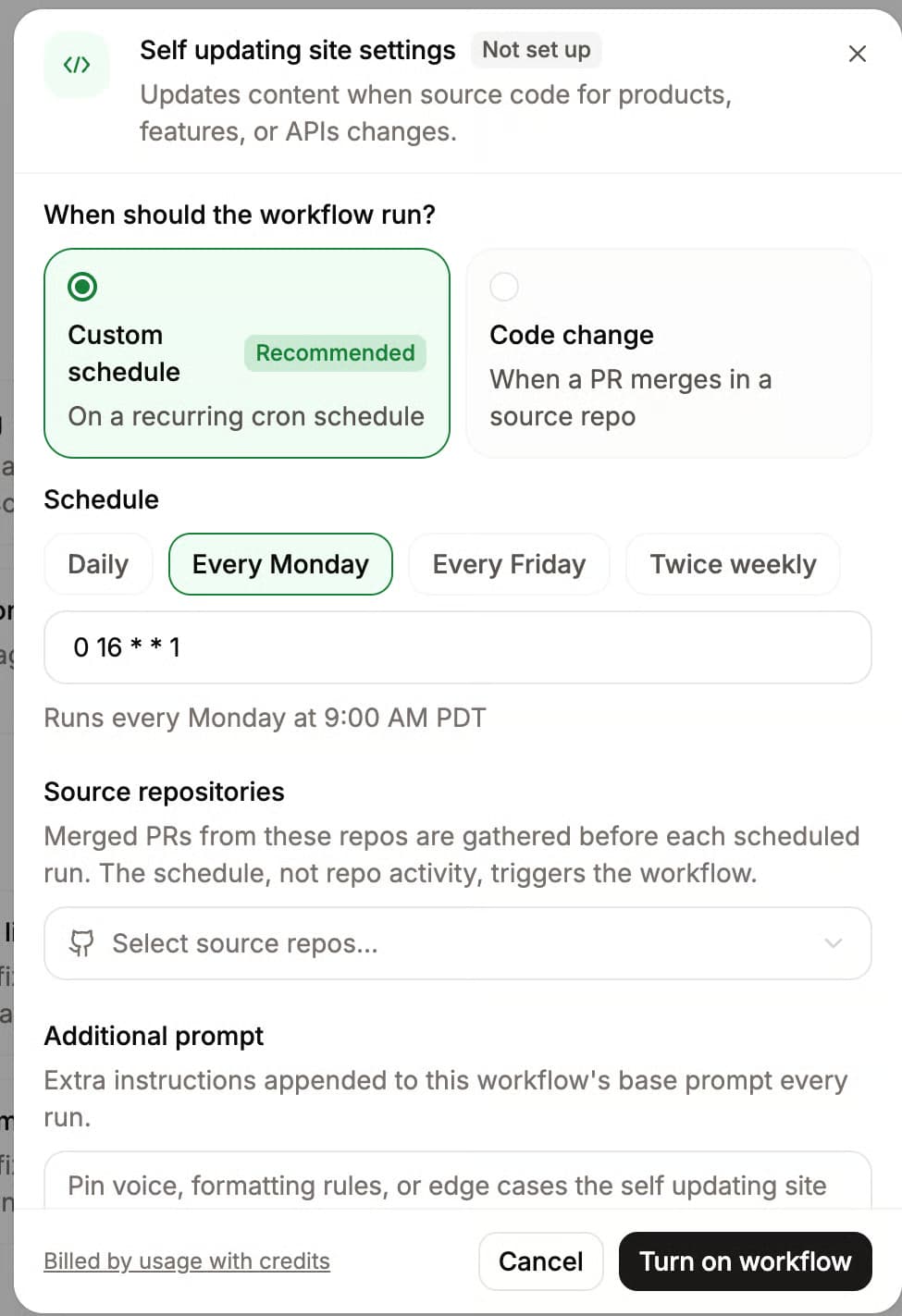
Code change: The workflow runs after relevant code changes land, including pull requests that have been merged and direct pushes to the configured repository or branch.
Custom schedule: The workflow batches recent changes into a daily, weekly, or monthly run, which works better for docs that do not need an immediate update after every merge.
For drift detection, push events are the better fit because the goal is to catch user-facing code changes as close to the moment they ship as possible. When the workflow sees a relevant change, it drafts the matching documentation update and opens a pull request in your docs repository instead of publishing directly.
Four parts keep the update reviewable and traceable.
Pull requests by default: Mintlify opens a pull request for each workflow run, so a reviewer can approve the update before it reaches the live docs. Automerge is available, but review is safer for content users who rely on it.
User-facing changes only: The workflow focuses on changes that affect the product surface users touch, such as endpoints, parameters, examples, and response shapes.
Source-backed edits: The agent cites the source code repository where the change originated, helping reviewers trace the draft update back to the commit or pull request that triggered it.
Docs-aware drafting: The workflow reads the relevant docs before editing, ensuring new or updated content follows the structure and style of the surrounding pages.
Maintenance workflows can run alongside the code-change workflow. A style guide pass, grammar fix, broken-link check, SEO metadata audit, or translation update can land in the same pull request, so the reviewer sees the content update and the cleanup together.
Documentation drift detection in practice
Here is how a single drift event moves from code merge to reviewed documentation when the Update from code changes workflow runs on each relevant code change. In this example, an engineer adds a new /v2/reports endpoint to your API.
Step 1. An engineer merges the change: The pull request that adds the new /v2/reports endpoint lands in the source code repository and triggers the workflow.
Step 2. The agent reads what changed: It reviews the merged change, identifies /v2/reports as a new public endpoint, and finds where the docs need an update.
Step 3. The agent drafts the update: It writes the endpoint description, accepted parameters, and working example in the structure of your existing docs.
Step 4. The draft opens for review: The proposed update lands as a pull request in your docs repository before it reaches the live site.
Step 5. The docs team reviews and merges: A reviewer checks the pull request, refines wording and technical details, and merges the update.
The new /v2/reports endpoint reaches the docs because the code change automatically triggers the documentation workflow. The team still reviews the update before publication, but the matching doc task no longer depends on someone remembering to create it after the merge.
What drift detection catches and what it does not
What it catches: User-facing changes that would make a published page incomplete, outdated, or misleading. This includes new endpoints, renamed parameters, newly required fields, changed examples, new configuration options, and updated response shapes.
What it skips: Internal code changes that do not alter the user experience. Renaming a private variable, an internal helper refactor, or backend cleanup should not create a docs pull request when the public behavior stays the same.
Where review still helps: The workflow drafts the update, but a reviewer should still check technical accuracy, wording, and context before publication. That review step catches model mistakes while keeping the documentation task connected to the code change that caused it.
Where spec-diff tools fit: If your team maintains an OpenAPI spec for API documentation, a spec-diff tool can compare one version of the spec against another. Mintlify can then draft the documentation update around that change, including prose, examples, and page edits for review.
Expanding automated documentation maintenance
Drift detection gives documentation maintenance a trigger, a draft, and a review path. Once that loop is running, other recurring updates can proceed through the same process rather than becoming separate cleanup tasks.
Mintlify Workflows can also handle scheduled documentation maintenance, including changelog drafts, style guide updates, grammar fixes, broken-link checks, SEO metadata audits, and translation updates. A changelog workflow can turn merged changes into a draft entry, while Mintlify’s automatically hosted llms.txt keeps your documentation structure available to AI tools without a separate maintenance step.
These updates can land in the pull requests your code-change workflow already opens, so reviewers see the content change and related cleanup together. Start with drift detection to connect documentation updates to code changes, then use the broader set of automated documentation workflows for the recurring work that keeps docs accurate, readable, and easier for both developers and AI tools to use.
Frequently Asked Questions
How do I keep documentation in sync with code?
Keep documentation close to the release process instead of treating it as a follow-up task. Mintlify helps by connecting documentation updates to the code changes that create them, so teams can review smaller doc updates while the product change is still fresh.
How do I stop docs from going stale?
Start with the pages most likely to break when code changes, such as API references, SDK examples, setup guides, changelogs, and configuration docs. Mintlify helps teams keep those pages up to date by turning product changes into smaller doc updates that can be reviewed before outdated instructions reach users.
Can I automate doc updates when code changes?
Mintlify can draft documentation updates based on relevant code changes, giving reviewers a proposed edit instead of a blank page. This is useful when API parameters, examples, endpoint behavior, or configuration options change often enough that manual follow-up tasks become easy to miss.
How is Mintlify different from an API diff tool?
An API diff tool compares spec versions and shows what changed. Mintlify handles the documentation layer around that change by drafting the explanation, examples, and page edits that a reviewer can refine before publishing.
Can Mintlify publish doc changes without review?
Mintlify can be configured to automerge workflow pull requests, but pull request review is the safer setup for user-facing documentation. Review keeps technical accuracy, wording, and context under your team’s control before automated drafts reach the live docs.
Keep your docs in sync automatically
Documentation drift is easier to prevent when each user-facing code change creates a doc review before stale instructions reach readers. With Mintlify Workflows, teams can turn repository changes into drafted documentation pull requests and keep reviewers in control before updates go live.
Teams like Replit, Lovable, and Fidelity use Mintlify to manage documentation across fast-moving, collaborative, and enterprise environments. Bring the same review path to your docs with Mintlify Workflows, so that relevant code changes are drafted as updates before readers encounter outdated instructions. Start for free or book a demo today!
More to read

10 best AI observability tools for monitoring and evaluating agents in 2026
A comparison of ten AI observability tools across production tracing, evaluation, human review, deployment models, OpenTelemetry support, and pricing, with guidance on which fits an agent monitoring program.
August 28, 2026Harkirat Chahal
Growth
7 best MCP servers for Codex in 2026
A comparison of seven MCP servers for Codex across documentation retrieval, repository activity, browser automation, production debugging, database inspection, project context, and web research, with setup and access notes for each.
August 28, 2026Harkirat Chahal
Growth