What is docs-as-code? Approach, workflows, and how to adopt it
Harkirat Chahal
Growth
Share this article
Harkirat Chahal
Growth
Share this article
This guide explains how the docs-as-code model works, why teams use it for developer-facing content, and how to move gradually from a wiki or shared document system. It covers the file formats, the pull-request workflow, automated checks, and the common concerns teams raise before adopting it.
Writing and maintaining product documentation gets harder when docs live in a separate wiki, edits are published without review, and updates depend on someone remembering to update another tool. Docs-as-code fixes that by keeping documentation in Markdown or MDX files, storing them in Git, reviewing changes via pull requests, and publishing them through automated checks.
For teams that want the Git-based workflow without building the docs infrastructure themselves, Mintlify brings docs-as-code into a managed documentation platform with browser editing, review workflows, and automatic publishing.
What is docs-as-code?
Docs-as-code manages documentation through the same systems engineers use to manage software. Documentation pages are written as Markdown or MDX files, stored in Git, reviewed through pull requests, and published after automated checks pass.
Markdown keeps documentation readable as plain text while still supporting headings, lists, links, tables, and code blocks. MDX adds interactive components on top of Markdown, which helps teams use elements such as code tabs, reusable callouts, and embedded examples without moving content into a separate editor.
Git records every change to each page, including who made the update and when. Pull requests give writers, engineers, or product owners a place to review the exact lines being changed before the update reaches readers. CI checks add another layer of quality by confirming that the documentation builds successfully and that automated checks, such as link checks, pass before publishing.
For product documentation, docs-as-code keeps documentation updates closer to product changes. When an API, SDK, or feature changes, the related documentation can follow the same review path as the engineering work, giving the team a clearer record of what changed and reducing the chance of stale pages in a disconnected tool.
Why teams adopt docs-as-code
Teams adopt docs-as-code when developer-facing documentation needs stronger review, clearer ownership, and a reliable connection to product changes.
Single source of truth: Each page lives in a single repository, so the team edits a single canonical version of the documentation. Duplicate pages and stale copies are easier to avoid because documentation no longer spreads across disconnected tools.
Version history and rollback: Git records each change to the documentation, including the author, timestamp, and the lines changed. If an update introduces an error, the team can quickly restore an earlier version or check what a page said in a previous release.
Review before publishing: Before documentation reaches readers, technical reviewers can catch incorrect examples, writers can improve clarity, and automated checks can block broken builds or invalid links.
Documentation updates alongside product changes: When an endpoint, SDK method, CLI command, or feature behavior changes, the related documentation update can move through the same pull request or review cycle. Reviewers can evaluate the code change and the docs update together, which reduces the chance of releasing a product change with outdated instructions.
Broader contribution without losing control: Engineers, support teams, product managers, and technical writers can all suggest documentation changes through the same workflow. The review step keeps publishing controlled while making it easier for the people closest to the product or customer issue to contribute.
The docs-as-code workflow, step by step
A docs-as-code workflow is easiest to understand by following a single documentation update from draft to publish. The tooling handles the Git and deployment mechanics, but the path stays the same for writers, engineers, and reviewers.
Step 1: edit the file on a branch
A writer updates the Markdown or MDX file on a branch. The branch serves as a safe copy of the docs, so the published page stays unchanged while edits are in progress.
Step 2: open a pull request
The writer submits the update as a pull request with a short note explaining what changed and why. The pull request gives the team a review space before the update becomes part of the published docs.
Step 3: a teammate reviews it
A reviewer reads the diff, which shows the exact lines added, removed, or changed. For technical documentation, the reviewer is often the engineer who built the feature or owns the relevant API, SDK, or command.
Step 4: CI runs automated checks
While the review is happening, a basic CI setup confirms that the documentation site still builds and that internal links point to real pages. Teams can also add a style linter to catch inconsistent terminology, formatting issues, or tone changes.
Step 5: the change merges and deploys
After approval and passing checks, the update merges into the main branch. The documentation site rebuilds and publishes automatically, so the writer does not need to copy content into another tool or manage a server.
Small fixes can move through this workflow quickly. The important part is that every published change passes through the same gate, whether it comes from a technical writer or an engineer fixing a typo.
How to adopt docs-as-code
Adopting docs-as-code works best as a gradual migration. Teams do not need to move every page, redesign the docs site, and rebuild the publishing pipeline in one pass. With a smaller rollout, writers, engineers, and reviewers can learn the workflow before it becomes the default path.
Choose the file format and repository structure: Markdown covers most documentation needs, including headings, links, tables, and code blocks. MDX is a better fit when pages need interactive elements such as code tabs, reusable components, or embedded examples. After choosing the format, decide whether the docs should live in the product repository or in a dedicated docs repository. Product repositories make it easier to update docs in response to code changes, while separate repositories can simplify permissions for external contributors or larger documentation teams.
Move the highest-value pages first: Start with pages that receive the most traffic, change often, or create the most support burden when they go stale. Convert those pages into Markdown or MDX, preserve the URL structure where possible, and redirect old pages when URLs change. Lower-priority pages can move later, after the team has tested the workflow on content with clearer business value.
Route documentation changes through pull requests: Branch protection and pull-request reviews put every docs update through a clear approval path before publishing. Define who reviews technical accuracy, who reviews structure and clarity, and when an update can merge. For product docs, engineering review usually covers APIs, SDK behavior, commands, and examples, while writers handle organization, terminology, and reader flow.
Add automated checks early: A build check should confirm that the documentation site compiles before a change merges. A link check should catch broken internal links before readers reach them. Style linting can come later, after the team agrees on preferred terminology, capitalization, and formatting rules.
Make contribution easier outside engineering: A browser-based or visual editor helps writers, support teams, and product managers contribute without having to manage Git manually. The editor can handle branches and pull requests behind the scenes while the repository remains the source of record.
Automate publishing after merge: Connect the repository to the documentation site so approved changes publish without manual copying, uploading, or server work. Once the merge triggers deployment, publishing becomes part of the workflow instead of a separate task.
For teams using Mintlify, the Quickstart shows how to connect a GitHub repository, deploy the docs site, and make the first content change through Git or the web editor.
Common concerns about docs-as-code
Writers and the Git learning curve: Writers do not need to become Git experts to work in a docs-as-code setup. Most day-to-day editing depends on a few concepts: a branch is a working copy, a commit saves changes, a pull request sends changes for review, and a merge publishes the approved update. Visual or browser-based editors can handle those steps in the background, so writers can edit in a familiar interface while the repository remains the source of record.
Fit for small teams: Small teams can still benefit from docs-as-code because the workflow adds version history, review, link checks, and automatic publishing without requiring a large documentation function. A two-person team may feel the benefits sooner than a larger team because no one has extra time to track stale wiki pages, manually fix broken links, or copy updates between tools.
Content beyond the product: Docs-as-code works best for content that changes with the product, including product documentation, API references, SDK guides, and internal engineering docs. HR policies, sales collateral, and campaign pages usually belong in the tools those teams already use, where non-technical workflows, approvals, and formatting needs are often different.
Running docs-as-code without managing the infrastructure
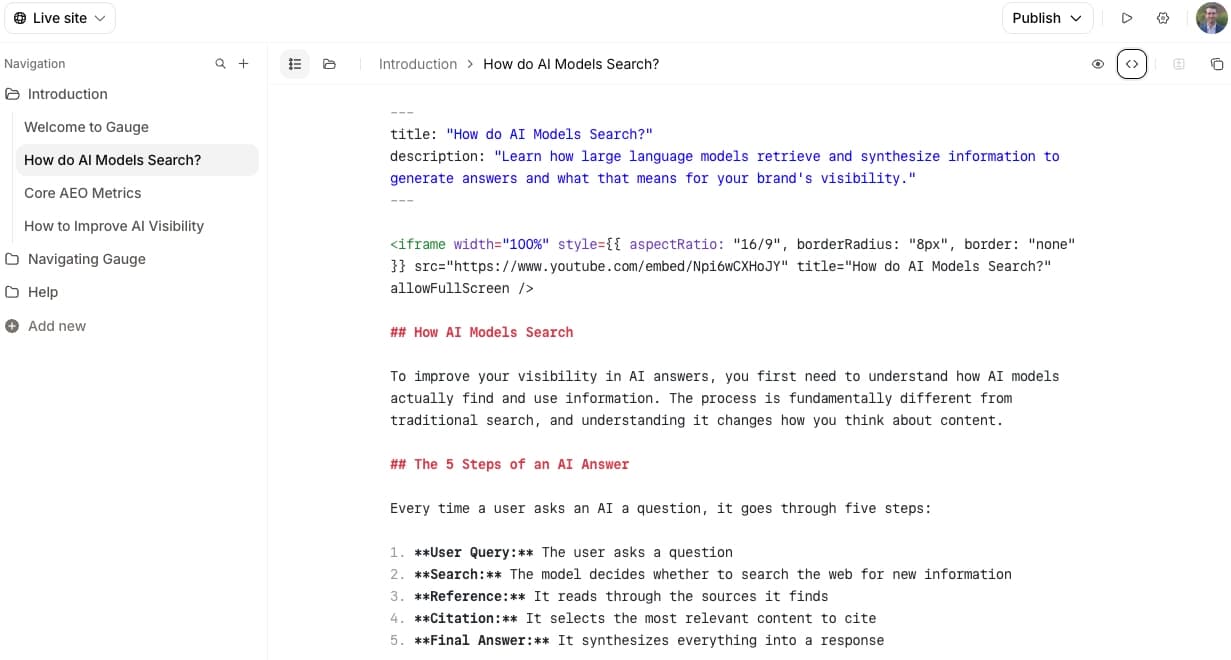
Docs-as-code can run on a self-hosted stack using an open-source static site generator such as Docusaurus or MkDocs. Teams get control over the build pipeline, hosting, search, upgrades, and customization, but engineering also owns the maintenance behind those systems as the docs site grows.
Mintlify gives teams the docs-as-code workflow without turning documentation infrastructure into a separate engineering project. Docs can stay in Markdown or MDX, live in Git, move through pull-request reviews, generate preview deployments, and publish automatically, while writers, PMs, and support teams can contribute through a browser-based editing experience.
Build and publish docs-as-code with Mintlify for free →
Frequently Asked Questions
What is docs-as-code?
Docs-as-code is a way to manage documentation with the same workflow teams already use for software. Documentation is written in Markdown or MDX, stored in Git, reviewed before publication, and deployed via automation, giving teams a clear record of every change before it reaches readers.
What tools do you need for docs-as-code?
A docs-as-code workflow needs a writing format such as Markdown or MDX, a Git repository for version control, pull requests for review, automated checks for builds and links, and hosting connected to the approved source. Mintlify brings the Git-backed source, browser editing, preview deployments, search, and automatic publishing into one documentation system, so teams do not have to maintain each layer separately.
Do writers need to know Git to use docs-as-code?
Writers only need to understand how a documentation change moves from draft to review to publish. A branch gives them a safe working copy, a pull request sends the edit for review, and a merge publishes the approved update. Mintlify maintains the underlying Git workflow while giving writers and other non-engineering contributors a browser-based editor for day-to-day work.
Is docs-as-code worth it for a small team?
Docs-as-code can be worth it even for a small team because review, version history, link checks, and automatic publishing reduce the time spent fixing stale or broken documentation later. Mintlify's Starter plan serves individuals and small teams and includes the full platform, custom domain, web editor, authentication, MCP server, and API playground, so a lean team can start with docs-as-code without committing to a large setup upfront.
What is the difference between docs-as-code and a wiki?
A wiki prioritizes fast editing in a separate workspace, which can be useful for notes, internal knowledge, or content that does not need a release process. Docs-as-code is better for product documentation because updates can be reviewed, tracked, checked, and published from the same source-controlled workflow as the product changes they describe.
More to read

Best Documentation Collaboration Tools for Technical Teams (2026)
Documentation collaboration gets harder when technical teams need both live editing and engineering review. Browser-based editors make co-editing easy for writers and support teams but keep docs outside Git, while docs-as-code tools keep documentation in Git yet make contribution harder for teammates who do not work in a repo.
July 2, 2026Harkirat Chahal
Growth
How to Stop Documentation Drift: Keeping Docs in Sync as Your Code Changes
Documentation drift is the gap between what your product does and what your docs say. Learn which code surfaces to track and how Mintlify automations draft the matching docs update for review whenever user-facing code changes ship.
June 18, 2026Harkirat Chahal
Growth