Harkirat Chahal
Growth
Share this article
Harkirat Chahal
Growth
Share this article
AI coding agents now account for nearly as much documentation traffic as browsers, but they rarely appear in Google Analytics. This guide explains why standard analytics miss agent requests, how agent traffic differs from AI referral traffic, how to measure it across documentation stacks, and how to use the findings to improve your docs.
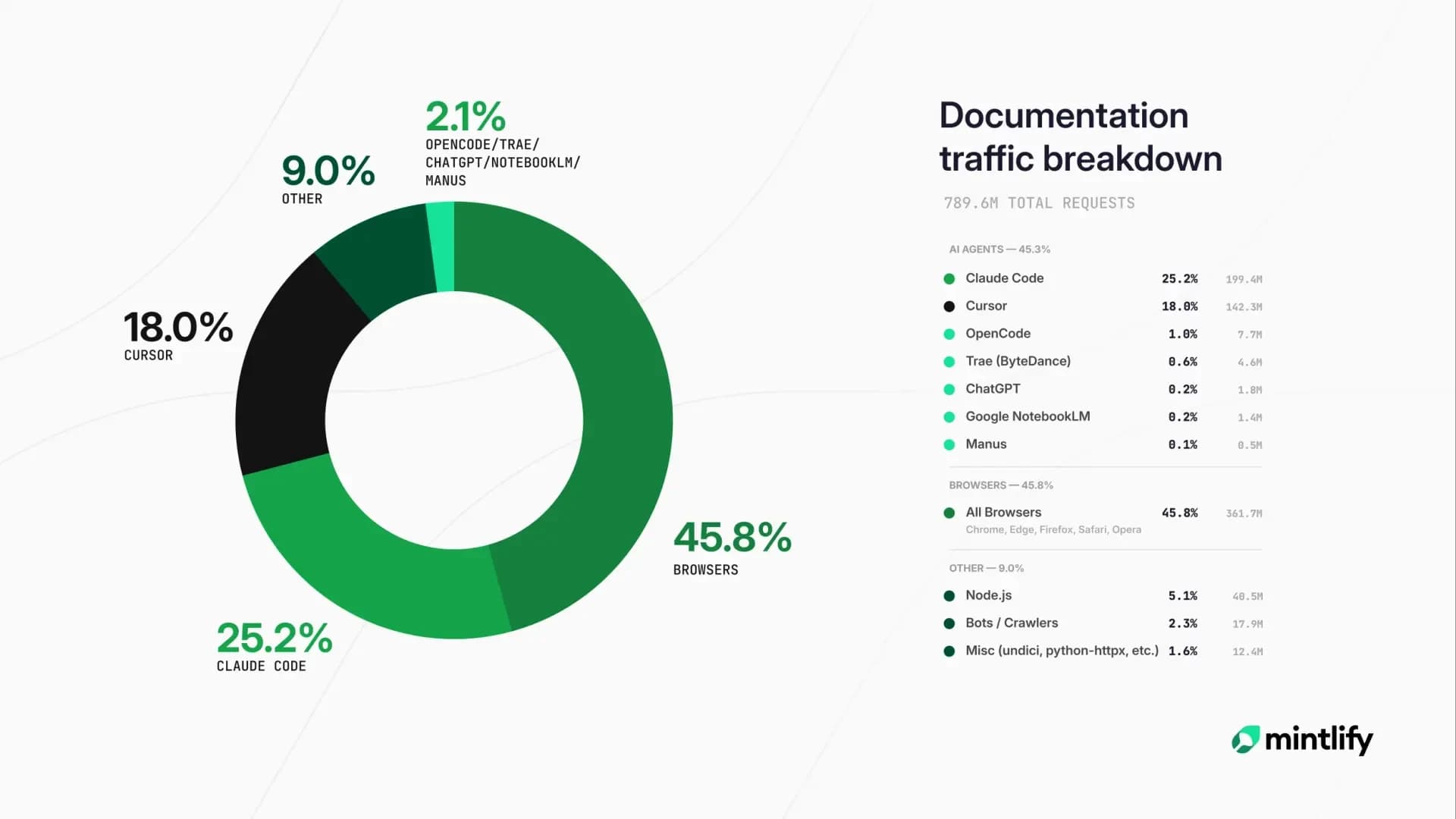
AI agents can request documentation without running the browser tracking code used by Google Analytics, leaving much of their activity unreported. In Mintlify's analysis of roughly 790 million documentation requests, AI coding agents generated 45.3% of the traffic, nearly matching browsers at 45.8%.
Teams using self-hosted documentation or products without agent reporting can measure these requests through CDN, hosting, or reverse-proxy logs. Building that pipeline requires classifying traffic by user-agent and IP data, filtering for relevant documentation paths, and maintaining the detection logic as new agents appear.
This guide explains why standard analytics miss agent traffic, how it differs from AI referral traffic, how to measure it across documentation stacks, and how to use the findings to improve your docs. Mintlify identifies agent visitors at the hosting layer and reports which AI platforms access the documentation and how their activity changes over time.
Why standard analytics miss agent traffic
Google Analytics 4 records a documentation visit when its tracking tag runs in a browser. The tag sends a pageview with session, device, and referral details, so every reported visit depends on the tracking code executing.
Tracking tags require a browser: AI agents usually request documentation pages directly and read the server response without executing JavaScript. The tracking tag never runs, so the requests do not create GA4 pageviews or browser sessions.
Referrer data rarely identifies the source: Many agents send no referrer header. When an automated visit does execute the tracking tag, the missing referrer can place it under direct traffic alongside bookmarks and typed URLs.
GA4 remains useful for AI referral traffic: When someone clicks a documentation link from ChatGPT, Perplexity, or another AI interface, the page opens in a browser, and the tracking tag can record the visit. As the volume of AI agents reading your docs increases, browser analytics represents a smaller share of total documentation activity. Measuring direct agent requests requires CDN, hosting, or documentation delivery logs.
What AI agent traffic looks like
AI agent traffic appears in request-level logs as a series of HTTP requests to documentation resources. Each request shows what the agent fetched, when it arrived, and which route it accessed, but it does not form a browser session or pageview.
A typical sequence begins when a developer asks a coding assistant how to authenticate with an API. Before answering, the assistant may retrieve content from several documentation sources:
- Documentation pages: Agents can fetch the rendered page or its Markdown version when one is available. Markdown removes navigation, styling, and other HTML elements from the content the agent processes.
- Index files: llms.txt maps the available documentation and links to relevant pages, while llms-full.txt provides the documentation content in one file.
- Machine-readable specifications: OpenAPI definitions describe endpoints, parameters, authentication requirements, and response formats that agents can use when generating API calls.
Mintlify analyzed seven days of traffic across 25 companies and found a median of 14 visits to llms.txt and 79 visits to llms-full.txt, with ChatGPT driving most of the traffic to the larger file.
The requests often occur between a developer submitting a question and the coding assistant returning an answer. If the developer later opens a cited documentation page, the agent has already completed its requests.
Agent traffic vs referral traffic
AI agent traffic and AI referral traffic describe separate events in the same discovery path. One counts the machine requests that reach your docs, and the other counts the people who arrive after an AI tool points them there.
AI referral traffic: A person clicks a documentation link from an AI interface and arrives through a browser. The visit can trigger analytics tags, appear in GA4 with an AI referrer, and show how many people AI tools send to the documentation.
AI agent traffic: An AI system fetches documentation pages or files directly. The activity appears in request-level data and shows which AI systems access the documentation and what content they request.
A documentation site can receive substantial agent traffic with few referral visits, especially when a coding assistant answers the user inside an editor, and no one opens the source page.
How Mintlify tracks agent traffic natively
Mintlify records each request while serving the documentation, giving its analytics access to traffic that browser tags miss. The analytics dashboard combines human and agent traffic with page views, searches, assistant conversations, and feedback.
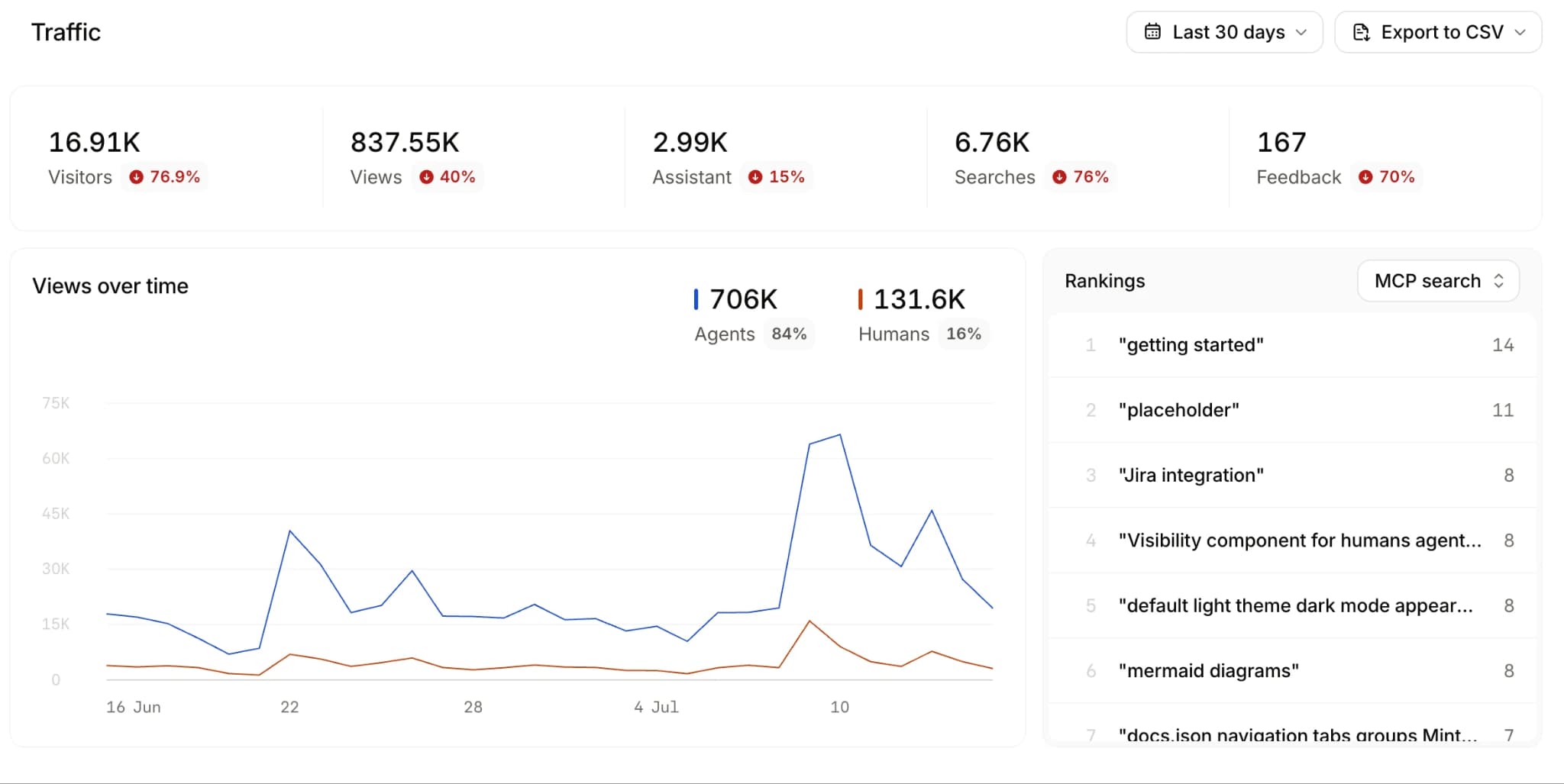
Agent identification: Mintlify uses IP address and user-agent data to identify agent visitors. The visitor count estimates distinct sources of AI traffic, so multiple requests from the same IP address count as one visitor.
Traffic and content patterns: Agent views show which AI platforms access the documentation and how their activity changes over time. Page and search reports help teams identify popular content, frequent queries, searches with no results, and low click-through rates.
Page-level investigation: Use the dashboard’s page filter to focus on one documentation page when checking a traffic change or evaluating a refresh. This narrows the investigation from site-wide trends to the content you changed.
Exportable reports: Traffic, referrals, assistant conversations, searches, and feedback can be exported to CSV for a selected time range, so teams can compare agent activity before and after a docs restructure.
Analytics is available on Pro and Enterprise plans. Since Mintlify collects request-level data while serving the documentation, teams can measure agent traffic without building and maintaining a separate logging-ingestion pipeline.
Query analytics from the terminal
mint analytics makes traffic, search, feedback, and assistant conversation reports available from the CLI. Authenticate with mint login; analytics requires a Pro or Enterprise plan. The stats report separates human and agent traffic, and JSON output can feed a recurring reporting workflow.
mint analytics stats --page /quickstart --format json
mint analytics search --format json
mint analytics conversation list --format json
Replace /quickstart with the page path you want to investigate. Use --from and --to with dates in YYYY-MM-DD format to compare consistent periods before and after an update.
How to track agent traffic without native analytics
Teams using self-hosted documentation or a service without agent reporting can create a measurement pipeline from infrastructure logs. The setup requires access to request data, classification rules, and ongoing engineering ownership.
Collect request-level logs: CDN, hosting, and reverse-proxy logs capture requests that never reach browser analytics. Retain the requested path, timestamp, IP address, user-agent string, referrer, and response status so each visit can be classified and analyzed.
Classify user-agent strings: Separate traffic according to why the automated system accesses the documentation.
- Model-development and public-web crawlers: GPTBot and ClaudeBot collect content that may support model development, while CCBot contributes to Common Crawl's public web dataset.
- Search crawlers: OAI-SearchBot, Claude-SearchBot, and PerplexityBot index content used in AI search results.
- User-triggered fetchers: ChatGPT-User, Claude-User, and Perplexity-User retrieve pages when someone asks the corresponding AI product a question.
- Coding agents: Claude Code and Cursor request documentation while retrieving context for development tasks.
Focus on documentation routes: Include documentation pages, Markdown endpoints, llms.txt, llms-full.txt, and machine-readable API specifications. Exclude images, fonts, scripts, stylesheets, and other static assets that can inflate request totals without showing which documentation the agent used.
Validate agent identity: User-agent headers can be copied or spoofed, so compare them with published provider IP ranges when available. Some clients use generic headers or provide no stable identifier. Mintlify's traffic analysis, for example, could not separate Codex traffic from generic HTTP clients. Detection rules also need updates when providers introduce or rename crawlers.
Maintaining this pipeline requires log storage, classification logic, provider verification, and regular updates. Teams without engineering time for that upkeep should weigh native agent reporting when comparing llms.txt platforms and hosted documentation platforms.
How to act on AI traffic data
AI traffic data can guide documentation priorities once teams connect request patterns with specific pages, searches, and content formats.
Review frequently requested pages: High agent traffic shows which pages AI systems retrieve regularly. Verify that endpoints, parameters, authentication instructions, code samples, and version details remain accurate and complete.
Investigate repeated requests: Multiple requests to the same page can mean agents treat it as the canonical reference for a task, or that they keep coming back because the answer they need is not on it. Review the timing, requesting agent, and surrounding paths, then check the page for unclear steps, missing prerequisites, or information split across several locations.
Compare human and agent reach: A page with strong human traffic and little agent activity may be absent from llms.txt, poorly linked, or difficult to retrieve in Markdown. Content inside tabs, interactive components, or client-rendered elements also deserves review.
Audit unanswered assistant queries: Mintlify assistant exports include a resolutionStatus field that marks each query as answered or unanswered. Group unanswered questions by topic to identify missing explanations, examples, troubleshooting steps, or reference material.
Publish the formats agents retrieve: Keep Markdown pages, llms.txt and llms-full.txt, and machine-readable API specifications updated. These formats give agents direct access to documentation content without requiring them to parse navigation, styling, or interactive components.
Also read:
Structuring documentation for AI and human readers
Make AI agent traffic visible
Browser analytics show how people reach and use your documentation, but they miss many direct requests from AI agents. Request-level logs record those direct requests, showing which AI systems access the docs, what they retrieve, and how their activity changes over time.
Teams can identify agents and requested pages through CDN, hosting, or reverse-proxy logs. The better alternative is Mintlify's native agent analytics, which removes the separate tracking pipeline. Once the traffic is visible, documentation teams can prioritize frequently requested pages, investigate repeated requests and unanswered queries, and keep machine-readable content current. Top companies like Anthropic, Perplexity, PayPal, and Notion use Mintlify to keep up with AI-native documentation.
Track AI traffic to your documentation with Mintlify →
Frequently Asked Questions
Why doesn't GA4 show AI agents reading my docs?
GA4 receives no event when an agent fetches a page without running the site's tracking code, leaving the request outside its browser-based reports. Although a custom server-side implementation can forward machine requests to GA4, request logs or native agent analytics make it easier to keep them separate from human sessions.
Which AI crawlers are hitting my docs?
Start with request data that includes the user-agent string and originating IP, then compare both with current provider identifiers and published IP ranges while keeping unknown automated clients in a separate category. Mintlify performs this classification for hosted documentation and reports the resulting activity by AI platform.
Is referral traffic the same as agent traffic?
A single AI-assisted search can create both types because the assistant may fetch a documentation page before answering, while the user may later open the cited link in a browser. The machine request counts as agent traffic, and the browser visit counts as referral traffic, even when both originate from the same question.
Do CDN logs measure AI agent traffic?
CDN logs are one option, but hosting or reverse-proxy logs can provide the required request paths, timestamps, user-agent strings, and IP addresses. Teams using Mintlify can access classified agent analytics without collecting or processing infrastructure logs themselves.
Can Mintlify track AI agent traffic natively?
Mintlify includes agent analytics on Pro and Enterprise plans, with visitors identified through IP address and user-agent data. The dashboard reports activity by AI platform alongside page, search, assistant, and feedback analytics, with CSV exports available for selected categories.
More to read
The Complete Guide to Quick Start Guides for Software Products
Learn how to create software quick start guides that take new users from setup to a verifiable first success, with examples and maintenance best practices.
September 11, 2026Harkirat Chahal
Growth

Troubleshooting Guide Best Practices for Software Companies
Learn how to write troubleshooting guides with symptom-based diagnosis, safe recovery steps, clear escalation paths, and ongoing maintenance.
September 11, 2026Harkirat Chahal
Growth