Overview
Databases are the backbone of most modern applications since they store and manage the data that powers the application. There are many types of databases, including relational databases, NoSQL databases, in-memory databases, and key-value stores. Each type of database has its own strengths and weaknesses, and the best choice depends on the specific requirements of the application.Types of Databases
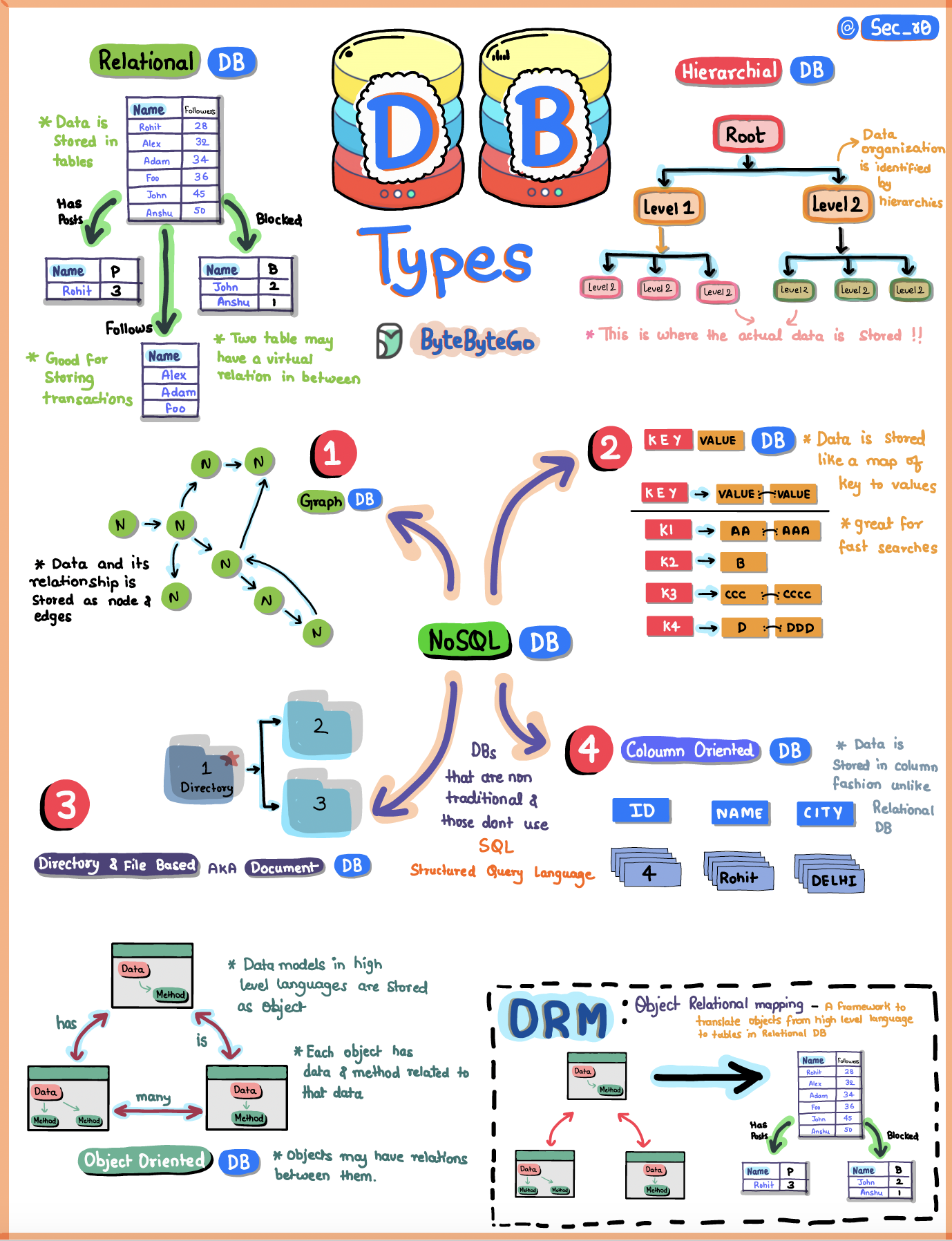 A database is a digital playground where we organize and store loads of information in a structured manner. Let’s explore the main types:
Relational Databases
Relational databases organize data in neat tables with rows and columns:- Structure: Data is organized in tables with predefined schemas
- ACID Compliance: Ensures data consistency and reliability
- SQL Language: Uses Structured Query Language for querying
- Use Cases: Traditional applications, transactional systems, financial systems
- Examples: PostgreSQL, MySQL, Oracle, SQL Server
OLAP Databases
Online Analytical Processing (OLAP) is optimized for reporting and analysis:- Purpose: Designed for complex analytical queries and business intelligence
- Characteristics: Optimized for read-heavy workloads
- Data Structure: Often uses dimensional modeling (star/snowflake schemas)
- Use Cases: Data warehousing, business analytics, reporting
NoSQL Databases
NoSQL databases offer flexible alternatives to traditional relational databases:Graph Databases
- Structure: Stores data as nodes and relationships
- Best For: Social networks, recommendation engines, fraud detection
- Examples: Neo4j, Amazon Neptune
- Think: Mapping who’s friends with whom in social networks
Key-Value Stores
- Structure: Simple key-value pairs, like a treasure chest
- Best For: Caching, session management, user preferences
- Examples: Redis, DynamoDB, Memcached
- Benefit: Extremely fast lookups by key
Document Databases
- Structure: Stores information in JSON-like documents
- Best For: Content management, catalogs, user profiles
- Examples: MongoDB, Couchbase, Amazon DocumentDB
- Flexibility: Schema-less design allows for easy evolution
Column-Family Databases
- Structure: Organizes data by columns rather than rows
- Best For: Time-series data, analytics, IoT applications
- Examples: Cassandra, HBase, ScyllaDB
- Advantage: Efficient for scanning large datasets
Database Scaling Strategies
Vertical Scaling (Scale Up)
- Add more CPU, RAM, or storage to existing server
- Simpler to implement but has hardware limits
- Single point of failure
Horizontal Scaling (Scale Out)
- Add more servers to distribute the load
- More complex but theoretically unlimited scaling
- Requires data distribution strategies
Database Sharding
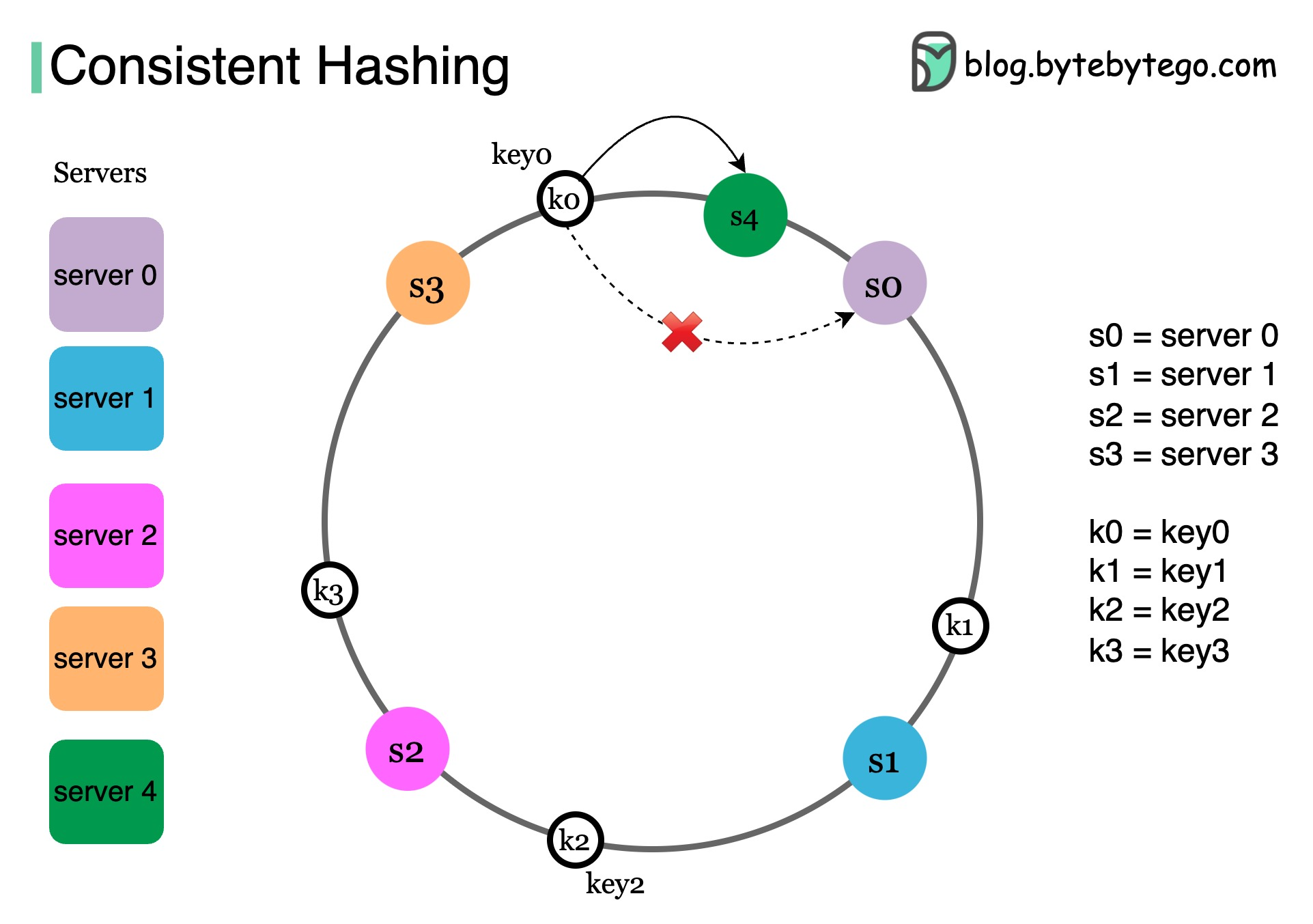 Sharding distributes data across multiple databases:
- Hash-Based Sharding: Use hash function to determine shard
- Range-Based Sharding: Divide data by ranges (e.g., A-M, N-Z)
- Geographic Sharding: Distribute by location
- Directory-Based Sharding: Use lookup table to map data to shards
Data Structures Powering Databases
Databases use specialized data structures for efficient operations:- B-Trees/B+ Trees: Used for indexing in relational databases
- LSM Trees: Used in write-heavy NoSQL databases like Cassandra
- Hash Tables: Power key-value stores for O(1) lookups
- Skip Lists: Alternative to balanced trees in some databases
- Bloom Filters: Space-efficient probabilistic data structure for membership tests
Choosing the Right Database
Relational
Choose when you need ACID guarantees, complex queries, and structured data
Document
Choose for flexible schemas, nested data, and rapid development
Key-Value
Choose for caching, session storage, and simple lookups
Graph
Choose for relationship-heavy data and traversal queries
Database Performance Optimization
Indexing
- Create indexes on frequently queried columns
- Balance between read and write performance
- Monitor index usage and remove unused indexes
Query Optimization
- Analyze query execution plans
- Avoid N+1 query problems
- Use appropriate JOIN strategies
- Implement pagination for large result sets
Caching
- Implement database query caching
- Use materialized views for complex queries
- Leverage buffer pools effectively
Database Replication
Replication creates copies of your database:- Master-Slave: One write node, multiple read replicas
- Master-Master: Multiple nodes accept writes
- Benefits: Improved read performance, high availability, disaster recovery
- Challenges: Replication lag, conflict resolution
Related Guides
Deepen your database knowledge:- Types of Databases
- How to Choose the Right Database
- 7 Must-Know Strategies to Scale Your Database
- Database Sharding Explained
- Consistent Hashing
- 8 Data Structures That Power Your Databases
- SQL Query Execution
The database choice significantly impacts your application’s performance, scalability, and maintenance complexity. Consider your data model, query patterns, and scaling requirements carefully.