What is DevOps?
DevOps is a culture and set of practices that bridge the gap between software development and operations, promoting collaboration and shared responsibility throughout the entire software development lifecycle.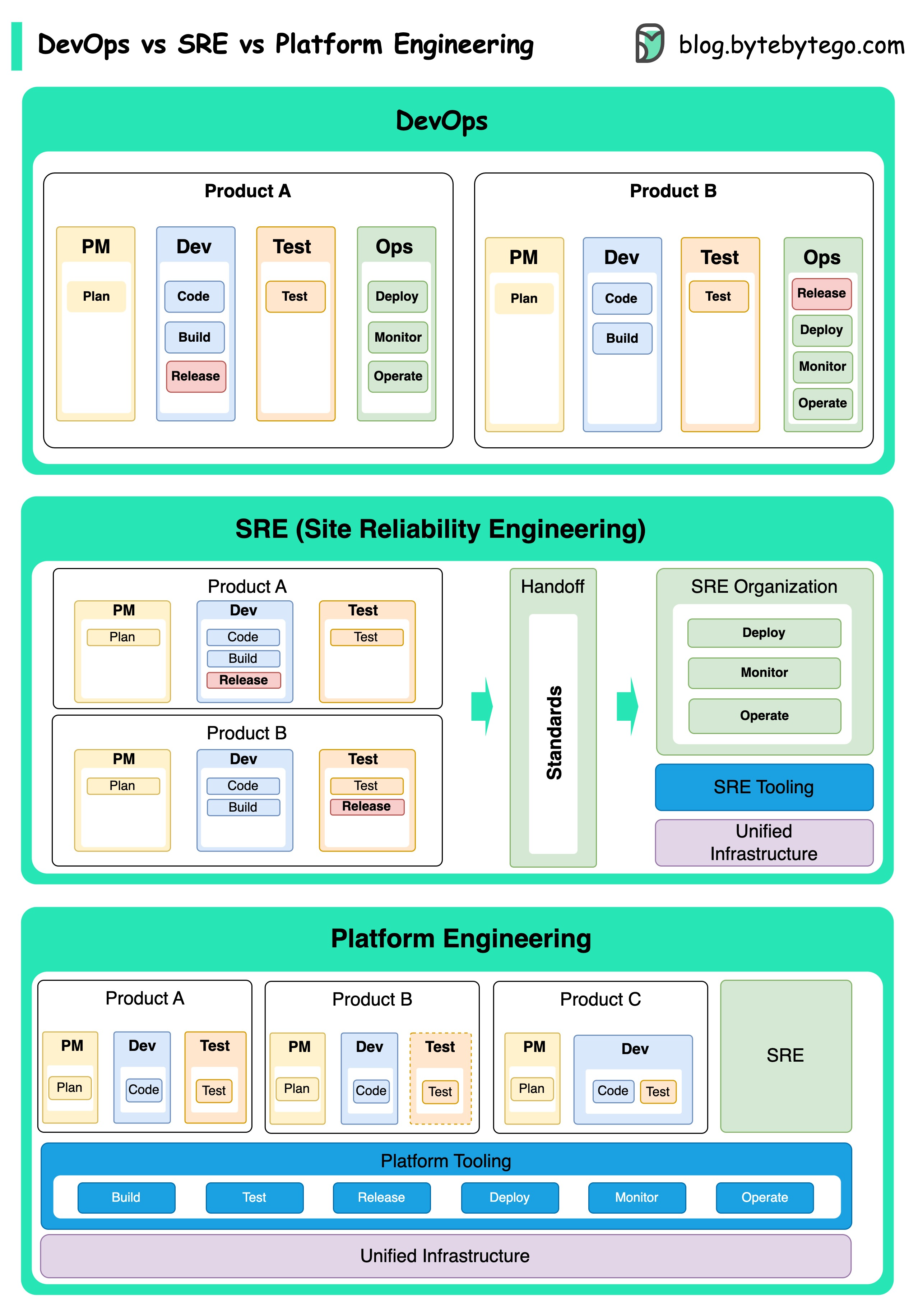
Evolution of DevOps
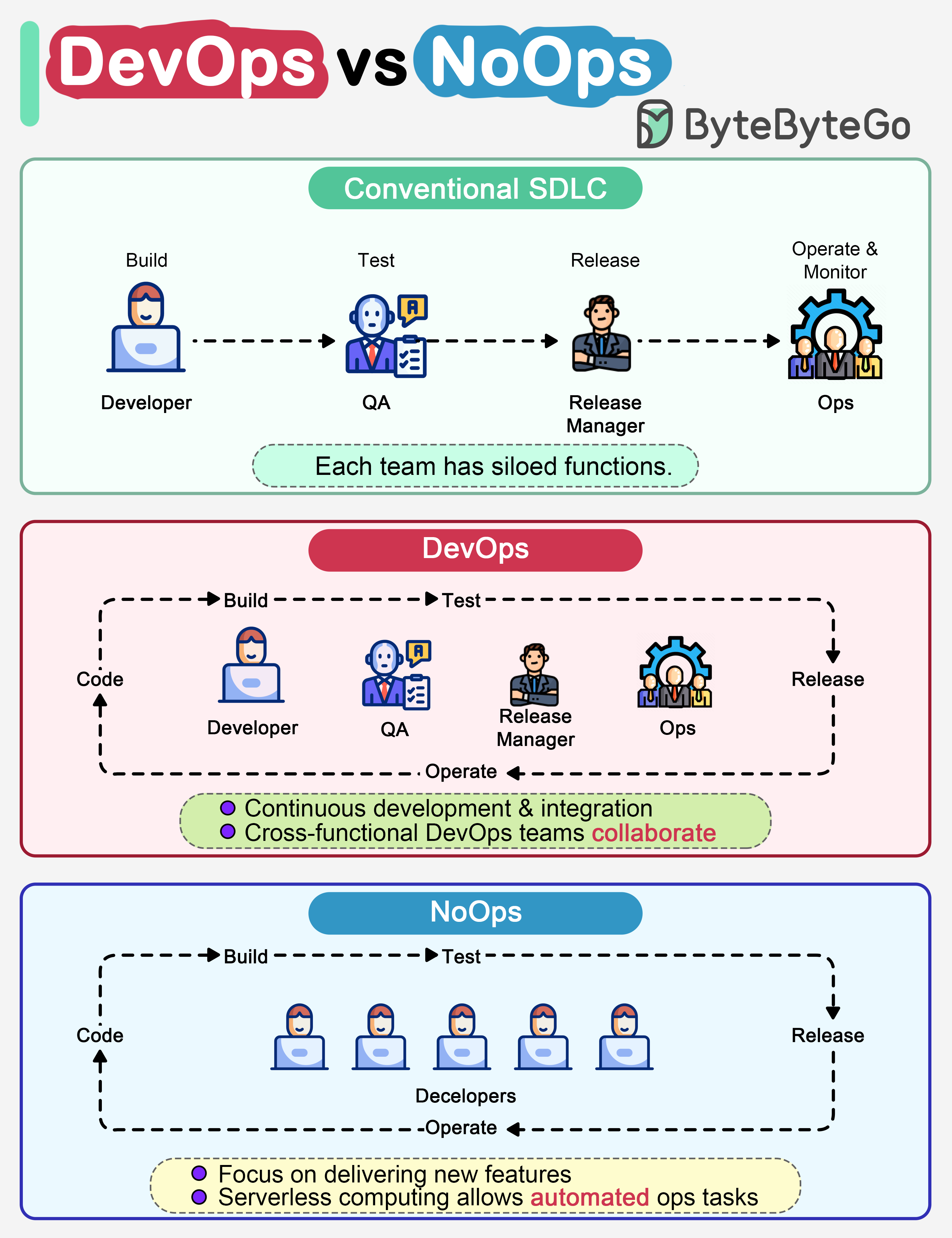
DevOps as a concept was introduced in 2009 by Patrick Debois and Andrew Shafer at the Agile conference. They sought to bridge the gap between software development and operations by promoting a collaborative culture and shared responsibility for the entire software development lifecycle.Traditional SDLC
Code, build, test, release, and monitoring are siloed functions working independently
DevOps
Continuous development and collaboration between developers and operations
NoOps
Serverless computing with FaaS and BaaS, automating most operations tasks
DevOps vs SRE vs Platform Engineering
DevOps
DevOps
Introduced in 2009, DevOps focuses on breaking down silos between development and operations teams. It emphasizes:
- Collaborative culture
- Automation of workflows
- Continuous integration and delivery
- Shared responsibility for the entire SDLC
Site Reliability Engineering (SRE)
Site Reliability Engineering (SRE)
Pioneered by Google in the early 2000s, SRE addresses operational challenges in managing large-scale, complex systems:
- Reliability-focused engineering practices
- Service Level Objectives (SLOs) and error budgets
- Automation to reduce manual operations
- Tools like Borg cluster management and Monarch monitoring
Platform Engineering
Platform Engineering
A more recent concept building on DevOps and SRE foundations:
- Delivers comprehensive platforms for product development
- Focuses on developer experience and productivity
- Provides self-service infrastructure capabilities
- Supports the entire business perspective
While these concepts emerged at different times, they are all related to the broader trend of improving collaboration, automation, and efficiency in software development and operations.
CI/CD Fundamentals
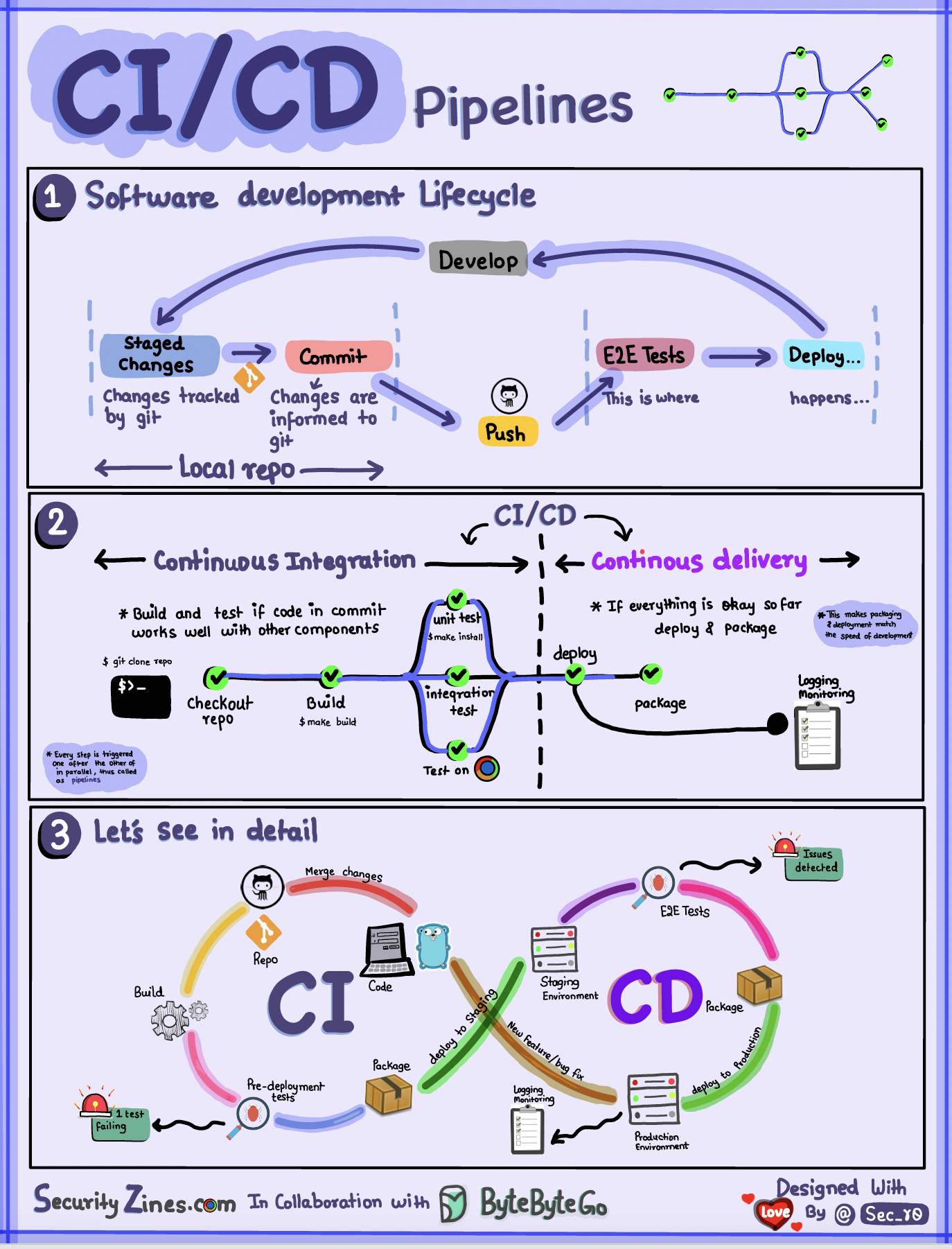
Software Development Life Cycle with CI/CD
The software development life cycle (SDLC) consists of several key stages: development, testing, deployment, and maintenance. CI/CD automates and integrates these stages to enable faster, more reliable releases. When code is pushed to a git repository, it triggers an automated build and test process. End-to-end (e2e) test cases are run to validate the code. If tests pass, the code can be automatically deployed to staging/production. If issues are found, the code is sent back to development for bug fixing. This automation provides fast feedback to developers and reduces risk of bugs in production.Continuous Integration (CI)
What is CI?
Continuous Integration automates the build, test, and merge process. It runs tests whenever code is committed to detect integration issues early.
- Early detection of integration issues
- Encourages frequent code commits
- Rapid feedback to developers
- Reduced risk of merge conflicts
- Automated testing and validation
Continuous Delivery/Deployment (CD)
What is CD?
Continuous Delivery automates release processes like infrastructure changes and deployment. It ensures software can be released reliably at any time through automated workflows.
- Automated deployment workflows
- Reduced manual intervention
- Faster time to market
- Consistent release processes
- Lower deployment risk
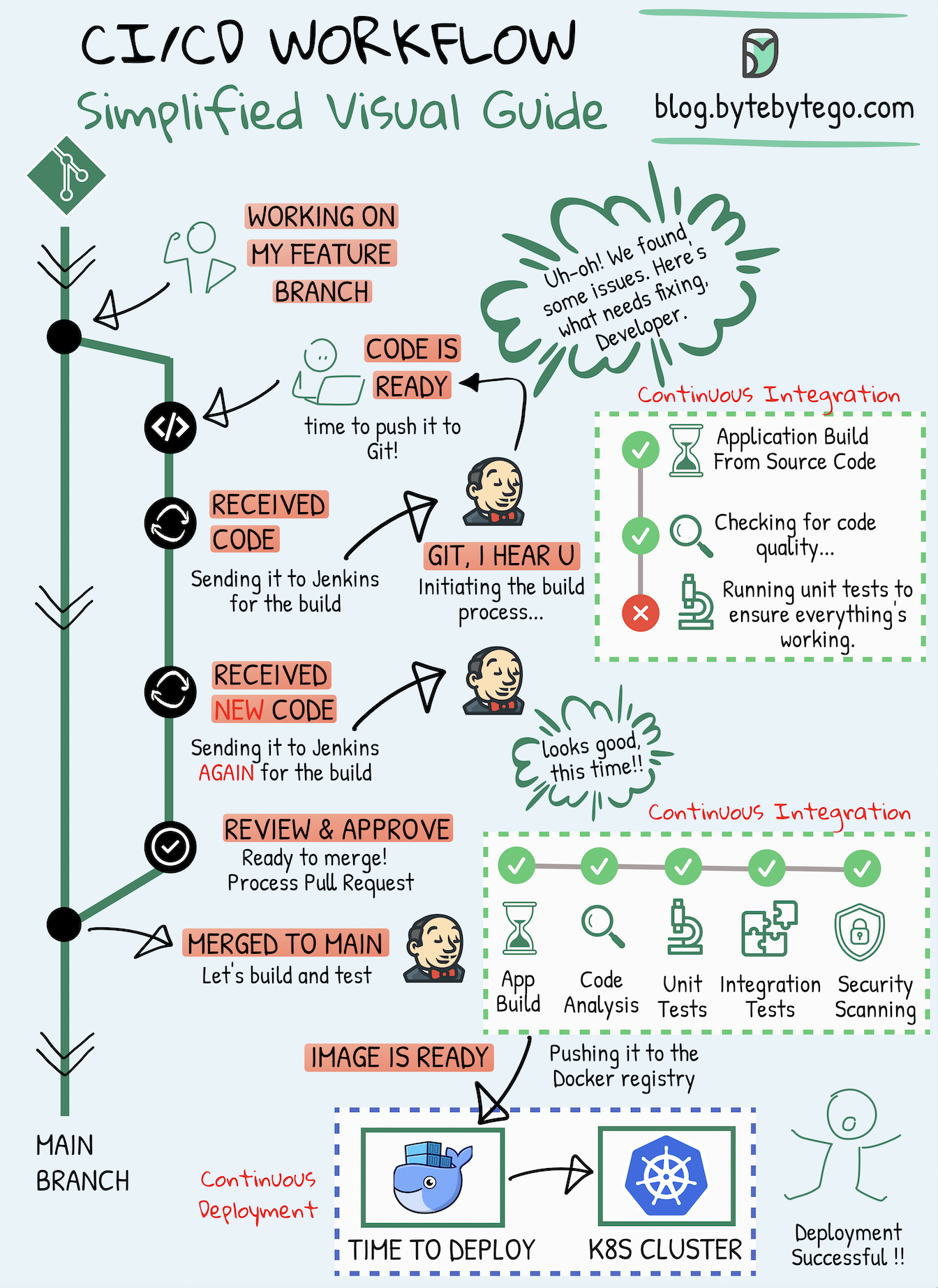
CI/CD Pipeline Stages
A typical CI/CD pipeline has several connected stages:Real-World CI/CD Examples
Netflix CI/CD Pipeline
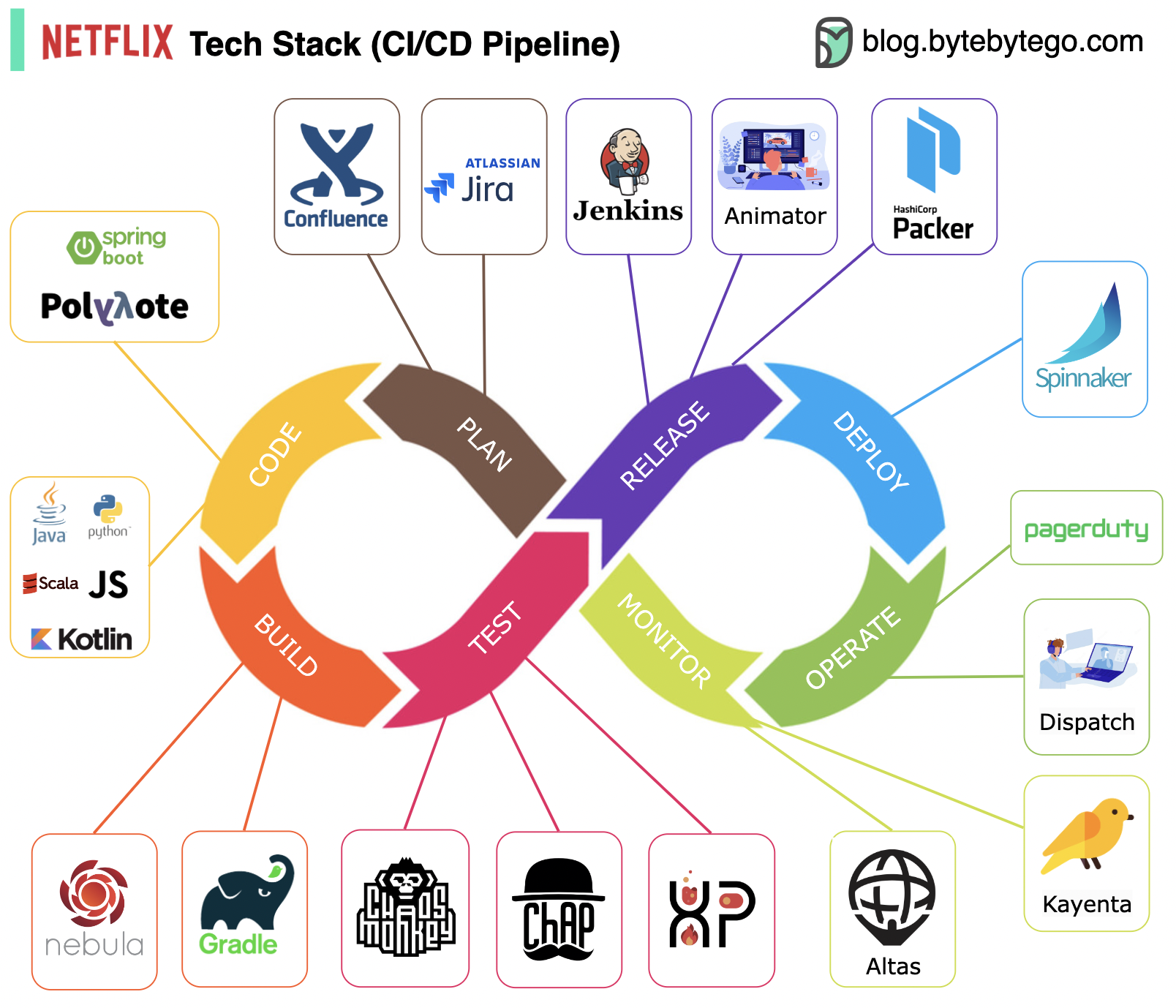
Planning & Documentation
Planning & Documentation
- JIRA for planning and project management
- Confluence for documentation and knowledge sharing
Development & Build
Development & Build
- Java as primary programming language for backend services
- Gradle for building with custom plugins for various use cases
Packaging & Testing
Packaging & Testing
- Packages and dependencies packed into Amazon Machine Images (AMI)
- Testing emphasizes production culture with chaos engineering tools
Deployment & Monitoring
Deployment & Monitoring
- Spinnaker (self-built) for canary rollout deployment
- Atlas for centralized monitoring metrics
- Kayenta for anomaly detection
Incident Management
Incident Management
- Incidents dispatched according to priority
- PagerDuty for incident handling
Uber CI/CD Tech Stack
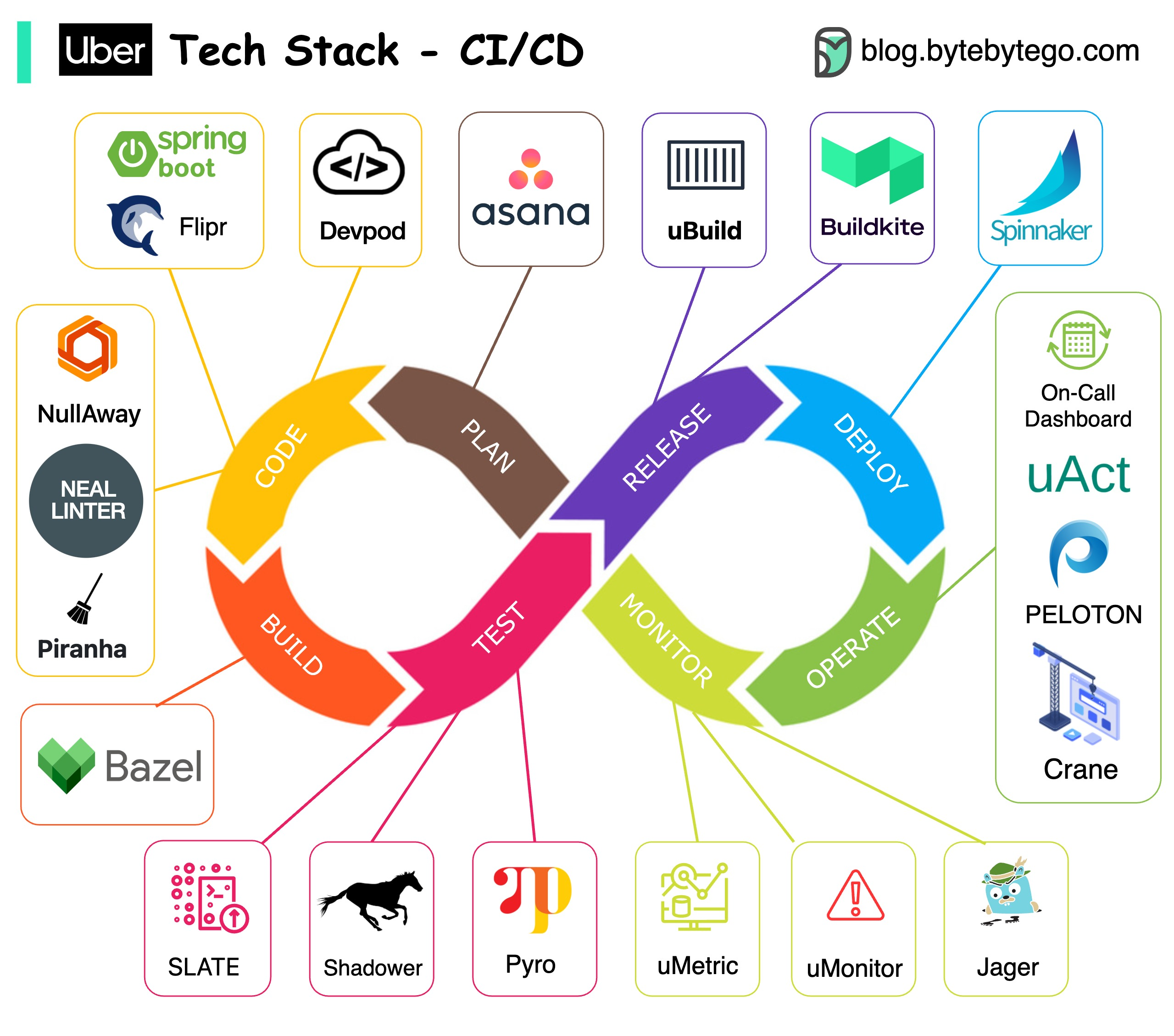
Project Planning
JIRA for project management and tracking
Backend Services
Spring Boot with custom Flipr configuration system for speedy releases
Code Quality
- NullAway for NullPointer problems
- NEAL for code linting
- Piranha for cleaning outdated feature flags
Repository
Monorepo approach using Bazel at scale
Testing
- SLATE for short-lived testing environments
- Shadower for load testing with production traffic replay
- Ballast for smooth user experience
Experimentation
Deep learning-based platform with open-sourced components like Pyro
Build & Package
uBuild powered by Buildkite for containerizing services
Deployment
Netflix Spinnaker for production deployments
Monitoring
Custom uMetric platform built on Cassandra
Operations
- Peloton for capacity planning and scheduling
- Crane for multi-cloud cost optimization
- uAct and OnCall dashboard for event tracing
Best Practices
Automate Everything
Automate builds, tests, deployments, and infrastructure provisioning to reduce human error and increase consistency
Version Control All Things
Store code, configuration, infrastructure-as-code, and documentation in version control
Test Early and Often
Implement comprehensive testing at all levels: unit, integration, end-to-end, and performance
Deploy Frequently
Small, frequent deployments reduce risk and make issues easier to identify and fix
Monitor Everything
Comprehensive monitoring and observability are essential for catching issues early
Build Security In
Integrate security scanning and testing throughout the pipeline (DevSecOps)
Use Infrastructure as Code
Manage infrastructure through code for consistency, versioning, and reproducibility
Enable Fast Feedback
Provide developers with quick feedback on build, test, and deployment status
Key Takeaways
DevOps Culture: Focus on collaboration, automation, and shared responsibility between development and operations teams
CI Automation: Continuous Integration detects issues early through automated builds and tests on every commit
CD Automation: Continuous Delivery enables reliable, automated deployments to staging and production environments
Pipeline Stages: A well-designed pipeline includes source control, build, test, staging, and production deployment stages
Real-World Scale: Companies like Netflix and Uber demonstrate advanced CI/CD practices at enterprise scale
Related Topics
Kubernetes & Docker
Learn about containerization and orchestration
Monitoring & Logging
Explore observability and system monitoring